



 本文讲述了在VSCode中如何配置Prettier和ESLint以遵循项目特定的.eslintrc.js规范,并详细介绍了设置步骤和关键配置文件。
1、问题描述
VSCode 中安装了 Prettier 和 ESLint 插件,在项目中使用了 .eslintrc.js 文件规范项目代码。
但是保存代码时格式化并不是按该文件的配置而是按 Prettier 的配置
2、当前项目.eslintrc.js文件是单独文件
解决:1、首先打开vscode,在vscode的设置扩展中安装eslint插件;
3、查看下面截图,按步骤1、2、3、4执行操作,即可配置成功。点击左下角设置,弹出设置,点击右上角3位置,弹出Settings.json 文件,修改,代码下面有整理,修改之后,重启vscode就可以了
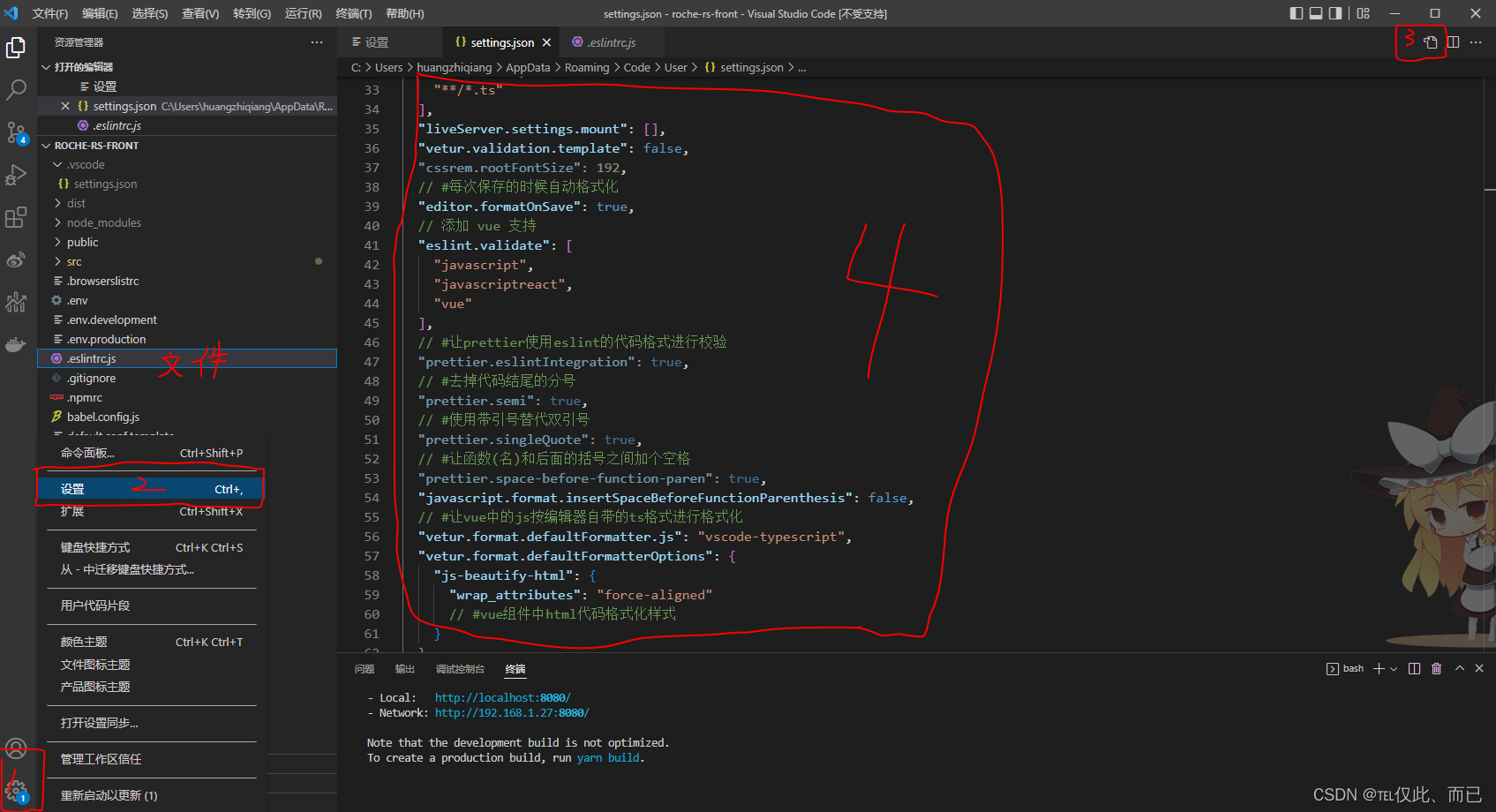
4、Settings.json文件代码
{
  "leek-fund.funds": [
    []
  ],
  "leek-fund.fundSort": -1,
  "js/ts.implicitProjectConfig.experimentalDecorators": true,
  "terminal.integrated.defaultProfile.windows": "Git Bash",
  "terminal.integrated.persistentSessionScrollback": 1000,
  "eslint.codeAction.showDocumentation": {},
  "eslint.codeAction.disableRuleComment": {
    "enable": false,
    "location": "separateLine"
  },
  "window.zoomLevel": 0,
  "editor.renderWhitespace": "none",
  "editor.renderControlCharacters": false,
  "editor.minimap.enabled": false,
  "breadcrumbs.enabled": true,
  "editor.fontSize": 16,
  "editor.tabSize": 2,
  "explorer.confirmDelete": false,
  "editor.wordWrap": "on",
  "liveServer.settings.NoBrowser": true,
  "liveServer.settings.donotShowInfoMsg": true,
  "files.trimTrailingWhitespace": true,
  "editor.codeActionsOnSave": {
    "source.fixAll.eslint": true
  },
  "liveServer.settings.ignoreFiles": [
    ".vscode/**",
    "**/*.scss",
    "**/*.sass",
    "**/*.ts"
  ],
  "liveServer.settings.mount": [],
  "vetur.validation.template": false,
  "cssrem.rootFontSize": 192,
  // #每次保存的时候自动格式化
  "editor.formatOnSave": true,
  // 添加 vue 支持
  "eslint.validate": [
    "javascript",
    "javascriptreact",
    "vue"
  ],
  // #让prettier使用eslint的代码格式进行校验
  "prettier.eslintIntegration": true,
  // #去掉代码结尾的分号
  "prettier.semi": true,
  // #使用带引号替代双引号
  "prettier.singleQuote": true,
  // #让函数(名)和后面的括号之间加个空格
  "prettier.space-before-function-paren": true,
  "javascript.format.insertSpaceBeforeFunctionParenthesis": false,
  // #让vue中的js按编辑器自带的ts格式进行格式化
  "vetur.format.defaultFormatter.js": "vscode-typescript",
  "vetur.format.defaultFormatterOptions": {
    "js-beautify-html": {
      "wrap_attributes": "force-aligned"
      // #vue组件中html代码格式化样式
    }
  }
}
5、.eslintrc.js
module.exports = {
  'root': true,
  'env': {
    browser: true,
    node: true,
    jest: true,
    es6: true
  },
  'extends': [
    'plugin:vue/essential',
    'eslint:recommended'
  ],
  'parserOptions': {
    parser: '@babel/eslint-parser'
  },
  'rules': {
    'no-console': process.env.NODE_ENV === 'production' ? 'warn' : 'off',
    'no-debugger': process.env.NODE_ENV === 'production' ? 'warn' : 'off',
    'prefer-const': 'error',
    'no-const-assign': 'error',
    'no-var': 'error',
    'no-new-object': 'error',
    'no-array-constructor': 'error',
    'prefer-destructuring': 'error',
    'quotes': ['error', 'single'],
    'prefer-template': 'error',
    'template-curly-spacing': 'error',
    'no-eval': 'error',
    'no-useless-escape': 'error',
    'no-loop-func': 'error',
    'prefer-rest-params': 'error',
    'default-param-last': 'error',
    'no-new-func': 'error',
    'space-before-function-paren': 0,
    'no-param-reassign': 'error',
    'arrow-parens': 'error',
    'no-confusing-arrow': 'error',
    'implicit-arrow-linebreak': 'error',
    'no-useless-constructor': 'error',
    'no-dupe-class-members': 'error',
    'class-methods-use-this': 'error',
    'no-duplicate-imports': 'error',
    'dot-notation': 'error',
    'no-restricted-properties': 'error',
    'no-undef': 'error',
    'one-var': 'error',
    'no-multi-assign': 'error',
    'no-plusplus': 'error',
    'no-unused-vars': ['error', {
      'vars': 'all',
      'args': 'none'
    }],
    'eqeqeq': 'error',
    'no-nested-ternary': 'error',
    'no-unneeded-ternary': 'error',
    'no-mixed-operators': 'error',
    'nonblock-statement-body-position': 'error',
    'brace-style': 'error',
    'no-else-return': 'error',
    'spaced-comment': 'error',
    'space-before-blocks': 'error',
    'keyword-spacing': 'error',
    'space-infix-ops': 'error',
    'eol-last': 'error',
    'newline-per-chained-call': 'error',
    'no-whitespace-before-property': 'error',
    'space-in-parens': 'error',
    'array-bracket-spacing': 'error',
    'max-len': ['error', { code: 100, ignoreUrls: true }],
    'block-spacing': 'error',
    'comma-spacing': 'error',
    'func-call-spacing': 'error',
    'key-spacing': 'error',
    'no-trailing-spaces': 'error',
    'no-multiple-empty-lines': 'error',
    'comma-style': 'error',
    'comma-dangle': 'error',
    'semi': ['error', 'never'],
    'camelcase': 'error',
    'no-underscore-dangle': 'error',
    'no-restricted-globals': 'error',
    'quote-props': ['error', 'consistent']
  }
}






 扫一扫
扫一扫


 3192
3192

 被折叠的 条评论
为什么被折叠?
被折叠的 条评论
为什么被折叠?
 到【灌水乐园】发言





