



 在使用Python时遇到一个问题,当尝试运行或调试时,系统提示需要输入`manage.py help<subcommand>`来获取特定子命令的帮助。可用的子命令包括`auth`、`contenttypes`、`django`等。解决这个问题的方法是检查项目的设置和命令输入,确保正确执行`manage.py`脚本。执行`manage.py help`可以查看所有可用命令,根据需要选择正确的命令执行。完成这一步后,问题通常可以得到解决。
python 点击run或者debug的时候出现
Type 'manage.py help <subcommand>' for help on a specific subcommand.

Available subcommands:

[auth]
    changepassword
    createsuperuser

[contenttypes]
    remove_stale_contenttypes

[django]
    check
    compilemessages
    createcachetable
    dbshell
    diffsettings
    dumpdata
    flush
    inspectdb
    loaddata
    makemessages
    makemigrations
    migrate
    sendtestemail
    shell
    showmigrations
    sqlflush
    sqlmigrate
    sqlsequencereset
    squashmigrations
    startapp
    startproject
    test
    testserver

[sessions]
    clearsessions

[staticfiles]
    collectstatic
    findstatic
    runserver

Process finished with exit code 0
该怎么办???
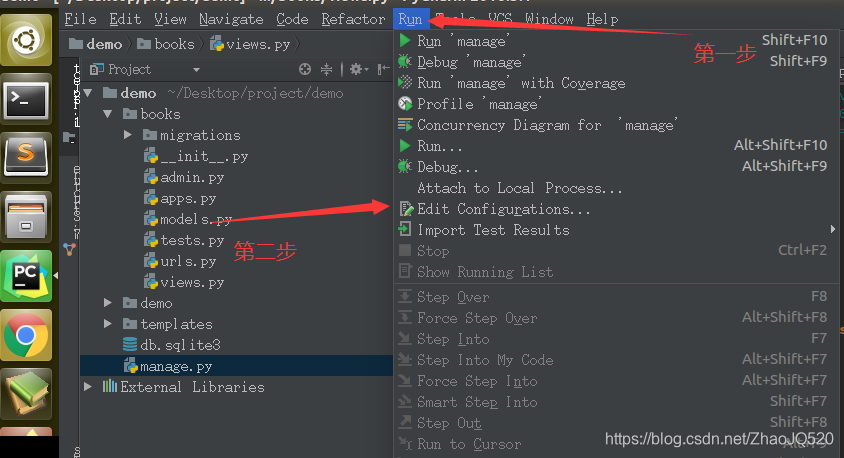
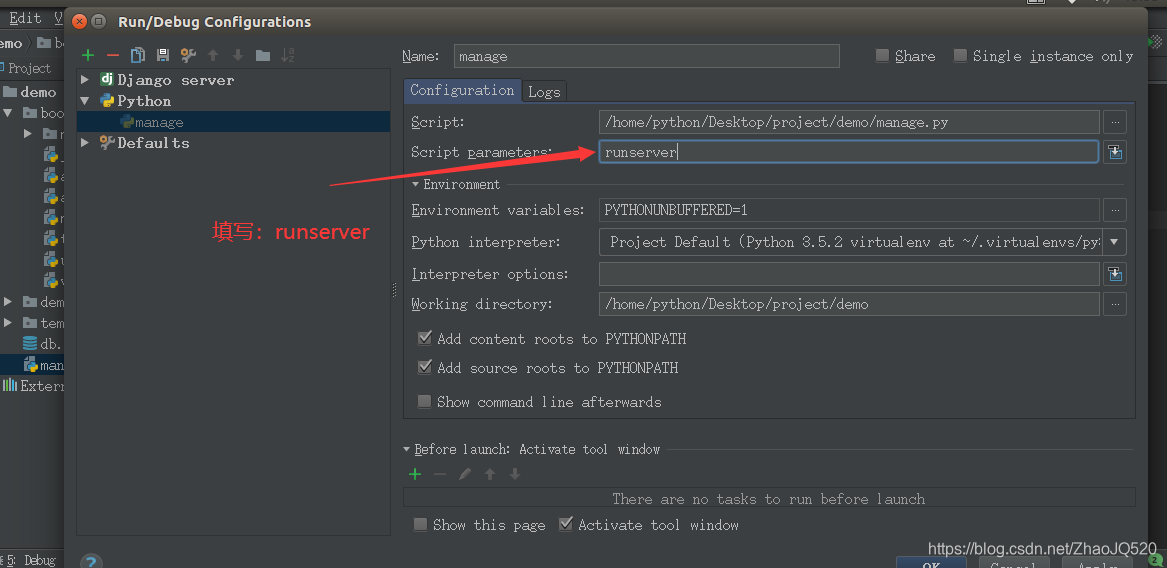
解决办法如下:





 扫一扫
扫一扫


 6506
6506

 被折叠的 条评论
为什么被折叠?
被折叠的 条评论
为什么被折叠?
 到【灌水乐园】发言





