How to Use the stat Command on Linux

The Linux stat command shows you much more detail than ls does. Take a peek behind the curtain with this informative and configurable utility. We'll show you how to use it.

stat Takes You Behind the Scenes

The ls command is great at what it does---and it does a lot---but with Linux, it seems that there's always a way to go deeper and see what lies beneath the surface. And often, it isn't just a case of lifting the edge of the carpet. You can rip up the floorboards and then dig a hole. You can peel Linux like an onion.

ls will show you a good deal of information about a file, such as which permissions are set on it, and how big it is, and whether it is a file or a symbolic link. To display this information ls reads it from a file system structure called an inode.

Every file and directory has an inode. The inode holds metadata about the file, such as which filesystem blocks it occupies, and the date stamps associated with the file. The inode is like a library card for the file. But ls will only show you some of the information. To see everything, we need to use the stat command.

Like ls, the stat command has a lot of options. This makes it a great candidate for the use of aliases. Once you have discovered a particular set of options that make stat give you the output that you want, wrap it in an alias or shell function. This makes it much more convenient to use, and you don't have to remember an arcane set of command-line options.

A Quick Comparison

Let's use ls to give us a long listing ( -l option) with human-readable file sizes (-h option):

ls -lh ana.h

ls -lh ana.h in a terminal window

From left to right, the information that ls provides is:

  • The very first character is a hyphen "-" and this tells us the file is a regular file and not a socket, symlink, or another type of object.
  • The owner, group, and other permissions are listed in octal format.
  • The number of hard links pointing to this file. In this case, and in most cases, it will be one.
  • The file owner is dave.
  • The group owner is dave.
  • The file size is 802 bytes.
  • The file was last modified on Friday, 13th December 2015.
  • The file name is ana.c.

Let's take a look with stat :

stat ana.h
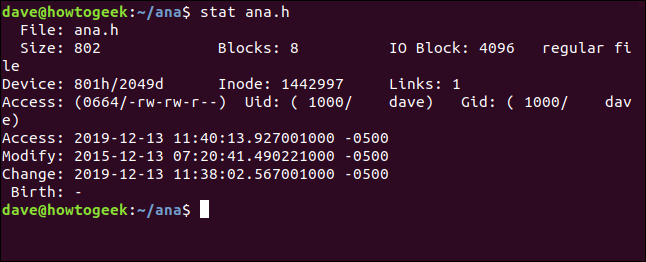
stat ana.h in a terminal window

The information we get from stat is:

  • File: The name of the file. Usually, it is the same as the name we passed to stat on the command line, but It can be different if we're looking at a symbolic link.
  • Size: The size of the file in bytes.
  • Blocks: The number of filesystem blocks the file requires, in order to be stored on the hard drive.
  • IO Block: The size of a filesystem block.
  • File type: The type of object the metadata describes. The most common types are files and directories, but they can also be links, sockets, or named pipes.
  • Device: The device number in hexadecimal and decimal. This is the ID of the hard drive the file is stored on.
  • Inode: The inode number. That is, the ID number of this inode. Together, the inode number and the device number uniquely identify a file.
  • Links: This number indicates how many hard links point to this file. Each hard link has its own inode. So another way to think about this figure is how many inodes point to this one file. Each time a hard link is created or deleted, this number will be adjusted up or down. When it reaches zero, the file itself has been deleted, and the inode is removed. If you use stat on a directory, this number represents the number of files in the directory, including the "." entry for the current directory and the ".." entry for the parent directory.
  • Access: The file permissions are shown in their octal and traditional rwx (read, write, execute formats).
  • Uid: User ID and account name of the owner.
  • Gid: Group ID and account name of the owner.
  • Access: The access timestamp. Not as straightforward as it might seem. Modern Linux distributions use a scheme called relatime, which tries to optimize the hard drive writes required to update the access time. Simply put, the access time is updated if it is older than the modified time.
  • Modify: The modification timestamp. This is the time when file's contents were last modified. (As luck would have it, the contents of this file were last changed four years ago to the day.)
  • Change: The change timestamp. This is the time the file's attributes or contents were last changed. If you modify a file by setting new file permissions, the change timestamp will be updated (because the file attributes have changed), but the modified timestamp will not be updated (because the file contents were not changed).
  • Birth: Reserved to show the original creation date of the file, but this is not implemented in Linux.

Understanding the Timestamps

The timestamps are timezone sensitive. The -0500 at the end of each line shows that this file was created on a computer in a Coordinated Universal Time (UTC) timezone that is five hours ahead of the timezone of the current computer. So this computer is five hours behind the computer that created this file. In fact, the file was created on a UK timezone computer, and we're looking at it here on a computer in the US Eastern Standard time zone.

The modify and change timestamps can cause confusion because, to the uninitiated, their names sound as if they mean the same thing.

Let's use chmod to modify the file permissions on a file called ana.c. We're going to make it writeable by everyone. This won't affect the contents of the file, but it will affect the attributes of the file.

chmod +w ana.c

And then we'll use stat to look at the timestamps:

stat ana.c
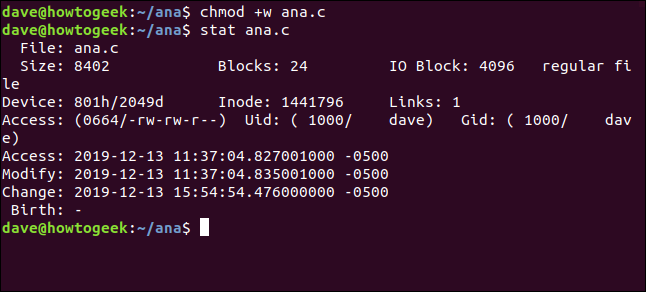
chnod +w ana.c in a terminal window

The change timestamp has been updated, but the modified one has not.

The modified timestamp will only be updated if the contents of the file are changed. The change timestamp is updated for both content changes and attribute changes.

Using Stat With Multiple Files

To have stat report on several files at once, pass the filenames to stat on the command line:

stat ana.h ana.o
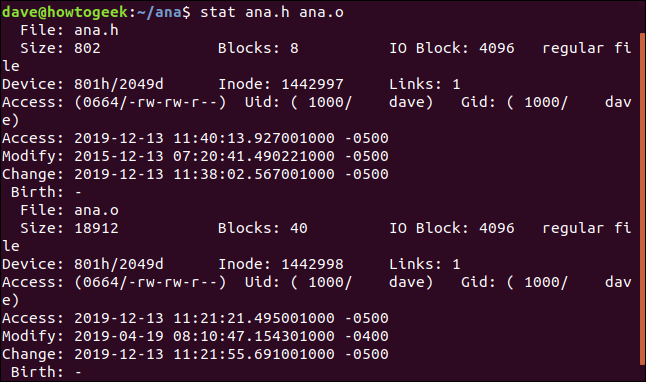
stat ana.h ana.o in a terminal window

To use stat on a set of files, use pattern matching. The question mark "?" represents any single character, and the asterisk "*" represents any string of characters. We can tell stat to report on any file called "ana" with a single letter extension, with this command:

stat ana.?
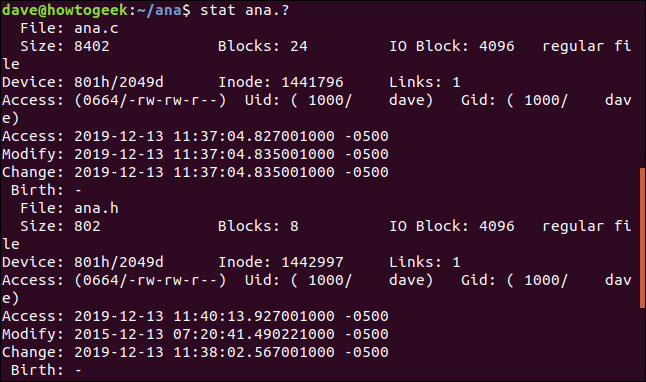
stat ana.? in a terminal window

Using stat to Report on Filesystems

stat can report on the status of filesystems, as well as the status of files. The -f (filesystem) option tells stat to report on the filesystem that the file resides on. Note we can also pass a directory such as "/" to stat instead of a filename.

stat -f ana.c
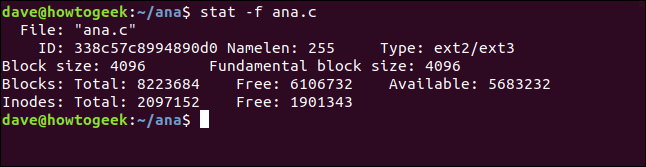
stat -f ana.c ina terminal window

The information stat gives us is:

  • File: The name of the file.
  • ID: The filesystem ID in hexadecimal notation.
  • Namelen: The maximum permissible length for file names.
  • Type: The type of filesystem.
  • Block size: The amount of data to request read requests for optimum data transfer rates.
  • Fundamental block size: The size of each filesystem block.

Blocks:

  • Total: The total count of all blocks n the filesystem.
  • Free: The number of free blocks in the filesystem.
  • Available: The number of free blocks available to regular (non-root) users.

Inodes:

  • Total: The total count of inodes in the filesystem.
  • Free: The number of free inodes in the filesystem.

If you use stat on a file that is actually a symbolic link, it will report on the link. If you wanted stat to report on the file that the link points to, use the -L (dereference) option. The file code.c is a symbolic link to ana.c . Let's look at it without the -L option:

stat code.c
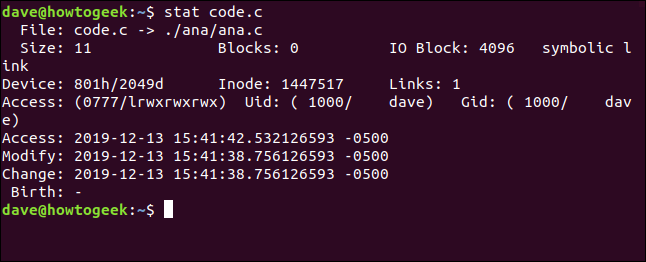
stat code.c in a terminal window

The filename shows code.c pointing to ( -> ) ana.c. The file size is only 11 bytes. There are zero blocks devoted to storing this link. The file type is listed as a symbolic link.

Clearly, we're not looking at the actual file here. Let's do that again and add the -L option:

stat -L code.c
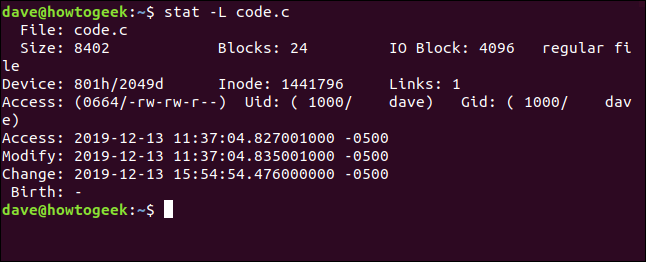
stat -L code.c  in a terminal window

This is now showing the file details for the file pointed to by the symbolic link. But note that the filename is still given as code.c. This is the name of the link, not the target file. This happens because this is the name we passed to stat on the command line.

✕Remove Ads

The Terse Report

The -t (terse) option causes stat to provide a condensed summary:

stat -t ana.c

stat -t ana.c in a terminal window

There are no clues given. To make sense of it---until you've memorized the field sequence---you need to cross-reference this output to a full stat output.

Custom Output Formats

A better way to obtain a different set of data from stat is to use a custom format. There is a long list of tokens called format sequences. Each of these represents a data element. Select the ones you want to have included in the output and create a format string. When we call stat and pass the format string to it, the output will only include the data elements we requested.

There are different sets of format sequences for files and filesystems. The list for files is:

  • %a: The access rights in octal.
  • %A: The access rights in human-readable form (rwx).
  • %b: The number of blocks allocated.
  • %B: The size in bytes of each block.
  • %d: The device number in decimal.
  • %D: The device number in hex.
  • %f: The raw mode in hex.
  • %F The file type.
  • %g: The group ID of the owner.
  • %G: The group name of the owner.
  • %h: The number of hard links.
  • %i: The inode number.
  • %m: The mount point.
  • %n: The file name.
  • %N: The quoted file name, with dereferenced filename if it is a symbolic link.
  • %o: The optimal I/O transfer size hint.
  • %s: The total size, in bytes.
  • %t: The major device type in hex, for character/block device special files.
  • %T: The minor device type in hex, for character/block device special files.
  • %u: The user ID of the owner.
  • %U: The user name of the owner.
  • %w: The time of file birth, human-readable, or a hyphen "-" if unknown.
  • %W: The time of file birth, seconds since the Epoch; 0 if unknown.
  • %x: The time of last access, human-readable.
  • %X: The time of last access, seconds since the Epoch.
  • %y: The time of last data modification, human-readable.
  • %Y: The time of last data modification, seconds since the Epoch.
  • %z: The time of last status change, human-readable.
  • %Z: The time of last status change, seconds since the Epoch.

The "epoch" is the Unix Epoch, which took place on 1970-01-01 00:00:00 +0000 (UTC).

For filesystems the format sequences are:

  • %a: The number of free blocks available to regular (non-root) users.
  • %b: The total data blocks in the filesystem.
  • %c: The total inodes in the filesystem.
  • %d: The number of free inodes in the filesystem.
  • %f: The number of free blocks in the filesystem.
  • %i: The file system ID in hexadecimal.
  • %l: The maximum length of filenames.
  • %n: The filename.
  • %s: The block size (the optimum writing size).
  • %S: The size of filesystem blocks (for block counts).
  • %t: The file system type in hexadecimal.
  • %T: file system type in human-readable form.

There are two options that accept strings of format sequences. These are --format and --printf. The difference between them is --printf interprets C-style escape sequences such as newline \n and tab \t , and it does not automatically add a newline character to its output.

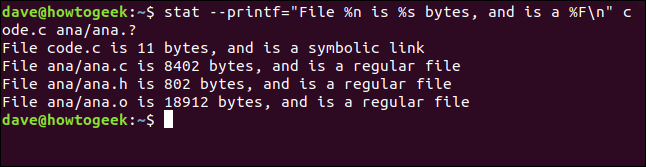
Let's create a format string and pass it to stat. The format sequences were going to use are %n for filename, %s for the size of the file and %F for the file type. We're going to add the \n escape sequence to the end fo the string to make sure each file is handled on a new line. Our format string looks like this:

"File %n is %s bytes, and is a %F\n"

We're going to pass this to stat using the --printf option. We're going to ask stat to report on a file called code.c and a set of files that match ana.?. This is the full command. Note the equals sign "=" between --printf and the format string:

stat --printf="File %n is %s bytes, and is a %F\n" code.c ana/ana.?
✕Remove Ads

stat --printf="File %n is %s bytes, and is a %F\n" code.c ana/ana.? in a terminal window

The report for each file is listed on a new line, which is what we requested. The filename, file size, and file type are provided for us.

Custom formats give you access to even more data elements than are included in the standard stat output.

Fine Grain Control

As you can see, there is tremendous scope to extract the particular data elements that are of interest to you. You can probably also see why we recommended using aliases for the longer and more complex incantations.

gezi@ubuntu:~/study/pubilc/camerademo6/curl-8.7.1$ ./configure --host=arm-linux-gnueabi --prefix=/home/gezi/study/pubilc/camerademo6/curl_arm --with-openssl checking whether to enable maintainer-specific portions of Makefiles... no checking whether make supports nested variables... yes checking whether to enable debug build options... no checking whether to enable compiler optimizer... (assumed) yes checking whether to enable strict compiler warnings... no checking whether to enable compiler warnings as errors... no checking whether to enable curl debug memory tracking... no checking whether to enable hiding of library internal symbols... yes checking whether to enable c-ares for DNS lookups... no checking whether to disable dependency on -lrt... (assumed no) checking whether to enable ECH support... no checking for path separator... : checking for sed... /bin/sed checking for grep... /bin/grep checking that grep -E works... yes checking for arm-linux-gnueabi-ar... /usr/bin/arm-linux-gnueabi-ar checking for a BSD-compatible install... /usr/bin/install -c checking for arm-linux-gnueabi-gcc... arm-linux-gnueabi-gcc checking whether the C compiler works... yes checking for C compiler default output file name... a.out checking for suffix of executables... checking whether we are cross compiling... yes checking for suffix of object files... o checking whether the compiler supports GNU C... yes checking whether arm-linux-gnueabi-gcc accepts -g... yes checking for arm-linux-gnueabi-gcc option to enable C11 features... none needed checking whether arm-linux-gnueabi-gcc understands -c and -o together... yes checking how to run the C preprocessor... arm-linux-gnueabi-gcc -E checking for stdio.h... yes checking for stdlib.h... yes checking for string.h... yes checking for inttypes.h... yes checking for stdint.h... yes checking for strings.h... yes checking for sys/stat.h... yes checking for sys/types.h... yes checking for unistd.h... yes checking for stdatomic.h... yes checking if _Atomic is available... yes checking for a sed that does not truncate output... (cached) /bin/sed checking for code coverage support... no checking whether build environment is sane... yes checking for arm-linux-gnueabi-strip... arm-linux-gnueabi-strip checking for a race-free mkdir -p... /bin/mkdir -p checking for gawk... gawk checking whether make sets $(MAKE)... yes checking whether make supports the include directive... yes (GNU style) checking dependency style of arm-linux-gnueabi-gcc... gcc3 checking curl version... 8.7.1 checking for httpd... no checking for apache2... no checking for apachectl... no checking for apxs... no configure: httpd/apache2 not in PATH, http tests disabled configure: apxs not in PATH, http tests disabled checking for nghttpx... no checking for caddy... no checking build system type... x86_64-pc-linux-gnu checking host system type... arm-unknown-linux-gnueabi checking for grep that handles long lines and -e... (cached) /bin/grep checking for egrep... /bin/grep -E checking if OS is AIX (to define _ALL_SOURCE)... no checking if _THREAD_SAFE is already defined... no checking if _THREAD_SAFE is actually needed... no checking if _THREAD_SAFE is onwards defined... no checking if _REENTRANT is already defined... no checking if _REENTRANT is actually needed... no checking if _REENTRANT is onwards defined... no checking for special C compiler options needed for large files... no checking for _FILE_OFFSET_BITS value needed for large files... 64 checking how to print strings... printf checking for a sed that does not truncate output... (cached) /bin/sed checking for fgrep... /bin/grep -F checking for ld used by arm-linux-gnueabi-gcc... /usr/arm-linux-gnueabi/bin/ld checking if the linker (/usr/arm-linux-gnueabi/bin/ld) is GNU ld... yes checking for BSD- or MS-compatible name lister (nm)... /usr/bin/arm-linux-gnueabi-nm -B checking the name lister (/usr/bin/arm-linux-gnueabi-nm -B) interface... BSD nm checking whether ln -s works... yes checking the maximum length of command line arguments... 1572864 checking how to convert x86_64-pc-linux-gnu file names to arm-unknown-linux-gnueabi format... func_convert_file_noop checking how to convert x86_64-pc-linux-gnu file names to toolchain format... func_convert_file_noop checking for /usr/arm-linux-gnueabi/bin/ld option to reload object files... -r checking for arm-linux-gnueabi-file... no checking for file... file configure: WARNING: using cross tools not prefixed with host triplet checking for arm-linux-gnueabi-objdump... arm-linux-gnueabi-objdump checking how to recognize dependent libraries... pass_all checking for arm-linux-gnueabi-dlltool... no checking for dlltool... no checking how to associate runtime and link libraries... printf %s\n checking for arm-linux-gnueabi-ar... /usr/bin/arm-linux-gnueabi-ar checking for archiver @FILE support... @ checking for arm-linux-gnueabi-strip... (cached) arm-linux-gnueabi-strip checking for arm-linux-gnueabi-ranlib... arm-linux-gnueabi-ranlib checking command to parse /usr/bin/arm-linux-gnueabi-nm -B output from arm-linux-gnueabi-gcc object... ok checking for sysroot... no checking for a working dd... /bin/dd checking how to truncate binary pipes... /bin/dd bs=4096 count=1 checking for arm-linux-gnueabi-mt... no checking for mt... mt checking if mt is a manifest tool... no checking for dlfcn.h... yes checking for objdir... .libs checking if arm-linux-gnueabi-gcc supports -fno-rtti -fno-exceptions... no checking for arm-linux-gnueabi-gcc option to produce PIC... -fPIC -DPIC checking if arm-linux-gnueabi-gcc PIC flag -fPIC -DPIC works... yes checking if arm-linux-gnueabi-gcc static flag -static works... yes checking if arm-linux-gnueabi-gcc supports -c -o file.o... yes checking if arm-linux-gnueabi-gcc supports -c -o file.o... (cached) yes checking whether the arm-linux-gnueabi-gcc linker (/usr/arm-linux-gnueabi/bin/ld) supports shared libraries... yes checking whether -lc should be explicitly linked in... no checking dynamic linker characteristics... GNU/Linux ld.so checking how to hardcode library paths into programs... immediate checking whether stripping libraries is possible... yes checking if libtool supports shared libraries... yes checking whether to build shared libraries... yes checking whether to build static libraries... yes checking whether to build shared libraries with -version-info... yes checking whether to build shared libraries with -no-undefined... no checking whether to build shared libraries with -mimpure-text... no checking whether to build shared libraries with PIC... yes checking whether to build static libraries with PIC... no checking whether to build shared libraries only... no checking whether to build static libraries only... no checking for arm-linux-gnueabi-windres... no checking for windres... no checking for inline... inline checking if cpp -P is needed... yes checking if cpp -P works... yes checking if compiler is DEC/Compaq/HP C... no checking if compiler is HP-UX C... no checking if compiler is IBM C... no checking if compiler is Intel C... no checking if compiler is clang... no checking if compiler is GNU C... yes checking compiler version... gcc '700' (raw: '7') checking if compiler is SGI MIPSpro C... no checking if compiler is SGI MIPS C... no checking if compiler is SunPro C... no checking if compiler is Tiny C... no checking whether build target is a native Windows one... no checking if compiler accepts some basic options... yes configure: compiler options added: -Werror-implicit-function-declaration checking if compiler optimizer assumed setting might be used... yes checking if compiler accepts optimizer enabling options... yes configure: compiler options added: -O2 checking if compiler accepts strict warning options... yes configure: compiler options added: -Wno-system-headers checking if compiler halts on compilation errors... yes checking if compiler halts on negative sized arrays... yes checking if compiler halts on function prototype mismatch... yes checking if compiler supports hiding library internal symbols... yes checking whether build target supports WIN32 file API... no checking whether build target supports WIN32 crypto API... no checking for good-to-use Darwin CFLAGS... no checking whether to link macOS CoreFoundation, CoreServices, and SystemConfiguration frameworks... no checking to see if the compiler supports __builtin_available()... no checking whether to support http... yes checking whether to support ftp... yes checking whether to support file... yes checking whether to support ldap... yes checking whether to support ldaps... yes checking whether to support rtsp... yes checking whether to support proxies... yes checking whether to support dict... yes checking whether to support telnet... yes checking whether to support tftp... yes checking whether to support pop3... yes checking whether to support imap... yes checking whether to support smb... yes checking whether to support smtp... yes checking whether to support gopher... yes checking whether to support mqtt... no checking whether to build documentation... yes checking whether to provide built-in manual... yes checking whether to enable generation of C code... yes checking whether to use libgcc... no checking if X/Open network library is required... no checking for gethostbyname... yes checking whether build target is a native Windows one... (cached) no checking for proto/bsdsocket.h... no checking for connect in libraries... yes checking for sys/types.h... (cached) yes checking for sys/time.h... yes checking for monotonic clock_gettime... yes checking for clock_gettime in libraries... no additional lib required checking for sys/types.h... (cached) yes checking for sys/time.h... (cached) yes checking for raw monotonic clock_gettime... yes checking for arm-linux-gnueabi-pkg-config... no checking for pkg-config... /usr/bin/pkg-config checking for zlib options with pkg-config... found checking for zlib.h... yes configure: found both libz and libz.h header checking for BrotliDecoderDecompress in -lbrotlidec... no checking for brotli/decode.h... no checking for ZSTD_createDStream in -lzstd... no checking for zstd.h... no checking for lber.h... no checking for ldap.h... no checking for ldap_ssl.h... no checking for LDAP libraries... cannot find LDAP libraries configure: WARNING: Cannot find libraries for LDAP support: LDAP disabled checking whether to enable IPv6... yes checking if struct sockaddr_in6 has sin6_scope_id member... yes checking if argv can be written to... no configure: WARNING: the previous check could not be made default was used checking if GSS-API support is requested... no checking whether to enable Windows native SSL/TLS... no checking whether to enable Secure Transport... no checking whether to enable Amiga native SSL/TLS (AmiSSL v5)... no checking for arm-linux-gnueabi-pkg-config... /usr/bin/pkg-config checking for openssl options with pkg-config... found configure: pkg-config: SSL_LIBS: "-lssl -lcrypto" configure: pkg-config: SSL_LDFLAGS: "" configure: pkg-config: SSL_CPPFLAGS: "" checking for HMAC_Update in -lcrypto... no checking for HMAC_Init_ex in -lcrypto... no checking OpenSSL linking with -ldl... no checking OpenSSL linking with -ldl and -lpthread... no checking for SSL_set_quic_use_legacy_codepoint... no configure: OpenSSL version does not speak QUIC API configure: OPT_OPENSSL: yes configure: OPENSSL_ENABLED: configure: error: --with-openssl was given but OpenSSL could not be detected
10-11
评论
成就一亿技术人!
拼手气红包6.0元
还能输入1000个字符
 
红包 添加红包
表情包 插入表情
 条评论被折叠 查看
添加红包

请填写红包祝福语或标题

红包个数最小为10个

红包金额最低5元

当前余额3.43前往充值 >
需支付:10.00
成就一亿技术人!
领取后你会自动成为博主和红包主的粉丝 规则
hope_wisdom
发出的红包
实付
使用余额支付
点击重新获取
扫码支付
钱包余额 0

抵扣说明:

1.余额是钱包充值的虚拟货币,按照1:1的比例进行支付金额的抵扣。
2.余额无法直接购买下载,可以购买VIP、付费专栏及课程。

余额充值


