

wp rest api_WP API-使用WordPress REST API

WordPress REST API:使用与扩展
本文介绍了WordPress REST API的基础知识,包括其用例、可扩展性、限制和安装步骤。WP API允许开发者通过HTTP请求远程访问和操作WordPress网站资源,支持CRUD操作。文章还讨论了添加资源字段、端点以及身份验证的注意事项。此外,提到了WP API在WordPress管理、第三方应用集成和未来发展的潜力。

wp rest api
WP API WordPress plugin

Before we discuss the WP REST API, it’s important to understand some terminology and background information. The acronym API stands for Application Programming Interface. An API is a programmatic way to interact with an application’s data. For example, Facebook’s API gives developers the ability to get all of the friends associated with a certain user. An API typically includes a specific set of instructions called documentation; to make it easy for any developer to work with it.

在讨论WP REST API之前,了解一些术语和背景信息很重要。 缩写API代表应用程序编程接口。 API是与应用程序数据进行交互的编程方式。 例如,Facebook的API使开发人员能够获取与特定用户关联的所有朋友。 API通常包括一组特定的指令,称为文档。 使任何开发人员都可以轻松使用它。

REST means Representational State Transfer. An API can be considered RESTful if its design/architecture subscribes to a specific set of constraints. You can look up what these constraints are here.

REST表示代表性状态转移。 如果API的设计/体系结构订阅了一组特定的约束,则可以认为该API是RESTful的。 您可以在此处查找这些约束。

HTTP requests are often the way that you interact with a RESTful API (HTTP requests are also the primary way that data is transmitted across the Internet). HTTP means Hyper Text Transfer Protocol. This protocol allows information to be shared between a client (cell phone, tablet, laptop, desktop, etc.) and a web accessible server in a request-response protocol. As an example, in order to publish a status to a user’s Facebook timeline, a HTTP request targeting that action on behalf of that user would be sent from our JavaScript code to Facebook’s API (ie. a Facebook server). The client (JavaScript code) would receive a response from the Facebook server indicating that the user’s status was successfully published.

HTTP请求通常是您与RESTful API交互的方式(HTTP请求也是通过Internet传输数据的主要方式)。 HTTP表示超文本传输​​协议。 该协议允许以请求-响应协议在客户端(手机,平板电脑,笔记本电脑,台式机等)和Web可访问服务器之间共享信息。 例如,为了将状态发布到用户的Facebook时间轴,将代表该用户的针对该操作的HTTP请求从我们JavaScript代码发送到Facebook的API(即Facebook服务器)。 客户端(JavaScript代码)将从Facebook服务器收到响应,指示用户状态已成功发布。
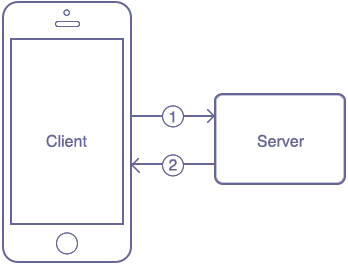
HTTP Request Flow

1. A client makes a HTTP request to a server and 2. The server responds with an HTTP response.

1.客户端向服务器发出HTTP请求,并且2.服务器以HTTP响应进行响应。

In a HTTP request, you need to define the type of action that you want to perform against a resource. There are four primary actions associated with any HTTP request (commonly referred to as CRUD):

在HTTP请求中,您需要定义要对资源执行的操作类型。 与任何HTTP请求(通常称为CRUD)相关联的主要动作有四个:

  1. POST (Create)

    POST(创建)
  2. GET (Retrieve)

    GET(检索)
  3. PUT (Update)

    PUT(更新)
  4. DELETE (Delete)

    删除(删除)

A resource is a data object that can be accessed via a HTTP request. The WP REST API allows you to “access your WordPress site’s data (resources) through an easy-to-use HTTP REST API”. In the case of the most recent version of the WP API (version 2), the resources include the following 9 WordPress objects:

资源是可以通过HTTP请求访问的数据对象。 WP REST API允许您“通过易于使用的HTTP REST API访问WordPress站点的数据(资源)”。 对于最新版本的WP API(版本2),资源包括以下9个WordPress对象:

  1. Posts

    帖子
  2. Pages

    页数
  3. Media

    媒体
  4. Post meta

    发布元
  5. Post revisions

    发布修订
  6. Comments

    注释
  7. Taxonomies

    分类法
  8. Terms

    条款
  9. Users

    用户数

With the WP API, you can perform any of the four CRUD actions against any of your WordPress site’s resources listed above. For example, you can use the WP API to create a post, retrieve a post, update a post or delete a post associated with your WordPress website.

使用WP API,您可以对上面列出的WordPress网站的任何资源执行四个CRUD操作中的任何一个。 例如,您可以使用WP API创建帖子,检索帖子,更新帖子或删除与WordPress网站关联的帖子。

It’s important to know that some HTTP requests don’t require authentication (anyone can make requests and the corresponding responses). In WP API, for example, certain GET requests like getting posts and getting media don’t require authentication. Other GET requests do require authentication though. For example, getting post revisions, getting users and getting post meta data require authentication. In addition, all POST, PUT and DELETE WP API actions require authentication.

重要的是要知道某些HTTP请求不需要身份验证(任何人都可以发出请求和相应的响应)。 例如,在WP API中,某些GET请求(例如获取帖子和获取媒体)不需要身份验证。 其他GET请求确实需要身份验证。 例如,获取帖子修订,获取用户和获取元数据都需要身份验证。 此外,所有POST,PUT和DELETE WP API操作都需要身份验证。

In WP API’s case, authentication for on site actions (plugins or themes installed to the site) are handled by cookies. However, if you’re off site, authentication is handled by OAuth (You would need to download the OAuth plugin to your WordPress site and then any external site would need to go through the normal OAuth flow to gain access. There’s also a Basic Authentication plugin that you could use as well).

在WP API的情况下,站点操作(安装到站点的插件或主题)的身份验证由cookie处理。 但是,如果您不在站点,则身份验证由OAuth处理(您需要将OAuth插件下载到WordPress站点,然后任何外部站点都需要通过常规OAuth流程来获得访问权限。还有基本身份验证您也可以使用的插件)。

Creating, retrieving, updating or deleting WordPress site data “is as simple as sending a HTTP request.”

创建,检索,更新或删除WordPress网站数据“就像发送HTTP请求一样简单。”

Now that you hopefully have a better understanding of what the WP API is, we’ll explore possible use cases as well as the APIs extensibility, limitations, installation instructions and making a couple example API calls.

现在,您希望对WP API有了更好的了解,我们将探讨可能的用例以及API的可扩展性,局限性,安装说明并进行一些API调用示例。

WP API用例 (Use Cases for the WP API)

In a presentation at WordCamp San Francisco in 2014, Sam Hotchkiss said that the WP API could result in “plugins running solely against the REST API; without having to have any PHP installed on that site’s server.” He thinks that the WP API may be opening up the door “for a third party app store” for plugins.

在2014年旧金山WordCamp的一次演讲中,Sam Hotchkiss表示WP API可能会导致“插件仅针对REST API运行; 无需在该站点的服务器上安装任何PHP。” 他认为WP API可能为插件的“第三方应用商店”打开大门。

On a May 27, 2015 WordPress Weekly episode, Matt Mullenweg, one of the co-founders of WordPress, said that the WP REST API is going to be “huge and revolutionary for developers”. Developers will be able to “build applications against it in a decoupled way”.

WordPress的共同创始人之一Matt Mullenweg在2015年5月27日的WordPress周刊中表示,WP REST API将“对开发人员来说是巨大而革命性的”。 开发人员将能够“以分离的方式针对它构建应用程序”。

Matt made sure to emphasize that “it really gets amazing when it’s combined with something else. Imagine a future version of HappyTables… where they don’t modify WP admin at all. It just creates a custom interface that talks purely over the REST API. Instead of trying to hack everything in WP admin.”

马特(Matt)一定要强调:“当它与其他东西结合在一起时,它真的变得很棒。 想象一下HappyTables的未来版本……他们根本不修改WP admin。 它只是创建一个纯粹通过REST API进行通信的自定义接口。 而不是尝试破解WP管理员中的所有内容。”

Matt continued, saying “I think [the] REST API is the beginning of WP admin becoming just one of many clients for managing WordPress. Think of WP admin as PHP, plus HTML, plus JavaScript clients. I think that you will see native clients. I think you’ll see pure JavaScript clients. I think you’ll see other PHP, HTML, JS clients; perhaps in the [vein] of HappyTables or some other verticals that have sprung up around WordPress”. He thinks that it may “make the admin [dashboard] something that you can replace as easily as you can replace the themes.”

马特继续说:“我认为[REST API]是WP管理员的开始,成为众多管理WordPress的客户端之一。 将WP admin视为PHP,HTML和JavaScript客户端。 我认为您会看到本地客户。 我认为您会看到纯JavaScript客户端。 我想您还会看到其他PHP,HTML,JS客户端; 也许是在HappyTables的[静脉]或其他围绕WordPress兴起的垂直领域中”。 他认为这可能“使管理员[dashboard]变得可以像替换主题一样容易地替换。”

高度可扩展 (Highly Extensible)

The WP API’s ability to access and manipulate a WordPress site’s resources remotely is cool enough in and of itself, but its extensibility makes it even more exciting. The WP API provides ways to both add additional fields to resources and to add endpoints to the API.

WP API远程访问和操纵WordPress网站资源的能力本身本身就很酷,但是它的可扩展性使其更加令人兴奋。 WP API提供了将附加字段添加到资源以及将端点添加到API的方法。

向资源添加字段 (Adding Fields to Resources)

Using the register_api_field function, you can add additional fields to be updated or retrieved when you make requests to certain WP API resources. You first need to run the add_action function and use rest_api_init as the hook (you would likely add this code via a WordPress plugin). The second parameter is the function name that is run when the hook is encountered. The function name in this instance is register_post_custom_field. custom_field is the field name, post is the resource and get_custom_field is the callback function that is run when a GET request is called on the post resource.

使用register_api_field函数,可以向请求某些WP API资源时添加要更新或检索的其他字段。 首先,您需要运行add_action函数并将rest_api_init用作挂钩(您可能会通过WordPress插件添加此代码)。 第二个参数是遇到钩子时运行的函数名称。 在此实例中,函数名称为register_post_custom_field。 custom_field是字段名称,post是资源,而get_custom_field是在发布资源上调用GET请求时运行的回调函数。

function register_post_custom_field() {
        register_api_field( 'post',
            'custom_field',
            array(
                'get_callback'    => 'get_custom_field',
                'update_callback' => null,
                'schema'          => null,
            )
        );
    }

You then need to add the get_custom_field callback function to the same file. In this function (as you can see below), you get the value of the “custom_field” for the post resource and you return it. This is so that when a call is made to get the custom field value, you will receive the custom field value in response.

然后,您需要将get_custom_field回调函数添加到同一文件。 在此函数中(如下所示),您将获得帖子资源的“ custom_field”值,然后将其返回。 这样一来,当调用获取自定义字段值时,您将收到自定义字段值作为响应。

function get_custom_field( $object, $field_name, $request ) {
        return get_post_meta( $object[ 'id' ], $field_name, true );
    }

添加端点 (Adding Endpoints)

According to wp-api.org, “endpoints are functions available through the API. This can be things like updating a post or deleting a comment. Endpoints perform a specific function, taking some number of parameters and returning data to the client. A route is the “name” you use to access endpoints, used in the URL. A route can have multiple endpoints associated with it, and which is used depends on the HTTP verb”.

根据wp-api.org,“端点是可通过API使用的函数。 这可能是更新帖子或删除评论之类的事情。 端点执行特定的功能,需要一些参数并将数据返回给客户端。 路由是URL中用于访问端点的“名称”。 路由可以具有与之关联的多个端点,其使用取决于HTTP动词。

In addition to adding fields to default resources, you can register custom endpoints to be used with the WP API. In order to register custom endpoints, you need to call the add_action function and use the rest_api_init hook and the register_rest_route function (again you’d likely add this code in a WordPress plugin). In the example below, the author/{author_id} route is registered and the GET endpoint for that route is defined (the callback function is get_post_title_by_author).

除了将字段添加到默认资源之外,您还可以注册要与WP API一起使用的自定义端点。 为了注册自定义端点,您需要调用add_action函数并使用rest_api_init钩子和register_rest_route函数(同样,您可能会在WordPress插件中添加此代码)。 在下面的示例中,作者/ {author_id}路由已注册,并定义了该路由的GET端点(回调函数为get_post_title_by_author)。

add_action( 'rest_api_init', function () {
            register_rest_route( 'myplugin/v1', '/author/(?P
   
    \d+)', array(
                'methods' => 'GET',
                'callback' => 'get_post_title_by_author'
            ) );
        } );
   

The following is the callback function that gets called when the GET endpoint is accessed via the WP API. FYI, posts are retrieved by the post’s author id in this function and the latest post title is returned.

以下是通过WP API访问GET端点时调用的回调函数。 仅供参考,通过此功能中帖子的作者ID检索帖子,并返回最新的帖子标题。

function get_post_title_by_author( $data ) {
            $posts = get_posts( array(
                'author' => $data['id'],
            ) );
        
            if ( empty( $posts ) ) {
                return null;
            }
        
            return $posts[0]->post_title;
        }

The ability to add endpoints and fields to the default WP API functionality makes it easier for developers to use the WP API on many different types of WordPress sites and provides more iterative opportunities in the future.

将端点和字段添加到默认WP API功能的功能使开发人员可以更轻松地在许多不同类型的WordPress网站上使用WP API,并在将来提供更多的迭代机会。

局限性 (Limitations)

There are some important limitations that you need to keep in mind before you begin working with the WP API. First off, any form of Serialized meta data is not allowed to be read or stored using the WP API. The creators of the API say that this is because “JSON can’t hold all formats of data stored in PHP” (for example, custom PHP objects cannot be represented), serialized data could also expose private data and serialized data has security problems (remote code execution vulnerabilities in particular).

在开始使用WP API之前,需要记住一些重要的限制。 首先,不允许使用WP API读取或存储任何形式的序列化元数据。 API的创建者说这是因为“ JSON不能保存PHP中存储的所有格式的数据”(例如,无法表示自定义PHP对象),序列化的数据也可能暴露私有数据,而序列化的数据存在安全性问题(远程代码执行漏洞)。

In addition, protected meta cannot be accessed or saved via the WP API. A protected meta is any meta field that has a key that begins with the _ (underscore) character. These meta fields cannot be exposed via the API.

此外,无法通过WP API访问或保存受保护的元。 受保护的元数据是任何具有以_(下划线)字符开头的键的元字段。 这些元字段无法通过API公开。

All other meta data is only available when “authenticated with permission to edit the post that the meta is attached to”. This is because any user can enter meta values via the Custom Fields metabox and they want to protect user privacy.

所有其他元数据仅在“已获得编辑元数据所附加的帖子的权限而获得认证”时才可用。 这是因为任何用户都可以通过“自定义字段”元框输入元值,并且他们想保护用户隐私。

It’s also important to note that the current version two beta “does not guarantee forwards compatibility with future betas.” They continue saying that “while we believe the API is now stable enough for public testing, we may continue to break the API in the future as we improve it further. Only use the API in development, and do not use version 2 in production environments.” You could use version 1 of the WP API, but we would recommend sticking to version 2 and just waiting to use it in production until they say it’s ready for production.

还需要注意的是,当前的两个Beta版本“不保证与将来的Beta版本具有向前兼容性。” 他们继续说:“尽管我们认为API现在已经足够稳定,可以进行公开测试,但我们可能会在将来进一步改进该API的同时继续破坏该API。 仅在开发中使用API​​,在生产环境中不使用版本2。” 您可以使用WP API的版本1,但我们建议您坚持使用版本2,然后等待生产中使用它,直到他们说它已准备好投入生产为止。

Lastly, in the same WordPress Weekly episode mentioned previously (on May 27), Matt Mullenweg talked about the limitations of the WP REST API’s authentication flow. He said that “third party integrations out of the box will still not be as smooth as you might be used to, like logging in with Facebook or logging in with Twitter to integrate something. That will still be a multi step process or require the site’s owner to go through some extra steps.”

最后,在之前提到的同一本WordPress周刊(5月27日)中,Matt Mullenweg谈到了WP REST API身份验证流程的局限性。 他说:“开箱即用的第三方集成仍然不会像您以前所习惯的那样平滑,例如使用Facebook登录或使用Twitter登录以集成某些内容。 这仍然是一个多步骤的过程,或者要求站点的所有者执行一些额外的步骤。”

安装说明 (Installation Instructions)

You should have a solid idea of what the WP API is capable of and what its limitations are. Let’s show you the steps involved in working with it. First off, you need to add the WP API plugin to your WordPress site.

您应该对WP API的功能及其局限性有扎实的认识。 让我们向您展示使用它的步骤。 首先,您需要将WP API插件添加到WordPress网站。

Go to https://wordpress.org/plugins/rest-api. Click the red Download button. This should download the latest version of the WP API plugin as a zip file.

转到https://wordpress.org/plugins/rest-api。 单击红色的下载按钮。 这应该以zip文件的形式下载WP API插件的最新版本。

WP REST API WordPress plugin download

Then, login to your WordPress site (your-site-name.com/wp-login.php). Hover over plugins in the left sidebar and click on Add New. Click on the Upload Plugin button, click Choose File and select the compressed version of the WP API plugin and then click Install Now.

然后,登录到您的WordPress网站(your-site-name.com/wp-login.php)。 将鼠标悬停在左侧边栏中的插件上,然后单击添加。 单击上载插件按钮,单击选择文件并选择WP API插件的压缩版本,然后单击立即安装。

WP API WordPress Plugin Upload and Install

Now that it’s installed, click the ‘Activate Plugin’ link.

安装完成后,点击“激活插件”链接。

WP API WordPress Plugin Activate

Change permalinks to something other than the default; we set ours to the Post name option.

将永久链接更改为默认值以外的其他值; 我们将我们的设置为“帖子名称”选项。

WordPress Permalink Settings

That’s everything that’s involved with configuring the WP REST API. Now, we can get to the fun stuff and get some data from your WordPress website using the WP API.

这就是配置WP REST API所涉及的一切。 现在,我们可以使用WP API来获取有趣的东西并从您的WordPress网站获取一些数据。

WP REST API请求示例 (Example WP REST API Requests)

We’re going to show you examples of some unauthenticated WP API GET requests. So, there’s no need to worry about any authentication plugins or settings.

我们将向您展示一些未经身份验证的WP API GET请求的示例。 因此,无需担心任何身份验证插件或设置。

Start off by adding the Postman Chrome Extension. You could also install the REST Easy Add-On if you use Firefox.

首先添加Postman Chrome扩展程序 。 如果使用Firefox,也可以安装REST Easy Add-On

获取帖子 (Getting Posts)

We’re going to show you how to get all of the posts that currently exist on your WordPress site. In order to do this, copy the following URL (route):

我们将向您展示如何获取WordPress网站上当前存在的所有帖子。 为此,请复制以下URL(路由):

http://www.your-web-site.com/wp-json/wp/v2/posts

Paste that route into Postman’s Enter request URL here field (You could also do this by simply typing the route above in a web browser but the data won’t be formatted (so it’ll be more difficult to see the schema)). Replace ‘your-web-site.com’ with the website that you installed the WP API plugin on (in our case it was the website wpmerchant.com; as you can see from the image below). Select GET from the drop down and click ‘Send’.

将该路由粘贴到Postman的“在此处输入请求URL”字段中(您也可以通过在网络浏览器中简单地在上面键入路由来完成此操作,但是数据不会被格式化(因此,很难看到架构))。 将“ your-web-site.com”替换为安装了WP API插件的网站(在我们的示例中是网站wpmerchant.com;从下图可以看到)。 从下拉列表中选择GET,然后单击“发送”。

Get Posts using the WP API

This is sending a GET request to your WordPress site’s server and the server is sending back a response based on the route and the HTTP action that is set. You should see a JSON response similar to the one below.

这会将GET请求发送到您的WordPress站点的服务器,并且服务器将根据路由和所设置的HTTP操作发送回响应。 您应该看到类似于以下内容的JSON响应。

Get Posts WP API Plugin Response

As you can see, this response is structured in a certain way so that you can easily and predictably access the data within it; this is called a schema. This structure is really important because knowing it, allows you to sift through the data programmatically. The response starts with a [ (left square bracket). This identifies the response as a JSON array. If you look at the response in more detail, you can find, amongst other information, that the first post in the array has a post ID of 838, a post title of WPMerchant: Simple and Powerful eCommerce for WordPress as well as the post content starting with <p>Powerful features in a simple interface.). This structure is carried out throughout all of the other posts that are returned in the response.

如您所见,此响应是以某种方式构造的,因此您可以轻松,可预测地访问其中的数据。 这称为架构。 这种结构非常重要,因为了解它可以让您以编程方式筛选数据。 响应以[((左方括号)开头。 这将响应标识为JSON数组。 如果您更详细地查看响应,则除其他信息外,您还可以发现数组中的第一条帖子的帖子ID为838WPMerchant的帖子标题:WordPress的简单而强大的电子商务以及该帖子的内容从<p>简单界面中的强大功能开始 )。 此结构在响应中返回的所有其他所有帖子中执行。

获取帖子 (Get a Post)

Now that you know how to get a list of the posts on your site, we’ll show you how to get a specific post from your WordPress site with the WP API plugin installed. Copy the route below.

现在您知道了如何获取网站上的帖子列表,我们将向您展示如何从安装了WP API插件的WordPress网站获取特定帖子。 复制以下路线。

http://www.your-web-site.com/wp-json/wp/v2/posts/{id}

Paste that into the Postman Enter request URL here field. Again, make sure you select GET from the drop down. Replace your-web-site.com with the website that you installed the WP API plugin on AND replace {id} with a Post ID that you know exists on the WordPress site.

将其粘贴到“邮递员在此处输入请求URL”字段中 。 同样,请确保从下拉列表中选择GET。 将您的web-site.com替换为您在WP API插件上安装的网站,并将{id}替换为您知道WordPress网站上存在的帖子ID。

Get a Post using the WP API Plugin

Click on the blue Send button. You should see something similar to the following response:

单击蓝色的发送按钮。 您应该看到类似于以下响应的内容:

Get a Post Response using the WP API Plugin

As you can see, there is no left square bracket to start off the response. This means that this response is an object NOT an array of objects. Specifically, this response includes all of the post data related to the post with a post ID of 838. The individual post data is in the same format as the list of posts above. You can again parse through the response and see the post id, post title, post content, post excerpt and many other post details.

如您所见,没有左方括号开始响应。 这意味着此响应是一个对象,而不是对象数组。 具体来说,此响应包含与帖子相关的所有帖子数据,其帖子ID为838。各个帖子数据的格式与上述帖子列表相同。 您可以再次解析响应,并查看帖子ID,帖子标题,帖子内容,帖子摘录和许多其他帖子详细信息。

Have fun and test out some other unauthenticated HTTP requests!

玩得开心,测试其他未经身份验证的HTTP请求!

结论 (Conclusion)

As you can tell, we’re really excited about using the WP API as well as the the implications of the WP REST API and the different functionality that will result from its use (and hopefully eventual incorporation into the WordPress core).

如您所知,我们对使用WP API以及WP REST API的含义以及使用它会带来的不同功能感到非常兴奋(并希望最终并入WordPress核心)。

In a subsequent article, we’re going to create an external site that creates, retrieves, updates and deletes WordPress posts using the WP REST API. So, check out our Twitter feed to stay tuned!

在后续文章中,我们将创建一个外部站点,该站点使用WP REST API创建,检索,更新和删除WordPress帖子。 因此,请查看我们的Twitter供稿以保持关注!

继续对话 (Continue the Conversation)

How do you plan on using the WP API? How do you foresee it being used? We would love to hear your thoughts below!

您如何计划使用WP API? 您如何预见它的使用? 我们很乐意听到您在下面的想法!

翻译自: https://www.sitepoint.com/wp-api/

wp rest api

评论
添加红包

请填写红包祝福语或标题

红包个数最小为10个

红包金额最低5元

当前余额3.43前往充值 >
需支付:10.00
成就一亿技术人!
领取后你会自动成为博主和红包主的粉丝 规则
hope_wisdom
发出的红包
实付
使用余额支付
点击重新获取
扫码支付
钱包余额 0

抵扣说明:

1.余额是钱包充值的虚拟货币,按照1:1的比例进行支付金额的抵扣。
2.余额无法直接购买下载,可以购买VIP、付费专栏及课程。

余额充值



