



1、层级结构
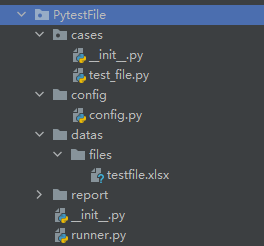
2、文件路径获取:config
import os.path


class Config(object):
    project_path = os.path.split(os.path.split(__file__)[0])[0]  # __file__获取当前文件的绝对路径


if __name__ == '__main__':
    print(os.path.split(os.path.split(__file__)[0])[0])
    print(os.path.join(Config.project_path, "datas/files/testfile.xls"))
路径结果:
D:\Study\pythonProject\venv\Scripts\python.exe D:/Study/pythonProject/PytestFile/config/config.py
D:/Study/pythonProject/PytestFile
D:/Study/pythonProject/PytestFile\datas/files/testfile.xls

Process finished with exit code 0
3、文件接口请求处理:
import pytest
import requests, os
from PytestFile.config.config import Config


class TestFile(object):
    case_file = [{"data": {"filename": "testfile"},
                  "file": {
                      "filemsg":
                          ("testfile.xls", open(os.path.join(Config.project_path, "datas/files/testfile.xls")))}
                  }]

    def setup_class(self):        #用例执行前,执行登录方法
        self.r = requests.Session()    #多次调用,只登录一次
        login = self.r.request(method="POST", url="http://localhost:8080/login",
                               data={"username": "test01", "password": "123456"})
        assert login.json().get("msg") == "login-pass"

    @pytest.mark.parametrize("upload_case", case_file)   #文件数据参数化
    def test_upload(self, upload_case):
        upload_file = self.r.post("http://localhost:8080/upload", data=upload_case.get("data"),
                                  files=upload_case.get("file"))
        assert upload_file.json()[0].get("filename") == upload_case["data"].get("filename")





 扫一扫
扫一扫


 2052
2052

 被折叠的 条评论
为什么被折叠?
被折叠的 条评论
为什么被折叠?
 到【灌水乐园】发言





