





伸缩侧边栏窗口1
本文展示了一个基于Qt的侧边栏(Sidebar)组件的实现代码,包含三个主要类:
-
Sidebar类:核心侧边栏控件,提供展开/收缩动画效果,支持自定义背景色、边框线、宽度和时间参数。采用垂直布局,通过QPropertyAnimation实现平滑的宽度变化动画。
-
SidebarOptionsButton类:侧边栏选项按钮,继承自QRadioButton,支持多种状态颜色设置(默认、选中、悬停等),可显示图标和文本,带有选中提示线条。
-
SidebarWindow类:整合侧边栏和多页窗口的容器控件,管理侧边栏与内容区域的布局关系,实现点击内容区域的事件处理。
该组件具有可扩展性,支持动态添加子控件,并提供了丰富的样式定制选项,适用于构建现代风格的应用程序界面。
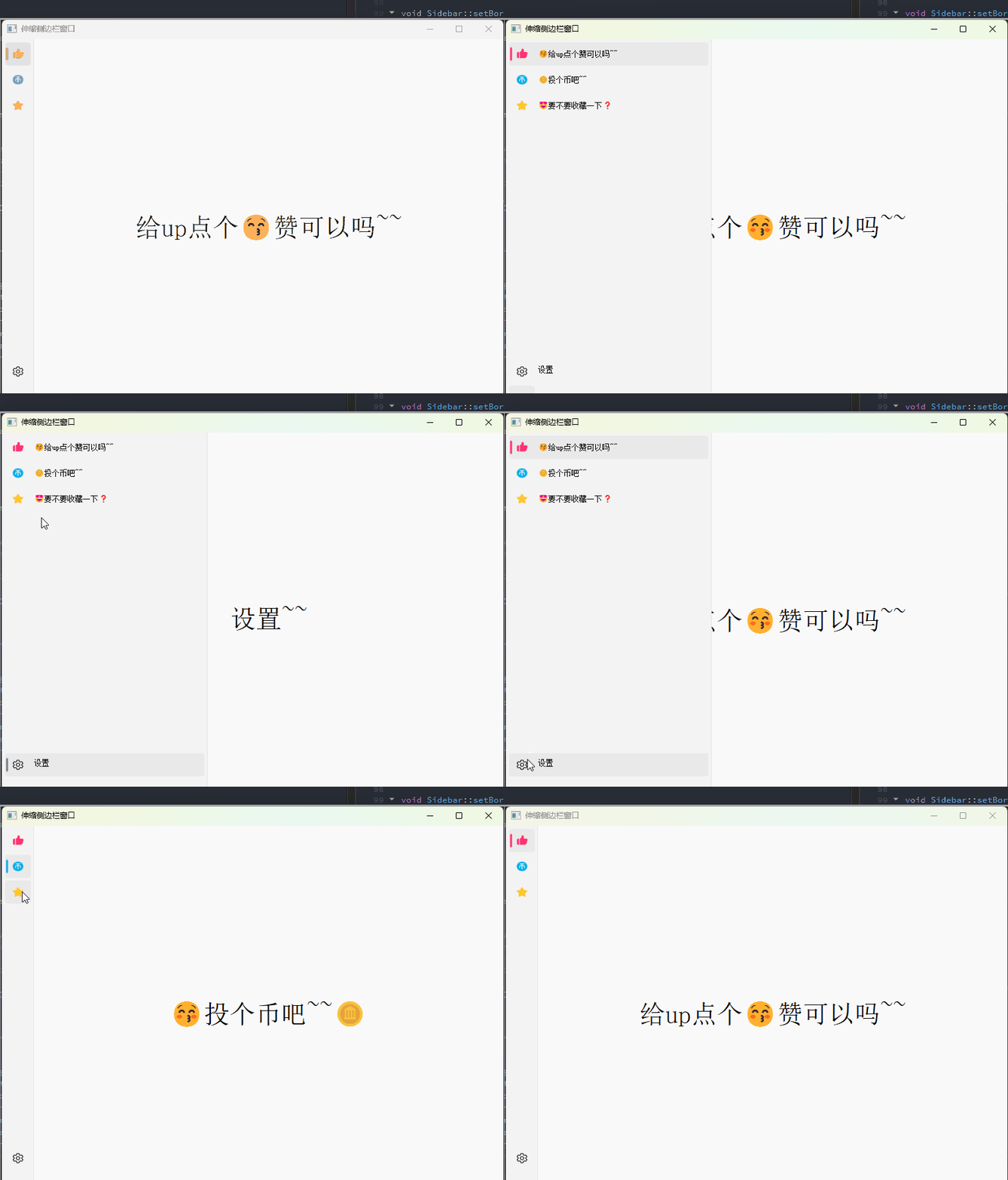
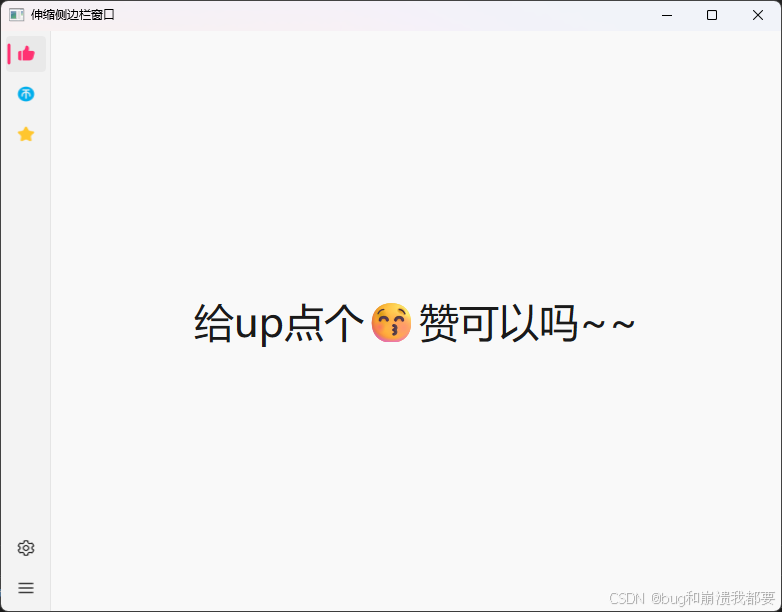
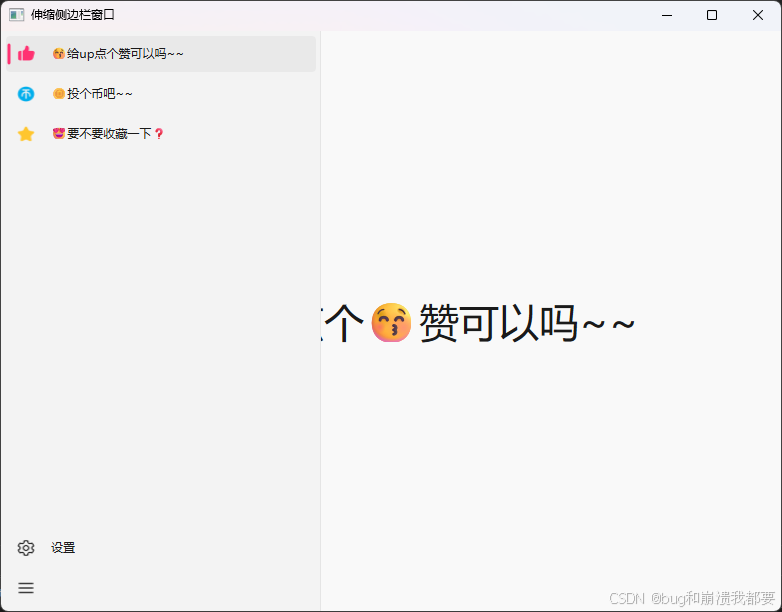
sidebar.h
#ifndef SIDEBAR_H
#define SIDEBAR_H

#include <QObject>
#include <QWidget>
#include <QResizeEvent>
#include <QPaintEvent>
#include <QMouseEvent>
#include <QPropertyAnimation>
#include <QSize>
#include <QPainter>
#include <QPen>
#include <QVBoxLayout>
#include <QBrush>
#include <QColor>

/*
 * Sidebar默认具有垂直布局
 * sidebarOptionsButton的位置确定依赖于Sidebar默认的垂直布局
 * childrenCumulativeHeight函数计算子控件累计高度,也依赖于Sidebar默认的垂直布局
 * 改变Sidebar布局可能会使子控件位置错误
 * 若不清楚位置确定的逻辑,不建议修改任何有关Sidebar布局的参数
 */
class Sidebar : public QWidget
{
    Q_OBJECT
public:
    explicit Sidebar(QWidget *parent, int initialWidth = 50);
    ~Sidebar();

    void addWidget(QWidget *btn);                   // 添加控件
    void addItem(QLayoutItem *item);                // 添加弹簧
    void setIncreasedWidth(quint32 increasedWidth); // 设置展开增加宽度
    void setExpandTime(int ms);                     // 设置展开时间
    void setBackgroundBrush(const QBrush &brush);   // 设置背景色绘制笔刷
    void setBorderLinePen(const QPen &pen);         // 设置右侧边界线绘制笔
    int childrenCumulativeHeight();                 // 计算子控件的累计总高度,包括布局边距和控件间距

public slots:
    void autoExpand(); // 自动控制展开或收缩
    void expand();     // 展开
    void shrink();     // 收缩

protected:
    void resizeEvent(QResizeEvent *) override;
    void paintEvent(QPaintEvent *) override;

signals:
    void expandStart();    // 开始展开
    void expandFinished(); // 展开结束
    void shrinkStart();    // 开始收缩
    void shrinkFinished(); // 收缩结束
    void finished();       // 展开或收缩结束

private:
    bool isAnimationRunning = false;             // 动画是否正在运行
    bool isExpanded = false;                     // 是否展开
    QPropertyAnimation *animation = nullptr;     // 属性动画
    QVBoxLayout *verticalLayout = nullptr;       // 垂直布局
    QSize initialSize;                           // 初始尺寸
    QSize endSize;                               // 终止尺寸
    QBrush backgroundBrush{qRgb(243, 243, 243)}; // 背景色绘制笔刷
    QPen borderLinePen{qRgb(229, 229, 229)};     // 右侧边界线绘制笔
};

#endif // SIDEBAR_H
sidebar.cpp
#include "sidebar.h"
#include <QLibraryInfo>
Sidebar::Sidebar(QWidget *parent, int initialWidth)
    : QWidget{parent},
      animation{new QPropertyAnimation(this, "size")},
      verticalLayout{new QVBoxLayout(this)}
{
    this->verticalLayout->setSpacing(4);
    this->verticalLayout->setContentsMargins(5, 5, 5, 5);
    this->animation->setDuration(150);
    this->borderLinePen.setWidth(2);

    connect(this->animation, &QPropertyAnimation::finished, this, [&]
            {
        if(this->initialSize.height()!=this->window()->height())
        {
            //动画结束,高度和父窗口不等,说明动画进行的过程中改变了窗口大小,需重新设置高度
            this->initialSize.rheight()=this->window()->height();
            this->endSize.rheight() = this->initialSize.rheight();
            this->animation->setStartValue(this->initialSize);
            this->animation->setEndValue(this->endSize);
            this->resize(this->width(),this->window()->height());
        }
        //设置展开状态和动画运行状态,根据展开状态发射相应信号
        this->isExpanded = !this->isExpanded;
        this->isAnimationRunning = false;
        if(this->isExpanded)
            emit this->expandFinished();
        else
            emit this->shrinkFinished();
        emit this->finished(); });

    // 动画起始高度和父窗口高度一样,宽度为初始宽度,之后不再更改宽度
    this->initialSize.rwidth() = initialWidth;
    this->initialSize.rheight() = this->window()->height();

    // 动画结束高度和动画起始高度始终相等,动画结束宽度为动画起始宽度加上展开增加宽度
    this->endSize.rwidth() = this->initialSize.rwidth() + 270;
    this->endSize.rheight() = this->initialSize.rheight();

    this->resize(initialWidth, this->window()->height());
}

Sidebar::~Sidebar()
{
    this->animation->deleteLater();
}

void Sidebar::autoExpand()
{
    this->expand();
    this->shrink();
}

void Sidebar::expand()
{
    // 当前不是展开状态
    if (!this->isExpanded && !this->isAnimationRunning)
    {
        this->animation->setDirection(QAbstractAnimation::Direction::Forward); // 正向
        this->animation->start();
        this->isAnimationRunning = true;
        emit this->expandStart();
    }
}

void Sidebar::shrink()
{
    if (this->isExpanded && !this->isAnimationRunning)
    {
        this->animation->setDirection(QAbstractAnimation::Direction::Backward); // 逆向
        this->animation->start();
        this->isAnimationRunning = true;
        emit this->shrinkStart();
    }
}

void Sidebar::addItem(QLayoutItem *item)
{
    this->verticalLayout->addItem(item);
}

void Sidebar::setIncreasedWidth(quint32 increasedWidth)
{
    // increasedWidth - (this->endSize.rwidth() - this->initialSize.rwidth());
    this->endSize.rwidth() += increasedWidth - this->endSize.rwidth() + this->initialSize.rwidth();
}

void Sidebar::setExpandTime(int ms)
{
    this->animation->setDuration(ms);
}

void Sidebar::setBackgroundBrush(const QBrush &brush)
{
    this->backgroundBrush = brush;
}

void Sidebar::setBorderLinePen(const QPen &pen)
{
    this->borderLinePen = pen;
}

int Sidebar::childrenCumulativeHeight()
{
    int cumulativeHeight = 0;                                                                  // 累计高度

#if (QT_VERSION >= QT_VERSION_CHECK(6,3,0))
    auto children(this->findChildren<QWidget *>(Qt::FindChildOption::FindDirectChildrenOnly)); // 查找直接子控件
#else
    auto children(this->findChildren<QWidget *>(QRegularExpression(QString(R"([\s\S]+)")),Qt::FindChildOption::FindDirectChildrenOnly));
#endif
    for (auto &child : children)
        cumulativeHeight += child->height(); // 累加直接子控件高度

    // 累加布局边距和控件间距
    cumulativeHeight += layout()->contentsMargins().top();
    cumulativeHeight += layout()->contentsMargins().bottom();
    cumulativeHeight += layout()->spacing() * (children.count() - 1);

    return cumulativeHeight;
}

void Sidebar::addWidget(QWidget *btn)
{
    this->verticalLayout->addWidget(btn);
}

void Sidebar::resizeEvent(QResizeEvent *)
{
    // 动画未运行时改变,父窗口高度改变,需重设动画起始和结束高度
    // 这里不判断高度是否相等(性能差不多?? 但是需要增加额外的初始化代码)
    if (!this->isAnimationRunning) //&& this->height()!=this->window()->height()
    {
        this->initialSize.rheight() = this->height();
        this->endSize.rheight() = this->initialSize.rheight();
        this->animation->setStartValue(this->initialSize);
        this->animation->setEndValue(this->endSize);
    }
}

void Sidebar::paintEvent(QPaintEvent *)
{
    QPainter painter(this);
    painter.setBrush(this->backgroundBrush);
    painter.setPen(Qt::PenStyle::NoPen);
    painter.drawRect(this->rect());
    painter.setPen(this->borderLinePen);
    painter.drawLine(this->width(), 0, this->width(), this->height());
}
sidebaroptionsbutton.h
#ifndef SIDEBAROPTIONSBUTTON_H
#define SIDEBAROPTIONSBUTTON_H

#include <QObject>
#include <QRadioButton>
#include <QWidget>
#include <QPoint>
#include <QEnterEvent>
#include <QEvent>
#include <QPaintEvent>
#include <QResizeEvent>
#include <QBrush>
#include <QColor>
#include <QLabel>
#include <QSizePolicy>
#include <QPainter>
#include <QPen>
#include <QPixmap>
#include <QRgb>
#include <QLayout>

class SidebarOptionsButton : public QRadioButton
{
    Q_OBJECT
public:
    SidebarOptionsButton(QWidget *parent, int index = 0, int minimumWidth = 40, int fixedHeight = 36);

    void setDisClickedColor(const QColor &color);      // 设置未选中时颜色
    void setClickedColor(const QColor &color);         // 设置选中时颜色
    void setClickedEnterColor(const QColor &color);    // 设置选中时鼠标进入颜色
    void setDisClickedEnterColor(const QColor &color); // 设置未选中时鼠标进入颜色
    void setPromptLineColor(const QColor &color);      // 设置选中时的提示线条颜色
    void setDrawPromptLineEnable(bool enable = true);  // 设置是否绘制选中时的提示线条
    void setFilletRadius(int radius);                  // 设置圆角半径
    int index();                                       // 获取索引值

public slots:
    void setIndex(int index);          // 设置索引
    void setIcon(const QPixmap &icon); // 设置图标
    void setText(const QString &text); // 设置展开后显示的文字

signals:
    void selectedIndex(int index); // 当按钮被选中时,这个信号将会发出索引值

protected:
    bool hitButton(const QPoint &pos) const override;    // 有效范围重设
#if (QT_VERSION >= QT_VERSION_CHECK(6,0,0))
    void enterEvent(QEnterEvent *event) override;        // 进入
#else
    void enterEvent(QEvent *event) override;
#endif
    void leaveEvent(QEvent *event) override;             // 离开
    void mousePressEvent(QMouseEvent *event) override;   // 点击
    void mouseReleaseEvent(QMouseEvent *event) override; // 松开
    void paintEvent(QPaintEvent *event) override;

private:
    QColor dis_clicked_Color{qRgb(243, 243, 243)};
    QColor clicked_color{qRgb(233, 233, 233)};
    QColor clicked_enter_color{qRgb(237, 237, 237)};
    QColor dis_clicked_enter_color{qRgb(233, 233, 233)};
    QColor pressColor{qRgb(236, 236, 236)};
    QColor prompt_line_color{qRgb(0, 159, 170)};
    QBrush background_brush{dis_clicked_Color};
    QLabel *icon_label = nullptr;
    QLabel *text_label = nullptr;
    int index_ = 0; // 索引值
    bool is_draw_prompt_line = true;
    int fillet_radius = 4;
};

#endif // SIDEBAROPTIONSBUTTON_H
sidebaroptionsbutton.cpp
#include "sidebaroptionsbutton.h"

SidebarOptionsButton::SidebarOptionsButton(QWidget *parent, int index, int minimumWidth, int fixedHeight)
    : QRadioButton{parent},
      icon_label{new QLabel(this)},
      text_label{new QLabel(this)},
      index_{index}
{
    QSizePolicy sizePolicy(QSizePolicy::Policy::Minimum, QSizePolicy::Policy::Fixed);
    sizePolicy.setHorizontalStretch(0);
    sizePolicy.setVerticalStretch(0);
    sizePolicy.setHeightForWidth(this->sizePolicy().hasHeightForWidth());
    this->setSizePolicy(sizePolicy);
    this->setMinimumWidth(minimumWidth);
    this->setFixedHeight(fixedHeight);
    this->resize(minimumWidth, fixedHeight);

    this->icon_label->resize(size() / 2);
    this->icon_label->move(width() / 4, height() / 4);
    this->icon_label->setScaledContents(true);

    this->text_label->move(this->width() + parent->layout()->contentsMargins().right(), height() / 4);

    connect(this, &SidebarOptionsButton::toggled, this, [&](bool isClicked)
            {
                if(isClicked)
                {
                    emit this->selectedIndex(this->index_);
                    this->background_brush.setColor(this->clicked_color);
                }
                else
                    this->background_brush.setColor(this->dis_clicked_Color);
                this->update();
            });
}

void SidebarOptionsButton::setDisClickedColor(const QColor &color)
{
    this->dis_clicked_Color = color;
}

void SidebarOptionsButton::setClickedColor(const QColor &color)
{
    this->clicked_color = color;
}

void SidebarOptionsButton::setClickedEnterColor(const QColor &color)
{
    this->clicked_enter_color = color;
}

void SidebarOptionsButton::setDisClickedEnterColor(const QColor &color)
{
    this->dis_clicked_enter_color = color;
}

void SidebarOptionsButton::setPromptLineColor(const QColor &color)
{
    this->prompt_line_color = color;
}

void SidebarOptionsButton::setDrawPromptLineEnable(bool enable)
{
    this->is_draw_prompt_line = enable;
}

void SidebarOptionsButton::setFilletRadius(int radius)
{
    this->fillet_radius = radius;
}

int SidebarOptionsButton::index()
{
    return this->index_;
}

void SidebarOptionsButton::setIndex(int index)
{
    this->index_ = index;
}

void SidebarOptionsButton::setIcon(const QPixmap &icon)
{
    this->icon_label->setPixmap(icon);
}

void SidebarOptionsButton::setText(const QString &text)
{
    this->text_label->setText(text);
}

bool SidebarOptionsButton::hitButton(const QPoint &) const
{
    return true;
}

#if (QT_VERSION >= QT_VERSION_CHECK(6,0,0))
void SidebarOptionsButton::enterEvent(QEnterEvent *event)
{
    QRadioButton::enterEvent(event);
    if (this->isChecked())
        this->background_brush.setColor(this->clicked_enter_color);
    else
        this->background_brush.setColor(this->dis_clicked_enter_color);
    this->update();
}
#else
void SidebarOptionsButton::enterEvent(QEvent *event)
{
    QRadioButton::enterEvent(event);
    if (this->isChecked())
        this->background_brush.setColor(this->clicked_enter_color);
    else
        this->background_brush.setColor(this->dis_clicked_enter_color);
    this->update();
}
#endif

void SidebarOptionsButton::leaveEvent(QEvent *event)
{
    QRadioButton::leaveEvent(event);
    if (this->isChecked())
        this->background_brush.setColor(this->clicked_color);
    else
        this->background_brush.setColor(this->dis_clicked_Color);
    this->update();
}

void SidebarOptionsButton::mousePressEvent(QMouseEvent *event)
{
    QRadioButton::mousePressEvent(event);
    this->background_brush.setColor(this->pressColor);
    this->update();
}

void SidebarOptionsButton::mouseReleaseEvent(QMouseEvent *event)
{
    QRadioButton::mouseReleaseEvent(event);
    this->background_brush.setColor(this->clicked_color);
    this->update();
}

void SidebarOptionsButton::paintEvent(QPaintEvent *)
{
    QPainter painter(this);
    painter.setRenderHints(QPainter::RenderHint::Antialiasing); // 抗锯齿

    // 绘制背景色
    painter.setBrush(this->background_brush);
    painter.setPen(Qt::PenStyle::NoPen);
    painter.drawRoundedRect(rect(), this->fillet_radius, this->fillet_radius);

    // 绘制选中提示线条
    if (this->isChecked() && this->is_draw_prompt_line)
    {
        QPen pen(this->prompt_line_color);
        pen.setCapStyle(Qt::PenCapStyle::RoundCap);

        int lineWidth = 3;
        pen.setWidth(lineWidth);

        painter.setPen(pen);

        int x = lineWidth;
        int y1 = this->height() / 4;
        int y2 = y1 * 2 + y1;

        painter.drawLine(x, y1, x, y2);
    }
}
sidebarwindow.h
#ifndef SIDEBARWINDOW_H
#define SIDEBARWINDOW_H

#include <QWidget>
#include <QResizeEvent>
#include <QPushButton>
#include <QHBoxLayout>
#include <QSpacerItem>
#include <QStackedWidget>
#include "sidebar.h"

class SidebarWindow : public QWidget
{
    Q_OBJECT

public:
    SidebarWindow(QWidget *parent = nullptr);
    Sidebar *sidebar();               // 返回侧边栏对象指针
    QSpacerItem *placeholderSpring(); // 返回占位弹簧对象指针
    QStackedWidget *stackedWidget();  // 返回多页窗口控件对象指针

protected:
    void resizeEvent(QResizeEvent *event) override;
    void mousePressEvent(QMouseEvent *event) override; // 点击

signals:
    void clicked(); // 多页窗口被点击时此信号将发出

private:
    void setupUi(QWidget *parent);
    Sidebar *sidebar_;               // 侧边栏
    QHBoxLayout *horizontalLayout;   // 水平布局
    QSpacerItem *placeholderSpring_; // 占位弹簧
    QStackedWidget *stackedWidget_;  // 多页窗口
};
#endif // SIDEBARWINDOW_H
sidebarwindow.cpp
#include "sidebarwindow.h"

SidebarWindow::SidebarWindow(QWidget *parent)
    : QWidget(parent)
{
    this->setupUi(this);
}

Sidebar *SidebarWindow::sidebar()
{
    return this->sidebar_;
}

QSpacerItem *SidebarWindow::placeholderSpring()
{
    return placeholderSpring_;
}

QStackedWidget *SidebarWindow::stackedWidget()
{
    return stackedWidget_;
}

void SidebarWindow::setupUi(QWidget *parent)
{
    this->horizontalLayout = new QHBoxLayout(parent);
    this->horizontalLayout->setContentsMargins(0, 0, 0, 0);

    // 占位弹簧大小需要和侧边栏宽度相等,默认已相等
    this->placeholderSpring_ = new QSpacerItem(50, 0, QSizePolicy::Policy::Fixed, QSizePolicy::Policy::Minimum);

    this->stackedWidget_ = new QStackedWidget(parent);

    // 添加到水平布局中
    this->horizontalLayout->addItem(placeholderSpring_);
    this->horizontalLayout->addWidget(stackedWidget_);

    this->stackedWidget_->setCurrentIndex(-1); // 没有初始页
    this->sidebar_ = new Sidebar(parent);      // 无布时,局默认位置即为(0,0)
    this->sidebar_->raise();                   // 将侧边栏移到最前方(写在其余控件之后)
    this->resize(600, 400);
}

void SidebarWindow::resizeEvent(QResizeEvent *event)
{
    QWidget::resizeEvent(event);
    this->sidebar_->resize(sidebar_->width(), height());
}

void SidebarWindow::mousePressEvent(QMouseEvent *event)
{
    QWidget::mousePressEvent(event);
    if (event->pos().x() > this->sidebar_->width())
        emit this->clicked();
}
伸缩侧边栏窗口2
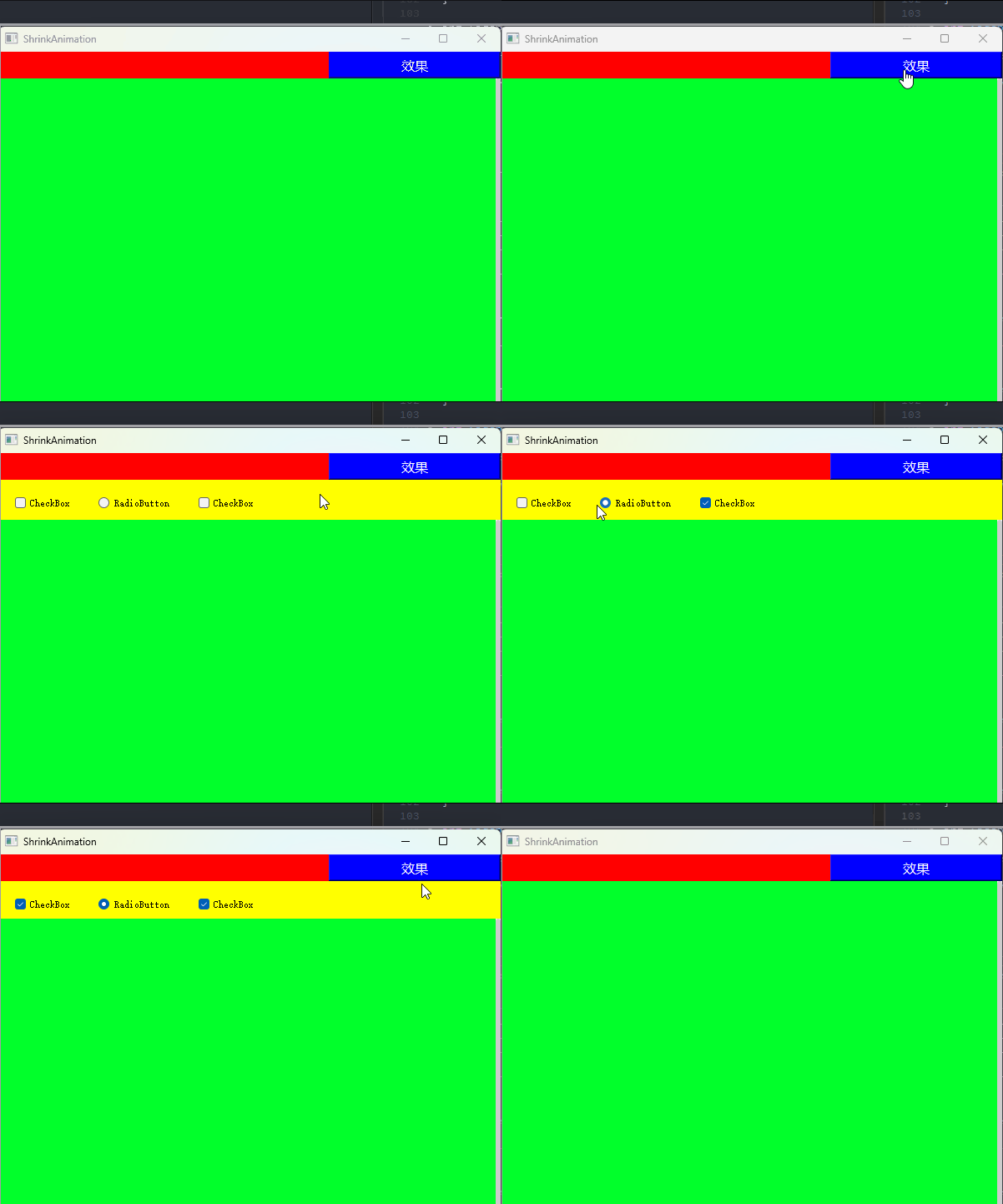
shrinkanimation.h
#ifndef SHRINKANIMATION_H
#define SHRINKANIMATION_H

#include <QtWidgets/QWidget>
#include "ui_shrinkanimation.h"

class ShrinkAnimation : public QWidget
{
	Q_OBJECT

public:
	ShrinkAnimation(QWidget *parent = 0);
	~ShrinkAnimation();

private:
	void initControl();
	void resizeEvent(QResizeEvent *);

private:
	Ui::ShrinkAnimationClass ui;
};

#endif // SHRINKANIMATION_H
shrinkanimation.cpp
//这里是主界面ShrinkAnimation.cpp
#include "shrinkanimation.h"
#include "statuswidget.h"

#include <QPropertyAnimation>
#include <QPushButton>

ShrinkAnimation::ShrinkAnimation(QWidget *parent)
    : QWidget(parent)
{
    ui.setupUi(this);
    initControl();
}

ShrinkAnimation::~ShrinkAnimation()
{

}

void ShrinkAnimation::initControl()
{
    ui.titleWidget->setFixedWidth(this->width());
    StatusWidget* pWidget = new StatusWidget(ui.upWidget);
    pWidget->setFixedSize(this->width(), 48);
    pWidget->move(0, ui.titleWidget->height());

    connect(ui.pushButton, &QPushButton::clicked, [this, pWidget]()
    {
        QPropertyAnimation *animation = new QPropertyAnimation(ui.upWidget, "fixSizeHeight");
        animation->setDuration(200);
        animation->setEasingCurve(QEasingCurve::InQuad);
        if (ui.upWidget->height() > 32)
        {
            animation->setEndValue(32);
        }
        else
        {
            animation->setEndValue(pWidget->height() + 32);
        }
        animation->start(QAbstractAnimation::DeleteWhenStopped);
    });
}

void ShrinkAnimation::resizeEvent(QResizeEvent*)
{
    ui.titleWidget->setFixedWidth(this->width());
    ui.pushButton->move(this->width() - ui.pushButton->width(), 0);
}
statuswidget.h
#ifndef STATUSWIDGET_H
#define STATUSWIDGET_H

#include <QWidget>
#include "ui_statuswidget.h"

class StatusWidget : public QWidget
{
	Q_OBJECT

public:
	StatusWidget(QWidget *parent = 0);
	~StatusWidget();

private:
	Ui::StatusWidget ui;

private:
	void paintEvent(QPaintEvent* event);
};

#endif // STATUSWIDGET_H
statuswidget.cpp
//黄色区域代码,添加自己想要添加的控件
#include "statuswidget.h"
#include <QPainter>
#include <QStyleOption>

StatusWidget::StatusWidget(QWidget *parent)
	: QWidget(parent)
{
	ui.setupUi(this);
}

StatusWidget::~StatusWidget()
{

}

void StatusWidget::paintEvent(QPaintEvent* event)
{
	// 背景图
	QStyleOption opt;
	opt.init(this);
	QPainter p(this);
	style()->drawPrimitive(QStyle::PE_Widget, &opt, &p, this);
    QWidget::paintEvent(event);
}

titlewidget.h
#ifndef TITLEWIDGET_H
#define TITLEWIDGET_H

#include <QWidget>
#include "ui_titlewidget.h"

class TitleWidget : public QWidget
{
	Q_OBJECT
	Q_PROPERTY(int fixSizeHeight READ fixSizeHeight WRITE setCusfixSizeHeight)

public:
	TitleWidget(QWidget *parent = 0);
	~TitleWidget();

public:
	void setCusfixSizeHeight(int height);
	int  fixSizeHeight();

private:
	Ui::TitleWidget ui;
};

#endif // TITLEWIDGET_H
titlewidget.cpp
//TitleWidget 这里就是自定义属性,设置展开收缩那部分
#include "titlewidget.h"

TitleWidget::TitleWidget(QWidget *parent)
	: QWidget(parent)
{
	ui.setupUi(this);
}

TitleWidget::~TitleWidget()
{

}

void TitleWidget::setCusfixSizeHeight(int height)
{
	this->setFixedHeight(height);
}

int TitleWidget::fixSizeHeight()
{
	return this->height();
}





 扫一扫
扫一扫


 1万+
1万+

 被折叠的 条评论
为什么被折叠?
被折叠的 条评论
为什么被折叠?
 到【灌水乐园】发言





