


ray框架是一个很有意思的框架,简单介绍一下:
Ray 是一个开源的统一框架,用于扩展 AI 和 Python 应用程序,如机器学习。它为并行处理提供了计算层, 使用以下组件最大限度地减少了运行分布式个人和端到端机器学习工作流的复杂性:
- 用于常见机器学习任务的可扩展库,例如数据预处理、分布式训练、超参数调优、强化学习和模型服务。
- 用于并行化和扩展 Python 应用程序的 Python 分布式计算原语。
- 用于将 Ray 集群与现有工具和基础设施(如 Kubernetes、AWS、GCP 和 Azure)集成和部署的集成和实用程序。
下面开整。
1、安装
设置pip的源:
vi ~/.pip/pip.conf
#将如下的内容写入到这个文件中,并保存退出
[global]
index-url = https://mirrors.aliyun.com/pypi/simple/
开始安装:
#在命令行执行如下的两个语句
pip install -U "ray[data,train,tune,serve]"
pip install -U "ray[default]"
2、使用ray的helloWorld
import time
import numpy as np
import ray

# 在使用IDE的情况下,不加ignore_reinit_error=True参数有可能导致错误
ray.init(ignore_reinit_error=True)
ray.available_resources()['CPU']


# ray的分布式计算是通过这个装饰符完成分配的
@ray.remote
def timer_ray(x):
    return x*x


if __name__ == "__main__":
    t0 = time.time()
    # 这个地方用ray.get()获取
    values = ray.get([timer_ray.remote(x) for x in range(80)])
    print('Time Elapsed:\t{:.4f}'.format(time.time() - t0))
    print(values)
执行这个代码:
  warnings.warn(
2025-04-09 11:51:33,690	INFO worker.py:1843 -- Started a local Ray instance. View the dashboard at http://127.0.0.1:8265
Time Elapsed:	0.9653
[0, 1, 4, 9, 16, 25, 36, 49, 64, 81, 100, 121, 144, 169, 196, 225, 256, 289, 324, 361, 400, 441, 484, 529, 576, 625, 676, 729, 784, 841, 900, 961, 1024, 1089, 1156, 1225, 1296, 1369, 1444, 1521, 1600, 1681, 1764, 1849, 1936, 2025, 2116, 2209, 2304, 2401, 2500, 2601, 2704, 2809, 2916, 3025, 3136, 3249, 3364, 3481, 3600, 3721, 3844, 3969, 4096, 4225, 4356, 4489, 4624, 4761, 4900, 5041, 5184, 5329, 5476, 5625, 5776, 5929, 6084, 6241]

Process finished with exit code 0
OK,使用ray框架的helloworld就搞定了。
3、整一个简单的例子。
本来想要整一个docker版本的,结果发现在现有电脑上没有办法安装,所以就还是用本地的代码来测试了。
整了一个计算圆周率的例子,可以看一下这个调用的过程:
import ray
import time

# 在使用IDE的情况下,不加ignore_reinit_error=True参数有可能导致错误
ray.init(ignore_reinit_error=True)
# 本地测试,按照CPU的个数来设置
part_num = 12


@ray.remote
def estimate_pia(num_terms_1, num_terms_2):
    pi_estimate = 0.0
    sign = 1
    for i in range(num_terms_1, num_terms_2):
        term = 1.0 / (2 * i + 1)
        pi_estimate += sign * term
        sign *= -1
    return 4.0 * pi_estimate


def get_result(data_nums):
    part = int(data_nums / part_num)
    result = 0
    a = []
    for i in range(0, part_num):
        a.append(estimate_pia.remote(i * part, (i + 1) * part))
    for i in range(0, part_num):
        mid = ray.get(a[i])
        result += mid
    return result


if __name__ == "__main__":
    t0 = time.time()
    local_result = get_result(2000000000)
    print(local_result)
    print('Time Elapsed:\t{:.4f}\tseconds!'.format(time.time() - t0))
执行结果如下:
2025-04-09 18:55:24,475	INFO worker.py:1843 -- Started a local Ray instance. View the dashboard at http://127.0.0.1:8265
(raylet) /Users/test_aa/data/pythonProject/newenv/lib/python3.9/site-packages/urllib3/__init__.py:35: NotOpenSSLWarning: urllib3 v2 only supports OpenSSL 1.1.1+, currently the 'ssl' module is compiled with 'LibreSSL 2.8.3'. See: https://github.com/urllib3/urllib3/issues/3020
(raylet)   warnings.warn(
3.1415926530889733
Time Elapsed:	111.9401	seconds!

Process finished with exit code 0
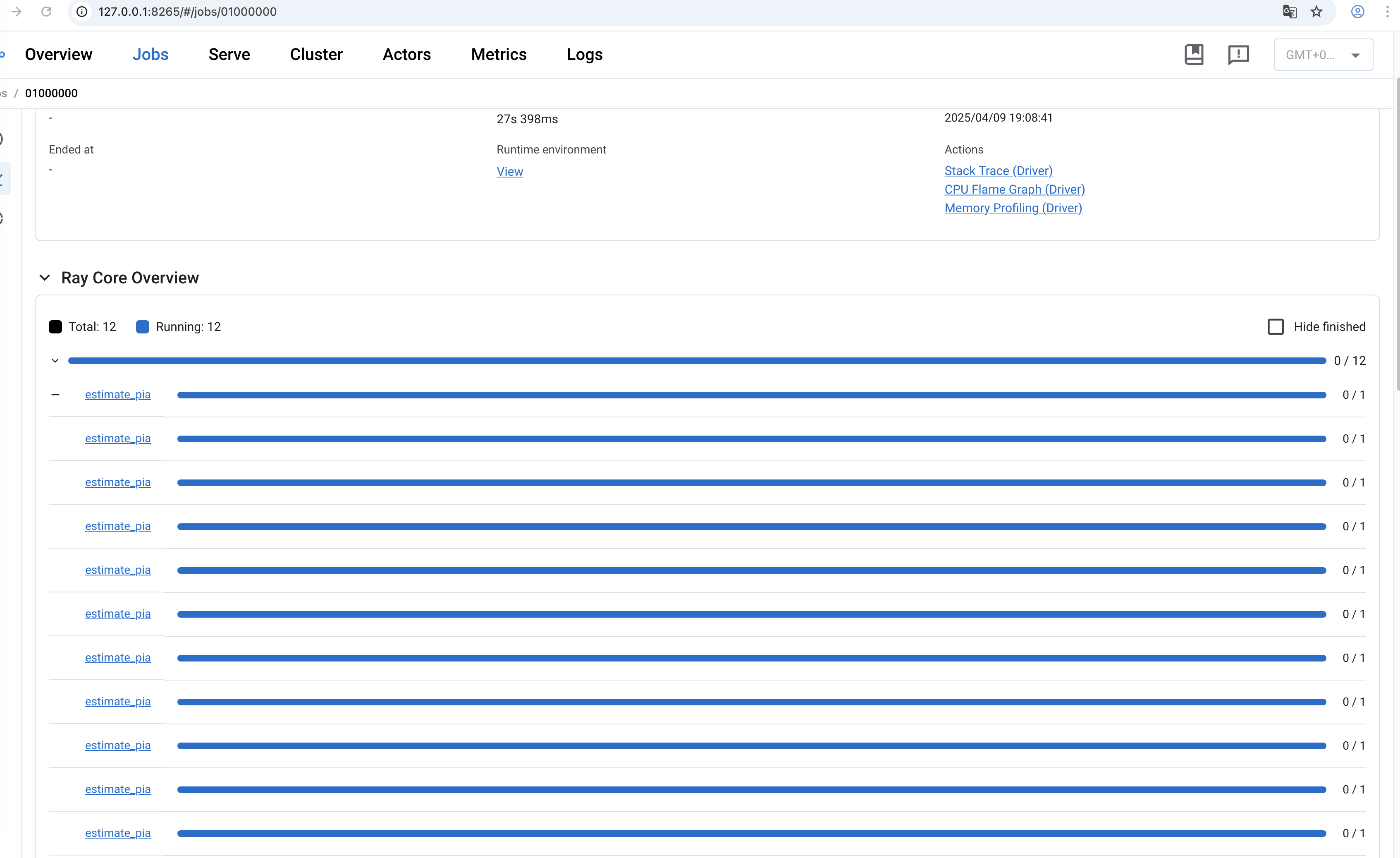
打开一下运行时候的界面是这样的:
http://127.0.0.1:8265/#/jobs/01000000
简单例子,搞定






 扫一扫
扫一扫


 1738
1738

 被折叠的 条评论
为什么被折叠?
被折叠的 条评论
为什么被折叠?
 到【灌水乐园】发言





