



实际在项目中使用phoenix操作hbase,会很麻烦,因为语法上phoenix的语法很有讲究,
双引号单引号的,很麻烦. 所以记录一下常用的sql写法.并且,不同phoenix的版本,对sql
语法的支持也是不一样.
1.创建表:
CREATE TABLE IF NOT EXISTS "qqqq_tables" ("id" varchar primary key, "source_id" varchar, "table_name" varchar, "table_desc" varchar, "remark" varchar, "create_time" varchar) COLUMN_ENCODED_BYTES=0;


CREATE TABLE IF NOT EXISTS "qqqq_tables" ("id" varchar primary key, "source_id" varchar, "table_name" varchar, "table_desc" varchar, "remark" varchar, "create_time" varchar) COLUMN_ENCODED_BYTES=0;


2.显示所有表:
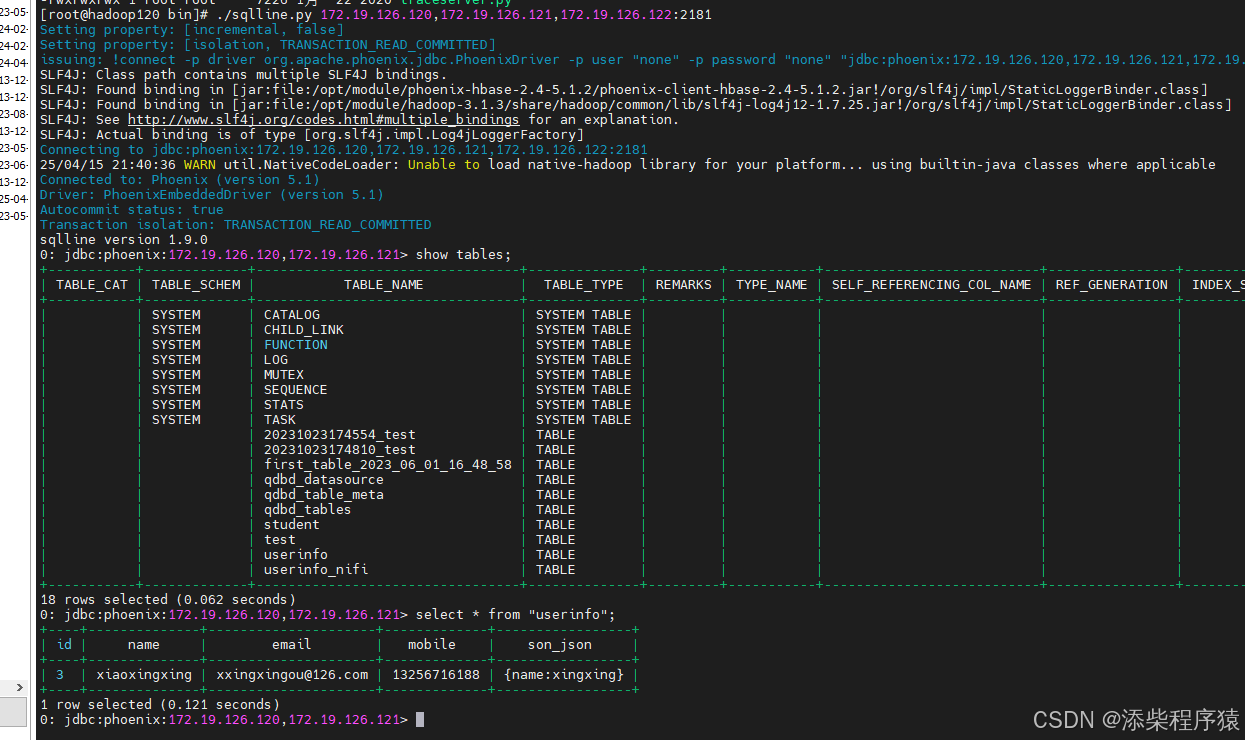
show tables


3.查询表:
select * from "qdbd_table_meta"


4.命令行连接
./sqlline.py 172.19.126.120,172.19.126.121,172.19.126.122:2181


5.删除表:
drop table "userinfo";


6.插入数据:
0: jdbc:phoenix:172.19.126.120,172.19.126.121> upsert into "userinfo" values('4','xiaohuang','xiaohuang@126.com','13256716111','{name:xiaohuang}');
1 row affected (0.14 seconds)


7.查询数据添加条件:对应字段要添加双引号
0: jdbc:phoenix:172.19.126.120,172.19.126.121> select * from "userinfo" where "id" = '3';
+----+--------------+---------------------+-------------+-----------------+
| id |     name     |        email        |   mobile    |    son_json     |
+----+--------------+---------------------+-------------+-----------------+
| 3  | xiaoxingxing | xxingxingou@126.com | 13256716188 | {name:xingxing} |
+----+--------------+---------------------+-------------+-----------------+


8.使用upsert更新表的某个字段
0: jdbc:phoenix:172.19.126.120,172.19.126.121> upsert into "userinfo" ("id","name") values ('4','xiaohuangzine');
1 row affected (0.017 seconds)
0: jdbc:phoenix:172.19.126.120,172.19.126.121> select * from "userinfo";
+----+---------------+---------------------+-------------+------------------+
| id |     name      |        email        |   mobile    |     son_json     |
+----+---------------+---------------------+-------------+------------------+
| 3  | xiaoxingxing  | xxingxingou@126.com | 13256716188 | {name:xingxing}  |
| 4  | xiaohuangzine | xiaohuang@126.com   | 13256716111 | {name:xiaohuang} |
+----+---------------+---------------------+-------------+------------------+
2 rows selected (0.035 seconds)


9.update更新某个字段无法使用:

0: jdbc:phoenix:172.19.126.120,172.19.126.121> update "userinfo" set "name" = 'xiaohuangzi' where "id"='4';
Error: ERROR 602 (42P00): Syntax error. Missing "STATISTICS" at line 1, column 8. (state=42P00,code=602)
org.apache.phoenix.exception.PhoenixParserException: ERROR 602 (42P00): Syntax error. Missing "STATISTICS" at line 1, column 8.
        at org.apache.phoenix.exception.PhoenixParserException.newException(PhoenixParserException.java:33)
        at org.apache.phoenix.parse.SQLParser.parseStatement(SQLParser.java:111)
        at org.apache.phoenix.jdbc.PhoenixStatement$PhoenixStatementParser.parseStatement(PhoenixStatement.java:1778)
        at org.apache.phoenix.jdbc.PhoenixStatement.parseStatement(PhoenixStatement.java:1861)
        at org.apache.phoenix.jdbc.PhoenixStatement.execute(PhoenixStatement.java:1980)
        at sqlline.Commands.executeSingleQuery(Commands.java:1054)
        at sqlline.Commands.execute(Commands.java:1003)
        at sqlline.Commands.sql(Commands.java:967)
        at sqlline.SqlLine.dispatch(SqlLine.java:734)
        at sqlline.SqlLine.begin(SqlLine.java:541)
        at sqlline.SqlLine.start(SqlLine.java:267)
        at sqlline.SqlLine.main(SqlLine.java:206)
Caused by: MissingTokenException(inserted [@-1,0:0='<missing STATISTICS>',<157>,1:7] at "userinfo")
        at org.apache.phoenix.parse.PhoenixSQLParser.recoverFromMismatchedToken(PhoenixSQLParser.java:376)
        at org.apache.phoenix.shaded.org.antlr.runtime.BaseRecognizer.match(BaseRecognizer.java:115)
        at org.apache.phoenix.parse.PhoenixSQLParser.update_statistics_node(PhoenixSQLParser.java:4488)
        at org.apache.phoenix.parse.PhoenixSQLParser.oneStatement(PhoenixSQLParser.java:1109)
        at org.apache.phoenix.parse.PhoenixSQLParser.statement(PhoenixSQLParser.java:526)
        at org.apache.phoenix.parse.SQLParser.parseStatement(SQLParser.java:108)


10.退出命令行
0: jdbc:phoenix:172.19.126.120,172.19.126.121> !quit
Closing: org.apache.phoenix.jdbc.PhoenixConnection


11.删除某条数据
delete from "userinfo_nifi" where "id"='3';








 扫一扫
扫一扫


 567
567

 被折叠的 条评论
为什么被折叠?
被折叠的 条评论
为什么被折叠?
 到【灌水乐园】发言





