



一、属性选择器
属性列表:
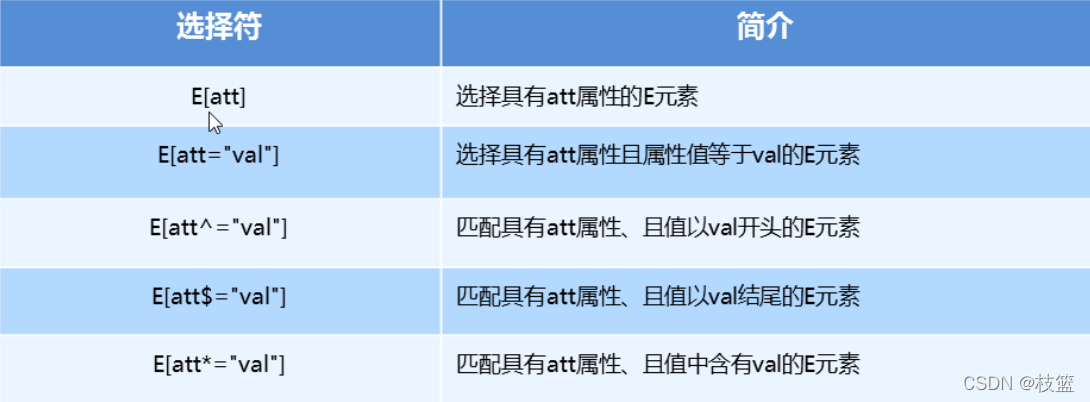
1.直接写属性
代码演示:
        /* 属性选择器使用方法 */
        /* 选择的是:  既是button 又有 disabled 这个属性的元素 */
        /* 属性选择器的权重是 10 */
        /* 1.直接写属性 */

        button[disabled] {
            cursor: default;
        }

        button {
            cursor: pointer;
        }
2.属性等于值
代码演示:
        /* 2. 属性等于值 */

        input[type="search"] {
            color: pink;
        }
        /* 3. 以某个值开头的 属性值 */

        div[class^="icon"] {
            color: red;
        }
        /* 4. 以某个值结尾的 */

        div[class$="icon"] {
            color: green;
        }
        /* 5. 可以在任意位置的 */

        div[class*="icon"] {
            color: blue;
        }
二、结构伪类选择器
属性列表: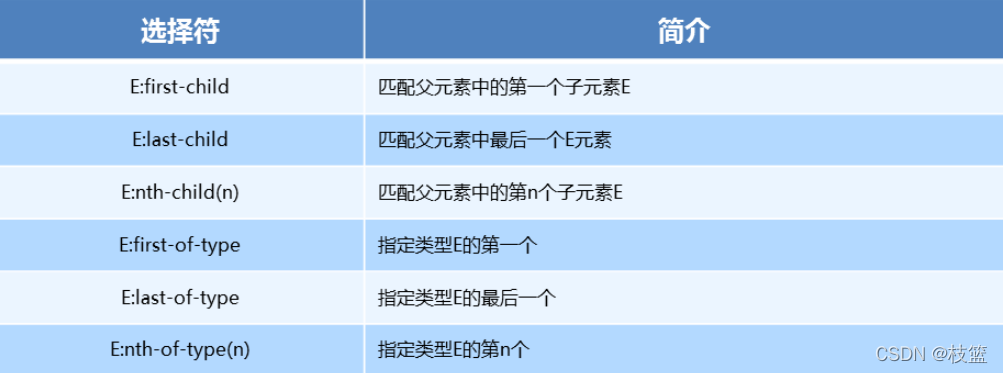
代码演示:
        ul li:first-child {
            background-color: blue;
        }

        ul li:last-child {
            background-color: skyblue;
        }
        /* nth-child(n)  我们要第几个,n就是几
            比如我们选第8个, 我们直接写 8就可以了 */

        ul li:nth-child(8) {
            background-color: lightpink;
        }
1.nth-child 详解
注意:
-
本质上就是选中第几个子元素
-
n 可以是数字、关键字、公式
-
n 如果是数字,就是选中第几个
-
常见的关键字有
even偶数、odd奇数 -
常见的公式如下(如果 n 是公式,则从 0 开始计算)
-
但是第 0 个元素或者超出了元素的个数会被忽略
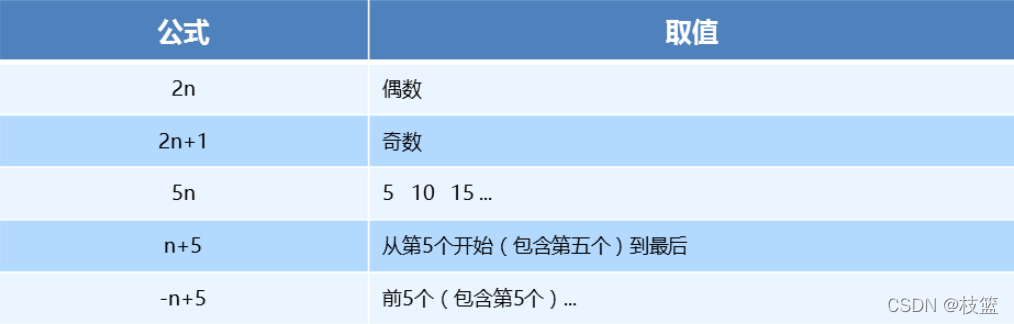
代码演示:
        /* n 可是关键词  even 是偶数  odd 是奇数 */

        ul li:nth-child(even) {
            background-color: blue;
        }

        ul li:nth-child(odd) {
            background-color: skyblue;
        }
        /* n 是公式  但是 n 从0开始计算 */

        ul li:nth-child(n) {
            background-color: hotpink;
        }
        /* 2n 偶数  类似于 even */

        ul li:nth-child(2n) {
            background-color: pink;
        }
        /* 2n + 1  类似于 odd */

        ul li:nth-child(2n+1) {
            background-color: yellow;
        }
        /* 5n  选择第  0  5  10  15 ... */

        ul li:nth-child(5n) {
            background-color: yellowgreen;
        }
        /* n+5 就是从第5个开始往后面选择 包含第5个  */

        ul li:nth-child(n+5) {
            background-color: royalblue;
        }
        /* -n + 5 就是选择前面5个   */

        ul li:nth-child(-n+5) {
            background-color: red;
        }
2.nth-child 和 nt-of-type 的区别
-
nth-child选择父元素里面的第几个子元素,不管是第几个类型 -
nt-of-type选择指定类型的元素
代码演示:
 div :nth-child(1) {
    background-color: lightblue;
  }

  div :nth-child(2) {
    background-color: yellow;
  }

  div span:nth-of-type(2) {
    background-color: lightseagreen;
  }

  div span:nth-of-type(3) {
    background-color: #fff;
  }
三、伪元素选择器
属性列表:

注意:
- before和after必须有content属性
- beforre在内容前面,after在内容后面
- before和after创建元素属于行内元素
- 因为在dom里面我们看不见刚才创建的元素,所以我们称为伪元素
- 伪元素和标签选择器一样,权重为1
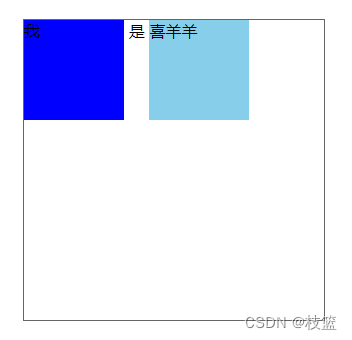
代码演示
        div {
            width: 300px;
            height: 300px;
            border: 1px solid #666;
        }

        div::before {
            display: inline-block;
            content: "我";
            width: 100px;
            height: 100px;
            background-color: blue;
        }

        div::after {
            content: "喜羊羊";
            display: inline-block;
            width: 100px;
            height: 100px;
            background-color: skyblue;
        }
效果图演示:





 扫一扫
扫一扫


 1194
1194

 被折叠的 条评论
为什么被折叠?
被折叠的 条评论
为什么被折叠?
 到【灌水乐园】发言





