



 本文讲述了在Ubuntu系统中遇到ifconfig显示异常后,通过切换用户权限、使用dhclient-v命令修复,并展示了操作过程及最终的网络配置结果。
问题
输入ifconfig显示:
awei@ubuntu:~$ ifconfig
lo: flags=73<UP,LOOPBACK,RUNNING>  mtu 65536
        inet 127.0.0.1  netmask 255.0.0.0
        inet6 ::1  prefixlen 128  scopeid 0x10<host>
        loop  txqueuelen 1000  (本地环回)
        RX packets 2116  bytes 151208 (151.2 KB)
        RX errors 0  dropped 0  overruns 0  frame 0
        TX packets 2116  bytes 151208 (151.2 KB)
        TX errors 0  dropped 0 overruns 0  carrier 0  collisions 0
解决方案
1.切换为root用户:sudo -i
2.输入:dhclient -v
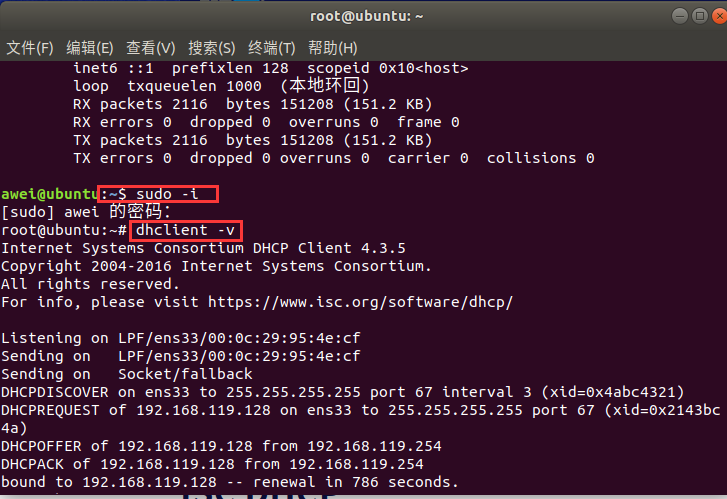
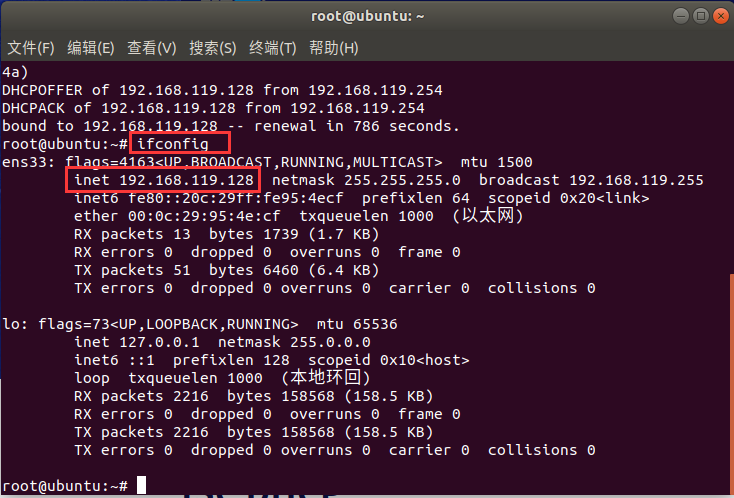
最后,验证,输入:ifconfig
root@ubuntu:~# ifconfig
ens33: flags=4163<UP,BROADCAST,RUNNING,MULTICAST>  mtu 1500
        inet 192.168.119.128  netmask 255.255.255.0  broadcast 192.168.119.255
        inet6 fe80::20c:29ff:fe95:4ecf  prefixlen 64  scopeid 0x20<link>
        ether 00:0c:29:95:4e:cf  txqueuelen 1000  (以太网)
        RX packets 13  bytes 1739 (1.7 KB)
        RX errors 0  dropped 0  overruns 0  frame 0
        TX packets 51  bytes 6460 (6.4 KB)
        TX errors 0  dropped 0 overruns 0  carrier 0  collisions 0

lo: flags=73<UP,LOOPBACK,RUNNING>  mtu 65536
        inet 127.0.0.1  netmask 255.0.0.0
        inet6 ::1  prefixlen 128  scopeid 0x10<host>
        loop  txqueuelen 1000  (本地环回)
        RX packets 2216  bytes 158568 (158.5 KB)
        RX errors 0  dropped 0  overruns 0  frame 0
        TX packets 2216  bytes 158568 (158.5 KB)
        TX errors 0  dropped 0 overruns 0  carrier 0  collisions 0

root@ubuntu:~#





 扫一扫
扫一扫


 1959
1959

 被折叠的 条评论
为什么被折叠?
被折叠的 条评论
为什么被折叠?
 到【灌水乐园】发言





