


目录
8.1-从 Oracle 官网下载:https://www.oracle.com/database/technologies/oracle19c-linux-downloads.html
9.3-安装结束后,会提示执行两个脚本(以 root 运行):
13.10-范围查询 between.... and ....
13.12-is null / is not null -----判断空值
13.16-ROWNUM-限制查询语句(oracle 12c版本之前)
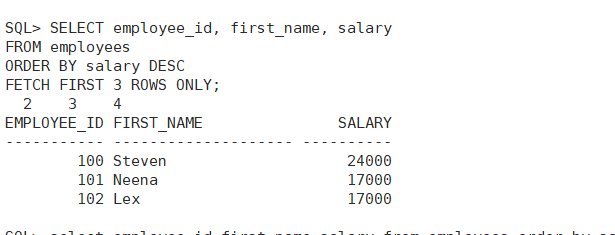
13.17-FETCH FIRST —— Oracle 12c
一、系统准备
1. 检查系统版本
Oracle 19c 官方支持:
-
Oracle Linux 7 / 8
-
RHEL 7 / 8
CentOS 7 兼容(8 也可,但需注意依赖)
二、安装系统依赖包
最小化系统缺少很多 Oracle 安装需要的库。
执行以下命令安装所有必需组件:
yum install -y binutils compat-libcap1 compat-libstdc++-33
gcc gcc-c++ glibc glibc-devel ksh libaio libaio-devel libgcc
libstdc++ libstdc++-devel libXi libXtst make sysstat elfutils-libelf-devel
unixODBC unixODBC-devel smartmontools net-tools unzip
-
libaio、glibc、libstdc++是 Oracle 数据文件 I/O 所需的基础库; -
ksh(Korn shell)是 Oracle 安装程序默认使用的 shell; -
elfutils-libelf-devel是内核符号和调试信息处理库; -
sysstat用于性能监控; -
net-tools提供ifconfig等命令; -
unzip用于解压 Oracle 安装包。
三、创建 Oracle 用户与组
Oracle 官方要求:
-
软件安装属主:
oracle -
主组:
oinstall -
辅助组:
dba
groupadd oinstall
groupadd dba
useradd -g oinstall -G dba oracle
passwd oracle
四、创建安装目录
mkdir -p /u01/app/oracle/product/19.3.0/dbhome_1
mkdir -p /u01/app/oraInventory
chown -R oracle:oinstall /u01
chmod -R 775 /u01
/u01是 Oracle 默认的软件安装路径。oraInventory用于存放安装记录(Inventory),后续升级和补丁也会用到
五、配置内核参数
Oracle 需要较大的内核参数以支撑内存、进程和文件句柄。
编辑 /etc/sysctl.conf:
vi /etc/sysctl.conf
5.1-添加以下内容:
fs.aio-max-nr = 1048576
fs.file-max = 6815744
kernel.shmall = 2097152
kernel.shmmax = 8589934592
kernel.shmmni = 4096
kernel.sem = 250 32000 100 128
net.ipv4.ip_local_port_range = 9000 65500
net.core.rmem_default = 262144
net.core.rmem_max = 4194304
net.core.wmem_default = 262144
net.core.wmem_max = 1048576
5.2-让参数生效:
sysctl -p
-
shmmax:单个共享内存段最大值(建议设置为物理内存一半); -
sem:信号量参数,Oracle 进程间通信依赖; -
file-max:系统最大打开文件数。
六、配置 Oracle 用户限制
编辑 /etc/security/limits.conf:
vi /etc/security/limits.conf
添加:
oracle soft nproc 2047
oracle hard nproc 16384
oracle soft nofile 1024
oracle hard nofile 65536
oracle soft stack 10240
限制 Oracle 用户的最大进程数、打开文件数等,防止因限制过低导致安装或运行失败。
七、设置环境变量
以 Oracle 用户身份编辑 .bash_profile:
su - oracle
vi ~/.bash_profile
添加:
export ORACLE_BASE=/u01/app/oracle
export ORACLE_HOME=$ORACLE_BASE/product/19.3.0/dbhome_1
export ORACLE_SID=orcl
export PATH=$PATH:$ORACLE_HOME/bin
使其生效:
source ~/.bash_profile
八、上传并解压 Oracle 安装包
8.1-从 Oracle 官网下载:https://www.oracle.com/database/technologies/oracle19c-linux-downloads.html
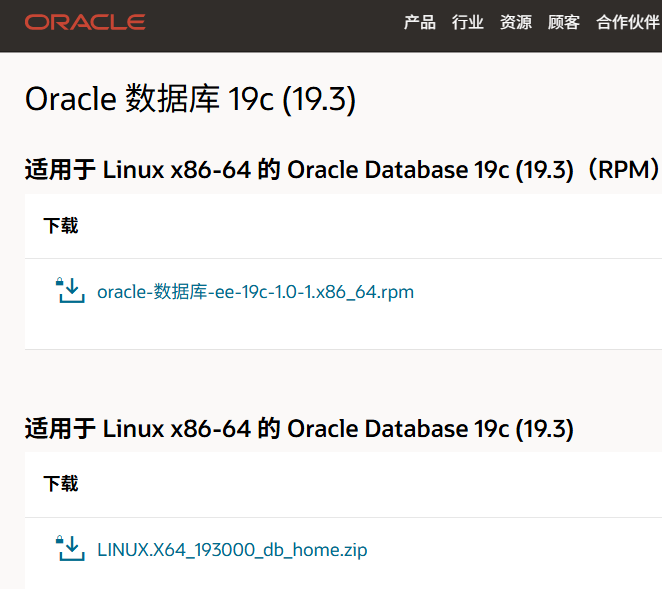
下载第二个zip压缩包
8.2-将文件上传至服务器(比如 /opt):
cd /opt
unzip LINUX.X64_193000_db_home.zip -d /u01/app/oracle/product/19.3.0/dbhome_1
chown -R oracle:oinstall /u01
九、以静默模式安装(推荐最小化系统)
9.1-切换到 oracle 用户:
su - oracle
cd $ORACLE_HOME
9.2-执行安装:
./runInstaller -silent -responseFile $ORACLE_HOME/install/response/db_install.rsp \
oracle.install.option=INSTALL_DB_SWONLY \
UNIX_GROUP_NAME=oinstall \
INVENTORY_LOCATION=/u01/app/oraInventory \
ORACLE_HOME=$ORACLE_HOME \
ORACLE_BASE=$ORACLE_BASE \
oracle.install.db.InstallEdition=EE \
oracle.install.db.OSDBA_GROUP=dba \
oracle.install.db.OSOPER_GROUP=dba \
DECLINE_SECURITY_UPDATES=true
静默模式原因:
最小化系统通常无 GUI,因此使用静默安装。
9.3-安装结束后,会提示执行两个脚本(以 root 运行):
/u01/app/oraInventory/orainstRoot.sh
/u01/app/oracle/product/19.3.0/dbhome_1/root.sh
十、创建数据库实例(静默方式)
只需为这些组赋值(可以全部设置为 dba)即可。
./runInstaller -silent \
-responseFile $ORACLE_HOME/install/response/db_install.rsp \
oracle.install.option=INSTALL_DB_SWONLY \
UNIX_GROUP_NAME=oinstall \
INVENTORY_LOCATION=/u01/app/oraInventory \
ORACLE_HOME=$ORACLE_HOME \
ORACLE_BASE=$ORACLE_BASE \
oracle.install.db.InstallEdition=EE \
oracle.install.db.OSDBA_GROUP=dba \
oracle.install.db.OSOPER_GROUP=dba \
oracle.install.db.OSBACKUPDBA_GROUP=dba \
oracle.install.db.OSDGDBA_GROUP=dba \
oracle.install.db.OSKMDBA_GROUP=dba \
oracle.install.db.OSRACDBA_GROUP=dba \
DECLINE_SECURITY_UPDATES=true
这将创建一个名为 orcl 的数据库实例。
十一、验证安装
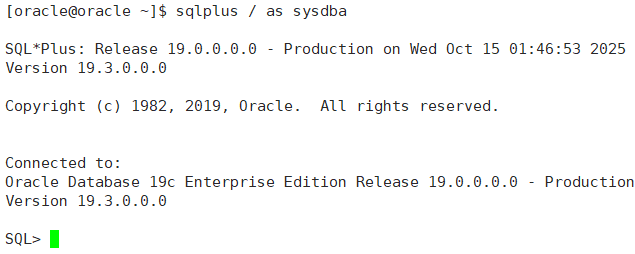
11.1-登录 SQL*Plus:
sqlplus / as sysdba
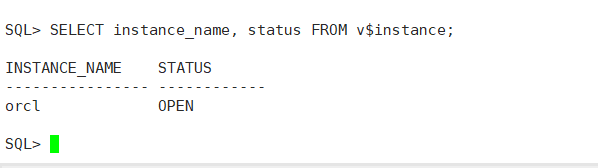
11.2-检查数据库状态:
SELECT instance_name, status FROM v$instance;
十二、开机自启(可选)
编辑 /etc/oratab,把最后一行改为:
orcl:/u01/app/oracle/product/19.3.0/dbhome_1:Y
十二:查询语句demo:
数据库安装好之后,可以创建一些table来验证查询语句:
12.1-table例子:
create table employees (
    employee_id    number(6)       PRIMARY KEY,  -- 员工编号
    first_name     varchar2(20),                 -- 名
    last_name      varchar2(25),                 -- 姓
    email          varchar2(50),                 -- 邮箱
    phone_number   varchar2(20),                 -- 电话
    hire_date      date,                         -- 入职日期
    job_id         varchar2(10),                 -- 职位ID
    salary         number(8,2),                  -- 工资
    commission_pct number(2,2),                  -- 提成比例
    manager_id     number(6),                    -- 上级ID
    department_id  number(4)                     -- 部门ID
);
-
NUMBER(8,2)表示最多 8 位数字,其中 2 位小数。 -
VARCHAR2是 Oracle 专用字符串类型。 -
主键(
PRIMARY KEY)防止重复。
12.2-插入测试数据
INSERT INTO employees VALUES (100, 'Steven', 'King', 'SKING', '515.123.4567', DATE '2003-06-17', 'AD_PRES', 24000, NULL, NULL, 90);
INSERT INTO employees VALUES (101, 'Neena', 'Kochhar', 'NKOCHHAR', '515.123.4568', DATE '2005-09-21', 'AD_VP', 17000, NULL, 100, 90);
INSERT INTO employees VALUES (102, 'Lex', 'De Haan', 'LDEHAAN', '515.123.4569', DATE '2001-01-13', 'AD_VP', 17000, NULL, 100, 90);
INSERT INTO employees VALUES (103, 'Alexander', 'Hunold', 'AHUNOLD', '590.423.4567', DATE '2006-01-03', 'IT_PROG', 9000, NULL, 102, 60);
INSERT INTO employees VALUES (104, 'Bruce', 'Ernst', 'BERNST', '590.423.4568', DATE '2007-05-21', 'IT_PROG', 6000, NULL, 103, 60);
INSERT INTO employees VALUES (105, 'David', 'Austin', 'DAUSTIN', '590.423.4569', DATE '2005-06-25', 'IT_PROG', 4800, NULL, 103, 60);
INSERT INTO employees VALUES (106, 'Valli', 'Pataballa', 'VPATABAL', '590.423.4560', DATE '2006-02-05', 'IT_PROG', 4800, NULL, 103, 60);
INSERT INTO employees VALUES (107, 'Diana', 'Lorentz', 'DLORENTZ', '590.423.5567', DATE '2007-02-07', 'IT_PROG', 4200, NULL, 103, 60);
COMMIT;
十三:验证查询语句:
| 类型 | 语法 | 示例 |
|---|---|---|
| 创建表 | CREATE TABLE | 建立测试表 |
| 插入数据 | INSERT INTO | 写入员工数据 |
| 查询 | SELECT ... FROM | 查询指定列 |
| 条件查询 | WHERE | salary > 10000 |
| 范围查询 | BETWEEN ... AND ... | salary BETWEEN 5000 AND 15000 |
| 模糊匹配 | LIKE | first_name LIKE 'A%' |
| 多条件 | IN、AND、OR | department_id IN (60, 90) |
| 空值判断 | IS NULL | commission_pct IS NULL |
| 算术运算 | + - * / | salary * 12 |
| 排序 | ORDER BY | ORDER BY salary DESC |
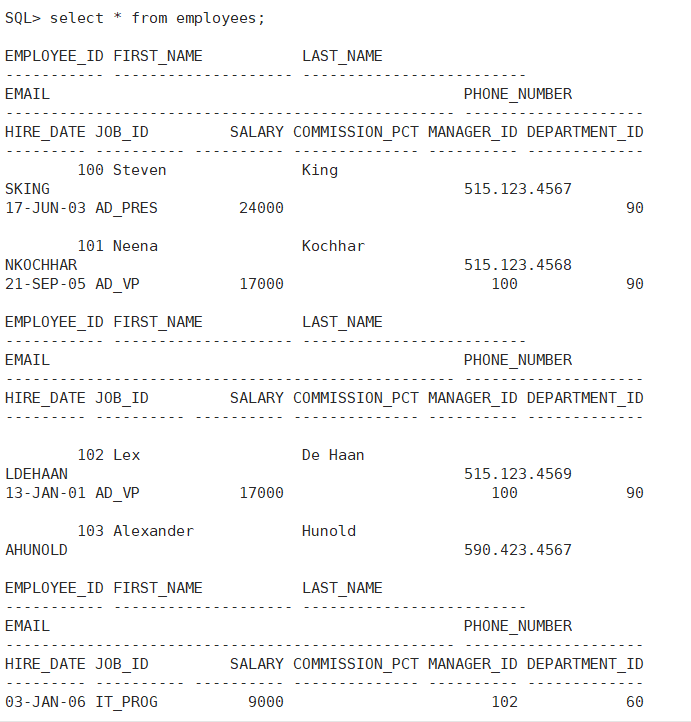
13.1-查询所有数据
-
SELECT指定要查看的列; -
不加
WHERE条件则查询所有记录。
SELECT * FROM employees;
13.2-查询特定列
select employee_id,first_name,salary from employees;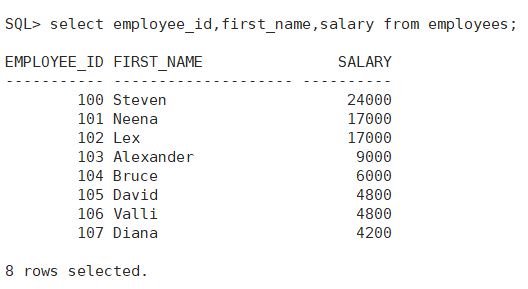
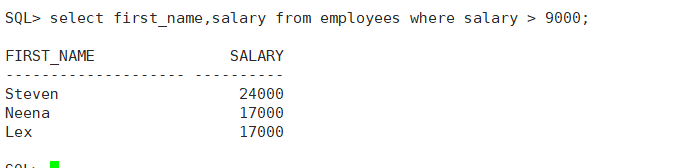
13.3-条件查询(WHERE)
>、<、= 都可以使用。
select first_name, salary from employees where salary > 9000;
13.4-多条件查询
select first_name,job_id,salary from employees where department_id = 60 and salary > 5000;
13.5-模糊查询
-
%表示任意长度字符串; -
_表示单个字符; -
查询所有以“A”开头的名字。
select first_name,last_name from employees where first_name like 'A%';
13.6-排序查询
select first_name,salary from employees order by salary desc;  --降序
select first_name,salary from employees order by salary asc;   --升序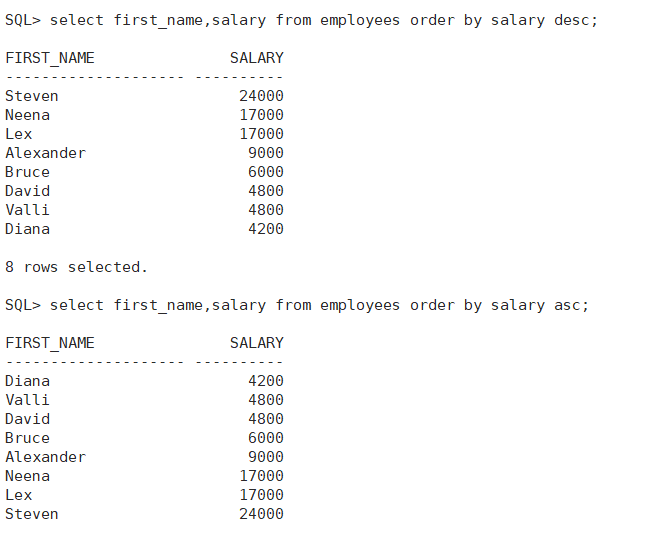
13.7-聚合函数
count() --计数 max() --最大值 min() --最小值 avg() --平均值 sum() --求和
SELECT COUNT(*) AS "员工总数", MAX(salary) AS "最高工资", MIN(salary) AS "最低工资", AVG(salary) AS "平均工资" FROM employees;
13.8-分组和分组过滤
select department_id, avg(salary) as "平均工资" from employees group by department_id having avg(salary) > 5000;
13.9-子查询
select first_name,salary from employees where salary > (select avg(salary) from employees);
13.10-范围查询 between.... and ....
select employee_id,first_name,salary from employees where salary between 5000 and 10000;
13.11-IN —— 匹配多个值
select first_name,department_id from employees where department_id in (60,90,100);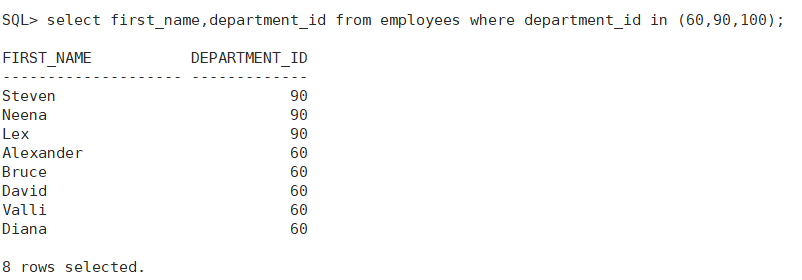
13.12-is null / is not null -----判断空值
select first_name,commission_pct from employees where commission_pct is null;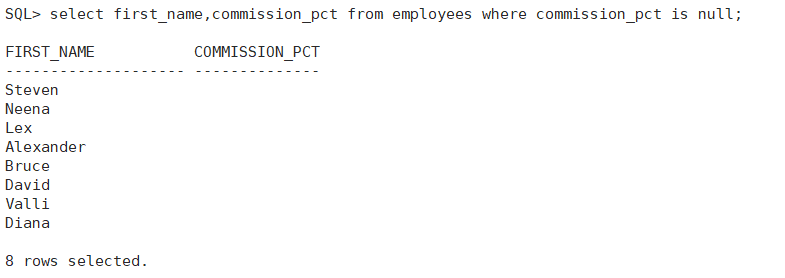
13.13-逻辑运算符(AND/OR/NOT)
select first_name,salary,department_id from employees where salary > 8000 and department_id = 90;
13.14-算数运算
SELECT first_name, salary, salary * 12 AS "年薪"
FROM employees;
---减,加,除同理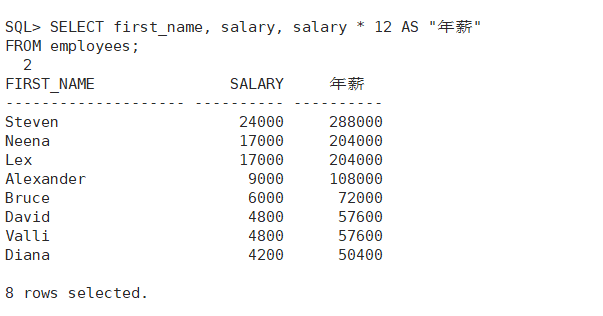
13.15-函数语法
| 函数 | 说明 | 示例 |
|---|---|---|
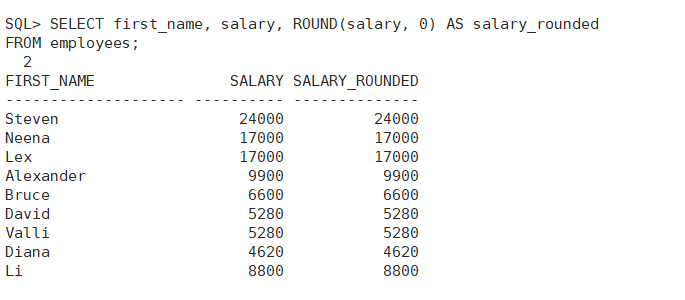
ROUND(n, x) | 四舍五入,保留 x 位小数 | SELECT ROUND(salary, 0) FROM employees; |
TRUNC(n, x) | 截断,保留 x 位小数 | SELECT TRUNC(salary, 0) FROM employees; |
CEIL(n) | 向上取整 | SELECT CEIL(salary/1000) FROM employees; |
FLOOR(n) | 向下取整 | SELECT FLOOR(salary/1000) FROM employees; |
MOD(n1, n2) | 取余 | SELECT MOD(employee_id,2) FROM employees; |
ABS(n) | 绝对值 | SELECT ABS(salary - 10000) FROM employees; |
-
n1:被除数 -
n2:除数 -
返回
n1除以n2的余数
MOD(n1, n2)
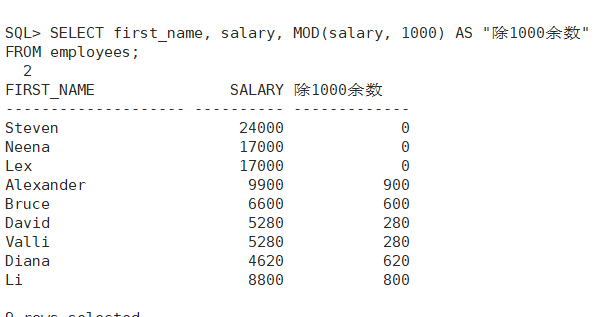
ROUND —— 四舍五入
select first_name, salary, round(salary, 0) as salary_rounded
from employees;
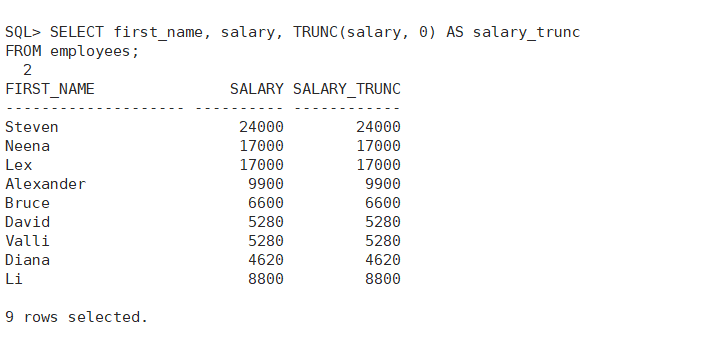
TRUNC —— 截断数字
select first_name, salary, trunc(salary, 0) AS salary_trunc
from employees;
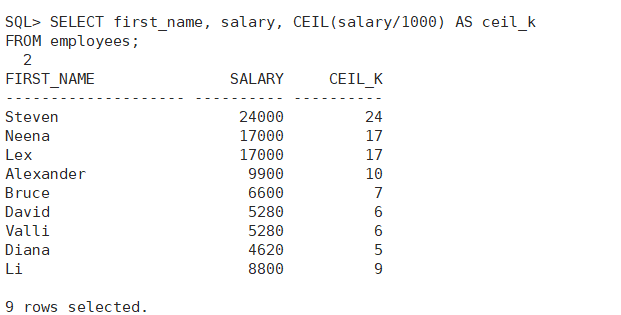
CEIL —— 向上取整
select first_name, salary, ceil(salary/1000) as ceil_k
from employees;
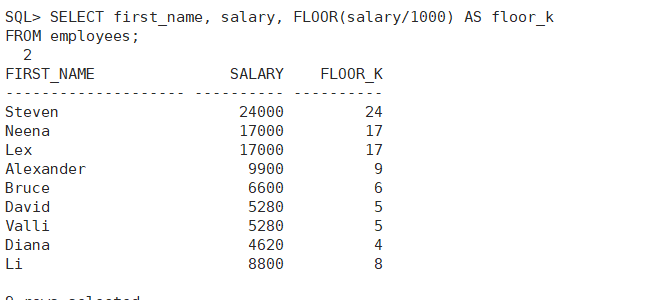
FLOOR —— 向下取整
select first_name, salary, floor(salary/1000) as floor_k
from employees;
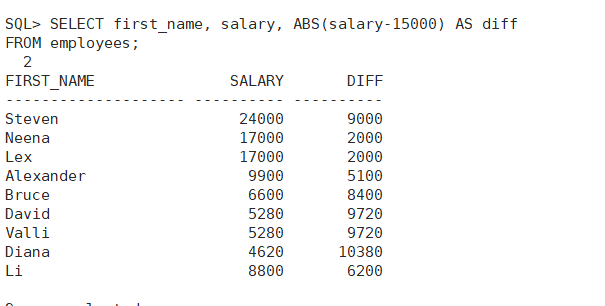
ABS —— 绝对值
select first_name, salary, abs(salary-15000) as diff
from employees;
13.16-ROWNUM-限制查询语句(oracle 12c版本之前)
-
ROWNUM是 Oracle 自动生成的行号; -
从 1 开始递增;
-
常用于调试或查看前几行数据;
select employee_id,first_name,salary from employees where rownum <= 5;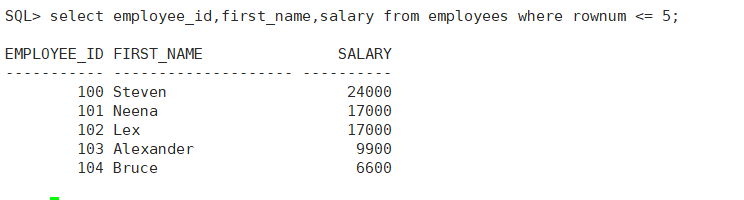
13.17-FETCH FIRST —— Oracle 12c
select employee_id, first_name, salary
from employees order by salary desc
fetch first 3 rows noly;
十四:数据操作语言
14.1-insert ---插入数据
INSERT INTO employees
VALUES (201, 'Li', 'Lei', 'LLEI', '010-88888888', SYSDATE, 'SA_REP', 7500, 0.1, 100, 60);
-
VALUES后面的字段顺序必须与表结构一致; -
SYSDATE是系统日期; -
如果某字段允许为空,可用
NULL;
14.2-指定部分字段插入
insert into employees (employee_id, first_name, last_name, salary)
values (202, 'Han', 'Meimei', 6800);
只为指定列提供值,其他列自动填 NULL。
14.3-UPDATE---更新数据
update employees set salary = 8000 where employee_id = 201;
修改多个字段中间用逗号隔开
14.4-根据条件批量修改
update employees set salary = salary * 1.1 where department_id = 60;14.5-DELETE---删除数据
delete from employees where employee_id = 202;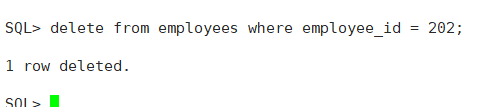
14.6-条件删除
update from employees where department_id = 50 and salary <5000;14.7-删除整个表的数据(慎用)
DELETE FROM employees;
删除整张表中所有记录,但保留表结构。
14.8-快速清空表
truncate table employees;
-
效果相当于
DELETE FROM employees;,但速度更快; -
不可回滚;
-
适合清空大表。





 扫一扫
扫一扫


 2万+
2万+

 被折叠的 条评论
为什么被折叠?
被折叠的 条评论
为什么被折叠?
 到【灌水乐园】发言





