<template>
<view class="container">
<!-- 🔝 顶部操作栏:选择文件 -->
<view class="header-card card">
<button class="btn outline" @click="triggerFileInput" :disabled="uploading">
<image src="/static/image/zy-workbench/shangchuan1.svg" style="width: 16px; height: 16px;transform: translate(-5px, 2px);" mode="aspectFit" />
选择文件<text v-if="isAndroid">(单选)</text>
</button>
<!-- 隐藏的 input -->
<input
:type="typeFile"
ref="fileInputRef"
:accept="acceptTypes"
:multiple="!isAndroid && !isSingle"
@change="handleFiles"
style="display: none"
/>
<view v-if="msg" class="msg-title"><view v-if="isAndroid">安卓手机因微信端限制仅支持文件单选<br /></view>{{msg}}</view>
</view>
<!-- 📄 中间可滚动文件列表(占满剩余空间) -->
<view class="file-list-container">
<view class="card file-list-wrapper" :style="{ minHeight: files.length > 0 ? '110px' : '273px' }">
<text class="section-title">已选文件<text class="section-title-tips">(单次最多上传{{maxCount}}个文件)</text></text>
<view class="file-list" v-if="files.length > 0">
<view class="file-item" v-for="(file, index) in files" :key="index">
<uni-icons class="icon-img" :type="imgTypeFn(file.name)" ></uni-icons>
<view class="file-item-box">
<view class="file-item-box-one">{{ file.name }}</view>
<view class="file-item-box-two">
<view class="file-item-box-two-name">{{ userName }}</view>
<view class="file-item-box-two-size">文件大小:{{ formatSize(file.size) }}</view>
</view>
</view>
<!-- 删除按钮 -->
<uni-icons class="delete-btn" color='#CCCCCC' type="shibai" @click="removeFile(index)"></uni-icons>
</view>
</view>
<view v-else class="empty-tip">
<image
src="/static/image/zy-workbench/noData.png"
mode="widthFix"
class="login-img"
/>
<text>暂无文件,请先选择</text>
</view>
</view>
</view>
<!-- 🔽 底部操作栏:上传按钮 -->
<view class="card footer-card-fixed">
<button class="btn outline" @click="uploadFiles" :disabled="uploading">
确定上传
</button>
</view>
</view>
<view v-if="hasPermissionIssue" class="permission-warning">
<text>🚫 当前环境可能无权访问文件,请检查浏览器权限设置</text>
</view>
</template>
<script setup>
import { ref, onMounted } from 'vue'
import { onShow } from '@dcloudio/uni-app'
import wx from "weixin-js-sdk";
// 是否已知有权限问题
const hasPermissionIssue = ref(false)
const isAndroid = ref(false)
isAndroid.value = navigator.userAgent.toLowerCase().includes('android') ? true : false
// 可在 mounted 中尝试探测能力
onMounted(() => {
try {
// 简单测试能否创建 Blob URL
const testBlob = new Blob(['test'], { type: 'text/plain' })
const url = URL.createObjectURL(testBlob)
URL.revokeObjectURL(url)
hasPermissionIssue.value = false
} catch (e) {
hasPermissionIssue.value = true
console.error('浏览器可能受限,无法正常处理文件:', e)
alert('⚠️ 浏览器权限受限,可能无法上传文件,请检查设置')
}
})
// 获取 URL 参数
const getUrlParameter = (name) => {
const regex = new RegExp(`[?&]${name}=([^&#]*)`)
const results = regex.exec(window.location.search)
return results === null ? '' : decodeURIComponent(results[1].replace(/\+/g, ' '))
}
// 获取 URL 参数并设置默认值
const maxCount = ref(null)
const maxSize = ref(null)
const isSingle = ref(null)
const typeFile = ref(null)
const uploadUrl = ref(null)
const headers = ref(null)
const otherParam = ref(null)
const userName = ref(null)
const acceptTypes = ref(null)
const needBack = ref('Y')
const testBack = ref(null)
const msg = ref('')
onShow(() => {
const pages = getCurrentPages();
console.log("🚀 ~ onShow ~ pages:", pages)
const currentPage = pages[pages.length - 1];
console.log("🚀 ~ onShow ~ currentPage:", currentPage)
const options = currentPage.$page.options;
console.log("🚀 ~ onShow ~ options:", options)
maxCount.value = parseInt(options.maxCount) || 10
console.log("🚀 ~ onShow ~ maxCount.value:", maxCount.value)
maxSize.value = parseInt(options.maxSize) * 1024 * 1024 || Infinity
console.log("🚀 ~ onShow ~ maxSize.value:", maxSize.value)
isSingle.value = options.isSingle === 'true'
console.log("🚀 ~ onShow ~ isSingle.value:", isSingle.value)
typeFile.value = options.typeFile||'file'
console.log("🚀 ~ onShow ~ typeFile.value :", typeFile.value )
uploadUrl.value = decodeURIComponent(options.uploadUrl)||''
console.log("🚀 ~ onShow ~ uploadUrl.value:", uploadUrl.value)
headers.value = options.headers?JSON.parse(decodeURIComponent(options.headers)):null
console.log("🚀 ~ onShow ~ headers.value:", headers.value)
otherParam.value = options.otherParam?JSON.parse(decodeURIComponent(options.otherParam)):null
console.log("🚀 ~ onShow ~ otherParam.value:", otherParam.value)
userName.value = options.userName||'操作人'
console.log("🚀 ~ onShow ~ userName.value:", userName.value)
acceptTypes.value = options.accept || 'image/*,video/*,.pdf,.doc,.docx,.xls,.xlsx,.txt,.ppt,.pptx,' + 'application/pdf,' + 'application/msword,' + 'application/vnd.openxmlformats-officedocument.wordprocessingml.document,' + 'application/vnd.ms-excel,' + 'application/vnd.openxmlformats-officedocument.spreadsheetml.sheet,' + 'text/plain,'+ 'application/zip,' +
'application/x-rar-compressed,' +
'application/x-7z-compressed,' +
'application/x-tar,' +
'application/gzip'
console.log("🚀 ~ onShow ~ acceptTypes.value:", acceptTypes.value)
needBack.value = options.needBack || 'Y'
console.log("🚀 ~ onShow ~ needBack.value:", needBack.value)
testBack.value = options.testBack || null
console.log("🚀 ~ onShow ~ testBack.value:", testBack.value)
msg.value = decodeURIComponent(options.msg) || ''
console.log("🚀 ~ onShow ~ msg.value:", msg.value)
})
// 数据存储
const files = ref([])
const fileInputRef = ref(null)
const uploading = ref(false) // 控制 loading 和防抖
// 工具函数
const formatSize = (bytes) => {
if (!bytes) return '0 KB'
const k = 1024
const sizes = ['B', 'KB', 'MB', 'GB']
const i = Math.floor(Math.log(bytes) / Math.log(k))
return parseFloat((bytes / Math.pow(k, i)).toFixed(2)) + ' ' + sizes[i]
}
const imgTypeFn = (name) => {
let type = name.split('.').pop().toLowerCase()
let imgType = 'oth'
const typeMap = {
img: ['png', 'jpg', 'jpeg', 'gif', 'bmp'],
exel: ['xls', 'xlsx', 'xlsm'],
word: ['doc', 'docx'],
pdf: ['pdf'],
ppt: ['ppt', 'pptx'],
txt: ['txt']
}
for (let key in typeMap) {
if (typeMap[key].includes(type)) {
imgType = key
}
}
return imgType
}
const getFileExt = (filename) => {
if (!filename) return ''
const match = filename.trim().toLowerCase().match(/\.([a-z0-9]+)$/)
return match ? match[1] : ''
}
const triggerFileInput = () => {
if ( maxCount.value <= files.value.length) {
uni.showToast({
title: `一次至多上传 ${maxCount.value}个文件,如需上传更多请分批操作`,
icon: 'none'
})
return
}
const input = document.createElement('input')
input.type = typeFile.value
input.accept = acceptTypes.value
input.multiple = !isAndroid.value && !isSingle.value
input.style.display = 'none'
document.body.appendChild(input)
// 获取 URL 参数并设置默认值
input.onchange = (event) => {
handleFiles(event)
document.body.removeChild(input)
}
input.click()
}
const handleFiles = async (event) => {
const selectedFiles = event.target.files
console.log("🚀 ~ handleFiles ~ selectedFiles:", selectedFiles)
if (!selectedFiles || selectedFiles.length === 0) return
// fixed: 20251023修改, 选择不受限制
// const remainingSlots = maxCount.value - files.value.length
// console.log("🚀 ~ handleFiles ~ files:", files)
// let availableSlots = Math.min(remainingSlots, selectedFiles.length)
const processedNames = []
const duplicates = []
const oversized = []
const added = []
for (const file of Array.from(selectedFiles)) {
// 检查是否超出剩余槽位
// if (processedNames.length >= availableSlots) break
// 检查重复
const isDuplicate = files.value.some(f => f.name === file.name && f.size === file.size)
if (isDuplicate) {
duplicates.push(file.name)
continue
}
// 检查大小
if (file.size > maxSize.value) {
oversized.push(file.name)
continue
}
// 合法文件
processedNames.push(file.name)
try {
const url = URL.createObjectURL(file)
// 获取最后一个点的索引
const lastDotIndex = file.name.lastIndexOf('.');
let hasName = lastDotIndex > 0 && lastDotIndex < file.name.length - 1;
console.log("🚀 ~ handleFiles ~ hasName:", hasName)
console.log("🚀 ~ fileName :", file, file.name)
files.value.push({
name: hasName ? file.name : file.name.includes('choose')&&file.name.includes('image')? file.name + '.jpg':file.name.includes('choose')&&file.name.includes('video')? file.name + '.mp4':file.name,
size: file.size,
type: file.type?file.type:file.name.includes('choose')?'image/jpeg':'',
url,
nativePath: null
})
added.push(file.name)
} catch (err) {
console.error('读取失败:', file.name, err.message)
// 判断是否是权限/安全相关错误
const permissionRelated =
err.message.includes('权限') ||
err.message.includes('安全策略') ||
err.message.includes('访问被拒绝') ||
err.message.includes('不可读') ||
err.message.includes('denied')
if (permissionRelated) {
uni.showToast({
title: `文件 "${file.name}" 无权限`,
icon: 'none'
})
} else {
uni.showToast({
title: `文件 "${file.name}" 读取失败:\n${err.message}`,
icon: 'none'
})
}
}
}
// 统一反馈结果
let message = ''
console.log("🚀 ~ handleFiles ~ added:", added)
if (added.length > 0) {
message = `成功添加 ${added.length} 个文件\n`
}
if (duplicates.length > 0) {
message = `已跳过 ${duplicates.length} 个重复文件`
}
if (oversized.length > 0) {
message = `单个文件不超过${maxSize.value / 1024 / 1024}MB,已跳过 ${oversized.length} 个超大文件`
}
if (message) {
console.log(message)
uni.showToast({
title: message.trim(),
icon: 'none'
})
}
}
const removeFile = (index) => {
const file = files.value[index]
URL.revokeObjectURL(file.url)
files.value.splice(index, 1)
uni.showToast({
title: '删除成功',
icon: 'none'
})
}
const uploadFiles = async () => {
if (uploading.value) return
uni.showLoading({
title: '上传中...',
});
try {
if(testBack.value=='Y'){
uni.showToast({
title: '上传成功',
icon: 'none'
})
files.value = []
setTimeout(() => {
wx.miniProgram.navigateBack({
delta: 1 // 返回上一级(通常就是打开 web-view 的那个页面)
});
}, 300);
}
} catch (error) {
console.log("🚀 ~ uploadFiles ~ error:", error)
}
console.log("🚀 ~ maxCount:", maxCount)
console.log("🚀 ~ maxSize:", maxSize)
console.log("🚀 ~ typeFile:", typeFile)
console.log("🚀 ~ acceptTypes:", acceptTypes)
console.log("🚀 ~ isSingle:", isSingle)
if (files.value.length === 0) {
uni.showToast({
title: `请先选择文件`,
icon: 'none'
})
return
}
if (files.value.length > maxCount.value) {
uni.showToast({
title: `单次最多上传 ${maxCount.value} 个文件`,
icon: 'none'
})
return
}
if (!uploadUrl.value) {
uni.showToast({
title: `未提供上传接口地址`,
icon: 'none'
})
return
}
// ✅ 开启 loading
uni.showLoading({
title: '上传中...'
});
uploading.value = true
const formData = new FormData()
try {
// 遍历每个文件项
for (const file of files.value) {
const { url, name, type } = file
// 检查是否有有效的 blob URL
if (!url || !name) {
console.warn('缺少文件 URL 或名称:', file)
continue
}
// 通过 fetch 获取 blob 数据
const response = await fetch(url)
const blob = await response.blob()
// 将 Blob 作为文件添加到 FormData
// 注意:第三个参数是推荐的文件名(否则可能默认为 "blob")
formData.append('files', blob, name)
}
console.log("🚀111 ~ uploadFiles ~ formData:", formData)
if (typeof otherParam.value === 'object' && otherParam.value !== null) {
// 遍历所有属性,解构添加到 FormData
Object.keys(otherParam.value).forEach(key => {
formData.append(key, otherParam.value[key])
})
}
console.log("🚀222 ~ uploadFiles ~ formData:", formData)
// 发送请求
const response = await fetch(uploadUrl.value, {
method: 'POST',
body: formData,
headers: {
...headers.value,
}
})
const data = await response.json()
console.log("🚀 ~ uploadFiles ~ data:", data)
uni.hideLoading();
uni.showToast({
title: data.msg,
icon: 'none'
})
uploading.value = false
if(data.code=='00000000'){
files.value = []
if(needBack.value=='Y'){
setTimeout(() => {
wx.miniProgram.navigateBack({
delta: 1 // 返回上一级(通常就是打开 web-view 的那个页面)
});
}, 300);
}
}
} catch (error) {
uni.hideLoading();
console.error('上传失败:', error)
uploading.value = false
uni.showToast({
title: '文件上传失败',
icon: 'none'
})
}
}
</script>
<style scoped lang="scss">
.msg-title{
margin-top: 16px;
font-family: 'Arial', 'Helvetica', sans-serif;
font-size: 13px;
color: #999999;
letter-spacing: 0;
font-weight: 400;
width: 100%;
min-height: 20px;
line-height: 1.5;
}
.container {
box-sizing: border-box;
display: flex;
flex-direction: column;
width: 100%;
height: 100vh;
margin: 0;
padding: 8px; // 上面留一点间距,下面交给 file-list-container 控制
overflow: hidden;
background-color: #f5f5f5;
}
// 头部和底部卡片
.header-card,
.footer-card {
flex: 0 0 auto;
padding: 12px 20px;
background: #fff;
box-shadow: 0 2px 6px rgba(0, 0, 0, 0.05);
z-index: 10;
}
.header-card {
flex: 0 0 auto;
padding: 12px 20px;
background: #fff;
box-shadow: 0 2px 6px rgba(0, 0, 0, 0.05);
border-radius: 6px;
min-height: 89px;
padding: 20px 16px;
box-sizing: border-box;
.outline {
background: #E3EFFF;
height: 49px;
border-radius: 4px;
font-size: 15px;
line-height: 49px;
color: #0F56D5;
text-align: center;
font-weight: 400;
&::after {
border: 0.5px solid #BAD8FF !important;
}
}
}
.footer-card {
flex: 0 0 auto;
padding: 12px;
background: #fff;
box-shadow: 0 2px 6px rgba(0, 0, 0, 0.05);
z-index: 10;
.outline {
background: #0F56D5;
border-radius: 2px;
height: 49px;
font-size: 18px;
color: #FFFFFF;
text-align: center;
font-weight: 400;
}
}
// 中间滚动区域(必须预留底部空间)
.file-list-container {
flex: 1;
overflow-y: auto;
margin: 12px 0; // 上下间距
padding-bottom: calc(env(safe-area-inset-bottom, 0) + 85px); // 防止内容被 footer 覆盖
box-sizing: border-box;
}
// 文件列表外层卡片(包裹滚动内容)
.file-list-wrapper {
// padding: 12px;
display: flex;
flex-direction: column;
margin: 0;
border-radius: 0;
overflow: hidden;
background-color: #FFFFFF !important;
border-radius: 6px;
}
.section-title {
font-size: 16px;
color: #333333;
letter-spacing: 0;
font-weight: 500;
margin-bottom: 7px;
padding-top: 12px;
padding-left: 12px;
&-tips{
font-size: 12px;
}
}
// ✅ 固定在底部的上传按钮盒子
.footer-card-fixed {
position: fixed;
bottom: 0;
left: 0;
right: 0;
width: 100vw; // 满屏宽度
padding: 12px calc(env(safe-area-inset-right, 12px)) calc(12px + env(safe-area-inset-bottom, 0)) calc(env(safe-area-inset-left, 12px));
padding-left: 12px;
padding-right: 12px;
background-color: #ffffff;
box-shadow: 0 -2px 10px rgba(0, 0, 0, 0.1);
z-index: 1000; // 浮于其他内容之上
box-sizing: border-box;
.outline {
background: #0F56D5;
border-radius: 2px;
height: 49px;
font-size: 18px;
color: #FFFFFF;
text-align: center;
font-weight: 400;
width: 100%;
}
}
.file-list {
flex: 1;
// padding: 0 10px;
display: flex;
flex-direction: column;
overflow-y: auto;
}
.file-item {
display: flex;
align-items: center; /* 垂直居中对齐图标和文本 */
padding: 12px 15px;
padding-left: 35px;
background: #ffffff;
font-size: 14px;
position: relative;
}
// 左侧图标
.icon-img {
width: 34px;
height: 34px;
min-width: 34px;
min-height: 34px;
font-size: 34px; // 如果 uni-icons 支持通过 font-size 控制大小
margin-right: 12px;
color: #666;
}
// 右侧内容区域(占满剩余空间)
.file-item-box {
flex: 1;
min-width: 0; /* 关键:允许内部内容触发省略号 */
display: flex;
flex-direction: column;
justify-content: center;
line-height: 1.5;
font-family: 'Arial', 'Helvetica', sans-serif;
}
// 文件名:单行省略
.file-item-box-one {
font-weight: 500;
color: #333;
white-space: nowrap;
overflow: hidden;
text-overflow: ellipsis;
margin-bottom: 4px;
}
// 用户 & 大小:左右排列
.file-item-box-two {
display: flex;
align-items: center;
font-size: 12px;
color: #888;
gap: 12px; /* 间距 */
}
// 用户名
.file-item-box-two-name {
max-width: 60px;
white-space: nowrap;
overflow: hidden;
text-overflow: ellipsis;
max-width: 100px; // 可选限制宽度
}
// 文件大小(自动收缩)
.file-item-box-two-size {
white-space: nowrap;
overflow: hidden;
text-overflow: ellipsis;
flex: 1; /* 占据剩余空间,优先被截断 */
}
/* 给非第一个 item 添加上边框 */
.file-item:not(:first-child) {
border-top: 1px solid #E5E6EB; /* 自定义颜色和样式 */
}
.file-info {
display: block;
line-height: 1.6;
}
.preview-img {
max-width: 100%;
max-height: 200px;
margin-top: 10px;
border-radius: 6px;
}
.link {
color: #1a73e8;
text-decoration: underline;
margin-top: 8px;
display: inline-block;
}
.delete-btn {
color: white;
width: 24px;
height: 24px;
border: none;
font-size: 14px;
line-height: 1;
text-align: center;
cursor: pointer;
opacity: 0.9;
}
.empty-tip {
font-family: PingFangSC-Regular;
font-size: 15px;
color: rgba(0,0,0,0.60);
letter-spacing: 0;
text-align: center;
line-height: 26px;
font-weight: 400;
display: flex;
justify-content: center;
align-items: center;
flex-direction: column;
}
.permission-warning {
background-color: #fff3cd;
color: #856404;
font-size: 13px;
padding: 10px;
text-align: center;
border-radius: 6px;
margin: 10px 15px;
border: 1px solid #ffeaa7;
}
.login-img{
width: 151px;
height: 91px;
margin-top: 59px;
margin-bottom: 7px;
}
</style>
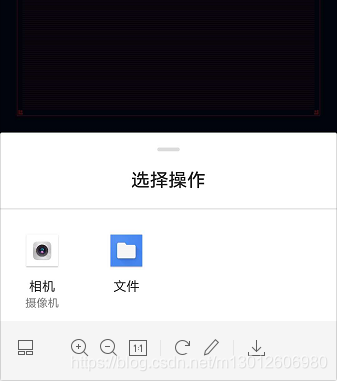
如何在安卓手机在选择文件的时候调用出拍照摄像和选中文件中的图片和视频功能
最新发布


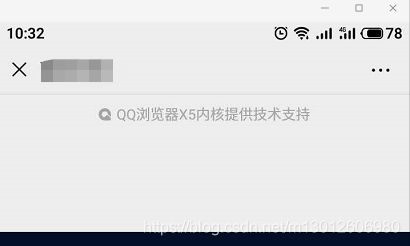
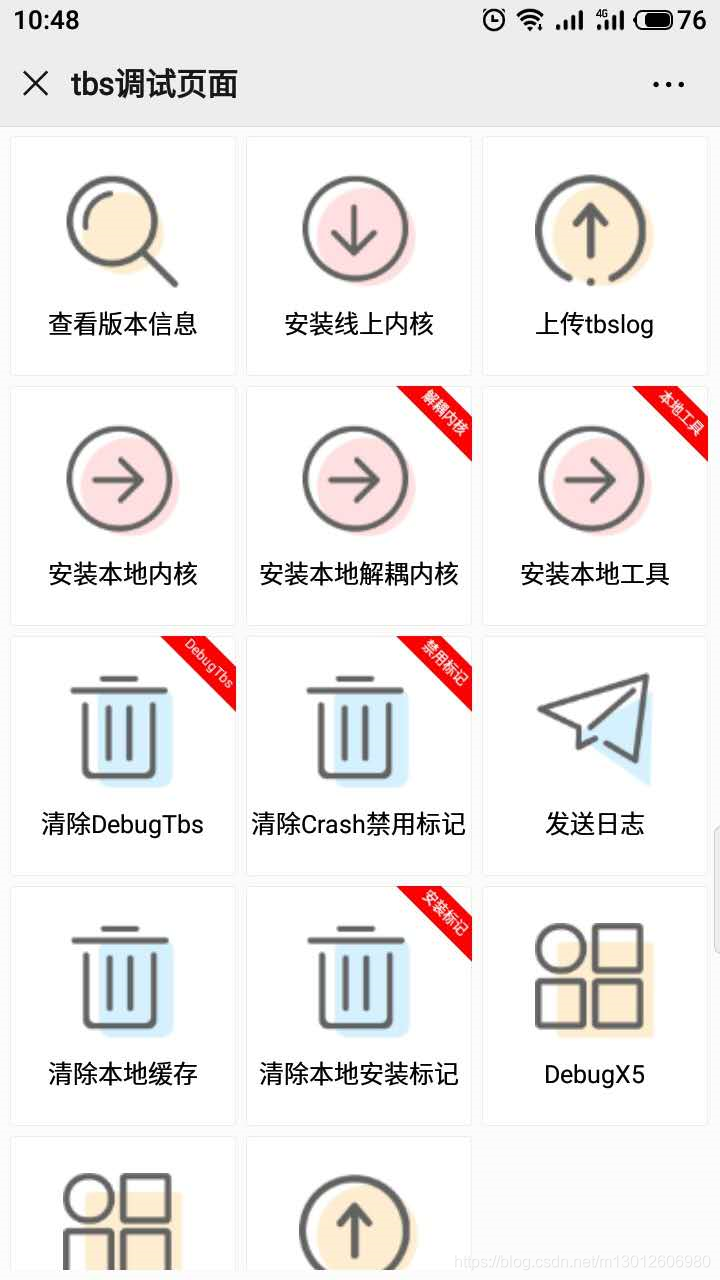
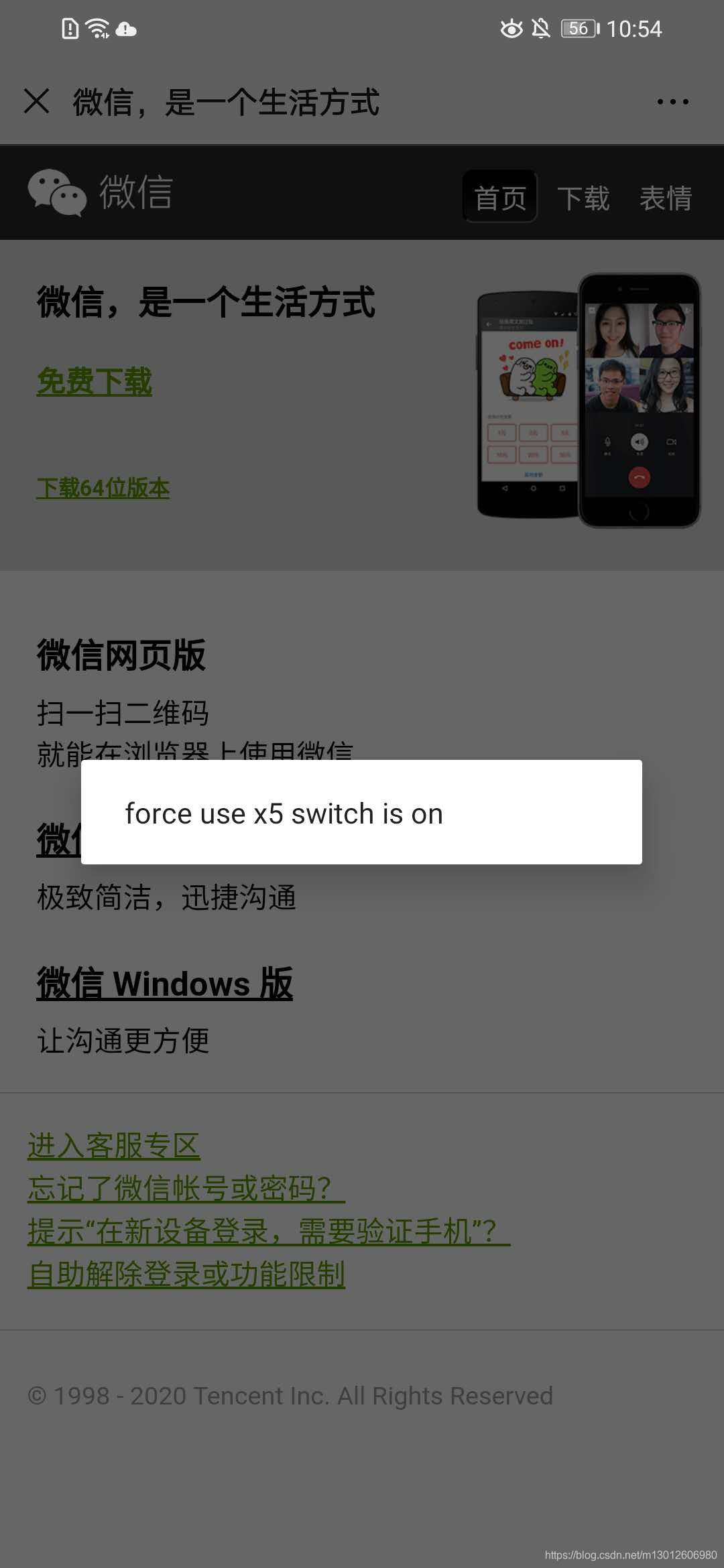
 本文解决了微信H5页面无法直接调用摄像头录制视频的问题。通过调整微信内核设置,使页面能直接激活摄像头,满足即时录制需求。







 扫一扫
扫一扫


 1万+
1万+


 到【灌水乐园】发言



