





文章目录
Python包制作 - 以DLT645-2007通讯规约库为例
概述
本报告以实际项目中的DLT645协议库为例,详细介绍Python安装包的制作过程。DLT645是一个电能表通信协议的Python实现库,支持TCP和RTU通信方式,是一个功能完整的实际项目案例。
Python包管理简介
包管理工具发展历程
Python包管理经历了从传统的setup.py到现代的pyproject.toml的演进:
- 传统方式: 使用
setup.py+setuptools - 现代方式: 使用
pyproject.toml+build工具 - 混合方式: 同时提供两种配置以保证兼容性
核心概念
- 源码包(sdist): 包含源代码的压缩包(.tar.gz)
- 轮子包(wheel): 预编译的二进制包(.whl)
- MANIFEST.in: 控制源码包中包含的非Python文件
项目结构设计
以DLT645项目为例,展示一个标准的Python包项目结构:
dlt645/
├── src/                    # 源代码目录
│   ├── __init__.py        # 包初始化文件
│   ├── common/            # 公共模块
│   ├── model/             # 数据模型
│   ├── protocol/          # 协议实现
│   ├── service/           # 服务层
│   │   ├── clientsvc/     # 客户端服务
│   │   └── serversvc/     # 服务端服务
│   └── transport/         # 传输层
│       ├── client/        # 客户端传输
│       └── server/        # 服务端传输
├── config/                # 配置文件目录
│   ├── energy_types.json
│   ├── demand_types.json
│   └── variable_types.json
├── test/                  # 测试目录
├── examples.py           # 使用示例
├── setup.py              # 传统配置文件
├── pyproject.toml        # 现代配置文件
├── MANIFEST.in           # 文件包含规则
├── build.sh              # 构建脚本
├── README.md             # 项目说明
└── requirements.txt      # 依赖列表
关键设计原则
- 模块化设计: 按功能分层组织代码
- 配置分离: 将配置文件独立存放
- 测试覆盖: 提供完整的测试用例
- 文档完善: 包含详细的使用说明和示例
配置文件详解
1. pyproject.toml(推荐的现代方式)
[build-system]
requires = ["setuptools>=45", "wheel", "setuptools-scm"]
build-backend = "setuptools.build_meta"

[project]
name = "dlt645"
version = "1.0.0"
description = "DLT645协议Python实现库"
readme = "README.md"
requires-python = ">=3.7"
license = {text = "Apache License 2.0"}
authors = [
    {name = "Chen Dongyu", email = "1755696012@qq.com"}
]
keywords = ["dlt645", "protocol", "communication", "energy", "meter"]
classifiers = [
    "Development Status :: 4 - Beta",
    "Intended Audience :: Developers",
    "Topic :: Communications",
    "Programming Language :: Python :: 3",
    "License :: OSI Approved :: Apache Software License",
]
dependencies = [
    "loguru>=0.5.0",
    "pyserial>=3.4",
]

[project.optional-dependencies]
dev = [
    "pytest>=6.0",
    "pytest-cov>=2.0",
    "black>=21.0",
]

[tool.setuptools]
packages = ["dlt645"]
package-dir = {"dlt645" = "src"}
include-package-data = true

[tool.setuptools.package-data]
"dlt645" = ["config/*.json"]
配置说明:
- build-system: 定义构建系统和依赖
- project: 项目基本信息和元数据
- dependencies: 运行时依赖
- optional-dependencies: 可选依赖(如开发工具)
- tool.setuptools: setuptools特定配置
2. setup.py(兼容传统方式)
from setuptools import setup, find_packages
import os

def read_readme():
    if os.path.exists("README.md"):
        with open("README.md", "r", encoding="utf-8") as f:
            return f.read()
    return "DLT645协议Python实现库"

setup(
    name="dlt645",
    version="1.0.0",
    author="Chen Dongyu",
    author_email="1755696012@qq.com",
    description="DLT645协议Python实现库",
    long_description=read_readme(),
    long_description_content_type="text/markdown",

    # 包结构配置
    packages=["dlt645", "dlt645.common", "dlt645.model", ...],
    package_dir={"dlt645": "src"},

    # 数据文件包含
    package_data={
        "dlt645": ["config/*.json"],
    },
    include_package_data=True,

    # 依赖管理
    install_requires=[
        "loguru>=0.5.0",
        "pyserial>=3.4",
    ],

    extras_require={
        "dev": [
            "pytest>=6.0",
            "pytest-cov>=2.0",
        ],
    },

    python_requires=">=3.7",
)
3. MANIFEST.in(文件包含控制)
include README.md
include pyproject.toml
include setup.py
recursive-include config *.json
recursive-include src *.py
recursive-include test *.py
global-exclude *.pyc
global-exclude __pycache__
global-exclude .DS_Store
构建脚本编写
自动化构建脚本(build.sh)
DLT645项目的构建脚本提供了完整的自动化构建流程:
#!/bin/bash
# 核心功能函数

# 清理构建文件
clean_build() {
    print_info "清理构建文件..."
    rm -rf build/
    rm -rf dist/
    rm -rf *.egg-info/
    find . -name "*.pyc" -delete
    find . -name "__pycache__" -type d -exec rm -rf {} + 2>/dev/null || true
}

# 检查依赖
check_dependencies() {
    python -c "import setuptools" 2>/dev/null || pip install setuptools
    python -c "import wheel" 2>/dev/null || pip install wheel
    python -c "import build" 2>/dev/null || pip install build
}

# 构建包
build_package() {
    if command -v python -m build &> /dev/null; then
        python -m build  # 现代方式
    else
        python setup.py sdist bdist_wheel  # 传统方式
    fi
}

# 测试安装
test_install() {
    temp_env="temp_test_env"
    python -m venv "$temp_env"
    source "$temp_env/bin/activate"
    pip install dist/*.whl
    python -c "import dlt645; print('包导入成功')"
    deactivate
    rm -rf "$temp_env"
}
构建脚本的使用方式
# 完整构建(包含测试)
./build.sh build

# 快速构建(跳过测试)
./build.sh quick

# 仅清理
./build.sh clean

# 完整构建+安装测试
./build.sh all
本地安装
# 从wheel文件安装
pip install dist/dlt645-1.0.0-py3-none-any.whl

# 从源码包安装
pip install dist/dlt645-1.0.0.tar.gz

# 开发模式安装(可编辑安装)
pip install -e .
在项目中引用的例子
1. 在EMS模拟设备中的使用
在实际的EMS模拟设备项目中,DLT645包被引用的方式:
# 在 src/device/device.py 中的引用
from dlt645.service.serversvc.server_service import (
    MeterServerService,
    new_tcp_server,
    new_rtu_server
)

class Device:
    def __init__(self):
        self.dlt645_server = None

    def start_dlt645_server(self, config):
        """启动DLT645服务器"""
        if config['protocol_type'] == 'TCP':
            self.dlt645_server = new_tcp_server(
                config['ip'],
                config['port'],
                config['timeout']
            )
        elif config['protocol_type'] == 'RTU':
            self.dlt645_server = new_rtu_server(
                config['port'],
                config['data_bits'],
                config['stop_bits'],
                config['baud_rate'],
                config['parity'],
                config['timeout']
            )

        # 设置设备数据
        self.setup_device_data()

        # 启动服务
        self.dlt645_server.server.start()

    def setup_device_data(self):
        """设置设备数据"""
        # 设置电能量数据
        self.dlt645_server.set_00(0x00000000, 12345.67)  # 总有功电能
        self.dlt645_server.set_00(0x00010000, 10000.50)  # 正向有功电能

        # 设置变量数据
        self.dlt645_server.set_02(0x02010100, 220.5)     # A相电压
        self.dlt645_server.set_02(0x02020100, 15.6)      # A相电流
2. 客户端使用示例
# 客户端连接示例
from dlt645 import MeterClientService

def create_dlt645_client(config):
    """创建DLT645客户端"""
    if config['connection_type'] == 'TCP':
        client = MeterClientService.new_tcp_client(
            config['host'],
            config['port'],
            config['timeout']
        )
    else:
        client = MeterClientService.new_rtu_client(
            port=config['serial_port'],
            baudrate=config['baud_rate'],
            databits=config['data_bits'],
            stopbits=config['stop_bits'],
            parity=config['parity'],
            timeout=config['timeout']
        )

    # 设置设备地址
    client.set_address(bytes.fromhex(config['device_address']))

    return client

def read_meter_data(client):
    """读取电表数据"""
    data_points = [
        (0x00000000, "总有功电能"),
        (0x00010000, "正向有功电能"),
        (0x02010100, "A相电压"),
        (0x02020100, "A相电流"),
    ]

    results = {}
    for di, description in data_points:
        try:
            if di & 0xFF000000 == 0x00000000:  # 电能量数据
                data = client.read_01(di)
            elif di & 0xFF000000 == 0x02000000:  # 变量数据
                data = client.read_03(di)

            if data:
                results[description] = data.value
                print(f"{description}: {data.value}")
            else:
                print(f"{description}: 读取失败")

        except Exception as e:
            print(f"读取{description}时发生错误: {e}")

    return results
3. 配置文件的使用
# 在项目配置中引用DLT645配置
import json
import os

def load_dlt645_config():
    """加载DLT645配置"""
    config_dir = os.path.join(os.path.dirname(__file__), 'config')

    configs = {}
    config_files = [
        'energy_types.json',
        'demand_types.json',
        'variable_types.json'
    ]

    for config_file in config_files:
        config_path = os.path.join(config_dir, config_file)
        if os.path.exists(config_path):
            with open(config_path, 'r', encoding='utf-8') as f:
                configs[config_file.replace('.json', '')] = json.load(f)

    return configs

# 使用配置文件
dlt645_configs = load_dlt645_config()
energy_types = dlt645_configs.get('energy_types', {})
5. 完整的应用示例
#!/usr/bin/env python3
# -*- coding: utf-8 -*-
"""
DLT645协议在EMS系统中的应用示例
"""

import time
import threading
from dlt645 import new_tcp_server, MeterClientService

class EMSDevice:
    """EMS设备类,集成DLT645协议"""

    def __init__(self, device_config):
        self.config = device_config
        self.dlt645_server = None
        self.is_running = False

    def start_dlt645_service(self):
        """启动DLT645服务"""
        # 创建服务器
        self.dlt645_server = new_tcp_server(
            self.config['dlt645']['ip'],
            self.config['dlt645']['port'],
            self.config['dlt645']['timeout']
        )

        # 注册设备
        device_addr = bytearray.fromhex(self.config['dlt645']['device_address'])
        self.dlt645_server.register_device(device_addr)

        # 初始化数据
        self.init_meter_data()

        # 启动服务器
        self.dlt645_server.server.start()
        self.is_running = True

        print(f"DLT645服务已启动: {self.config['dlt645']['ip']}:{self.config['dlt645']['port']}")

    def init_meter_data(self):
        """初始化电表数据"""
        # 电能量数据
        energy_data = self.config.get('energy_data', {})
        for di_hex, value in energy_data.items():
            di = int(di_hex, 16)
            self.dlt645_server.set_00(di, value)

        # 变量数据
        variable_data = self.config.get('variable_data', {})
        for di_hex, value in variable_data.items():
            di = int(di_hex, 16)
            self.dlt645_server.set_02(di, value)

    def update_real_time_data(self, data_updates):
        """更新实时数据"""
        if not self.is_running:
            return

        for data_type, updates in data_updates.items():
            for di_hex, value in updates.items():
                di = int(di_hex, 16)
                if data_type == 'energy':
                    self.dlt645_server.set_00(di, value)
                elif data_type == 'variable':
                    self.dlt645_server.set_02(di, value)

# 使用示例
if __name__ == "__main__":
    # 设备配置
    device_config = {
        'dlt645': {
            'ip': '127.0.0.1',
            'port': 8021,
            'timeout': 30,
            'device_address': '010203040506'
        },
        'energy_data': {
            '0x00000000': 12345.67,  # 总有功电能
            '0x00010000': 10000.50,  # 正向有功电能
        },
        'variable_data': {
            '0x02010100': 220.5,     # A相电压
            '0x02020100': 15.6,      # A相电流
        }
    }

    # 创建设备实例
    ems_device = EMSDevice(device_config)

    # 启动DLT645服务
    ems_device.start_dlt645_service()

    # 模拟数据更新
    def simulate_data_updates():
        """模拟数据更新"""
        import random
        while True:
            updates = {
                'variable': {
                    '0x02010100': 220.0 + random.uniform(-5, 5),  # A相电压波动
                    '0x02020100': 15.0 + random.uniform(-2, 2),   # A相电流波动
                }
            }
            ems_device.update_real_time_data(updates)
            time.sleep(5)  # 每5秒更新一次

    # 启动数据更新线程
    update_thread = threading.Thread(target=simulate_data_updates, daemon=True)
    update_thread.start()

    # 保持主程序运行
    try:
        print("EMS设备运行中,按Ctrl+C退出...")
        while True:
            time.sleep(1)
    except KeyboardInterrupt:
        print("\n设备已停止")
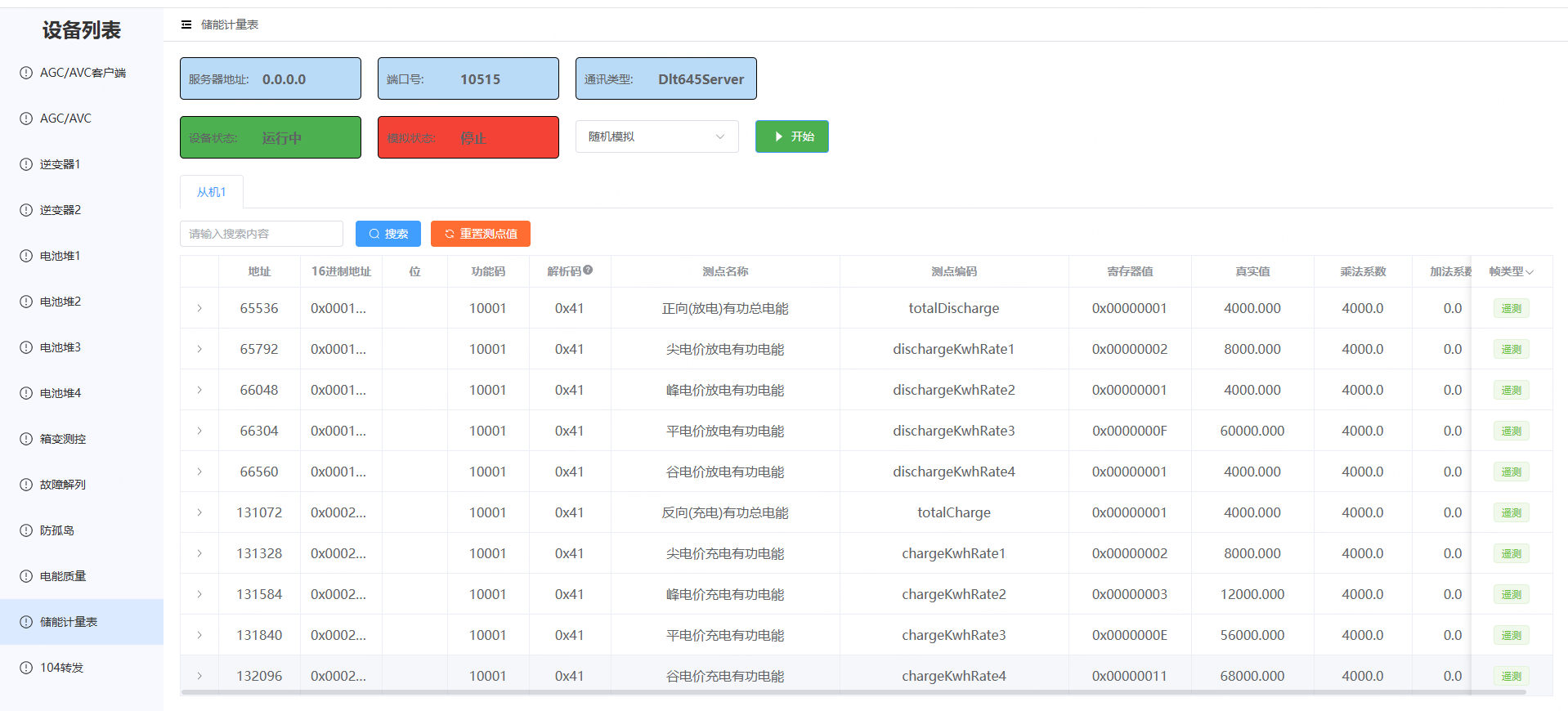
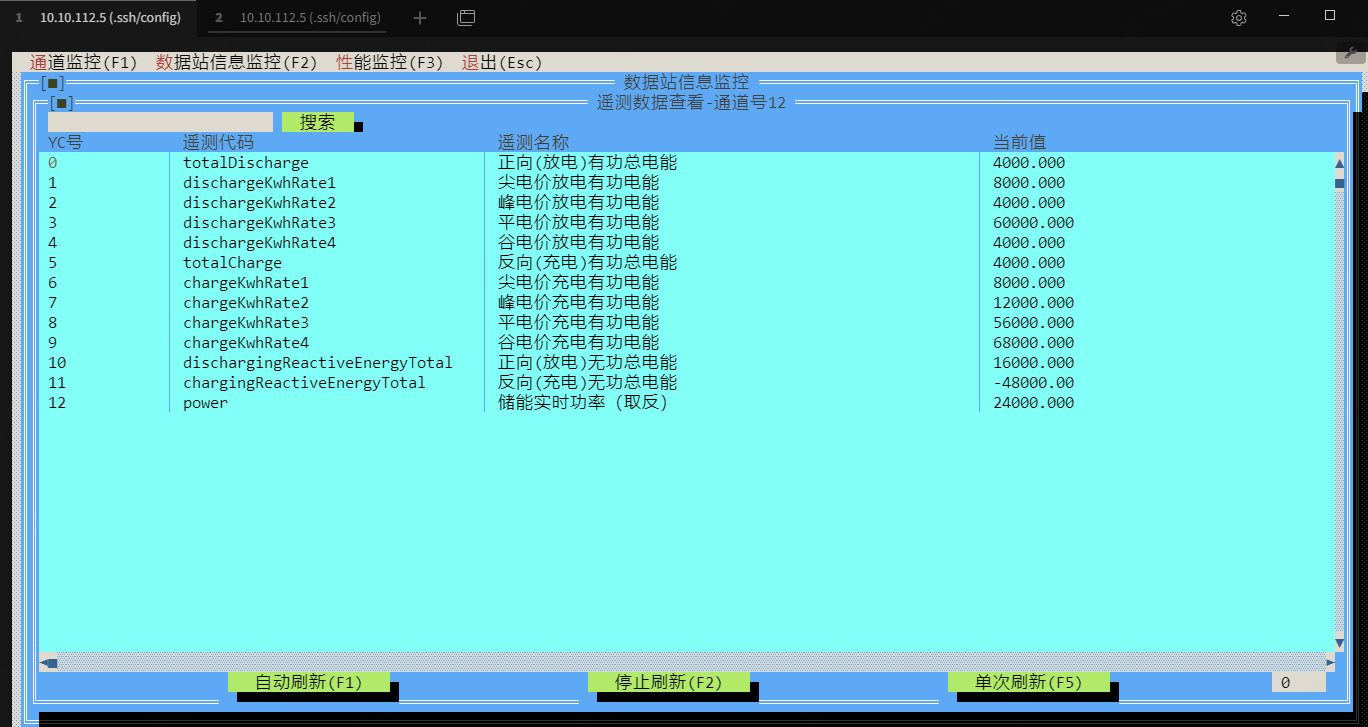
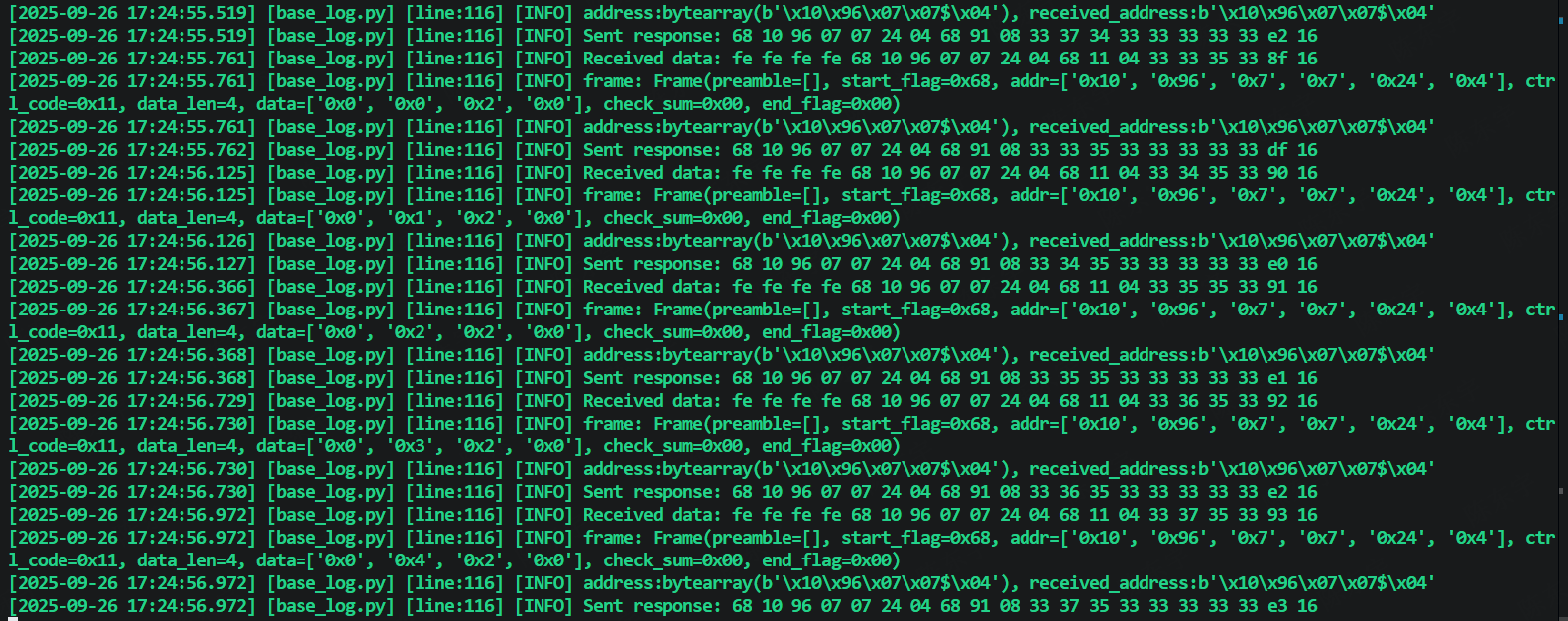
6.嵌入模拟设备后效果
-
在界面上设置随机数据
-
查看实时数据进行对比
-
验证通讯报文是否正确
最佳实践与总结
最佳实践
-
项目结构标准化
- 使用标准的目录结构
- 分离源码、测试、配置和文档
- 提供清晰的包层次结构
-
配置文件管理
- 同时提供setup.py和pyproject.toml以保证兼容性
- 使用MANIFEST.in精确控制包含的文件
- 合理设置依赖版本范围
-
自动化构建
- 编写完整的构建脚本
- 包含测试、清理、验证等步骤
- 提供多种构建选项
-
版本管理
- 使用语义化版本控制
- 维护CHANGELOG记录变更
- 考虑向后兼容性
-
文档完善
- 提供详细的README
- 包含使用示例和API文档
- 说明安装和依赖要求
常见问题与解决方案
-
导入路径问题
# 在__init__.py中正确设置导入 from .service.serversvc.server_service import MeterServerService from .service.clientsvc.client_service import MeterClientService -
数据文件包含
# 在setup.py中包含配置文件 package_data={ "dlt645": ["config/*.json"], } -
依赖版本冲突
# 使用合理的版本范围
install_requires=[
    "loguru>=0.5.0,<1.0.0",
    "pyserial>=3.4,<4.0",
]






 扫一扫
扫一扫


 1989
1989

 被折叠的 条评论
为什么被折叠?
被折叠的 条评论
为什么被折叠?
 到【灌水乐园】发言





