一、网页基本信息
<!DOCTYPE html>
<html lang="en">
<head>
<meta charset="UTF-8">
<meta name="keywords" content="codeparadise">
<meta name="description" content="来这个地方可以学习编程">
<title>我的第一个网页</title>
</head>
<body>
Hello,World!
</body>
</html>
二、网页基本标签
<!DOCTYPE html>
<html lang="en">
<head>
<meta charset="UTF-8">
<title>基本标签学习</title>
</head>
<body>
<h1>一级标签</h1>
<h2>二级标签</h2>
<h3>三级标签</h3>
<h4>四级标签</h4>
<h5>五级标签</h5>
<h6>六级标签</h6>
<p>会当凌绝顶</p>
<p>一览众山小</p>
<hr/>
会当凌绝顶 <br/>
一览众山小 <br/>
<h1>字体样式标签</h1>
粗体:<strong>I love you</strong>
斜体:<em>I love you</em>
<br/>
空 格
空 格
<br/>
>
<br/>
<
©版权所有canoe
</body>
</html>
三、图像标签
<!DOCTYPE html>
<html lang="en">
<head>
<meta charset="UTF-8">
<title>图像标签学习</title>
</head>
<body>
<img src="../../resource/image/background.jpg" alt="canoe'photo" title="悬停文字" width="400" height="400">
</body>
</html>
四、超链接标签
<!DOCTYPE html>
<html lang="en">
<head>
<meta charset="UTF-8">
<title>链接标签学习</title>
</head>
<body>
<a name="top">顶部</a>
<a href="ImageLabel.html" target="_blank">点击我跳转到图像标签</a>
<br/>
<a href="https://www.baidu.com" target="_self">点击我跳转到百度</a>
<br/>
<a href="MyFirstHTMLWebPage.html">
<img src="../../resource/image/background.jpg" alt="canoe'photo" title="悬停文字" width="400" height="400">
</a>
<p>
<br/>
<a href="MyFirstHTMLWebPage.html">
<img src="../../resource/image/background.jpg" alt="canoe'photo" title="悬停文字" width="400" height="400">
</a>
</p>
<p>
<br/>
<a href="MyFirstHTMLWebPage.html">
<img src="../../resource/image/background.jpg" alt="canoe'photo" title="悬停文字" width="400" height="400">
</a>
<p>
<br/>
<a href="MyFirstHTMLWebPage.html">
<img src="../../resource/image/background.jpg" alt="canoe'photo" title="悬停文字" width="400" height="400">
</a>
<p>
<br/>
<a href="MyFirstHTMLWebPage.html">
<img src="../../resource/image/background.jpg" alt="canoe'photo" title="悬停文字" width="400" height="400">
</a>
<p>
<br/>
<a href="MyFirstHTMLWebPage.html">
<img src="../../resource/image/background.jpg" alt="canoe'photo" title="悬停文字" width="400" height="400">
</a>
<p>
<br/>
<a href="MyFirstHTMLWebPage.html">
<img src="../../resource/image/background.jpg" alt="canoe'photo" title="悬停文字" width="400" height="400">
</a>
</p>
<a href="#top">回到顶部</a>
<a name="down">down</a>
<a href="mailto:1194571700@qq.com">邮件联系我</a>
</body>
</html>
五、列表
<!DOCTYPE html>
<html lang="en" xmlns:dl="http://www.w3.org/1999/html">
<head>
<meta charset="UTF-8">
<title>列表学习</title>
</head>
<body>
<ol>
<li>Java</li>
<li>Python</li>
<li>运维</li>
<li>前端</li>
<li>C/C++</li>
</ol>
<br/>
<ul>
<li>Java</li>
<li>Python</li>
<li>运维</li>
<li>前端</li>
<li>C/C++</li>
</ul>
<dl>
<dt>学科</dt>
<dd>Java</dd>
<dd>Python</dd>
<dd>Linux</dd>
<dd>C</dd>
<dt>位置</dt>
<dd>西安</dd>
<dd>重庆</dd>
<dd>新疆</dd>
</dl>
</body>
</html>
六、表格标签
<!DOCTYPE html>
<html lang="en">
<head>
<meta charset="UTF-8">
<title>表格学习</title>
</head>
<body>
<table border="1px">
<tr>
<td colspan="4">1-1</td>
</tr>
<tr>
<td rowspan="2">2-1</td>
<td>2-2</td>
<td>2-3</td>
<td>2-4</td>
</tr>
<tr>
<td>3-1</td>
<td>3-2</td>
<td>3-3</td>
</tr>
</table>
</body>
</html>
七、媒体元素
<!DOCTYPE html>
<html lang="en">
<head>
<meta charset="UTF-8">
<title>媒体元素学习</title>
</head>
<body>
<video src="../../resource/video/video.mp4" controls autoplay></video>
<audio src="../../resource/audio/audio.mp3" controls autoplay></audio>
</body>
</html>
八、页面结构分析
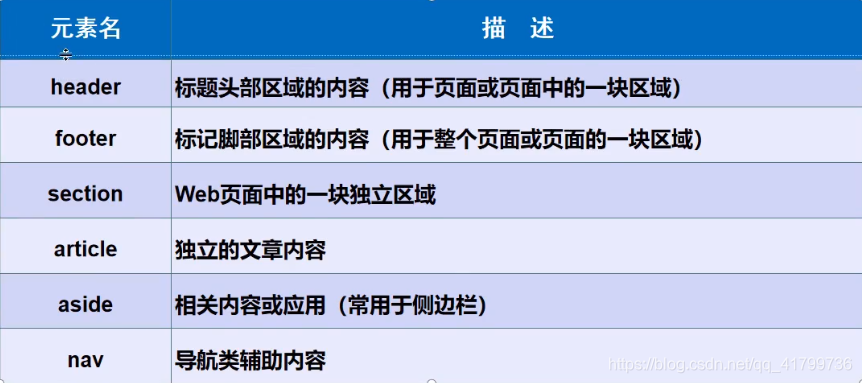
<!DOCTYPE html>
<html lang="en">
<head>
    <meta charset="UTF-8">
    <title>页面结构分析</title>
</head>
<body>

<header>
    <h2>网页头部</h2>
</header>

<section>
    <h2>网页主体</h2>
</section>

<footer>
    <h2>网页脚部</h2>
</footer>

</body>
</html>
九、iframe内联框架
<!DOCTYPE html>
<html lang="en">
<head>
<meta charset="UTF-8">
<title>内联框架学习</title>
</head>
<body>
<iframe src="" name="hello" frameborder="0" width="1000px" height="800px"></iframe>
<a href="http://www.codeparadise.tech" target="hello">点击跳转到我的博客</a>
</body>
</html>
十、表单
1.初始get,post
<!DOCTYPE html>
<html lang="en">
<head>
<meta charset="UTF-8">
<title>登录注册</title>
</head>
<body>
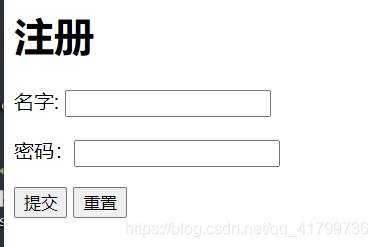
<h1>注册</h1>
<form action="MyFirstHTMLWebPage.html" method="get">
<p>名字: <input type="text" name="user name"> </p>
<p>密码:<input type="password"> </p>
<p>
<input type="submit">
<input type="reset">
</p>
</form>
</body>
</html>
2.文本框和多选框
<!DOCTYPE html>
<html lang="en">
<head>
<meta charset="UTF-8">
<title>登录注册</title>
</head>
<body>
<h1>注册</h1>
<form action="MyFirstHTMLWebPage.html" method="get">
<p>名字: <input type="text" name="user name"> </p>
<p>密码:<input type="password"> </p>
<p>性别:
<input type="radio" value="boy" name="sex">男
<input type="radio" value="girl" name="sex">女
</p>
<p>
<input type="submit">
<input type="reset">
</p>
</form>
</body>
</html>
3.所有
<!DOCTYPE html>
<html lang="en">
<head>
<meta charset="UTF-8">
<title>登录注册</title>
</head>
<body>
<h1>注册</h1>
<form action="MyFirstHTMLWebPage.html" method="get">
<p>名字: <input type="text" name="user name" placeholder="请输入用户名" required> </p>
<p>密码:<input type="password" name="pwd" value="123456" hidden> </p>
<p>性别:
<input type="radio" value="boy" name="sex" disabled>男
<input type="radio" value="girl" name="sex">女
</p>
<p>爱好:
<input type="checkbox" value="sleep" name="hobby">睡觉
<input type="checkbox" value="code" name="hobby">写代码
<input type="checkbox" value="chat" name="hobby">聊天
<input type="checkbox" value="=game" name="hobby">游戏
</p>
<p>按钮:
<input type="button" name="btn1" value="点击变长">
<input type="image" src="../../resource/image/background.jpg">
</p>
<p>国家:
<select name="列表名称">
<option value="china">中国</option>
<option value="us">美国</option>
<option value="eth" selected>瑞士</option>
<option value="ind">印度</option>
</select>
</p>
<p>反馈:
<textarea name="textarea" cols="50" rows="10">文本内容</textarea>
</p>
<p>
<input type="file" name="files">
<input type="button" value="上传" name="upload">
</p>
<p>邮箱:
<input type="email" name="email">
</p>
<p>自定义邮箱:
<input type="text" name="diyemail" pattern="\w+([-+.]\w+)*@\w+([-.]\w+)*\.\w+([-.]\w+)*">
</p>
<p>URL:
<input type="url" name="url">
</p>
<p>数字:
<input type="number" name="num" max="100" min="0" step="10">
</p>
<p>音量:
<input type="range" name="voice" min="0" max="100" step="2">
</p>
<p>搜索:
<input type="search" name="search" id="mark">
</p>
<p>
<label for="mark">点我</label>
<input type="text">
</p>
<p>
<input type="submit">
<input type="reset">
</p>
</form>
</body>
</html>



 该博客围绕网页展开,介绍了网页基本信息、基本标签、图像标签、超链接标签等内容,还涉及列表、表格标签、媒体元素等。此外,对页面结构进行分析,讲解了iframe内联框架,重点阐述表单相关知识,包括get和post、文本框与多选框等。





 扫一扫
扫一扫


 4225
4225

 被折叠的 条评论
为什么被折叠?
被折叠的 条评论
为什么被折叠?
 到【灌水乐园】发言





