



Linux函数exec
一、概述:
当用fork函数创建新的子进程后,子进程往往要调用一种exec函数以执行另一个程序。当程序调用一种exec函数时,该进程执行的程序完全替换为新程序,而新程序则从其main函数开始执行。因为调用exec并不创建新进程,所以前后的进程ID并未改变。exec只是用磁盘上的一个新程序替换了当前进程的正文段、数据段、堆段和栈段。
三、有7种不同的exec函数可供使用,它们常常被统称为exec函数。
       #include <unistd.h>

       extern char **environ;

1.     int execl(const char *path, const char *arg, ...);
2.     int execlp(const char *file, const char *arg, ...);
3.     int execle(const char *path, const char *arg,..., char * const envp[]);
4.     int execv(const char *path, char *const argv[]);
5.     int execvp(const char *file, char *const argv[]);
6.     int execvpe(const char *file, char *const argv[],char *const envp[]);
(我们只讲其中的execl,execlp,execvp)
参数:
*path:可执行文件的路径名。
*arg:可执行程序所带的参数,第一个参数为可执行文件名字,没有带路经且arg必须以NULL结束。
*file:如果参数file中包含/,则就将其视为路径名,否则就按PATH环境变量,在它所指定的各目录中搜寻可执行文件。
函数名中的字符可以帮助理解和分辨:
l表示以参数列表的形式调用
v表示以参数数组的方式调用
e表示可传递环境变量
p表示PATH中搜索执行的文件,如果给出的不是绝对路径就会去PATH搜索相应名字的文件,如PATH没有设置, 则会默认在/bin,/usr/bin下搜索。
返回值:
如果执行成功则函数不会返回,执行失败则直接返回-1,失败原因存于errno 中。
二、exec族函数的作用
exec函数族的作用是根据指定的文件名找到可执行文件,并用它来取代调用进程的内容,换句话说,就是在调用进程内部执行一个可执行文件。这里的可执行文件既可以是二进制文件,也可以是任何Linux下可执行的脚本文件。
与一般情况不同,exec函数族的函数执行成功后不会返回,因为调用进程的实体,包括代码段,数据段和堆栈等都已经被新的内容取代,只留下进程ID等一些表面上的信息仍保持原样。只有调用失败了,它们才会返回一个-1,从原程序的调用点接着往下执行。
三、实例1:在执行文件execl.c过程中调用execl,从而执行echoarg.c。
文件:echoarg.c
#include <stdio.h>

int main(int argc,char *argv[])
{
    int i = 0;
    for(i = 0; i < argc; i++)
    {
        printf("argv[%d]: %s\n",i,argv[i]);
    }
    return 0;
}
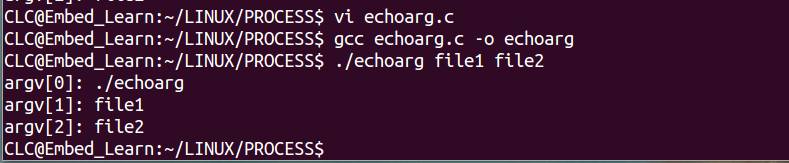
只编译运行echoarg.c结果如下:
文件:execl.c
#include <stdio.h>
#include <stdlib.h>
#include <unistd.h>

int main(void)
{
    printf("before execl\n");
    if(execl("./echoarg","file1","file2",NULL) == -1)
    {
        printf("execl failed!\n");
        perror("why");
    }
    printf("after execl\n");
    return 0;
}
注:perror(s) 用来将上一个函数发生错误的原因输出到标准设备(stderr)。参数 s 所指的字符串会先打印出,后面再加上错误原因字符串。此错误原因依照全局变量errno的值来决定要输出的字符串。
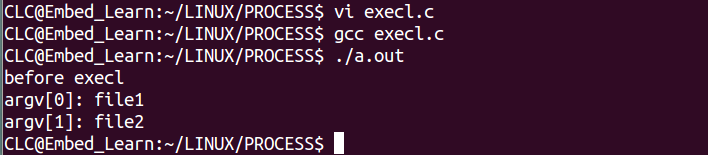
若调用execl失败,返回-1,然后开始执行 printf(“after execl\n”);(打印"after execl")。
若成功则不执行 printf(“after execl\n”);(不打印"after execl")。
四、实例2:
我们都知道ls命令是linux下最常用的命令之一,用来列出目录下的文件。我们也可以调用execl来执行ls的命令。
ls指令运行结果:

我们可以通过whereis ls 指令来获得ls的文件路径。

execl.c
#include <stdio.h>
#include <stdlib.h>
#include <unistd.h>

int main(void)
{
    printf("before execl\n");
    if(execl("/bin/ls","ls",NULL,NULL) == -1)
    {
        printf("execl failed!\n");
        perror("why");
    }
    printf("after execl\n");
    return 0;
}
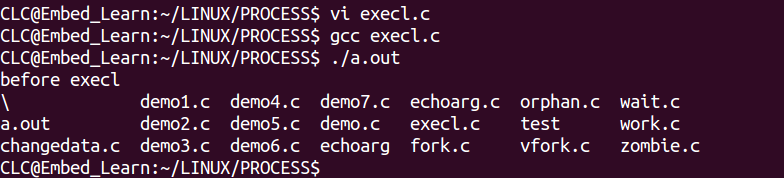
编译运行结果如下:
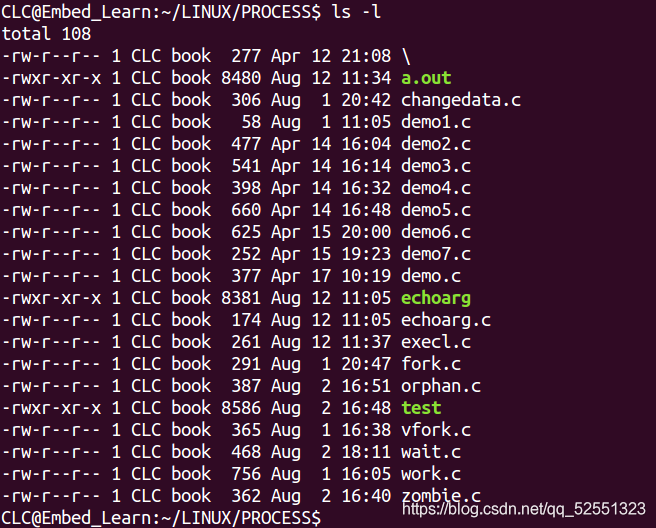
ls -l则会把详细列表打印出来:
可以尝试在execl函数的第三个参数写为“-l”:
execl.c
#include <stdio.h>
#include <stdlib.h>
#include <unistd.h>

int main(void)
{
    printf("before execl\n");
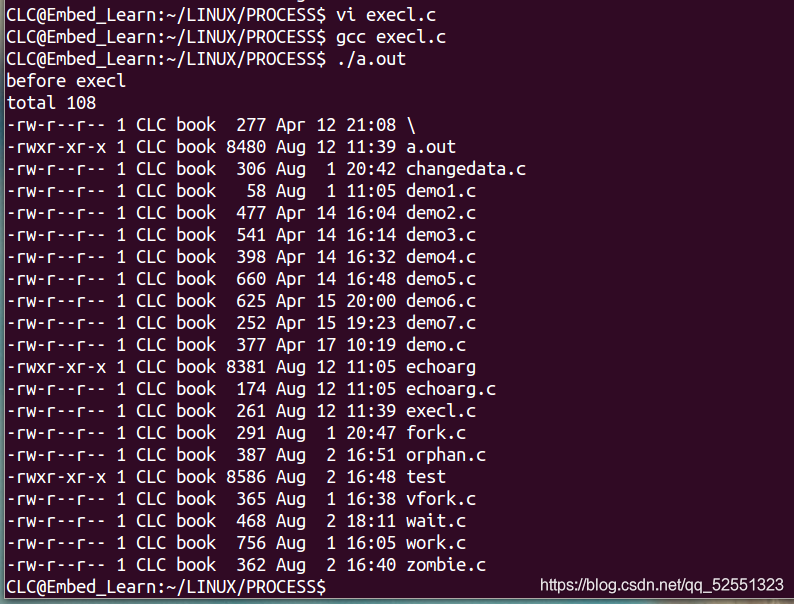
    if(execl("/bin/ls","ls","-l",NULL) == -1)
    {
        printf("execl failed!\n");
        perror("why");
    }
    printf("after execl\n");
    return 0;
}
编译运行结果如下:
五、实例3:获取日期和时间
Linux指令date 可以用来显示或设定系统的日期与时间

我们也可以调用execl函数来获取日期和时间(原理同实例2相同)
#include <stdio.h>
#include <stdlib.h>
#include <unistd.h>

int main(void)
{
    printf("before execl\n");
    if(execl("/bin/date","date",NULL,NULL) == -1)
    {
        printf("execl failed!\n");
        perror("why");
    }
    printf("after execl\n");
    return 0;
}
编译运行结果如下:

六、在前面几个实例中调用函数execl第一个参数需要给出绝对路径,而函数execlp通过环境变量PATH查找到可执行文件(如实例6的“date”)。
实例6:execlp.c
#include <stdio.h>
#include <stdlib.h>
#include <unistd.h>

int main(void)
{
    printf("before execlp\n");
    if(execlp("date","date",NULL,NULL) == -1)
    {
        printf("execlp failed!\n");
        perror("why");
    }
    printf("after execlp\n");
    return 0;
}
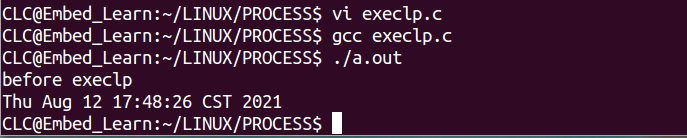
实例7.execvp.c
#include <stdio.h>
#include <stdlib.h>
#include <unistd.h>

int main(void)
{
        printf("before execvp\n");
        char *argv[] = {"data",NULL,NULL};
        if(execvp("date",argv) == -1) {
                printf("execvp failed!\n");
                perror("why");
        }

        printf("after execvp\n");

        return 0;
}
与execlp不同,execvp以参数数组的方式调用。

七、前面在讲函数fork和vfork中我们提到:
fork有以下两种用法。
(1) 一个父进程希望复制自己,使父进程和子进程同时执行不同的代码段。这在网络服务进程中是常见的—父进程等待客户端的服务请求。当这种请求到达时,父进程调用fork,使子进程处理此请求。父进程则继续等待下一个服务请求。
(2) 一个进程要执行一个不同的程序。这对shell是常见的情况。在这种情况下,子进程从返回后立刻调用exec。
所以我们可以把fork和exec配合使用。
实例8:通过调用fork创建子进程来对文件进行更改。
TEST.config
SPEED=3
LENG=9
SCORE=9
LEVEL=0
change.c
#include <sys/types.h>
#include <sys/stat.h>
#include <fcntl.h>
#include <stdio.h>
#include <unistd.h>
#include <string.h>
#include <stdlib.h>

int main(int argc,char *argv[])
{
        int  fdsrc;
        char *readbuf=NULL;

        if(argc!=2){
                printf("param error\ni");
                exit(-1);
        }

        fdsrc=open(argv[1],O_RDWR);

        int size=lseek(fdsrc,0,SEEK_END);
        lseek(fdsrc,0,SEEK_SET);

        readbuf=(char *)malloc(sizeof(size)+8);
        int n_read=read(fdsrc,readbuf,size);

        char *p=strstr(readbuf,"LENG=");

        if(p==NULL){
                printf("not found\n");
                exit(-1);
        }

        p=p+strlen("LENG=");
        *p='5';

        lseek(fdsrc,0,SEEK_SET);
        int n_write=write(fdsrc,readbuf,strlen(readbuf));

        close(fdsrc);
        return 0;
}
#include <sys/types.h>
#include <sys/stat.h>
#include <fcntl.h>
#include <stdio.h>
#include <unistd.h>
#include <string.h>
#include <stdlib.h>
#include <sys/wait.h>

int main()
{
        pid_t pid;

        int data = 0;

        while(1){
                printf("please input a data\n");
                scanf("%d",&data);
                if(data==1){
                        pid=fork();
                        if(pid>0){
                                wait(NULL);
                        }
                        if(pid==0){
                                execl("./change","change","TEST.config",NULL);
                        }
                }else{
                        printf("wait...\n");
                }
        }
        return 0;
}
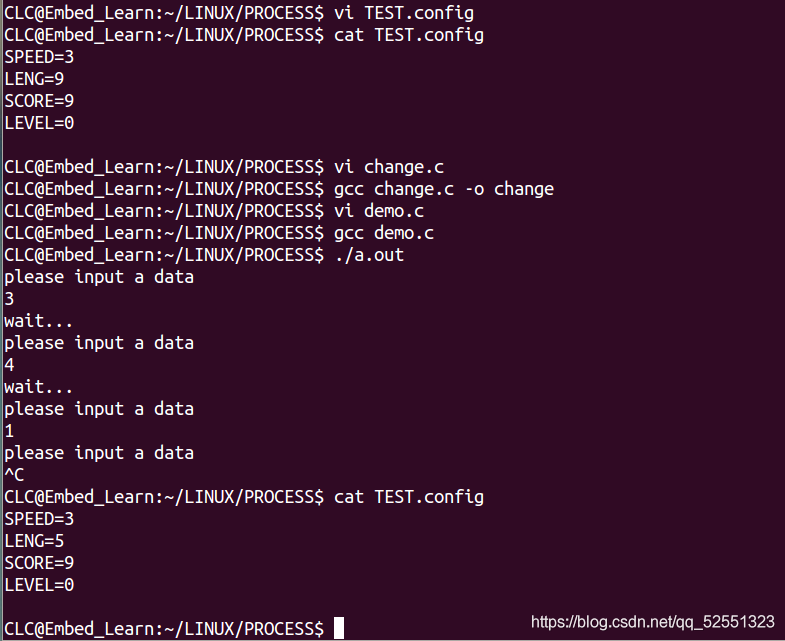
demo.c中调用当输入data = 1时,函数fork创建子进程,子进程调用execl来执行change(可执行文件),在change中对TEST.config进行更改。
文件TEST.config中"LENG"被修改成 了9。





 扫一扫
扫一扫


 1484
1484

 被折叠的 条评论
为什么被折叠?
被折叠的 条评论
为什么被折叠?
 到【灌水乐园】发言





