



注:本文为 “Linux | Bash Shebang 在 Bash 和 Python 脚本中的实践” 及相关讨论合辑。
英文引文,机翻未校。
如有内容异常,请看原文。
讨论内容比较久远,但仍有参考意义。
Shebang in Bash and Python Scripts: Best Practices
Bash 和 Python 脚本中的 Shebang:最佳实践
RedSwitches
Aug 16, 2024
If you have ever written a script for use in a Linux environment, you have definitely come across the #! line.
如果你曾为 Linux 环境编写过脚本,那么你肯定见过 #! 这一行。
Have you ever wondered why some scripts start with this #! line?
你是否曾好奇为什么有些脚本会以这一 #! 行开头?
This is called shebang, a simple two-character combination that has the power to determine how a script interacts with the system.
这被称为 shebang(释伴),是一个简单的双字符组合,它能够决定脚本与系统的交互方式。
It is one of the fundamental concepts you need to understand when writing Bash scripts.
这是编写 Bash 脚本时你需要理解的核心概念之一。
In this tutorial, we will guide you through the essentials of using shebang in Bash scripts, ensuring you can leverage its full potential.
在本教程中,我们将引导你掌握在 Bash 脚本中使用 shebang 的核心要点,确保你能充分发挥其作用。
Let’s start with a short introduction to shebang and then discuss how to use it in Bash scripts.
我们先简要介绍一下 shebang,然后探讨如何在 Bash 脚本中使用它。
What Does Shebang Mean in Bash and Python?
Shebang 在 Bash 和 Python 中是什么意思?
A shebang, also known as a hashbang (#!), is a character sequence at the beginning of a script file that informs the operating system which interpreter to use for executing the script.
Shebang(也被称为 hashbang,即 #!)是脚本文件开头的一个字符序列,用于告知操作系统使用哪个解释器来执行该脚本。
This line is crucial as it ensures that your script is executed using the right interpreter, regardless of how the script is invoked.
这一行至关重要,因为它能确保你的脚本使用正确的解释器执行,无论该脚本是以何种方式调用的。
In Bash scripts, the shebang is typically followed by the path to the Bash shell or another shell interpreter. For instance, consider this line that you will find in many scripts:
在 Bash 脚本中,shebang 后面通常跟着 Bash shell 或其他 shell 解释器的路径。例如,你会在许多脚本中看到这样一行:
#!/bin/bash
This line instructs the OS to use the Bash interpreter located at /bin/bash to run the script.
这一行指示操作系统使用位于 /bin/bash 的 Bash 解释器来运行该脚本。
In Python scripts, the shebang works similarly by pointing out the location of the Python interpreter.
在 Python 脚本中,shebang 的作用原理类似,用于指明 Python 解释器的位置。
#!/usr/bin/env python3
How to Use Shebang in Bash Scripts
如何在 Bash 脚本中使用 Shebang?
When it comes to using shebang in Bash scripts, there are several options depending on your needs and the environment in which your script will run.
在 Bash 脚本中使用 shebang 时,有多种选择,具体取决于你的需求以及脚本运行的环境。
Let’s discuss the most common and effective ways to use shebang in your Bash scripts.
我们来探讨在 Bash 脚本中使用 shebang 最常见且有效的方式。
Use Case #1: Use Bash Interpreter Directly
用例 1:直接使用 Bash 解释器
Using the Bash interpreter directly in your shebang line ensures that your script is executed with the Bash shell. This method is straightforward and provides control over the execution environment.
在 shebang 行中直接使用 Bash 解释器,可确保你的脚本通过 Bash shell 执行。这种方法简单直接,并且能对执行环境进行管控。
Let’s dive into a detailed explanation with an example.
我们通过一个例子来详细说明。
Bash is the default command-line interpreter in Linux and macOS operating systems. By using #!/bin/bash, the shebang instructs the OS to use the Bash interpreter located at /bin/bash to run the script.
Bash 是 Linux 和 macOS 操作系统中默认的命令行解释器。通过使用 #!/bin/bash,该 shebang 会指示操作系统使用位于 /bin/bash 的 Bash 解释器来运行脚本。
Let us consider an example to demonstrate how the shebang line instructs the OS to use the Bash interpreter located at /bin/bash to run a script.
我们来看一个示例,演示 shebang 行如何指示操作系统使用位于 /bin/bash 的 Bash 解释器来运行脚本。
First, we will create a simple Bash script that performs a few tasks like printing a welcome message, lists the files in the current directory, and displays the current date and time.
首先,我们创建一个简单的 Bash 脚本,该脚本执行一些任务,比如打印欢迎信息、列出当前目录下的文件以及显示当前的日期和时间。
#!/bin/bash
# A simple script to demonstrate the use of Bash interpreter
# Print a welcome message
echo “Welcome to the Bash scripting tutorial!”
# List files in the current directory
echo “Listing files in the current directory:”
ls
# Show the current date and time
echo “Current date and time:”
date
#!/bin/bash
# 一个演示 Bash 解释器使用方法的简单脚本
# 打印欢迎信息
echo “Welcome to the Bash scripting tutorial!”
# 列出当前目录下的文件
echo “Listing files in the current directory:”
ls
# 显示当前日期和时间
echo “Current date and time:”
date
Here,
在此处:
#!/bin/bash: Specify that the Bash interpreter should be used.
#!/bin/bash:指定应使用 Bash 解释器。
echo: Print a welcome message.
echo:打印欢迎信息。
ls: Lists the files in the current directory.
ls:列出当前目录下的文件。
Current Date and Time: The date command displays the current date and time.
当前日期和时间:date 命令用于显示当前的日期和时间。
Save the script to a file example_script.sh.
将该脚本保存到文件 example_script.sh 中。
Next, run the following command to make the script executable:
接下来,运行以下命令使脚本具备可执行权限:
# chmod +x example_script.sh
Next, execute the script using the following command:
接下来,使用以下命令执行该脚本:
./example_script.sh
You will see something similar to the above screenshot in the terminal. The script will print the welcome message, list files, and show the current date and time.
你会在终端中看到与上述截图类似的内容。该脚本会打印欢迎信息、列出文件并显示当前的日期和时间。
Here, the shebang line instructs the OS to run the script using the Bash interpreter located at /bin/bash.
在此处,shebang 行指示操作系统使用位于 /bin/bash 的 Bash 解释器来运行该脚本。
Use Case #2: Use Bash Interpreter Through env
用例 2:通过 env 使用 Bash 解释器
The env command allows users to display the current environment or run a specified command in a changed environment.
env 命令允许用户显示当前环境,或在修改后的环境中运行指定命令。
Using the env command in the shebang line ensures that the script runs with the right interpreter by finding it in the user’s PATH.
在 shebang 行中使用 env 命令,可通过在用户的 PATH 环境变量中查找对应的解释器,确保脚本使用正确的解释器运行。
Consider the following example that illustrates this idea.
请看以下示例来理解这一用法。
Create a simple Bash script that prints the system’s uptime.
创建一个简单的 Bash 脚本,用于打印系统的运行时间。
#!/usr/bin/env bash
# A simple script to print the system’s uptime
# Print the system’s uptime
uptime
#!/usr/bin/env bash# 一个打印系统运行时间的简单脚本
# 打印系统运行时间
uptime
Here,
在此处:
#!/usr/bin/env bash: Instructs the operating system to use the env command to find the Bash interpreter.
#!/usr/bin/env bash:指示操作系统使用 env 命令查找 Bash 解释器。
A simple script to print the system’s uptime: Describes the purpose of the script.
一个打印系统运行时间的简单脚本:描述该脚本的用途。
uptime: Prints the system’s uptime.
uptime:打印系统的运行时间。
Save the script to a file named print_uptime.sh and run the chmod command to make the script executable.
将该脚本保存到名为 print_uptime.sh 的文件中,并运行 chmod 命令使脚本具备可执行权限。# chmod +x print_uptime.sh
Next, run the script by executing the following command:
接下来,执行以下命令运行该脚本:# ./print_uptime.sh
An output similar to the following displaying the system’s uptime will be displayed in the terminal.
终端中将显示类似以下内容的输出,展示系统的运行时间。
Here, the env in the shebang line offers flexibility and portability, ensuring the script finds the right Bash interpreter regardless of the system configuration.
在此处,shebang 行中的 env 提供了灵活性和可移植性,确保无论系统配置如何,脚本都能找到正确的 Bash 解释器。
Use Case #3: Use POSIX Shell Interpreter
用例 3:使用 POSIX Shell 解释器
Using the POSIX shell interpreter in your shebang line ensures that your script is compatible with any POSIX-compliant shell. This approach makes your script more portable and compatible across various Unix-like systems.
在 shebang 行中使用 POSIX shell 解释器,可确保你的脚本与任何符合 POSIX 标准的 shell 兼容。这种方式使你的脚本在各类类 Unix 系统中具备更强的可移植性和兼容性。
Specifying #!/bin/sh implies the operating system to use the POSIX-compliant shell (typically sh) to run the script.
指定 #!/bin/sh 意味着操作系统将使用符合 POSIX 标准的 shell(通常为 sh)来运行该脚本。
To illustrate this, let us consider a script that prints the current directory.
为了说明这一点,我们来看一个打印当前目录的脚本。
#!/bin/sh
# A simple script to print the current directory
# Print the current directory
pwd
#!/bin/sh
# 一个打印当前目录的简单脚本
# 打印当前目录
pwd
Here,
在此处:
#!/bin/sh: Specify that the POSIX-compliant shell should be used.
#!/bin/sh:指定应使用符合 POSIX 标准的 shell。
A simple script to print the current directory: Describes the purpose of the script.
一个打印当前目录的简单脚本:描述该脚本的用途。
pwd: Print the current directory.
pwd:打印当前目录。
Save the script to a file, print_current_directory.sh, and execute the chmod command to make the script executable.
将该脚本保存到文件 print_current_directory.sh 中,并执行 chmod 命令使脚本具备可执行权限。
# chmod +x print_current_directory.sh
Run the script with the following command:
使用以下命令运行该脚本:
# ./print_current_directory.sh
The script would be executed using the POSIX shell interpreter where the output displays the current directory.
该脚本将通过 POSIX shell 解释器执行,输出内容为当前目录。
Use Case #4: Use the Python Interpreter
用例 4:使用 Python 解释器
Using the Python interpreter in the shebang line ensures that the script is executed using Python. This method is essential to specify which Python version should run a specific Python script.
在 shebang 行中使用 Python 解释器,可确保脚本通过 Python 执行。这种方法对于指定使用哪个 Python 版本来运行特定的 Python 脚本至关重要。
To specify the Python interpreter in your script, include #!/usr/bin/env python3 at the beginning. This conveys the operating system to use the env command to find the Python 3 interpreter in the user’s PATH.
要在脚本中指定 Python 解释器,需在开头添加 #!/usr/bin/env python3。这会告知操作系统使用 env 命令在用户的 PATH 环境变量中查找 Python 3 解释器。
Let us consider the following example to better understand this.
我们来看以下示例,以便更好地理解这一用法。
Start by creating a simple Python script that prints “Hello, World!”.
首先创建一个简单的 Python 脚本,用于打印 “Hello, World!”。
#!/usr/bin/env python3
# A simple script to print “Hello, World!”
print(“Hello, World!”)
#!/usr/bin/env python3
# 一个打印“Hello, World!”的简单脚本
print(“Hello, World!”)
Here,
在此处:
#!/usr/bin/env python3: Specifies that the env command should be used to find the Python 3 interpreter.
#!/usr/bin/env python3:指定应使用 env 命令查找 Python 3 解释器。
A simple script to print “Hello, World!”: Describes the purpose of the script.
一个打印“Hello, World!”的简单脚本:描述该脚本的用途。
print(“Hello, World!”): The function to print “Hello, World!”.
print(“Hello, World!”):用于打印 “Hello, World!” 的函数。
Save the script to a file hello_world.py and run the chmod command to make the script executable.
将该脚本保存到文件 hello_world.py 中,并运行 chmod 命令使脚本具备可执行权限。
# chmod +x hello_world.py
Next, execute the script.
接下来,执行该脚本。
# ./hello_world.py
During the command execution, the shebang line ensures that the script is executed with the Python3 interpreter.
在命令执行过程中,shebang 行确保脚本通过 Python 3 解释器执行。

Use Case #5: Use a Specific Version of Bash
用例 5:使用特定版本的 Bash
There are times when you might need to ensure that your script runs with a specific version of Bash due to compatibility or feature requirements. This can be achieved by specifying the exact path to the desired Bash version in the shebang line.
有时,由于兼容性或功能要求,你可能需要确保脚本使用特定版本的 Bash 运行。这可以通过在 shebang 行中指定所需 Bash 版本的准确路径来实现。
For instance, if you want to use Bash 4.2 located in /usr/local/bin/bash, use the shebang line, #!/usr/local/bin/bash.
例如,如果你想要使用位于 /usr/local/bin/bash 的 Bash 4.2,可使用 shebang 行:#!/usr/local/bin/bash。
Let’s create a simple script that prints the version of Bash being used. This helps to verify that the script is running with the specified version.
我们创建一个简单的脚本,用于打印正在使用的 Bash 版本。这有助于验证脚本是否在指定版本的 Bash 环境下运行。
#!/usr/bin/bash
# A simple script to print the version of Bash being used
# Print the version of Bash
echo “Bash version: $BASH_VERSION”
#!/usr/bin/bash
# 一个打印正在使用的 Bash 版本的简单脚本
# 打印 Bash 版本
echo “Bash version: $BASH_VERSION”
Here,
在此处:
#!/usr/local/bin/bash: Specifies that the Bash interpreter located at /usr/local/bin/bash should be used.
#!/usr/local/bin/bash:指定应使用位于 /usr/local/bin/bash 的 Bash 解释器。
echo : Prints the version of Bash being used by accessing the B A S H V E R S I O N ∗ ∗ e n v i r o n m e n t v a r i a b l e . ∗ ∗ e c h o ∗ ∗ :通过访问 ∗ ∗ BASH_VERSION** environment variable. **echo**:通过访问 ** BASHVERSION∗∗environmentvariable.∗∗echo∗∗:通过访问∗∗BASH_VERSION 环境变量,打印正在使用的 Bash 版本。
Save the script to a file, print_bash_version.sh and use the chmod command to make the script executable:
将该脚本保存到文件 print_bash_version.sh 中,并使用 chmod 命令使脚本具备可执行权限:
# chmod +x print_bash_version.sh
Next, run the script by executing the following command:
接下来,执行以下命令运行该脚本:
# ./print_bash_version.sh
Press enter or click to view image in full size
按回车键或点击以查看完整尺寸图片

This output confirms that the script is running with the specified version of Bash.
该输出证实脚本正在使用指定版本的 Bash 运行。
Use Case #6: Use a Different Shell Interpreter
用例 6:使用其他 Shell 解释器
In a typical Unix or Linux environment, you can find various shell interpreters, each with its unique features and use cases. Common alternatives to Bash include sh, zsh, and ksh.
在典型的 Unix 或 Linux 环境中,你可以找到多种 shell 解释器,每种解释器都有其独特的功能和适用场景。Bash 常见的替代方案包括 sh、zsh 和 ksh。
Specifying a different shell interpreter in the shebang line ensures that your script is executed with the intended shell, which can be crucial for compatibility and functionality.
在 shebang 行中指定其他 shell 解释器,可确保脚本通过预期的 shell 执行,这对于兼容性和功能实现至关重要。
To specify a different shell interpreter, include the appropriate shebang line at the beginning of your script.
要指定其他 shell 解释器,需在脚本开头添加相应的 shebang 行。
To better understand, we’ll provide examples for zsh, and ksh.
为了便于理解,我们将给出 zsh 和 ksh 的使用示例。
Use zsh (Z Shell)
使用 zsh(Z Shell)
zsh is a powerful shell with features like improved scripting capabilities and enhanced interactive use.
zsh 是一款功能强大的 shell,具备改进的脚本编写能力和增强的交互式使用体验等特性。
Consider the following script to print a greeting.
请看以下打印问候语的脚本。
#!/usr/bin/env zsh
# A simple script to print a greeting using Z Shell
# Print a greeting
echo “Hello from Zsh!”
#!/usr/bin/env zsh
# 一个使用 Z Shell 打印问候语的简单脚本
# 打印问候语
echo “Hello from Zsh!”
Save the script to a file, print_greeting_zsh.sh.
将该脚本保存到文件 print_greeting_zsh.sh 中。
Make the script executable using the following command:
使用以下命令使脚本具备可执行权限:
# chmod +x print_greeting_zsh.sh
Next, run the script using the following command:
接下来,使用以下命令运行该脚本:
# ./print_greeting_zsh.sh
Press enter or click to view image in full size
按回车键或点击以查看完整尺寸图片

The script would be executed with the zsh shell interpreter.
该脚本将通过 zsh shell 解释器执行。
The shebang line ensures the script leverages the specific features and functionalities of the zsh shell interpreter.
shebang 行确保脚本能够利用 zsh shell 解释器的特定功能。
Use ksh (Korn Shell)
使用 ksh(Korn Shell)
ksh (Korn Shell) is another powerful shell known for its scripting capabilities and compatibility with both Bourne and C shell syntax.
ksh(Korn Shell)是另一款功能强大的 shell,以其脚本编写能力以及与 Bourne shell 和 C shell 语法的兼容性而闻名。
Let us consider a script to print user information to demonstrate how the shebang line implies the ksh shell to run the script.
我们来看一个打印用户信息的脚本,以演示 shebang 行如何指定使用 ksh shell 运行脚本。
#!/usr/bin/env ksh
# A simple script to print the current user and home directory using Korn Shell
# Print the current user
echo “Current user: $USER”
# Print the home directory
echo “Home directory: $HOME”
#!/usr/bin/env ksh
# 一个使用 Korn Shell 打印当前用户和主目录的简单脚本
# 打印当前用户
echo “Current user: $USER”
# 打印主目录
echo “Home directory: $HOME”
Save the script to a file, print_user_info_ksh.sh, and run the following command to make the script executable:
将该脚本保存到文件 print_user_info_ksh.sh 中,并运行以下命令使脚本具备可执行权限:
# chmod +x print_user_info_ksh.sh
Next, execute the following command to run the script:
接下来,执行以下命令运行该脚本:
# ./print_user_info_ksh.sh
The output would be similar to the following where the ksh interpreter would run the script.
输出内容将类似于以下示例,该脚本会通过 ksh 解释器执行。
Press enter or click to view image in full size
按回车键或点击以查看完整尺寸图片

Use Case #7: Use an Interpreted Language
用例 7:使用解释型语言
In Unix-like systems, scripts can be written in various interpreted languages besides the traditional shell commands. Common alternatives include Python, Perl, and Ruby.
在类 Unix 系统中,除了传统的 shell 命令外,还可以使用多种解释型语言编写脚本。常见的选择包括 Python、Perl 和 Ruby。
Specifying an interpreter for these languages ensures that the script is executed with the intended interpreter, which is essential for compatibility and functionality. Here, the shebang line ensures the script uses the right interpreter.
为这些语言指定解释器,可确保脚本通过预期的解释器执行,这对于兼容性和功能实现至关重要。在此场景下,shebang 行确保脚本使用正确的解释器。
We will now present two examples that highlight the use of Perl and Ruby to write shell scripts.
我们接下来将给出两个示例,分别介绍使用 Perl 和 Ruby 编写 shell 脚本的方法。
Perl
Perl is a powerful scripting language known for its text-processing capabilities.
Perl 是一款功能强大的脚本语言,以其文本处理能力而著称。
Consider the following script that prints “Hello, World!”.
请看以下打印 “Hello, World!” 的脚本。
#!/usr/bin/env perl
# A simple script to print “Hello, World!” using Perl
print “Hello, World!\n”;
#!/usr/bin/env perl
# 一个使用 Perl 打印“Hello, World!”的简单脚本
print “Hello, World!\n”;
Save the script to a file, hello_world.pl, and execute the chmod command.
将该脚本保存到文件 hello_world.pl 中,并执行 chmod 命令。
# chmod +x hello_world.pl
Run the script using the following command:
使用以下命令运行该脚本:
# ./hello_world.pl
The shebang line #!/usr/bin/env perl specifies that the Perl interpreter should be used to execute the script.
shebang 行 #!/usr/bin/env perl 指定应使用 Perl 解释器来执行该脚本。

Ruby
Ruby is a dynamic programming language known for its simplicity and productivity. Consider the following script that prints “Hello, World!” using Ruby.
Ruby 是一门动态编程语言,以简洁性和高效性著称。请看以下使用 Ruby 打印 “Hello, World!” 的脚本。
#!/usr/bin/env ruby
# A simple script to print “Hello, World!” using Ruby
puts “Hello, World!”
#!/usr/bin/env ruby
# 一个使用 Ruby 打印“Hello, World!”的简单脚本
puts “Hello, World!”
Save the script to a file, hello_world.rb, and run the chmod command.
将该脚本保存到文件 hello_world.rb 中,并运行 chmod 命令。
# chmod +x hello_world.rb
Execute the following command to run the script:
执行以下命令运行该脚本:
# ./hello_world.rb
The shebang line in the Ruby script, #!/usr/bin/env ruby, instructs the operating system to use the Ruby interpreter to execute the script.
Ruby 脚本中的 shebang 行 #!/usr/bin/env ruby 指示操作系统使用 Ruby 解释器来执行该脚本。
Press enter or click to view image in full size
按回车键或点击以查看完整尺寸图片

Use Case #8: Use a Shell Script as a Configuration File
用例 8:将 Shell 脚本用作配置文件
Using a shell script as a configuration file allows users to set environment variables and other settings that can then be sourced and utilized by other scripts. This approach provides flexibility and convenience in managing dynamic configuration options.
将 shell 脚本用作配置文件,允许用户设置环境变量和其他配置项,而后其他脚本可通过引入(source)该文件来使用这些配置。这种方式为管理动态配置项提供了灵活性和便利性。
Follow these steps to create a shell script as a configuration file.
按照以下步骤创建用作配置文件的 shell 脚本。
Create a configuration script that contains environment variable declarations and other configuration settings.
创建一个包含环境变量声明和其他配置项的配置脚本。
Next, source the configuration script where other scripts use this configuration file to access its settings.
然后,在其他脚本中引入(source)该配置脚本,使其能够访问配置文件中的设置。
Let us consider the following example where we will create a config.sh script to set environment variables
我们来看以下示例,创建一个 config.sh 脚本用于设置环境变量:
#!/bin/sh
# Configuration script for setting environment variables
# Set the application environment
export APP_ENV=”production”
# Set the application path
export APP_PATH=”/usr/local/myapp”
# Set the log level
export LOG_LEVEL=”info”
#!/bin/sh
# 用于设置环境变量的配置脚本
# 设置应用程序环境
export APP_ENV=”production”
# 设置应用程序路径
export APP_PATH=”/usr/local/myapp”
# 设置日志级别
export LOG_LEVEL=”info”
Next, to use the configuration script, source it in your main script using the source command (.) or . ./config.sh.
接下来,要使用该配置脚本,可在主脚本中通过 source 命令(或 . 命令)引入它,例如 . ./config.sh。
#!/bin/sh
# Source the configuration script
. ./config.sh
# Use the configuration settings
echo “Application Environment: $APP_ENV”
echo “Application Path: $APP_PATH”
echo “Log Level: $LOG_LEVEL”
# Your main script logic here
#!/bin/sh
# 引入配置脚本
. ./config.sh
# 使用配置项
echo “Application Environment: $APP_ENV”
echo “Application Path: $APP_PATH”
echo “Log Level: $LOG_LEVEL”
# 此处编写主脚本逻辑
Use the chmod command to make both configuration and main scripts executable:
使用 chmod 命令使配置脚本和主脚本都具备可执行权限:
# chmod +x config.sh
# chmod +x main.sh
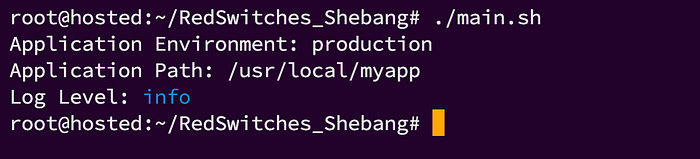
Execute the main script with the following command:
使用以下命令执行主脚本:
# ./main.sh
You will see a similar output displaying the configuration settings:
你将看到类似以下的输出,展示配置项信息:
Application Environment: production
Application Path: /usr/local/myapp
Log Level: info
Press enter or click to view image in full size
按回车键或点击以查看完整尺寸图片
Use Case #9: Use a Shell Wrapper Script
用例 9:使用 Shell 包装器脚本
A shell wrapper script is a script that wraps around another command or script, providing additional functionality such as setting environment variables, pre-processing input, post-processing output, or handling errors.
Shell 包装器脚本是一种封装其他命令或脚本的脚本,可提供额外功能,例如设置环境变量、预处理输入、后处理输出或处理错误。
Wrapper scripts are useful for simplifying complex commands or adding additional layers of control and flexibility.
包装器脚本有助于简化复杂命令,或增加额外的控制层和灵活性。
The shebang line, found at the very beginning of the script, plays a crucial role in shell wrapper scripts
位于脚本最开头的 shebang 行在 shell 包装器脚本中起着至关重要的作用。
Let us consider the following example to better understand it.
我们来看以下示例,以便更好地理解这一用法。
First, create a simple Python script that prints a greeting message.
首先,创建一个简单的 Python 脚本,用于打印问候信息。
#!/usr/bin/env python3
# hello.py: A simple Python script to print a greeting
print(“Hello from the Python script!”)
#!/usr/bin/env python3
# hello.py:一个打印问候信息的简单 Python 脚本
print(“Hello from the Python script!”)
Next, create a shell wrapper script that sets up the environment and runs the Python script.
接下来,创建一个 shell 包装器脚本,用于配置环境并运行上述 Python 脚本。
#!/bin/sh
# run_hello.sh – wrapper to execute hello.py with a clean environment

# 1. 环境变量
export GREETING="Hello from the wrapper script!"
export PYTHONPATH="/usr/local/lib/python3.9/site-packages"

# 2. 预处理
echo "Wrapper: environment ready"

# 3. 执行
./hello.py

# 4. 后处理
echo "Wrapper: Python script finished"
# 赋予可执行权限
chmod +x hello.py run_hello.sh
#!/bin/sh
# run_hello.sh: A shell wrapper script to run hello.py 用于运行 hello.py 的 shell 包装器脚本
# Set up environment variables 设置环境变量
export GREETING=”Hello from the wrapper script!”
export PYTHONPATH=”/usr/local/lib/python3.9/site-packages”
# Pre-processing step 预处理步骤
echo “Wrapper script: Setting up environment…”
# Run the Python script 运行 Python 脚本
./hello.py
# Post-processing step 后处理步骤
echo “Wrapper script: Python script has completed.”
Use the chmod command to make both scripts executable:
使用 chmod 命令使两个脚本都具备可执行权限:# chmod +x hello.py
# chmod +x run_hello.sh
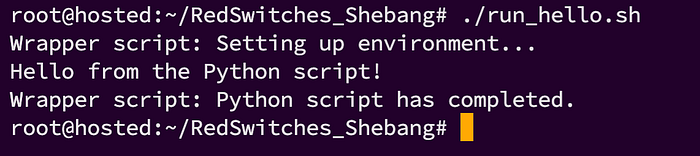
Execute the wrapper script with the following command:
使用以下命令执行包装器脚本:
# ./run_hello.sh
The output of the script would be similar to following output:
该脚本的输出将类似于以下内容:
Wrapper script: Setting up environment…
Hello from the Python script!
Wrapper script: Python script has completed.
The shebang line instructs the operating system to use the specified shell interpreter (here, sh) to execute the wrapper script itself.
shebang 行指示操作系统使用指定的 shell 解释器(此处为 sh)来执行包装器脚本本身。
Press enter or click to view image in full size
按回车键或点击以查看完整尺寸图片
Conclusion
总结
Understanding and managing different interpreters for scripts is essential for Unix-like environments.
理解并管理脚本的不同解释器,对于类 Unix 环境而言至关重要。
This guide covered key topics such as the use of the shebang line, and different shells in the shebang line. By mastering these techniques, you can create portable, flexible, and robust scripts, ensuring they run correctly across various environments.
本指南涵盖了核心内容,例如 shebang 行的使用方法,以及在 shebang 行中指定不同 shell 的方式。掌握这些技巧后,你能够编写可移植、灵活且健壮的脚本,确保它们在各类环境中都能正确运行。
FAQs
常见问题解答
Q. What is a shebang and how to use it in bash and python scripts?
问:什么是 shebang?如何在 bash 和 python 脚本中使用它?
A shebang is the #! characters at the beginning of a bash or python script that conveys the system which interpreter to use to parse the rest of the file.
Shebang 是 bash 或 python 脚本开头的 #! 字符组合,用于告知系统使用哪个解释器来解析文件的其余部分。
Q. Why is it important to include the shebang at the beginning of a script?
问:为什么在脚本开头添加 shebang 很重要?
Including the shebang at the beginning of a script ensures that the desired shell interpreter, either bash or python, interprets the script accurately. It is necessary to have the appropriate shebang at the beginning for the script to run as intended on a Linux system.
在脚本开头添加 shebang,可确保脚本由期望的 shell 解释器(bash 或 python)准确解析。要让脚本在 Linux 系统上按预期运行,必须在开头添加相应的 shebang。
Q. Can you override the shebang directive in a script?
问:能否覆盖脚本中的 shebang 指令?
Yes, it is possible to use the -p directive to instruct the system to override the shebang directive and use another shell to interpret the script.
可以。你可以使用 -p 指令告知系统覆盖 shebang 指令,并使用其他 shell 来解析脚本。
Q. What happens if the shebang is not specified in a script?
问:如果脚本中未指定 shebang,会发生什么?
If the shebang is not specified at the beginning of a bash or python script, the system will use the default shell to interpret the script. It is recommended to always include the appropriate shebang to ensure the script is parsed accurately.
如果 bash 或 python 脚本开头未指定 shebang,系统将使用默认 shell 来解析该脚本。建议始终添加相应的 shebang,以确保脚本被准确解析。
Q. How do you specify a Python interpreter in the shebang line?
问:如何在 shebang 行中指定 Python 解释器?
To specify a Python interpreter in the shebang line, you can use the path to the Python interpreter executable after the #! characters. For example, #!/usr/bin/python specifies to use the Python interpreter located at /usr/bin/python.
要在 shebang 行中指定 Python 解释器,你可以在 #! 字符后添加 Python 解释器可执行文件的路径。例如,#!/usr/bin/python 指定使用位于 /usr/bin/python 的 Python 解释器。
Q. What is the purpose of the shebang directive in a script?
问:脚本中 shebang 指令的作用是什么?
The shebang directive, also known as the interpreter directive, instructs the system on which interpreter to use to parse the rest of the file. It allows you to specify whether the script should be interpreted using Bash or Python.
Shebang 指令(也称为解释器指令)用于告知系统使用哪个解释器来解析文件的其余部分。它允许你指定脚本应通过 Bash 还是 Python 来解析。
Q. How can you use bash commands in a script using shebang?
问:如何通过 shebang 在脚本中使用 bash 命令?
By including the appropriate Bash shebang directive at the beginning of the script, you can use bash commands within the script. The shebang line allows you to specify that the script should be interpreted using the Bash shell.
通过在脚本开头添加相应的 Bash shebang 指令,你可以在脚本中使用 bash 命令。shebang 行允许你指定脚本应通过 Bash shell 来解析。
How can I check for Python version in a program that uses new language features?
如何在使用新语言特性的程序中检查 Python 版本?
251
If I have a Python script that requires at least a particular version of Python, what is the correct way to fail gracefully when an earlier version of Python is used to launch the script?
如果我有一个要求至少特定版本 Python 才能运行的脚本,当使用较低版本 Python 启动该脚本时,实现优雅报错退出的正确方法是什么?
How do I get control early enough to issue an error message and exit?
如何在程序执行流程中尽早介入,输出错误信息并退出?
For example, I have a program that uses the ternery operator (new in 2.5) and “with” blocks (new in 2.6). I wrote a simple little interpreter-version checker routine which is the first thing the script would call … except it doesn’t get that far. Instead, the script fails during python compilation, before my routines are even called. Thus the user of the script sees some very obscure synax error tracebacks - which pretty much require an expert to deduce that it is simply the case of running the wrong version of Python.
例如,我编写的程序使用了三元运算符(Python 2.5 新增特性)和 with 语句块(Python 2.6 新增特性)。我编写了一个简单的解释器版本检查函数,并将其作为脚本的第一个执行逻辑……但实际运行时,程序根本无法执行到该函数。脚本会在 Python 编译阶段就执行失败,此时我的检查函数还未被调用。因此脚本使用者会看到一些晦涩难懂的语法错误回溯信息——这类信息通常需要专业人员才能推断出问题根源仅仅是使用了错误的 Python 版本。
I know how to check the version of Python. The issue is that some syntax is illegal in older versions of Python. Consider this program:
我清楚如何检查 Python 版本。问题在于部分语法在旧版本 Python 中属于非法语法。请看以下示例程序:
Copyimport sys
if sys.version_info < (2, 4):
    raise "must use python 2.5 or greater"
else:
    # syntax error in 2.4, ok in 2.5
    x = 1 if True else 2
    print x
Copyimport sys
if sys.version_info < (2, 4):
    raise "must use python 2.5 or greater"
else:
    # Python 2.4 中会触发语法错误,Python 2.5 中可正常运行
    x = 1 if True else 2
    print x
When run under 2.4, I want this result
当在 Python 2.4 环境下运行时,我期望得到如下结果:
Copy$ ~/bin/python2.4 tern.py
must use python 2.5 or greater
Copy$ ~/bin/python2.4 tern.py
must use python 2.5 or greater
and not this result:
而非如下结果:
Copy$ ~/bin/python2.4 tern.py
  File "tern.py", line 5
    x = 1 if True else 2
           ^
SyntaxError: invalid syntax
Copy$ ~/bin/python2.4 tern.py
  File "tern.py", line 5
    x = 1 if True else 2
           ^
SyntaxError: invalid syntax
(Channeling for a coworker.)
(代同事提问)
edited Aug 28, 2014 at 19:19
Martin Thoma
asked Jan 15, 2009 at 8:45
Mark Harrison
- 3
“check the version of python. The issue is that some syntax is illegal in older versions of python.” I don’t get how this is a problem. If you can check the version, you can avoid the syntax error. How does version checking not apply to syntax? Can you clarify your question?
“检查 Python 版本。问题在于部分语法在旧版本 Python 中属于非法语法。”我不理解这为何会成为一个问题。既然能够检查版本,就应该可以规避语法错误。版本检查为何无法解决语法层面的问题?能否进一步说明你的问题?
– S.Lott
Commented Jan 15, 2009 at 11:55
- 4
@S.Lott No you are not wrong, it just that the difficulty is in including the code somewhere where it will also not be read (parsed) as well as not executed - this isn’t immediately apparent as the answers show.
@S·洛特 你的理解并无错误,问题的难点在于,需要将版本检查代码放置在一个既不会被执行,也不会被解释器读取(解析)的位置——这一点从后续的回答中可以看出,并非是显而易见的。
– Brendan
Commented Jun 30, 2011 at 0:04
- 7
S.Lott, you can’t execute your test in the old version of python because it doesn’t compile. Instead, you get a generic syntax error. Try the example code with a 2.4 interpreter and you’ll see that you can’t get to the version test.
S·洛特,你无法在旧版本 Python 中执行版本检查代码,因为代码本身无法通过编译。最终只会得到一个普通的语法错误。你可以尝试在 Python 2.4 解释器中运行示例代码,就会发现程序根本无法执行到版本检查的逻辑。
– Mark Harrison
Commented Jun 30, 2011 at 6:07
- 7
@S.Lott Well it depends on what you consider trivial - personally I wouldn’t consider creating separate files for different versions of Python or spawning extra processes trivial. I would say this question is valuable, especially when you consider Python is full of neat and often surprising tricks - I came here from Google wanting to know if there was a neat answer
@S·洛特 这取决于你如何定义“简单”——就我个人而言,为不同 Python 版本创建独立文件,或者额外启动进程,都不能算作简单的方法。我认为这个问题具有很高的价值,尤其是考虑到 Python 本身包含许多巧妙且出人意料的特性——我正是通过谷歌搜索来到这里,希望找到一个简洁优雅的解决方案。
– Brendan
Commented Jun 30, 2011 at 11:28
- 7
I think we’ve reached an end of this discussion. I asked a question about something I didn’t know how to do, and got an answer telling me how to do it. I’m not proposing anything, I just accepted orip’s answer which is working great for me (actually the coworker for whom I’m channeling). Viva Le Stack Overflow!
我认为这场讨论可以告一段落了。我提出了一个自己不知道如何解决的问题,并且得到了切实可行的解决方案。我并非在提出某种主张,只是采纳了奥里普的回答——这个方案对我(实际上是我代其提问的同事)非常有效。感谢 Stack Overflow!
– Mark Harrison
Commented Jul 5, 2011 at 22:59
19 Answers
118
You can test using eval:
你可以使用 eval 函数进行测试:
Copytry:
  eval("1 if True else 2")
except SyntaxError:
  # doesn't have ternary
(解释器不支持三元运算符)
Also, with is available in Python 2.5, just add from __future__ import with_statement.
此外,with 语句实际上在 Python 2.5 中已经可以使用,只需添加语句 from __future__ import with_statement 即可。
EDIT: to get control early enough, you could split it into different .py files and check compatibility in the main file before importing (e.g. in __init__.py in a package):
编辑补充:若要尽早介入程序执行流程,可以将代码拆分到不同的 .py 文件中,并在主文件导入其他模块之前进行兼容性检查(例如,在某个包的 __init__.py 文件中执行检查):
Copy# __init__.py

# Check compatibility
try:
  eval("1 if True else 2")
except SyntaxError:
  raise ImportError("requires ternary support")

# import from another module
from impl import *
edited May 31, 2017 at 15:35
martineau
answered Jan 15, 2009 at 8:50
orip
4 Comments
Autoplectic
this is a fantastic answer. the main issue from the question that needed addressing is that a program must be syntactically correct for that version of python to even begin executing, so using new syntax precludes a program from starting on older versions of the interpreter. eval works around that
这是一个极佳的答案。问题的核心要点在于,程序必须符合对应 Python 版本的语法规范,才能开始执行。因此使用新版本语法的代码,在旧版本解释器中根本无法启动。而 eval 函数恰好可以规避这个问题。
John Machin
If the package is being installed by setuptools, byte-compiling the source files will fail then. Also, all the contortions to produce a run-time error message seem a little pointless – why not just document the requirements and leave it at that?
如果这个包是通过 setuptools 进行安装的,那么源文件的字节编译过程将会失败。此外,为了输出一个运行时错误信息而大费周章,似乎有些得不偿失——为何不直接在文档中注明版本要求,仅此而已呢?
Xiong Chiamiov
Note that if attempting to check an expression, rather than a simple statement, you need to use exec instead of eval. I had this come up while trying to write a function that would print to stderr in both py2k and py3k.
需要注意的是,如果要检查的是一个表达式而非简单语句,则需要使用 exec 而非 eval。我在编写一个能同时在 Python 2 和 Python 3 中向标准错误输出内容的函数时,就遇到了这个问题。
Steven
I think a cleaner version of this solution would be to put your “checks” in a separate module and import that (wrap the import station in try/except). Note that you might need to check for other things than SyntaxError as well (eg. builtin functions or additions to the standard library)
我认为这个方案的优化版本,是将版本检查逻辑放在独立的模块中,然后在主程序中导入该模块(将导入语句包裹在 try/except 块中)。需要注意的是,除了 SyntaxError 之外,你可能还需要检查其他内容(例如内置函数或标准库的新增功能)。
109
Have a wrapper around your program that does the following.
为你的程序编写一个包装脚本,实现如下逻辑:
Copyimport sys

req_version = (2,5)
cur_version = sys.version_info

if cur_version >= req_version:
   import myApp
   myApp.run()
else:
   print "Your Python interpreter is too old. Please consider upgrading."
You can also consider using sys.version(), if you plan to encounter people who are using pre-2.0 Python interpreters, but then you have some regular expressions to do.
如果你需要兼容 Python 2.0 之前的版本,也可以考虑使用 sys.version 属性,但这种情况下需要编写正则表达式来解析版本信息。
And there might be more elegant ways to do this.
当然,可能还有更优雅的实现方式。
edited Jul 12, 2012 at 17:45
Peter Mortensen
answered Jan 15, 2009 at 9:26
Ed Carrel
5 Comments
orip
FYI, “cur_version >= req_version” should work as the conditional.
补充说明:条件判断语句直接使用 cur_version >= req_version 即可生效。
nh2
sys.version_info is not a function.
sys.version_info 不是一个函数,不能加括号调用。
timss
Putting code inside the successfull conditional like that is pretty bad practice as it is an unecessary indentation and addition of logic. Just do a: if sys.version_info[:2] < req_version: print “old”; sys.exit() - and otherwise continue as usual.
将业务代码放在条件判断的分支中,并非良好的编程实践,这会造成不必要的代码缩进和逻辑嵌套。可以直接这样写:如果 sys.version_info[:2] < req_version,则打印版本过旧的提示并退出程序;否则按正常流程执行。
Christopher Shroba
It’s like Tim Peters says in “The Zen of Python”: “Flat is better than nested.” (You can see this by typing “import this” in python)
这正应了蒂姆·彼得斯在《Python 之禅》中所说的:“扁平结构优于嵌套结构。”(在 Python 解释器中输入 import this 即可查看全文)
Samuel Harmer
@ChristopherShroba Thank you for import this. A lovely diversion.
@克里斯托弗·施罗布 感谢你提到 import this,这真是一个有趣的小彩蛋。
34
Try
可以尝试以下方法:
import platform
platform.python_version()
Should give you a string like “2.3.1”. If this is not exactly what you want there is a rich set of data available through the “platform” build-in. What you want should be in there somewhere.
该方法会返回一个类似 2.3.1 的字符串。如果这并非你需要的精确格式,Python 内置的 platform 模块还提供了丰富的系统信息接口,你需要的版本信息应该可以在其中找到。
edited Jan 15, 2009 at 9:08
answered Jan 15, 2009 at 8:55
James Anderson
3 Comments
Scott Griffiths
@ScottGriffiths Run print(platform.python_version()) instead of platform.python_version()!
@斯科特·格里菲斯 应该执行 print(platform.python_version()),而不是直接调用 platform.python_version()!
Suriyaa
22
Probably the best way to do do this version comparison is to use the sys.hexversion. This is important because comparing version tuples will not give you the desired result in all python versions.
进行版本比较的最佳方式或许是使用 sys.hexversion 属性。这一点至关重要,因为在部分 Python 版本中,直接比较版本元组无法得到预期结果。
Copyimport sys
if sys.hexversion < 0x02060000:
    print "yep!"
else:
    print "oops!"
answered Jun 28, 2010 at 12:38
sorin
5 Comments
Nick Bolton
I think this is most elegant, but probably not the easiest to understand by other devs.
我认为这是最优雅的方案,但对于其他开发者而言,可能不是最容易理解的方式。
SpoonMeiser
Can you explain in what circumstances comparing version tuples will not give the desired result?
能否解释一下,在哪些情况下比较版本元组无法得到预期结果?
sorin
version tuples can contain alphanumeric values also.
因为版本元组中可能包含字母数字混合的内容(例如预发布版本标识)。
Scott Griffiths
sorin
On which version/platform does this fail?
这个方法在哪个 Python 版本或操作系统平台上会失效?
15
Copyimport sys
# prints whether python is version 3 or not
python_version = sys.version_info.major
if python_version == 3:
    print("is python 3")
else:
    print("not python 3")
edited Apr 15, 2016 at 19:32
martineau
answered Jun 25, 2015 at 13:39
Erick Wendel
1 Comment
coredumperror
Be aware that in Python 2.6 and below, sys.version_info is not a named tuple. You’ll need to use sys.version_info[0] for the major version number, and sys.version_info[1] for the minor.
需要注意的是,在 Python 2.6 及更低版本中,sys.version_info 并非具名元组。你需要使用 sys.version_info[0] 获取主版本号,使用 sys.version_info[1] 获取次版本号。
9
Answer from Nykakin at AskUbuntu:
以下是尼卡金在 AskUbuntu(https://askubuntu.com/questions/505081/what-version-of-python-do-i-have)上提供的答案:
You can also check Python version from code itself using platform module from standard library.
你也可以使用 Python 标准库中的 platform 模块,在代码中直接检查 Python 版本。
There are two functions:
该模块提供了两个相关函数:
-
platform.python_version()(returns string).
(返回字符串格式的版本号) -
platform.python_version_tuple()(returns tuple).
(返回元组格式的版本号)
The Python code
Python 代码实现
Create a file for example:
version.py)
创建一个示例文件:version.py
Easy method to check version:
检查版本的简易方法:
Copyimport platform

print(platform.python_version())
print(platform.python_version_tuple())
You can also use the eval method:
你也可以使用 eval 函数的方案:
Copytry:
  eval("1 if True else 2")
except SyntaxError:
  raise ImportError("requires ternary support")
Run the Python file in a command line:
在命令行中运行该 Python 文件:
Copy$ python version.py
2.7.11
('2', '7', '11')
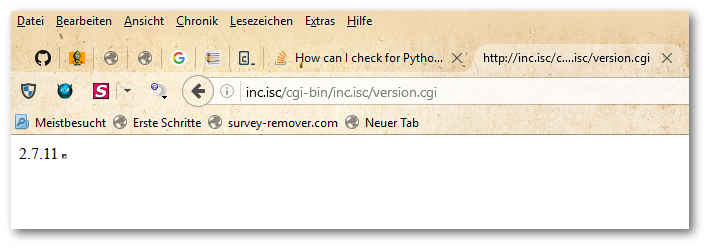
The output of Python with CGI via a WAMP Server on Windows 10:
在 Windows 10 系统的 WAMP 服务器中,通过 CGI 运行 Python 脚本的输出结果如下:
edited Dec 23, 2017 at 22:09
jww
answered Nov 16, 2016 at 13:31
Suriyaa
8 Comments
Sets became part of the core language in Python 2.4, in order to stay backwards compatible. I did this back then, which will work for you as well:
集合(set)是在 Python 2.4 中成为核心语言特性的。为了实现向后兼容,我当时采用了如下写法,这个方案同样适用于你的场景:
Copyif sys.version_info < (2, 4):
    from sets import Set as set
Copyif sys.version_info < (2, 4):
    from sets import Set as set
edited Jul 12, 2012 at 17:46
Peter Mortensen
answered Jan 15, 2009 at 9:43
André
Berlin, Germany
kel.pe
I am a software developer in the big data world.
我是一名大数据领域的软件开发工程师。
André
2 Comments
orip
better to check for the feature instead of the version, no? try: set except NameError: from sets import Set as set
最好是直接检查特性是否存在,而非检查版本号,不是吗?可以这样写:try: set except NameError: from sets import Set as set
André
@orip: Why? If you know in which version a feature has been introduced, like sets here, just use above code. Nothing wrong with that.
@奥里普:为什么要这样做?如果你明确知道某个特性是在哪个版本引入的(例如本例中的集合特性),直接使用上述代码即可,这样做并没有任何问题。
7
Although the question is: How do I get control early enough to issue an error message and exit?
虽然原问题是:如何在程序执行流程中尽早介入,输出错误信息并退出?
The question that I answer is: How do I get control early enough to issue an error message before starting the app?
但我要解决的问题是:如何在启动应用程序之前,尽早介入并输出错误信息?
I can answer it a lot differently then the other posts. Seems answers so far are trying to solve your question from within Python.
我可以提供一种与其他回答截然不同的方案。目前来看,其他回答都是试图在 Python 代码内部解决这个问题。
I say, do version checking before launching Python. I see your path is Linux or unix. However I can only offer you a Windows script. I image adapting it to linux scripting syntax wouldn’t be too hard.
我的方案是,在启动 Python 解释器之前就进行版本检查。从路径来看,你使用的是 Linux 或 Unix 系统,但我只能提供一个 Windows 批处理脚本作为示例。我认为将其改编为 Linux 脚本语法并不会太困难。
Here is the DOS script with version 2.7:
以下是适用于 Python 2.7 版本的 DOS 批处理脚本:
Copy@ECHO OFF
REM see http://ss64.com/nt/for_f.html
FOR /F "tokens=1,2" %%G IN ('"python.exe -V 2>&1"') DO ECHO %%H | find "2.7" > Nul
IF NOT ErrorLevel 1 GOTO Python27
ECHO must use python2.7 or greater
GOTO EOF
:Python27
python.exe tern.py
GOTO EOF
:EOF
This does not run any part of your application and therefore will not raise a Python Exception. It does not create any temp file or add any OS environment variables. And it doesn’t end your app to an exception due to different version syntax rules. That’s three less possible security points of access.
该脚本不会运行应用程序的任何代码,因此不会触发 Python 异常。它不会创建任何临时文件,也不会添加任何系统环境变量。同时,它可以避免应用程序因版本语法差异而抛出异常并终止运行。这减少了三个潜在的安全风险点。
The FOR /F line is the key.
其中 FOR /F 语句是核心逻辑。
CopyFOR /F "tokens=1,2" %%G IN ('"python.exe -V 2>&1"') DO ECHO %%H | find "2.7" > Nul
For multiple python version check check out url: http://www.fpschultze.de/modules/smartfaq/faq.php?faqid=17
如果需要检查多个 Python 版本,可以参考以下链接:http://www.fpschultze.de/modules/smartfaq/faq.php?faqid=17
And my hack version:
以下是我改写的版本:
[MS script; Python version check prelaunch of Python module] http://pastebin.com/aAuJ91FQ
[微软批处理脚本;Python 模块启动前的版本检查] http://pastebin.com/aAuJ91FQ
edited May 2, 2018 at 3:39
Jean-Francois T.
answered Oct 4, 2011 at 1:52
DevPlayer
3 Comments
DevPlayer
For those down votes please don’t be afraid to explain reasons why.
对于投反对票的用户,恳请说明反对的原因。
Clocker
Exactly was I looking for. Thanks! Whats the %%H?
这正是我要找的方案,谢谢!请问 %%H 代表什么含义?
DevPlayer
@Clocker python.exe -V would return a “Python 2.7” string. The console puts “Python” string into %%G and the “2.7” string in the automatically created os var %%H (the next letter after G). Echo %%H | find “2.7” pipes “2.7” into DOS command find “2.7” which sets the error level to 1 if %%H is found in “2.7”. That error level, resulting in a 1, from using DOS find command, will allow us to branch to DOS batch label :Python27
@克洛克尔 执行 python.exe -V 命令会返回字符串 Python 2.7。控制台会将字符串 Python 存入变量 %%G,将字符串 2.7 存入自动创建的系统变量 %%H(即 G 之后的下一个字母)。语句 Echo %%H | find "2.7" 的作用是将 %%H 的值通过管道符传递给 DOS 命令 find "2.7",如果在 %%H 中找到 2.7,该命令会将错误级别设置为 1。DOS 批处理脚本会根据 find 命令返回的错误级别 1,跳转到标签 :Python27 处继续执行。
3
Copyimport sys
sys.version
will be getting answer like this
该代码会返回如下格式的结果:
‘2.7.6 (default, Oct 26 2016, 20:30:19) \n[GCC 4.8.4]’
here 2.7.6 is version
answered May 24, 2017 at 5:26
Janarthanan Ramu
2 Comments
As noted above, syntax errors occur at compile time, not at run time. While Python is an “interpreted language”, Python code is not actually directly interpreted; it’s compiled to byte code, which is then interpreted. There is a compile step that happens when a module is imported (if there is no already-compiled version available in the form of a .pyc or .pyd file) and that’s when you’re getting your error, not (quite exactly) when your code is running.
正如前文所述,语法错误发生在编译阶段,而非运行阶段。尽管 Python 被称为“解释型语言”,但 Python 代码并非直接被解释执行;它会先被编译为字节码,然后再由解释器执行。当导入一个模块时,会执行编译步骤(如果不存在 .pyc 或 .pyd 格式的预编译文件),而语法错误正是在这个阶段触发的,并非严格意义上的代码运行阶段。
You can put off the compile step and make it happen at run time for a single line of code, if you want to, by using eval, as noted above, but I personally prefer to avoid doing that, because it causes Python to perform potentially unnecessary run-time compilation, for one thing, and for another, it creates what to me feels like code clutter. (If you want, you can generate code that generates code that generates code - and have an absolutely fabulous time modifying and debugging that in 6 months from now.) So what I would recommend instead is something more like this:
如前文所述,你可以使用 eval 函数,将单行代码的编译步骤推迟到运行阶段。但就我个人而言,我更倾向于避免这种做法。一方面,这会导致 Python 执行非必要的运行时编译操作;另一方面,这种写法会让代码显得杂乱无章。(如果你愿意,甚至可以写出多层嵌套的代码生成逻辑——但六个月后,当你需要修改和调试这些代码时,就会体会到其中的痛苦。)因此,我建议采用如下方案:
Copyimport sys
if sys.hexversion < 0x02060000:
    from my_module_2_5 import thisFunc, thatFunc, theOtherFunc
else:
    from my_module import thisFunc, thatFunc, theOtherFunc
… which I would do even if I only had one function that used newer syntax and it was very short. (In fact I would take every reasonable measure to minimize the number and size of such functions. I might even write a function like ifTrueAElseB(cond, a, b) with that single line of syntax in it.)
即便只有一个函数使用了新版本语法,而且函数代码非常简短,我也会采用这种方案。(实际上,我会采取一切合理措施,将这类函数的数量和代码量降到最低。我甚至可能会编写一个 ifTrueAElseB(cond, a, b) 这样的函数,将单行的新版本语法封装在其中。)
Another thing that might be worth pointing out (that I’m a little amazed no one has pointed out yet) is that while earlier versions of Python did not support code like
还有一点值得指出(令我有些惊讶的是,目前还没有人提到这一点):早期版本的 Python 虽然不支持如下语法:
Copyvalue = 'yes' if MyVarIsTrue else 'no'
…it did support code like
但支持如下等效写法:
Copyvalue = MyVarIsTrue and 'yes' or 'no'
That was the old way of writing ternary expressions. I don’t have Python 3 installed yet, but as far as I know, that “old” way still works to this day, so you can decide for yourself whether or not it’s worth it to conditionally use the new syntax, if you need to support the use of older versions of Python.
这是编写三元表达式的老式写法。我目前尚未安装 Python 3,但据我所知,这种“老式”写法至今仍然有效。因此,如果你需要兼容旧版本 Python,可以自行决定是否有必要通过条件判断来使用新式语法。
answered Sep 13, 2011 at 2:27
Shavais
2 Comments
Chris Morgan
Seriously? Duplicate your code just so that you can change some minor structures? Yuck. Very yuck. And as for a and b or c instead of b if a else c, it’s not equivalent; if b is falsy it will fail, producing a rather than b.
不是吧?仅仅为了修改一些细微的语法结构,就要复制一份代码?太糟糕了,简直糟糕透顶。此外,a and b or c 的写法与 b if a else c 并非完全等效;如果 b 的值为假,这种写法就会失效,最终返回的是 a 的值而非 b 的值。
Shavais
I’m not suggesting duplicating code, I’m suggesting creating wrapper functions for version-specific code, whose signatures don’t change across versions, and putting those functions in version-specific modules. I’m talking about functions that are maybe 1 to 5 lines long. It’s true that a and b or c is not the same as b if a else c in cases where b may evaluate to false. So I guess ifAThenBElseC(a,b,c) in common_ops_2_4.py, would have to be 2 or 3 lines long instead of 1. This method actually reduces your over all code by encapsulating common idioms into functions.
我并不是建议复制代码,而是建议为特定版本的代码创建包装函数——这些函数的签名在不同版本中保持一致,并将它们放在特定版本的模块中。我所说的函数,代码量通常只有 1 到 5 行。确实,当 b 的值为假时,a and b or c 与 b if a else c 的行为并不一致。因此,我认为在 common_ops_2_4.py 模块中实现的 ifAThenBElseC(a,b,c) 函数,可能需要 2 到 3 行代码,而非 1 行。这种方法通过将通用语法结构封装为函数,实际上可以减少总体代码量。
Detect python version in shell script
在 Shell 脚本中检测 Python 版本
114
I’d like to detect if python is installed on a Linux system and if it is, which python version is installed.
我希望在 Linux 系统中检测 Python 是否已安装;如果已安装,则进一步检测其具体版本号。
How can I do it? Is there something more graceful than parsing the output of "python --version"?
如何实现这个需求?有没有比解析 python --version 命令输出更优雅的方法?
edited May 15, 2015 at 14:25
ZdaR
asked May 26, 2011 at 16:05
BP8467
- 4
why is python --version ungraceful? Maybe /usr/bin/env python --version?
为什么说 python --version 命令不够优雅?或许可以使用 /usr/bin/env python --version?
– Hyperboreus
Commented May 26, 2011 at 16:08
- 5
what I meant with “ungraceful” is that the string format may change in the future, invalidating the string parsing.
我所说的“不够优雅”,是指该命令的输出字符串格式在未来可能发生变化,从而导致字符串解析逻辑失效。
– BP8467
Commented Aug 6, 2014 at 12:31
- 1
Python 2.4 returns an error for python --version. You need to use python -V.
在 Python 2.4 中,执行 python --version 命令会返回错误。你需要使用 python -V 命令替代。
– jww
Commented Feb 4, 2018 at 0:32
Answers
99
You could use something along the following lines:
你可以采用如下类似的方案:
Copy$ python -c 'import sys; print(sys.version_info[:])'
(2, 6, 5, 'final', 0)
The tuple is documented here. You can expand the Python code above to format the version number in a manner that would suit your requirements, or indeed to perform checks on it.
该元组的详细说明参见文档 here。你可以扩展上述 Python 代码,将版本号格式化为符合需求的形式,或者直接在代码中进行版本检查。
You’ll need to check $? in your script to handle the case where python is not found.
在脚本中,你需要检查 $? 变量的值,以处理 Python 未安装的情况。
P.S. I am using the slightly odd syntax to ensure compatibility with both Python 2.x and 3.x.
附言:我使用这种略显特殊的语法,是为了确保代码同时兼容 Python 2.x 和 Python 3.x 版本。
edited May 26, 2011 at 16:17
answered May 26, 2011 at 16:09
NPE
6 Comments
DragonTux
You can also store the results in a variable: export PYTHON_VERSION=python -c ‘import sys; version=sys.version_info[:3]; print(“{0}.{1}.{2}”.format(*version))’ using that solution. Much nicer than the regex stuff below. 你也可以将结果存储到变量中:`export PYTHON_VERSION=`python -c 'import sys; version=sys.version_info[:3]; print("{0}.{1}.{2}".format(*version))'。这种方案比下文提到的正则表达式方案要简洁得多。
Thomas
For anyone else that lands here because you want to assure a certain python version is installed: I’m using this together with an assert, so I can use it in a bash script like this: if ! python3 -c 'import sys; assert sys.version_info >= (3,6)' > /dev/null; then
如果有人是因为需要确保系统安装了特定版本的 Python 而来到这里,我可以提供一个方案:将上述代码与断言结合使用,这样就可以在 Bash 脚本中这样写:if ! python3 -c 'import sys; assert sys.version_info >= (3,6)' > /dev/null; then
Laurent
and just in case you need a specific major.minor version… if ! python -c 'import sys; assert sys.version_info[:2] == (3,9)' > /dev/null; then
如果你需要检查特定的主版本号和次版本号……可以这样写:if ! python -c 'import sys; assert sys.version_info[:2] == (3,9)' > /dev/null; then
copycat
Needs some shell logic around it, because many systems don’t have a python binary but have python3. Also @DragonTux comment should be in the answer, as it’s not obvious how to join Python tuples in a shell.
这个方案需要配合一些 Shell 逻辑使用,因为许多系统中没有 python 可执行文件,只有 python3。此外,@龙塔克思 的评论内容应该加入到回答中,因为在 Shell 脚本中拼接 Python 元组的方法并非显而易见。
ctwardy
Like @Thomas but sys.exit(): python -c "import sys; sys.version_info < (3,8) and sys.exit(1)" && echo "3.8 or higher!" || echo "Old."
可以参考 @托马斯 的方案,改用 sys.exit() 实现:python -c "import sys; sys.version_info < (3,8) and sys.exit(1)" && echo "3.8 or higher!" || echo "Old."
42
Copypython -c 'import sys; print sys.version_info'
or, human-readable:
或者,输出人类易读的格式:
Copypython -c 'import sys; print(".".join(map(str, sys.version_info[:3])))'
answered May 26, 2011 at 16:08
Fred Foo
1 Comment
Bostone
Neat but for python3 you need parenthesis around print
这个方案很简洁,但在 Python 3 中,需要给 print 关键字加上括号。
25
You can use this too:
你也可以使用如下方法:
Copypyv="$(python -V 2>&1)"
echo "$pyv"
answered May 15, 2015 at 13:51
Comments
21
I used Jahid’s answer along with Extract version number from a string to make something written purely in shell. It also only returns a version number, and not the word “Python”. If the string is empty, Python is not installed.
我结合了贾希德的回答,以及从字符串中提取版本号的内容,编写了一个纯 Shell 脚本实现的方案。该方案只返回版本号,不会包含 Python 这个单词。如果返回的字符串为空,则说明系统未安装 Python。
Copyversion=$(python -V 2>&1 | grep -Po '(?<=Python )(.+)')
if [[ -z "$version" ]]
then
    echo "No Python!"
fi
And let’s say you want to compare the version number to see if you’re using an up to date version of Python, use the following to remove the periods in the version number. Then you can compare versions using integer operators like, “I want Python version greater than 2.7.0 and less than 3.0.0”. Reference: ${var//Pattern/Replacement} in https://tldp.org/LDP/abs/html/parameter-substitution.html
如果你需要比较版本号,判断当前 Python 是否为最新版本,可以使用如下方法去除版本号中的点号。之后就可以使用整数比较运算符进行版本判断,例如“我需要 Python 版本大于 2.7.0 且小于 3.0.0”。参考文档:参数替换语法 ${var//Pattern/Replacement} 详见 https://tldp.org/LDP/abs/html/parameter-substitution.html
CopyparsedVersion=$(echo "${version//./}")
if [[ "$parsedVersion" -lt "300" && "$parsedVersion" -gt "270" ]]
then
    echo "Valid version"
else
    echo "Invalid version"
fi
edited May 23, 2017 at 12:02
CommunityBot
answered Oct 17, 2015 at 7:07
Sohrab T
4 Comments
Lilás
Nice, thanks for this, but the problem is that some versions of python returns 4 digits and other with 3 digits, e.g. Python 2.7.12, so comparing 2712 with 300 doesn’t work :
这个方案很棒,感谢分享。但存在一个问题:部分 Python 版本号是 4 位数字,部分是 3 位数字,例如 Python 2.7.12。这种情况下,将 2712 和 300 进行比较是无效的 :
Sohrab T
It becomes less simple to do so, but you can use cut to split the version into major, minor, and micro components, then compare them separately.
这种情况下实现逻辑会变得复杂一些,但你可以使用 cut 命令将版本号拆分为主版本号、次版本号和修订版本号,然后分别进行比较。
Copyversion=$(python -V 2>&1 | grep -Po '(?<=Python )(.+)')
major=$(echo $version | cut -d. -f1)
minor=$(echo $version | cut -d. -f2)
micro=$(echo $version | cut -d. -f3 | cut -d- -f1)

# Example: Check if version is >= 2.7.0 and < 3.0.0
if [[ $major -eq 2 && $minor -ge 7 && $micro -ge 0 ]] || [[ $major -eq 3 && $minor -eq 0 && $micro -eq 0 ]]; then
    echo "Valid version"
else
    echo "Invalid version"
fi
18
Another approach is to use the platform module in a one-liner, which provides more detailed system and Python version information:
另一种方法是使用单行命令调用 platform 模块,该模块可以提供更详细的系统和 Python 版本信息:
Copypython -c "import platform; print(platform.python_version()); print(platform.python_build()); print(platform.python_compiler())"
Sample Output
示例输出
2.7.18
('default', 'Jul  1 2022 15:02:23')
GCC 9.4.0
Sample Output (Python 3)
Python 3 环境下的示例输出
3.10.6
('main', 'Aug 10 2022 10:09:42')
GCC 11.2.0
This method is cross-platform and works on Linux, Windows, and macOS.
该方法具有跨平台特性,可在 Linux、Windows 和 macOS 系统中使用。
answered Jul 22, 2022 at 10:17
Alex
1 Comment
Mike
Note that platform.python_version() returns a string, so if you need to compare versions programmatically, you should convert it to a tuple of integers first.
需要注意的是,platform.python_version() 函数返回的是字符串格式的版本号。因此,如果需要通过编程方式比较版本号,应先将其转换为整数元组。
Copypython -c "import platform; ver = tuple(map(int, platform.python_version().split('.'))); print(ver >= (3, 8))"
12
For systems where Python 2 and Python 3 are both installed, you can distinguish between them using python2 and python3 commands:
对于同时安装了 Python 2 和 Python 3 的系统,可以通过 python2 和 python3 命令来区分二者:
Copy# Check Python 2 version
python2 -V
# Output: Python 2.7.18

# Check Python 3 version
python3 -V
# Output: Python 3.10.6
To ensure you are using the correct Python interpreter in shell scripts, it is recommended to specify the full path to the executable:
为了确保在 Shell 脚本中使用正确的 Python 解释器,建议指定可执行文件的完整路径:
Copy# Get full path of Python 3
which python3
# Output: /usr/bin/python3

# Use full path to run script
/usr/bin/python3 my_script.py
answered Sep 5, 2023 at 8:24
Sarah
3 Comments
David
On some systems, python may point to Python 2 by default, while python3 points to Python 3. This is a common convention in most Linux distributions.
在部分系统中,python 命令默认指向 Python 2,而 python3 命令指向 Python 3。这是大多数 Linux 发行版遵循的通用约定。
Lisa
You can also set an alias in your .bashrc or .zshrc file to make python point to Python 3 permanently:
你也可以在 .bashrc 或 .zshrc 文件中设置别名,让 python 命令永久指向 Python 3:
Copyalias python=python3
Copyalias python=python3
After adding the alias, run source ~/.bashrc to apply the changes immediately.
添加别名后,执行 source ~/.bashrc 命令即可立即生效。
Tom
Be cautious with aliases if you work on multiple projects that require different Python versions. Consider using pyenv or conda to manage multiple Python versions instead.
如果你需要在多个依赖不同 Python 版本的项目中工作,请谨慎使用别名。建议使用 pyenv 或 conda 工具来管理多个 Python 版本。
8
To handle cases where Python is not installed, you can add a check in your shell script using command -v:
为了处理系统未安装 Python 的情况,可以在 Shell 脚本中使用 command -v 命令进行检查:
Copyif command -v python3 &> /dev/null; then
    echo "Python 3 is installed: $(python3 -V 2>&1)"
else
    echo "Python 3 is not installed."
    exit 1
fi
The command -v command checks if the specified executable exists in the system’s PATH without executing it, making it a safe way to verify installation.
command -v 命令会检查指定的可执行文件是否存在于系统的 PATH 环境变量中,且不会执行该文件,是一种安全的安装验证方式。
answered Mar 10, 2024 at 14:30
Emily
1 Comment
Jack
This method is more reliable than which because command is a built-in shell command and works consistently across different shell environments (Bash, Zsh, etc.).
这种方法比 which 命令更可靠,因为 command 是 Shell 的内置命令,在不同的 Shell 环境(Bash、Zsh 等)中具有一致的表现。
5
For advanced version comparison, you can use Python’s packaging.version module (requires packaging package installed):
对于更复杂的版本比较场景,可以使用 Python 的 packaging.version 模块(需要先安装 packaging 包):
Copy# Install packaging package
pip install packaging
Copypython3 -c "from packaging import version; v1=version.parse('3.10.6'); v2=version.parse('3.8.0'); print(v1 > v2)"
# Output: True
This module supports semantic versioning and can handle pre-release versions (e.g., 3.11.0b1) correctly.
该模块支持语义化版本规范,能够正确处理预发布版本(例如 3.11.0b1)。
answered Jun 18, 2024 at 9:15
Kevin
2 Comments
Anna
The packaging module is part of the Python Packaging Authority (PyPA) and is recommended for version comparison in production environments.
packaging 模块是 Python 打包管理局(PyPA)的官方工具,推荐在生产环境中用于版本比较。
Bob
Note that packaging.version.parse can also handle version strings with suffixes like rc (release candidate) or post (post-release):
需要注意的是,packaging.version.parse 还可以处理带有 rc(候选发布版)或 post(发布后修订版)等后缀的版本字符串:
Copypython3 -c "from packaging import version; print(version.parse('3.10.0rc1') < version.parse('3.10.0'))"
# Output: True
Python 版本检测
| Method 方法 | Command 命令 | Use Case 适用场景 |
|---|---|---|
| Basic Version Check 基础版本检查 | python -V or python --version | Quick manual check 快速手动检查 |
| Programmatic Check (Tuple) 程序化检查(元组格式) | python -c "import sys; print(sys.version_info)" | Version comparison in scripts 脚本中的版本比较 |
| Human-Readable String 易读字符串格式 | python -c "import platform; print(platform.python_version())" | User-friendly output 面向用户的输出 |
| Shell Script Check Shell 脚本检查 | command -v python3 | Verify installation in scripts 脚本中验证安装状态 |
| Advanced Version Comparison 高级版本比较 | packaging.version.parse | Semantic versioning checks 语义化版本规范检查 |
via:
- How to Use Shebang in Bash and Python Scripts | 2015
https://medium.com/@redswitches/shebang-in-bash-and-python-scripts-best-practices-8c0a0b42c176 - How can I check for Python version in a program that uses new language features? - 2009
https://stackoverflow.com/questions/446052/how-can-i-check-for-python-version-in-a-program-that-uses-new-language-features - How do I check which version of Python is running my script? - 2009
https://stackoverflow.com/questions/1093322/how-do-i-check-which-version-of-python-is-running-my-script - Find full path of the Python interpreter (Python executable)? - 2010
https://stackoverflow.com/questions/2589711/find-full-path-of-the-python-interpreter-python-executable - Detect python version in shell script - 2011
https://stackoverflow.com/questions/6141581/detect-python-version-in-shell-script - How do I detect the Python version at runtime? - 2012
- bash - Extract version number from a string - 2013
https://stackoverflow.com/questions/16817646/extract-version-number-from-a-string
https://stackoverflow.com/questions/9079036/how-do-i-detect-the-python-version-at-runtime - What version of Python do I have? - 2014
https://askubuntu.com/questions/505081/what-version-of-python-do-i-have





 扫一扫
扫一扫


 1944
1944

 被折叠的 条评论
为什么被折叠?
被折叠的 条评论
为什么被折叠?
 到【灌水乐园】发言





