



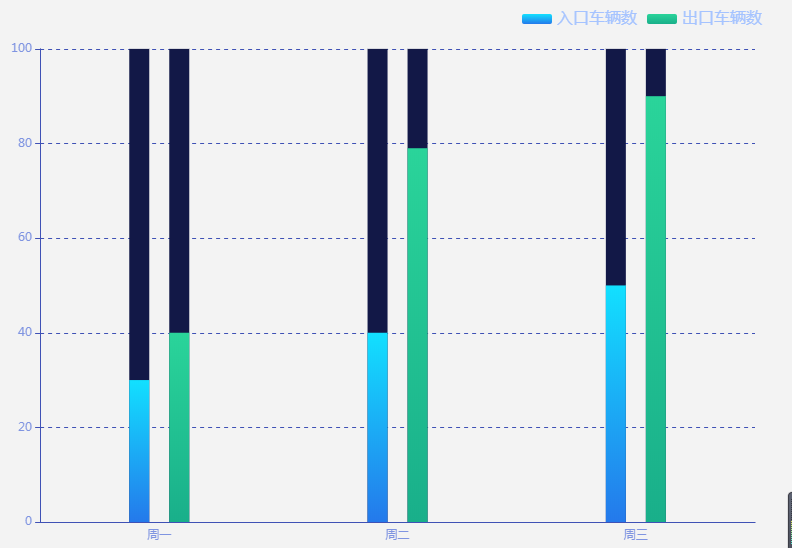
 本文详细介绍了一个使用ECharts进行车辆数据可视化的案例,包括入口和出口的车辆数量对比,通过柱状图展示周一至周三的数据变化趋势。代码配置了丰富的图表样式,如线性渐变颜色填充、阴影效果、图例样式等,适用于交通管理和停车场数据分析。
1.效果
2.代码
option = {
      tooltip: {
        show: "true",
        trigger: 'item',
        backgroundColor: '#235EAE', // 背景
        borderWidth: 1,
        borderColor: '#6C99FF',
        padding: [5, 5, 5, 5], //内边距
        extraCssText: 'box-shadow: 0 0 3px rgba(255, 255, 255, 0.4);', //添加阴影
        formatter: function (params) {
          if (params.seriesIndex == "3" || params.seriesIndex == "2") {
            return params.name + '<br>' + params.seriesName + ':' + params.value + '辆';
          }
        },
        textStyle: {
          color: '#fefefe',
          fontSize: 16
        },
      },

      legend: {
        data: ['入口车辆数', '出口车辆数', ],
        right: 20,
        top: 0,
        itemGap: 10, // 各个item之间的间隔,单位px,默认为10,
        itemWidth: 30, // 图例图形宽度
        itemHeight: 10, // 图例图形高度
        textStyle: {
          color: '#A5C3FF',
          fontWeight: 'normal',
          fontSize: 16
        },
      },
      grid: {
        left: '3%',
        right: '4%',
        top: '8%',
        bottom: 0,
        containLabel: true
      },
      xAxis: [{
          type: 'category',
          data: ['周一', '周二', "周三"],
          axisTick: {
            show: false // 是否显示坐标轴轴线
          },
          axisLabel: { //坐标轴刻度标签的相关设置。
            show: true,
            /*  interval: 0,*/
            // rotate: '20',
            textStyle: {
              color: '#7F94E1',
              fontSize: 12
            }
          },
          axisLine: { //坐标轴轴线相关设置。
            inside: false,
            lineStyle: {
              color: '#3f51b5'
            }
          }
        },
        {
          type: 'category',
          axisLine: {
            show: false
          },
          axisTick: {
            show: false
          },
          axisLabel: {
            show: false
          },
          splitArea: {
            show: false
          },
          splitLine: {
            show: false
          },
          data: ['周一', '周二', "周三"]
        },
      ],

      yAxis: [{
        type: 'value',
        splitLine: { // 网格线
          show: true,
          lineStyle: {
            type: 'dashed',
            color: '#3f51b5'
          }
        },
        axisLabel: { //坐标轴刻度标签的相关设置。
          show: true,
          textStyle: {
            color: '#7F94E1',
            fontSize: 12
          }
        },
        axisLine: { //坐标轴轴线相关设置。
          lineStyle: {
            color: '#3f51b5'
          }
        }
      }],
      series: [{
          type: 'bar',
          xAxisIndex: 1,
          zlevel: 1,
          itemStyle: {
            normal: {
              color: '#121847',
              borderWidth: 0,
              shadowBlur: {
                shadowColor: 'rgba(255,255,255,0.31)',
                shadowBlur: 10,
                shadowOffsetX: 0,
                shadowOffsetY: 2,
              },
            }
          },
          barWidth: 20,
          barGap: '100%',
          data: [100, 100, 100]
        },
        {
          type: 'bar',
          xAxisIndex: 1,
          barGap: '100%',
          data: [100, 100, 100],
          zlevel: 1,
          barWidth: 20,
          itemStyle: {
            normal: {
              color: '#121847',
              borderWidth: 0,
              shadowBlur: {
                shadowColor: 'rgba(255,255,255,0.31)',
                shadowBlur: 10,
                shadowOffsetX: 0,
                shadowOffsetY: 2,
              },
            }
          },
        },

        {
          name: '入口车辆数',
          type: 'bar',
          data: [30, 40, 50],
          barMaxWidth: 20,
          zlevel: 2,
          barGap: '100%',
          itemStyle: {
            normal: {
              color: {
                type: 'linear',
                x: 0,
                y: 0,
                x2: 0,
                y2: 1,
                colorStops: [{
                  offset: 0,
                  color: '#12e0ff' // 0% 处的颜色
                }, {
                  offset: 1,
                  color: '#2479eb' // 100% 处的颜色
                }]
              }
            }
          },
        },
        {
          name: '出口车辆数',
          type: 'bar',
          // stack: '广告',
          barMaxWidth: 20,
          zlevel: 2,
          barGap: '100%',
          data: [40, 79, 90],
          itemStyle: {
            normal: {
              color: {
                type: 'linear',
                x: 0,
                y: 0,
                x2: 0,
                y2: 1,
                colorStops: [{
                  offset: 0,
                  // color: '#7e68ff' // 0% 处的颜色
                  // color:'#29a5ff'
                  color: '#2ad49a'
                }, {
                  offset: 1,
                  // color: '#5669e4' // 100% 处的颜色
                  // color:'#267ffb'
                  color: '#19af8a'
                }]
              }
            }
          },
        },
      ]
    };





 扫一扫
扫一扫


 5480
5480

 被折叠的 条评论
为什么被折叠?
被折叠的 条评论
为什么被折叠?
 到【灌水乐园】发言





