


1、升级GCC
2、升级make
# 升级 make(默认为3 升级为4)
wget http://ftp.gnu.org/gnu/make/make-4.3.tar.gz
tar -xzvf make-4.3.tar.gz && cd make-4.3/
./configure  --prefix=/usr/local/make
make && make install
cd /usr/bin/ && mv make make.bak
ln -sv /usr/local/make/bin/make /usr/bin/make
3、下载glibc
wget http://ftp.gnu.org/gnu/glibc/glibc-2.28.tar.gz
tar xf glibc-2.28.tar.gz
cd glibc-2.28/ && mkdir build  && cd build
4 、lnss_test2错误
make install时候lnss_test2错误:
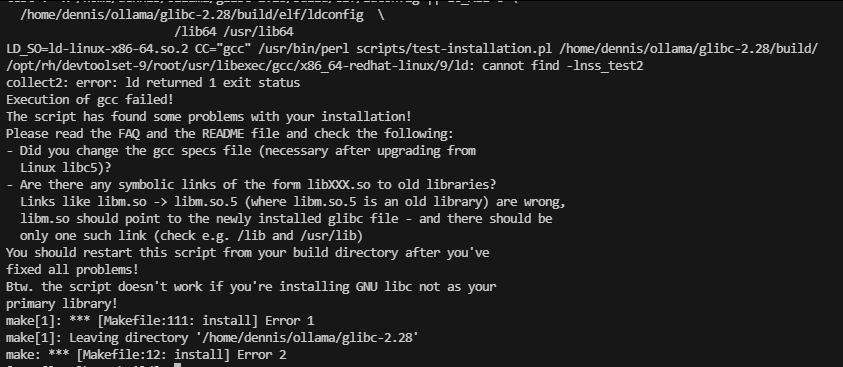
修改test-installation.pl文件:
vim scripts/test-installation.pl在文件的128行新增$name ne “nss_test2”,如下图所示:

5、config参数
# ../configure --prefix=/usr --disable-profile --enable-add-ons --with-headers=/usr/include  --with-binutils=/usr/bin
../configure --prefix=/usr --disable-profile --enable-add-ons --with-headers=/usr/include --disable-sanity-checks --disable-werror --enable-obsolete-nsl
make && make install
--with-binutils=/usr/bin:
这个参数不用,因为gcc临时启用,不在这个目录下;要用这个参数就需要通过ln把gcc链接到/usr/bin下;
enable-obsolete-nsl:
如果执行configure命令是不带参数,make install过程会有出现报错:undefined reference to '_nsl_default_nss@GLIBC_PRIVATE
6、安装
make -j 10
# make localedata/install-locales -j 10
make install -j 10
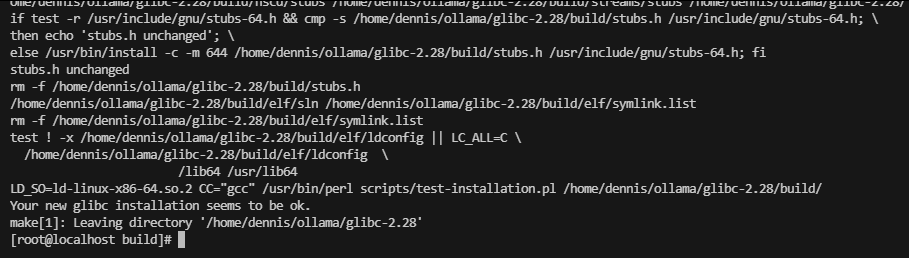
结果:





 扫一扫
扫一扫


 6659
6659

 被折叠的 条评论
为什么被折叠?
被折叠的 条评论
为什么被折叠?
 到【灌水乐园】发言





