


 本文介绍了如何使用Android TabHost实现标签页切换,并展示了如何为每个标签页创建自定义适配器,分别展示推荐、热门、最新和经典内容。通过模拟数据和ListView展示,详细展示了TabActivity和适配器的使用。
一:布局文件activity.xml
<?xml version="1.0" encoding="utf-8"?>
<TabHost xmlns:android="http://schemas.android.com/apk/res/android"
    xmlns:tools="http://schemas.android.com/tools"
    android:layout_width="match_parent"
    android:layout_height="match_parent"
    tools:context=".Activity8"
    android:id="@android:id/tabhost">
    <TextView
        android:layout_width="match_parent"
        android:layout_height="50dp"
        android:text="Tag标签页切换"
        android:textSize="23sp"
        android:gravity="center"/>

    <Button
        android:id="@+id/btn"
        android:layout_width="match_parent"
        android:layout_height="50dp"
        android:text="返回"
        android:layout_marginTop="60dp"/>

    <LinearLayout
        android:layout_width="match_parent"
        android:layout_height="match_parent"
        android:orientation="vertical"
        android:layout_marginTop="120dp">
        <TabWidget
            android:id="@android:id/tabs"
            android:layout_width="match_parent"
            android:layout_height="wrap_content"/>
        <FrameLayout
            android:id="@android:id/tabcontent"
            android:layout_width="match_parent"
            android:layout_height="wrap_content"/>
    </LinearLayout>
</TabHost>
二:主界面Activity
package com.example.test;

import android.app.TabActivity;
import android.content.Intent;
import android.os.Bundle;
import android.view.LayoutInflater;
import android.view.View;
import android.view.WindowManager;
import android.widget.Button;
import android.widget.TabHost;

public class Activity8 extends TabActivity {

    @Override
    protected void onCreate(Bundle savedInstanceState) {
        super.onCreate(savedInstanceState);
        getWindow().setFlags(WindowManager.LayoutParams.FLAG_FULLSCREEN, WindowManager.LayoutParams.FLAG_FULLSCREEN);
        setContentView(R.layout.activity_8);

        initView();

        tabPaging();
    }

    private void initView() {
        Button btn = findViewById(R.id.btn);

        btn.setOnClickListener(new View.OnClickListener() {
            @Override
            public void onClick(View v) {
                finish();
            }
        });
    }

    private void tabPaging() {
        TabHost tabHost = getTabHost();
        TabHost.TabSpec spec;

        //进入界面时刷新UI————setContent(intent.addFlags(Intent.FLAG_ACTIVITY_CLEAR_TOP))
        // tag页面1
        View tab1 = LayoutInflater.from(this).inflate(R.layout.activity_tab1, null);
        Intent intent1 = new Intent().setClass(this, Tab1.class);
        spec = tabHost.newTabSpec("tab1").setIndicator(tab1).setContent(intent1.addFlags(Intent.FLAG_ACTIVITY_CLEAR_TOP));
        tabHost.addTab(spec);

        // tag页面2
        View tab2 = LayoutInflater.from(this).inflate(R.layout.activity_tab2, null);
        Intent intent2 = new Intent().setClass(this, Tab2.class);
        spec = tabHost.newTabSpec("tab2").setIndicator(tab2).setContent(intent2.addFlags(Intent.FLAG_ACTIVITY_CLEAR_TOP));
        tabHost.addTab(spec);

        // tag页面3
        View tab3 = LayoutInflater.from(this).inflate(R.layout.activity_tab3, null);
        Intent intent3 = new Intent().setClass(this, Tab3.class);
        spec = tabHost.newTabSpec("tab3").setIndicator(tab3).setContent(intent3.addFlags(Intent.FLAG_ACTIVITY_CLEAR_TOP));
        tabHost.addTab(spec);

        // tag页面4
        View tab4 = LayoutInflater.from(this).inflate(R.layout.activity_tab4, null);
        Intent intent4 = new Intent().setClass(this, Tab4.class);
        spec = tabHost.newTabSpec("tab4").setIndicator(tab4).setContent(intent4.addFlags(Intent.FLAG_ACTIVITY_CLEAR_TOP));
        tabHost.addTab(spec);

        // 设置监听器
        tabHost.setOnTabChangedListener(new TabHost.OnTabChangeListener() {
            @Override
            public void onTabChanged(String tabId) {
                if (tabId.equals("tab1")) {
                    Toast.makeText(Activity8.this, "推荐", Toast.LENGTH_LONG).show();
                } else if (tabId.equals("tab2")) {
                    Toast.makeText(Activity8.this, "热门", Toast.LENGTH_LONG).show();
                } else if (tabId.equals("tab3")) {
                    Toast.makeText(Activity8.this, "最新", Toast.LENGTH_LONG).show();
                } else if (tabId.equals("tab4")) {
                    Toast.makeText(Activity8.this, "经典", Toast.LENGTH_LONG).show();
                }
            }
        });
    }
}
tag页标签activity_tab1,activity_tab2,activity_tab3,activity_tab4布局:
<?xml version="1.0" encoding="utf-8"?>
<RelativeLayout xmlns:android="http://schemas.android.com/apk/res/android"
    xmlns:app="http://schemas.android.com/apk/res-auto"
    xmlns:tools="http://schemas.android.com/tools"
    android:layout_width="wrap_content"
    android:layout_height="wrap_content"
    tools:context=".Tab1"
    android:padding="5dp"
    android:background="@drawable/tab_btn"
    android:gravity="center">

    <TextView
        android:layout_width="wrap_content"
        android:layout_height="wrap_content"
        android:text="推荐"/>

</RelativeLayout>
<?xml version="1.0" encoding="utf-8"?>
<RelativeLayout xmlns:android="http://schemas.android.com/apk/res/android"
    xmlns:app="http://schemas.android.com/apk/res-auto"
    xmlns:tools="http://schemas.android.com/tools"
    android:layout_width="wrap_content"
    android:layout_height="wrap_content"
    tools:context=".Tab2"
    android:padding="5dp"
    android:background="@drawable/tab_btn"
    android:gravity="center">

    <TextView
        android:layout_width="wrap_content"
        android:layout_height="wrap_content"
        android:text="热门"/>
</RelativeLayout>
<?xml version="1.0" encoding="utf-8"?>
<RelativeLayout xmlns:android="http://schemas.android.com/apk/res/android"
    xmlns:app="http://schemas.android.com/apk/res-auto"
    xmlns:tools="http://schemas.android.com/tools"
    android:layout_width="wrap_content"
    android:layout_height="wrap_content"
    tools:context=".Tab3"
    android:padding="5dp"
    android:background="@drawable/tab_btn"
    android:gravity="center">

    <TextView
        android:layout_width="wrap_content"
        android:layout_height="wrap_content"
        android:text="最新"/>
</RelativeLayout>
<?xml version="1.0" encoding="utf-8"?>
<RelativeLayout xmlns:android="http://schemas.android.com/apk/res/android"
    xmlns:app="http://schemas.android.com/apk/res-auto"
    xmlns:tools="http://schemas.android.com/tools"
    android:layout_width="wrap_content"
    android:layout_height="wrap_content"
    tools:context=".Tab4"
    android:padding="5dp"
    android:background="@drawable/tab_btn"
    android:gravity="center">

    <TextView
        android:layout_width="wrap_content"
        android:layout_height="wrap_content"
        android:text="经典"/>
</RelativeLayout>
三:Tag页面
tag1:
package com.example.test;

import androidx.appcompat.app.AppCompatActivity;

import android.os.Bundle;
import android.view.View;
import android.widget.AdapterView;
import android.widget.ListView;
import android.widget.Toast;

import com.example.test.tools.TabAdapter1;

import java.util.ArrayList;
import java.util.HashMap;
import java.util.List;
import java.util.Map;

public class Tab1 extends AppCompatActivity {
    List<Map<String, String>> list = new ArrayList<>();

    @Override
    protected void onCreate(Bundle savedInstanceState) {
        super.onCreate(savedInstanceState);
        setContentView(R.layout.tab_body);

        initView();
    }

    private void initView() {
        /**
         * 模拟list数据
         */
        Map<String, String> map1 = new HashMap();
        map1.put("name", "张三");
        map1.put("age", "18");
        map1.put("gender", "男");
        map1.put("number", "001");
        list.add(map1);
        Map<String, String> map2 = new HashMap();
        map2.put("name", "翠花");
        map2.put("age", "16");
        map2.put("gender", "女");
        map2.put("number", "002");
        list.add(map2);
        Map<String, String> map3 = new HashMap();
        map3.put("name", "李四");
        map3.put("age", "20");
        map3.put("gender", "男");
        map3.put("number", "003");
        list.add(map3);
        Map<String, String> map4 = new HashMap();
        map4.put("name", "熊大");
        map4.put("age", "32");
        map4.put("gender", "男");
        map4.put("number", "004");
        list.add(map4);
        Map<String, String> map5 = new HashMap();
        map5.put("name", "王五");
        map5.put("age", "25");
        map5.put("gender", "男");
        map5.put("number", "005");
        list.add(map5);
        Map<String, String> map6 = new HashMap();
        map6.put("name", "赵六");
        map6.put("age", "45");
        map6.put("gender", "男");
        map6.put("number", "006");
        list.add(map6);
        Map<String, String> map7 = new HashMap();
        map7.put("name", "姬七");
        map7.put("age", "33");
        map7.put("gender", "男");
        map7.put("number", "007");
        list.add(map7);
    }

    @Override
    protected void onStart() {
        super.onStart();
        Content();
    }

    private void Content() {
        ListView listView = findViewById(R.id.tab);
        TabAdapter1 adapter = new TabAdapter1(Tab1.this, list);
        listView.setAdapter(adapter);
        listView.setOnItemClickListener(new AdapterView.OnItemClickListener() {
            @Override
            public void onItemClick(AdapterView<?> parent, View view, int position, long id) {
                Toast.makeText(Tab1.this, list.get(position).get("name"), Toast.LENGTH_LONG).show();
            }
        });
    }
}
布局:
<?xml version="1.0" encoding="utf-8"?>
<RelativeLayout xmlns:android="http://schemas.android.com/apk/res/android"
    android:layout_width="match_parent"
    android:layout_height="match_parent">

    <ListView
        android:id="@+id/tab"
        android:layout_width="match_parent"
        android:layout_height="match_parent"/>
</RelativeLayout>
自定义适配器TabAdapter1:
package com.example.test.tools;

import android.content.Context;
import android.view.LayoutInflater;
import android.view.View;
import android.view.ViewGroup;
import android.widget.BaseAdapter;
import android.widget.TextView;

import com.example.test.R;

import java.util.List;
import java.util.Map;

public class TabAdapter1 extends BaseAdapter {
    private Context context;
    private List<Map<String, String>> list;
    private LayoutInflater inflater;

    public TabAdapter1(Context context, List<Map<String, String>> list) {
        this.context = context;
        this.list = list;
        inflater = LayoutInflater.from(context);
    }

    @Override
    public int getCount() {
        return list.size();
    }

    @Override
    public Object getItem(int position) {
        return list.get(position);
    }

    @Override
    public long getItemId(int position) {
        return position;
    }

    @Override
    public View getView(int position, View convertView, ViewGroup parent) {
        Holder holder = null;
        if (convertView == null) {
            holder = new Holder();
            convertView = inflater.inflate(R.layout.tab_list1, null);
            holder.name = convertView.findViewById(R.id.name);
            holder.age = convertView.findViewById(R.id.age);
            holder.gender = convertView.findViewById(R.id.gender);
            holder.number = convertView.findViewById(R.id.number);
            convertView.setTag(holder);
        } else {
            holder = (Holder) convertView.getTag();
        }
        holder.name.setText(list.get(position).get("name"));
        holder.age.setText(list.get(position).get("age"));
        holder.gender.setText(list.get(position).get("gender"));
        holder.number.setText(list.get(position).get("number"));
        return convertView;
    }

    class Holder {
        TextView name;
        TextView age;
        TextView gender;
        TextView number;
    }
}
自定义适配器布局文件tab_list1:
<?xml version="1.0" encoding="utf-8"?>
<LinearLayout xmlns:android="http://schemas.android.com/apk/res/android"
    android:orientation="vertical"
    android:layout_width="match_parent"
    android:layout_height="match_parent"
    android:padding="10dp"
    android:background="#9CF1DD">

    <LinearLayout
        android:layout_width="match_parent"
        android:layout_height="wrap_content"
        android:layout_weight="5">
        <TextView
            android:id="@+id/number"
            android:layout_width="wrap_content"
            android:layout_height="match_parent"
            android:layout_weight="5"
            android:background="#d3d3"
            android:gravity="center"
            android:text="number"
            android:textSize="40dp"/>
        <LinearLayout
            android:layout_width="wrap_content"
            android:layout_height="match_parent"
            android:orientation="vertical"
            android:layout_weight="3">
            <TextView
                android:id="@+id/gender"
                android:layout_width="match_parent"
                android:layout_height="wrap_content"
                android:layout_weight="1"
                android:background="#a3a3"
                android:gravity="center"
                android:text="gender"
                android:textSize="20dp"/>
            <TextView
                android:id="@+id/age"
                android:layout_width="match_parent"
                android:layout_height="wrap_content"
                android:layout_weight="1"
                android:background="#a3a"
                android:gravity="center"
                android:text="age"
                android:textSize="20dp"/>
        </LinearLayout>
    </LinearLayout>
    <LinearLayout
        android:layout_width="match_parent"
        android:layout_height="wrap_content"
        android:background="#e4e"
        android:layout_weight="2">
        <TextView
            android:id="@+id/name"
            android:layout_width="match_parent"
            android:layout_height="match_parent"
            android:gravity="center"
            android:text="name"
            android:textSize="30dp"/>
    </LinearLayout>
</LinearLayout>
tag2:
package com.example.test;

import androidx.appcompat.app.AppCompatActivity;

import android.os.Bundle;
import android.view.View;
import android.widget.AdapterView;
import android.widget.ListView;
import android.widget.Toast;

import com.example.test.tools.TabAdapter2;

import java.util.ArrayList;
import java.util.HashMap;
import java.util.List;
import java.util.Map;

public class Tab2 extends AppCompatActivity {
    List<Map<String, String>> list = new ArrayList<>();

    @Override
    protected void onCreate(Bundle savedInstanceState) {
        super.onCreate(savedInstanceState);
        setContentView(R.layout.tab_body);

        initView();
    }

    private void initView() {
        /**
         * 模拟list数据
         */
        Map map1 = new HashMap();
        map1.put("name", "熊二");
        map1.put("age", "30");
        map1.put("gender", "男");
        map1.put("number", "001");
        list.add(map1);
        Map map2 = new HashMap();
        map2.put("name", "达瓦");
        map2.put("age", "25");
        map2.put("gender", "男");
        map2.put("number", "002");
        list.add(map2);
        Map map3 = new HashMap();
        map3.put("name", "如花");
        map3.put("age", "20");
        map3.put("gender", "女");
        map3.put("number", "003");
        list.add(map3);
        Map map4 = new HashMap();
        map4.put("name", "光头强");
        map4.put("age", "30");
        map4.put("gender", "男");
        map4.put("number", "004");
        list.add(map4);
        Map<String, String> map5 = new HashMap();
        map5.put("name", "张飞");
        map5.put("age", "33");
        map5.put("gender", "男");
        map5.put("number", "005");
        list.add(map5);
        Map<String, String> map6 = new HashMap();
        map6.put("name", "曹操");
        map6.put("age", "45");
        map6.put("gender", "男");
        map6.put("number", "006");
        list.add(map6);
        Map<String, String> map7 = new HashMap();
        map7.put("name", "刘备");
        map7.put("age", "33");
        map7.put("gender", "男");
        map7.put("number", "007");
        list.add(map7);
    }

    @Override
    protected void onStart() {
        super.onStart();
        Content();
    }

    private void Content() {
        ListView listView = findViewById(R.id.tab);
        TabAdapter2 adapter = new TabAdapter2(Tab2.this, list);
        listView.setAdapter(adapter);
        listView.setOnItemClickListener(new AdapterView.OnItemClickListener() {
            @Override
            public void onItemClick(AdapterView<?> parent, View view, int position, long id) {
                Toast.makeText(Tab2.this, list.get(position).get("name"), Toast.LENGTH_LONG).show();
            }
        });
    }
}
布局:
<?xml version="1.0" encoding="utf-8"?>
<RelativeLayout xmlns:android="http://schemas.android.com/apk/res/android"
    android:layout_width="match_parent"
    android:layout_height="match_parent">

    <ListView
        android:id="@+id/tab"
        android:layout_width="match_parent"
        android:layout_height="match_parent"/>
</RelativeLayout>
自定义适配器TabAdapter2:
package com.example.test.tools;

import android.content.Context;
import android.view.LayoutInflater;
import android.view.View;
import android.view.ViewGroup;
import android.widget.BaseAdapter;
import android.widget.TextView;

import com.example.test.R;

import java.util.List;
import java.util.Map;

public class TabAdapter2 extends BaseAdapter {
    private Context context;
    private List<Map<String, String>> list;
    private LayoutInflater inflater;

    public TabAdapter2(Context context, List<Map<String, String>> list) {
        this.context = context;
        this.list = list;
        inflater = LayoutInflater.from(context);
    }

    @Override
    public int getCount() {
        return list.size();
    }

    @Override
    public Object getItem(int position) {
        return list.get(position);
    }

    @Override
    public long getItemId(int position) {
        return position;
    }

    @Override
    public View getView(int position, View convertView, ViewGroup parent) {
        Holder holder = null;
        if (convertView == null) {
            holder = new Holder();
            convertView = inflater.inflate(R.layout.tab_list2, null);
            holder.name = convertView.findViewById(R.id.name);
            holder.age = convertView.findViewById(R.id.age);
            holder.gender = convertView.findViewById(R.id.gender);
            holder.number = convertView.findViewById(R.id.number);
            convertView.setTag(holder);
        } else {
            holder = (Holder) convertView.getTag();
        }
        holder.name.setText(list.get(position).get("name"));
        holder.age.setText(list.get(position).get("age"));
        holder.gender.setText(list.get(position).get("gender"));
        holder.number.setText(list.get(position).get("number"));
        return convertView;
    }

    class Holder {
        TextView name;
        TextView age;
        TextView gender;
        TextView number;
    }
}
自定义适配器布局文件tab_list2:
<?xml version="1.0" encoding="utf-8"?>
<LinearLayout xmlns:android="http://schemas.android.com/apk/res/android"
    android:orientation="vertical"
    android:layout_width="match_parent"
    android:layout_height="match_parent"
    android:padding="10dp"
    android:background="#6BB1A1">
    <LinearLayout
        android:layout_width="match_parent"
        android:layout_height="wrap_content"
        android:background="#d3d3d3"
        android:layout_weight="5">
        <TextView
            android:id="@+id/name"
            android:layout_width="wrap_content"
            android:layout_height="match_parent"
            android:layout_weight="5"
            android:background="#d3d3"
            android:gravity="center"
            android:text="name"
            android:textSize="40dp"/>
        <LinearLayout
            android:layout_width="wrap_content"
            android:layout_height="match_parent"
            android:orientation="vertical"
            android:layout_weight="3">
            <TextView
                android:id="@+id/number"
                android:layout_width="match_parent"
                android:layout_height="wrap_content"
                android:layout_weight="1"
                android:background="#a3a3"
                android:gravity="center"
                android:text="number"
                android:textSize="20dp"/>
            <TextView
                android:id="@+id/age"
                android:layout_width="match_parent"
                android:layout_height="wrap_content"
                android:layout_weight="1"
                android:background="#a3a"
                android:gravity="center"
                android:text="age"
                android:textSize="20dp"/>
        </LinearLayout>
    </LinearLayout>
    <LinearLayout
        android:layout_width="match_parent"
        android:layout_height="wrap_content"
        android:background="#e4e"
        android:layout_weight="2">
        <TextView
            android:id="@+id/gender"
            android:layout_width="match_parent"
            android:layout_height="match_parent"
            android:gravity="center"
            android:text="gender"
            android:textSize="30dp"/>
    </LinearLayout>
</LinearLayout>
tag3:
package com.example.test;

import androidx.appcompat.app.AppCompatActivity;

import android.os.Bundle;
import android.view.View;
import android.widget.AdapterView;
import android.widget.ListView;
import android.widget.Toast;

import com.example.test.tools.TabAdapter3;

import java.util.ArrayList;
import java.util.HashMap;
import java.util.List;
import java.util.Map;

public class Tab3 extends AppCompatActivity {
    List<Map<String, String>> list = new ArrayList<>();

    @Override
    protected void onCreate(Bundle savedInstanceState) {
        super.onCreate(savedInstanceState);
        setContentView(R.layout.tab_body);

        initView();
    }

    private void initView() {
        /**
         * 模拟list数据
         */
        Map map1 = new HashMap();
        map1.put("name", "李白");
        map1.put("age", "25");
        map1.put("gender", "男");
        map1.put("number", "001");
        list.add(map1);
        Map map2 = new HashMap();
        map2.put("name", "韩信");
        map2.put("age", "28");
        map2.put("gender", "男");
        map2.put("number", "002");
        list.add(map2);
        Map map3 = new HashMap();
        map3.put("name", "莫邪");
        map3.put("age", "20");
        map3.put("gender", "女");
        map3.put("number", "003");
        list.add(map3);
        Map map4 = new HashMap();
        map4.put("name", "妲己");
        map4.put("age", "999");
        map4.put("gender", "女");
        map4.put("number", "004");
        list.add(map4);
        Map<String, String> map5 = new HashMap();
        map5.put("name", "猪八戒");
        map5.put("age", "999");
        map5.put("gender", "男");
        map5.put("number", "005");
        list.add(map5);
        Map<String, String> map6 = new HashMap();
        map6.put("name", "夏侯惇");
        map6.put("age", "45");
        map6.put("gender", "男");
        map6.put("number", "006");
        list.add(map6);
        Map<String, String> map7 = new HashMap();
        map7.put("name", "刘禅");
        map7.put("age", "33");
        map7.put("gender", "男");
        map7.put("number", "007");
        list.add(map7);
    }

    @Override
    protected void onStart() {
        super.onStart();
        Content();
    }

    private void Content() {
        ListView listView = findViewById(R.id.tab);
        TabAdapter3 adapter = new TabAdapter3(Tab3.this, list);
        listView.setAdapter(adapter);
        listView.setOnItemClickListener(new AdapterView.OnItemClickListener() {
            @Override
            public void onItemClick(AdapterView<?> parent, View view, int position, long id) {
                Toast.makeText(Tab3.this, list.get(position).get("name"), Toast.LENGTH_LONG).show();
            }
        });
    }
}
布局:
<?xml version="1.0" encoding="utf-8"?>
<RelativeLayout xmlns:android="http://schemas.android.com/apk/res/android"
    android:layout_width="match_parent"
    android:layout_height="match_parent">

    <ListView
        android:id="@+id/tab"
        android:layout_width="match_parent"
        android:layout_height="match_parent"/>
</RelativeLayout>
自定义适配器TabAdapter3:
package com.example.test.tools;

import android.content.Context;
import android.view.LayoutInflater;
import android.view.View;
import android.view.ViewGroup;
import android.widget.BaseAdapter;
import android.widget.TextView;

import com.example.test.R;

import java.util.List;
import java.util.Map;

public class TabAdapter3 extends BaseAdapter {
    private Context context;
    private List<Map<String, String>> list;
    private LayoutInflater inflater;

    public TabAdapter3(Context context, List<Map<String, String>> list) {
        this.context = context;
        this.list = list;
        inflater = LayoutInflater.from(context);
    }

    @Override
    public int getCount() {
        return list.size();
    }

    @Override
    public Object getItem(int position) {
        return list.get(position);
    }

    @Override
    public long getItemId(int position) {
        return position;
    }

    @Override
    public View getView(int position, View convertView, ViewGroup parent) {
        Holder holder = null;
        if (convertView == null) {
            holder = new Holder();
            convertView = inflater.inflate(R.layout.tab_list3, null);
            holder.name = convertView.findViewById(R.id.name);
            holder.age = convertView.findViewById(R.id.age);
            holder.gender = convertView.findViewById(R.id.gender);
            holder.number = convertView.findViewById(R.id.number);
            convertView.setTag(holder);
        } else {
            holder = (Holder) convertView.getTag();
        }
        holder.name.setText(list.get(position).get("name"));
        holder.age.setText(list.get(position).get("age"));
        holder.gender.setText(list.get(position).get("gender"));
        holder.number.setText(list.get(position).get("number"));
        return convertView;
    }

    class Holder {
        TextView name;
        TextView age;
        TextView gender;
        TextView number;
    }
}
自定义适配器布局文件tab_list3:
<?xml version="1.0" encoding="utf-8"?>
<LinearLayout xmlns:android="http://schemas.android.com/apk/res/android"
    android:orientation="vertical"
    android:layout_width="match_parent"
    android:layout_height="match_parent"
    android:padding="10dp"
    android:background="#2DB595">
    <LinearLayout
        android:layout_width="match_parent"
        android:layout_height="wrap_content"
        android:background="#d3d3d3"
        android:layout_weight="5">
        <TextView
            android:id="@+id/age"
            android:layout_width="wrap_content"
            android:layout_height="match_parent"
            android:layout_weight="5"
            android:background="#d3d3"
            android:gravity="center"
            android:text="age"
            android:textSize="40dp"/>
        <LinearLayout
            android:layout_width="wrap_content"
            android:layout_height="match_parent"
            android:orientation="vertical"
            android:layout_weight="3">
            <TextView
                android:id="@+id/number"
                android:layout_width="match_parent"
                android:layout_height="wrap_content"
                android:layout_weight="1"
                android:background="#a3a3"
                android:gravity="center"
                android:text="number"
                android:textSize="20dp"/>
            <TextView
                android:id="@+id/name"
                android:layout_width="match_parent"
                android:layout_height="wrap_content"
                android:layout_weight="1"
                android:background="#a3a"
                android:gravity="center"
                android:text="name"
                android:textSize="20dp"/>
        </LinearLayout>
    </LinearLayout>
    <LinearLayout
        android:layout_width="match_parent"
        android:layout_height="wrap_content"
        android:background="#e4e"
        android:layout_weight="2">
        <TextView
            android:id="@+id/gender"
            android:layout_width="match_parent"
            android:layout_height="match_parent"
            android:gravity="center"
            android:text="gender"
            android:textSize="30dp"/>
    </LinearLayout>
</LinearLayout>
tag4:
package com.example.test;

import androidx.appcompat.app.AppCompatActivity;

import android.os.Bundle;
import android.view.View;
import android.widget.AdapterView;
import android.widget.ListView;
import android.widget.Toast;

import com.example.test.tools.TabAdapter4;

import java.util.ArrayList;
import java.util.HashMap;
import java.util.List;
import java.util.Map;

public class Tab4 extends AppCompatActivity {
    List<Map<String, String>> list = new ArrayList<>();

    @Override
    protected void onCreate(Bundle savedInstanceState) {
        super.onCreate(savedInstanceState);
        setContentView(R.layout.tab_body);

        initView();
    }

    private void initView() {
        /**
         * 模拟list数据
         */
        Map map1 = new HashMap();
        map1.put("name", "貂蝉");
        map1.put("age", "18");
        map1.put("gender", "女");
        map1.put("number", "001");
        list.add(map1);
        Map map2 = new HashMap();
        map2.put("name", "西施");
        map2.put("age", "16");
        map2.put("gender", "女");
        map2.put("number", "002");
        list.add(map2);
        Map map3 = new HashMap();
        map3.put("name", "杨玉环");
        map3.put("age", "28");
        map3.put("gender", "女");
        map3.put("number", "003");
        list.add(map3);
        Map map4 = new HashMap();
        map4.put("name", "王昭君");
        map4.put("age", "25");
        map4.put("gender", "女");
        map4.put("number", "004");
        list.add(map4);
        Map<String, String> map5 = new HashMap();
        map5.put("name", "小乔");
        map5.put("age", "22");
        map5.put("gender", "女");
        map5.put("number", "005");
        list.add(map5);
        Map<String, String> map6 = new HashMap();
        map6.put("name", "大乔");
        map6.put("age", "26");
        map6.put("gender", "女");
        map6.put("number", "006");
        list.add(map6);
        Map<String, String> map7 = new HashMap();
        map7.put("name", "甄姬");
        map7.put("age", "28");
        map7.put("gender", "女");
        map7.put("number", "007");
        list.add(map7);
    }

    @Override
    protected void onStart() {
        super.onStart();
        Content();
    }

    private void Content() {
        ListView listView = findViewById(R.id.tab);
        TabAdapter4 adapter = new TabAdapter4(Tab4.this, list);
        listView.setAdapter(adapter);
        listView.setOnItemClickListener(new AdapterView.OnItemClickListener() {
            @Override
            public void onItemClick(AdapterView<?> parent, View view, int position, long id) {
                Toast.makeText(Tab4.this, list.get(position).get("name"), Toast.LENGTH_LONG).show();
            }
        });
    }
}
布局:
<?xml version="1.0" encoding="utf-8"?>
<RelativeLayout xmlns:android="http://schemas.android.com/apk/res/android"
    android:layout_width="match_parent"
    android:layout_height="match_parent">

    <ListView
        android:id="@+id/tab"
        android:layout_width="match_parent"
        android:layout_height="match_parent"/>
</RelativeLayout>
自定义适配器TabAdapter4:
package com.example.test.tools;

import android.content.Context;
import android.view.LayoutInflater;
import android.view.View;
import android.view.ViewGroup;
import android.widget.BaseAdapter;
import android.widget.TextView;

import com.example.test.R;

import java.util.List;
import java.util.Map;

public class TabAdapter4 extends BaseAdapter {
    private Context context;
    private List<Map<String, String>> list;
    private LayoutInflater inflater;

    public TabAdapter4(Context context, List<Map<String, String>> list) {
        this.context = context;
        this.list = list;
        inflater = LayoutInflater.from(context);
    }

    @Override
    public int getCount() {
        return list.size();
    }

    @Override
    public Object getItem(int position) {
        return list.get(position);
    }

    @Override
    public long getItemId(int position) {
        return position;
    }

    @Override
    public View getView(int position, View convertView, ViewGroup parent) {
        Holder holder = null;
        if (convertView == null) {
            holder = new Holder();
            convertView = inflater.inflate(R.layout.tab_list4, null);
            holder.name = convertView.findViewById(R.id.name);
            holder.age = convertView.findViewById(R.id.age);
            holder.gender = convertView.findViewById(R.id.gender);
            holder.number = convertView.findViewById(R.id.number);
            convertView.setTag(holder);
        } else {
            holder = (Holder) convertView.getTag();
        }
        holder.name.setText(list.get(position).get("name"));
        holder.age.setText(list.get(position).get("age"));
        holder.gender.setText(list.get(position).get("gender"));
        holder.number.setText(list.get(position).get("number"));
        return convertView;
    }

    class Holder {
        TextView name;
        TextView age;
        TextView gender;
        TextView number;
    }
}
自定义适配器布局文件tab_list4:
<?xml version="1.0" encoding="utf-8"?>
<LinearLayout xmlns:android="http://schemas.android.com/apk/res/android"
    android:orientation="vertical"
    android:layout_width="match_parent"
    android:layout_height="match_parent"
    android:padding="10dp"
    android:background="#22F3C2">
    <LinearLayout
        android:layout_width="match_parent"
        android:layout_height="wrap_content"
        android:background="#d3d3d3"
        android:layout_weight="5">
        <TextView
            android:id="@+id/gender"
            android:layout_width="wrap_content"
            android:layout_height="match_parent"
            android:layout_weight="5"
            android:background="#d3d3"
            android:gravity="center"
            android:text="gender"
            android:textSize="40dp"/>
        <LinearLayout
            android:layout_width="wrap_content"
            android:layout_height="match_parent"
            android:orientation="vertical"
            android:layout_weight="3">
            <TextView
                android:id="@+id/name"
                android:layout_width="match_parent"
                android:layout_height="wrap_content"
                android:layout_weight="1"
                android:background="#a3a3"
                android:gravity="center"
                android:text="name"
                android:textSize="20dp"/>
            <TextView
                android:id="@+id/age"
                android:layout_width="match_parent"
                android:layout_height="wrap_content"
                android:layout_weight="1"
                android:background="#a3a"
                android:gravity="center"
                android:text="age"
                android:textSize="20dp"/>
        </LinearLayout>
    </LinearLayout>
    <LinearLayout
        android:layout_width="match_parent"
        android:layout_height="wrap_content"
        android:background="#e4e"
        android:layout_weight="2">
        <TextView
            android:id="@+id/number"
            android:layout_width="match_parent"
            android:layout_height="match_parent"
            android:gravity="center"
            android:text="number"
            android:textSize="30dp"/>
    </LinearLayout>
</LinearLayout>
以上四个自定义适配器内容一样,引用的布局文件不同,真实开发中可根据需求对不同的适配器内容进行相应的修改,以达到项目的需求。
四:效果
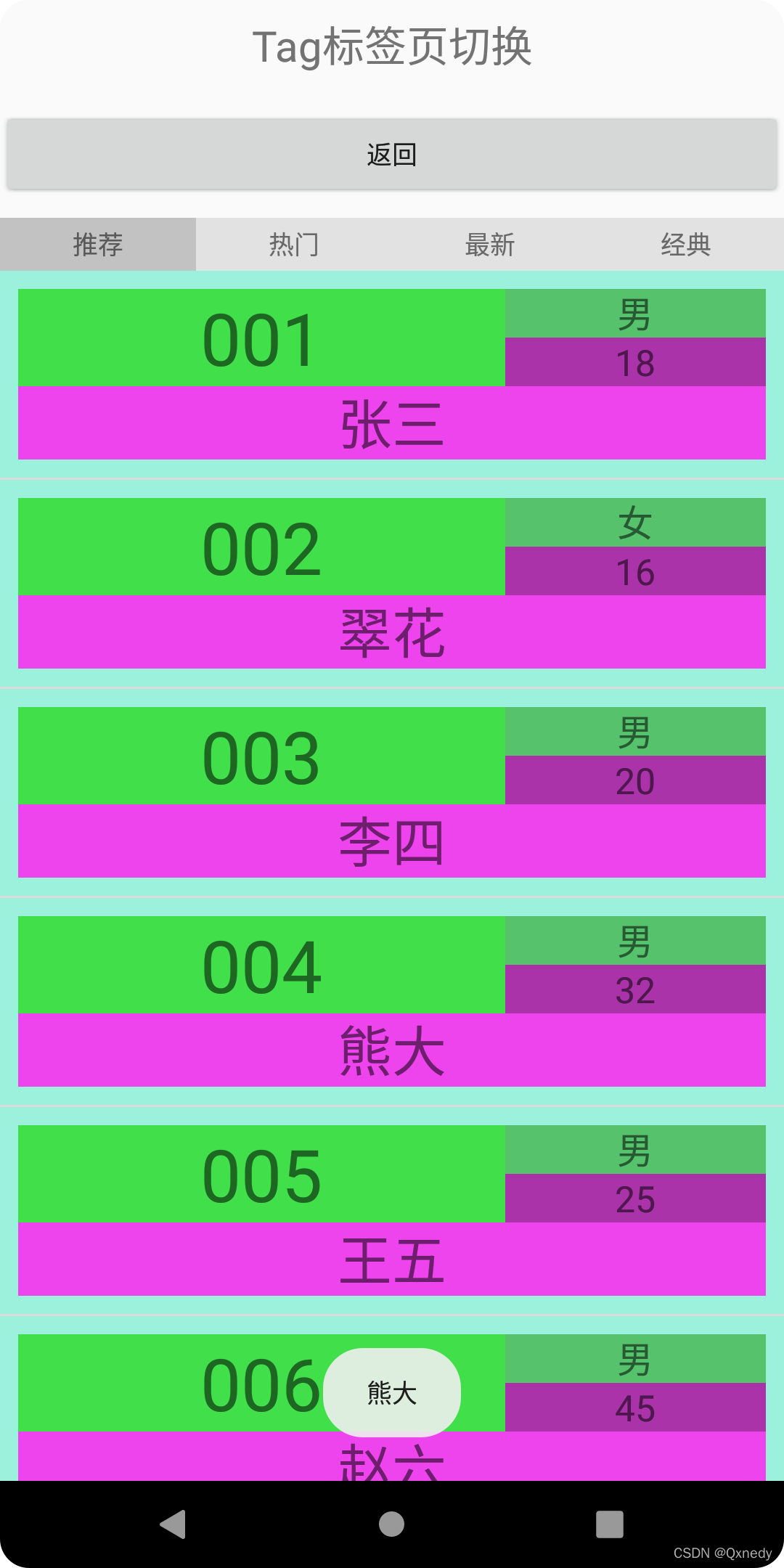
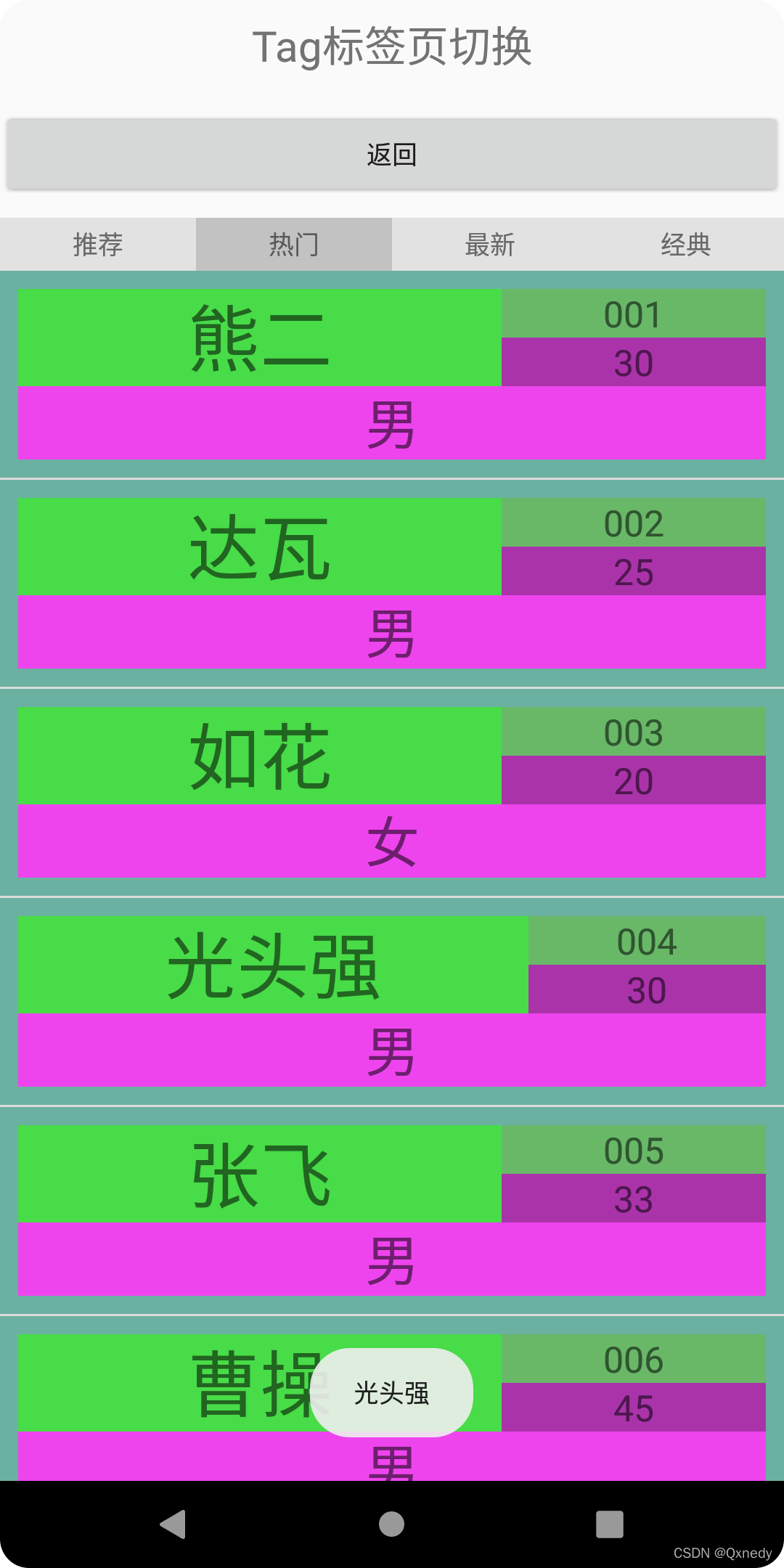
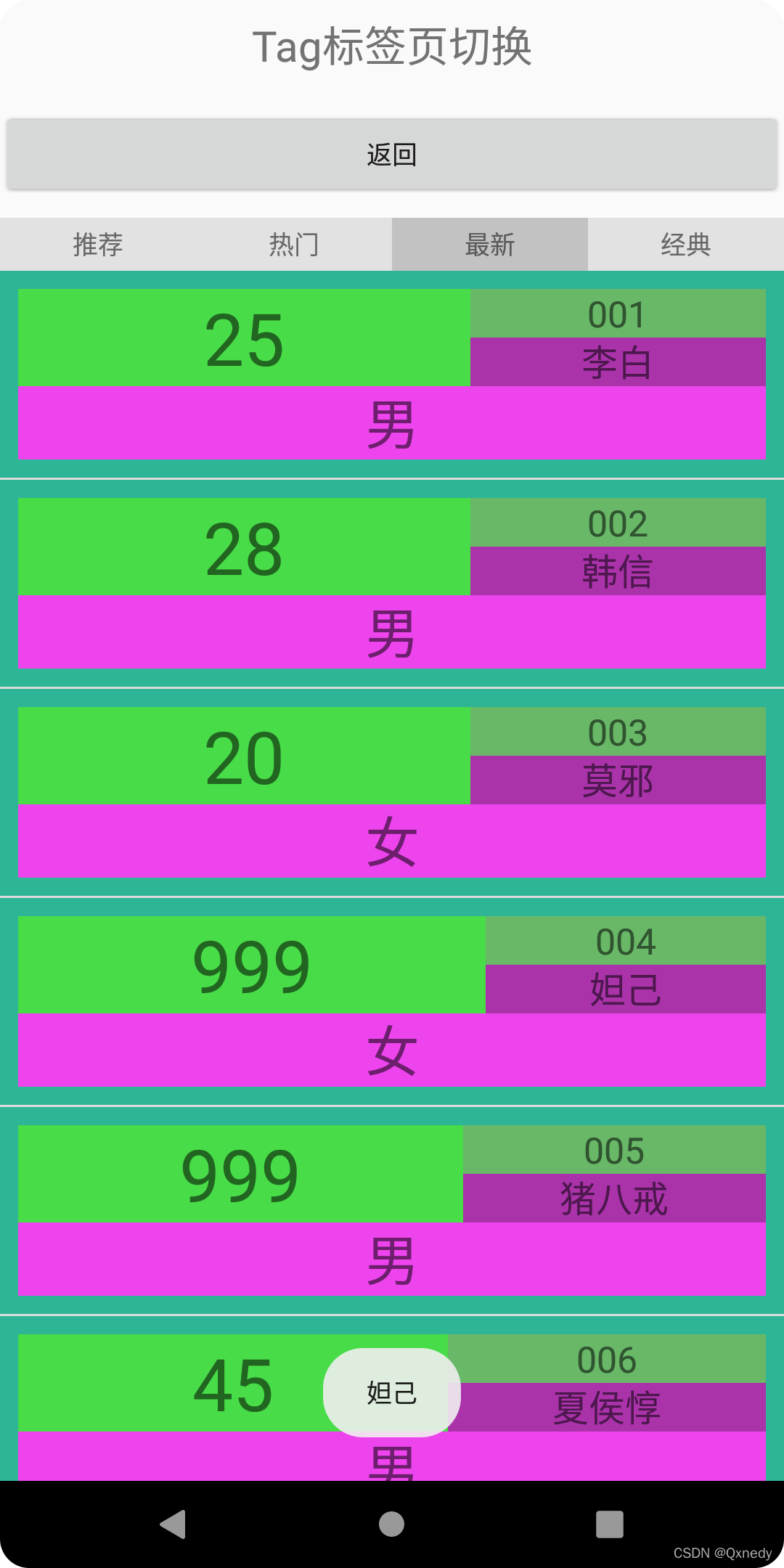
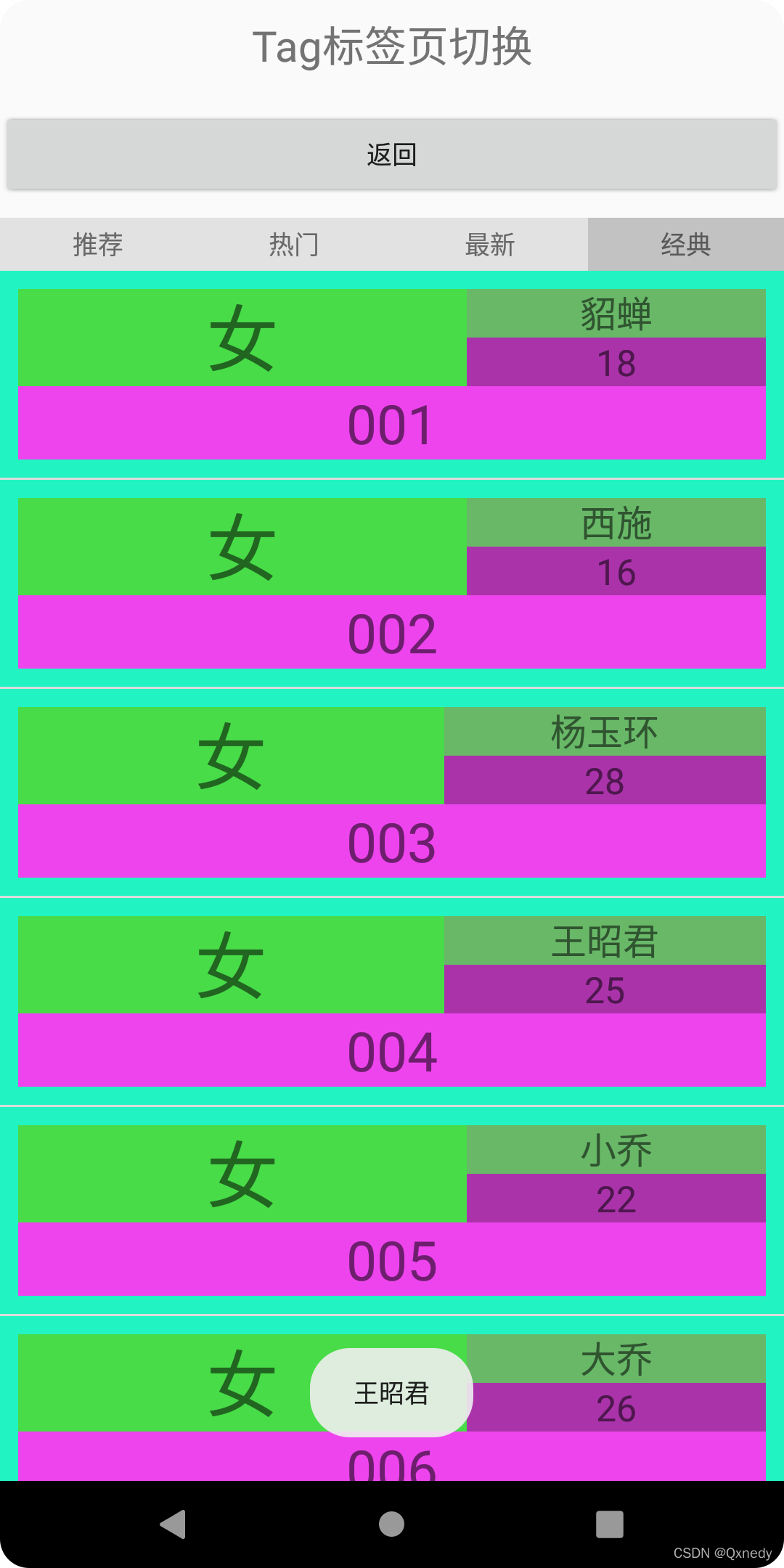





 扫一扫
扫一扫


 1762
1762

 被折叠的 条评论
为什么被折叠?
被折叠的 条评论
为什么被折叠?
 到【灌水乐园】发言





