



Qt Quick Style Generator: Automating Qt Quick Styling with Figma
Qt Quick样式生成器:使用Figma自动化Qt Quick样式
January 27, 2025 by Doris Verria | Comments
2025年1月27日由Doris Verria发表|评论
A Qt Quick Controls style defines the visual representation of the controls. By overriding the control’s visual “delegates” such as the background, content item, or other components, developers can implement unique looks and styles for these controls. Sometimes these styles can include complex visual elements or intricate effects and reproducing them in QML can be challenging for a style designer or someone with limited QML experience. But one doesn’t have to know the ins and outs of QML to be able to write a style. With the qqstylegenerator tool, creating a Qt Quick Controls style becomes a seamless process by automating much of the manual effort.
Qt Quick控件样式定义控件的视觉表示。通过覆盖控件的视觉“委托”,如背景、内容项或其他组件,开发人员可以为这些控件实现独特的外观和样式。有时,这些风格可能包含复杂的视觉元素或复杂的效果,对于风格设计师或QML经验有限的人来说,在QML中再现它们可能是一项挑战。但一个人不必知道QML的来龙去脉,就能写出一种风格。使用qqtylegenerator工具,通过自动化大部分手动工作,创建Qt Quick控件样式成为一个无缝的过程。
qqstylegenerator is a tool designed to create ready-to-use Qt Quick Controls styles from Figma designs. By using predefined Figma templates, it helps developers easily produce consistent and visually appealing styles without much hassle.
qqtylegenerator是一个工具,旨在从Figma设计中创建即用型Qt Quick控件样式。通过使用预定义的Figma模板,它可以帮助开发人员轻松生成一致且视觉上吸引人的风格,而不会带来太多麻烦。
Figma templates
Figma模板
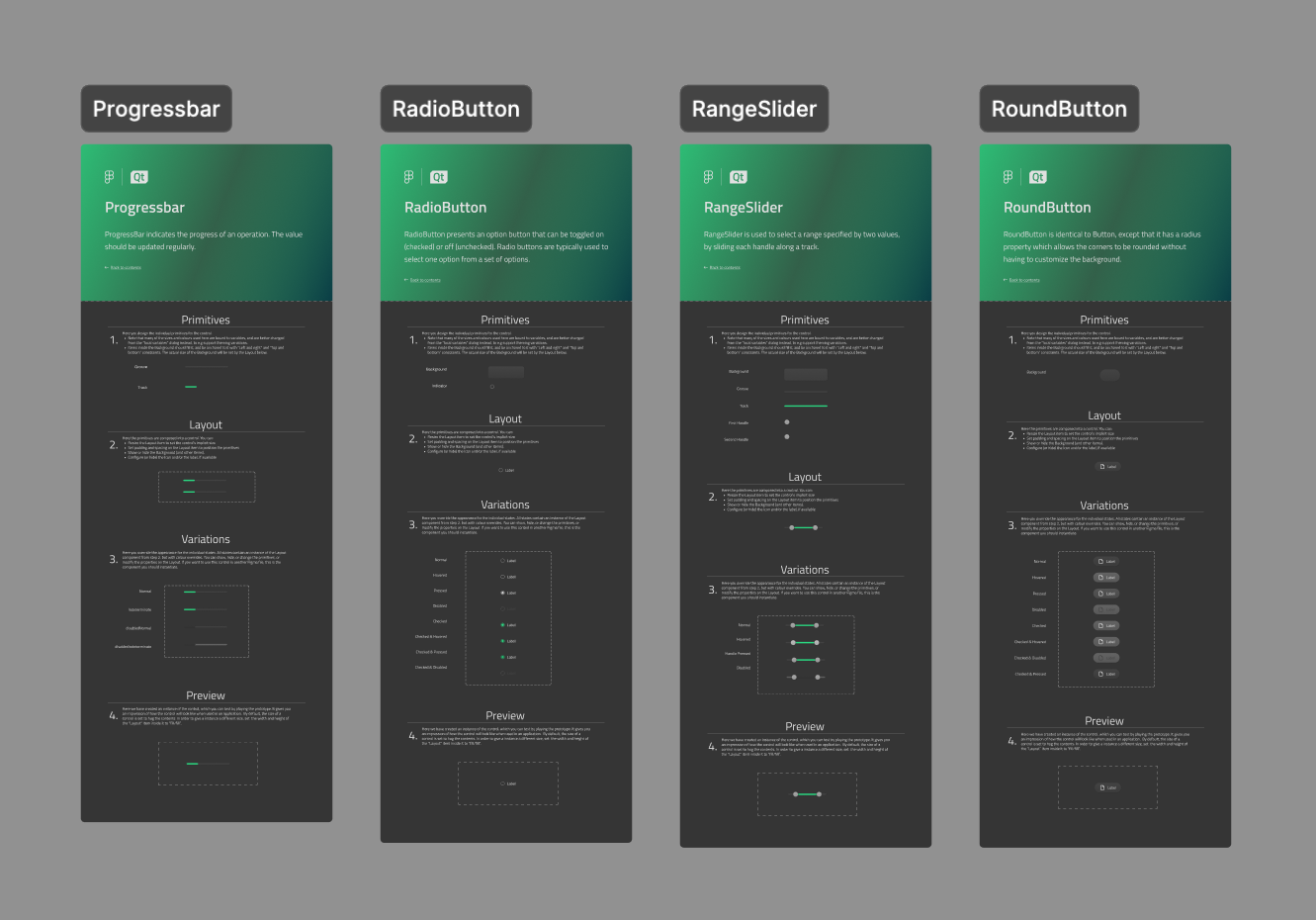
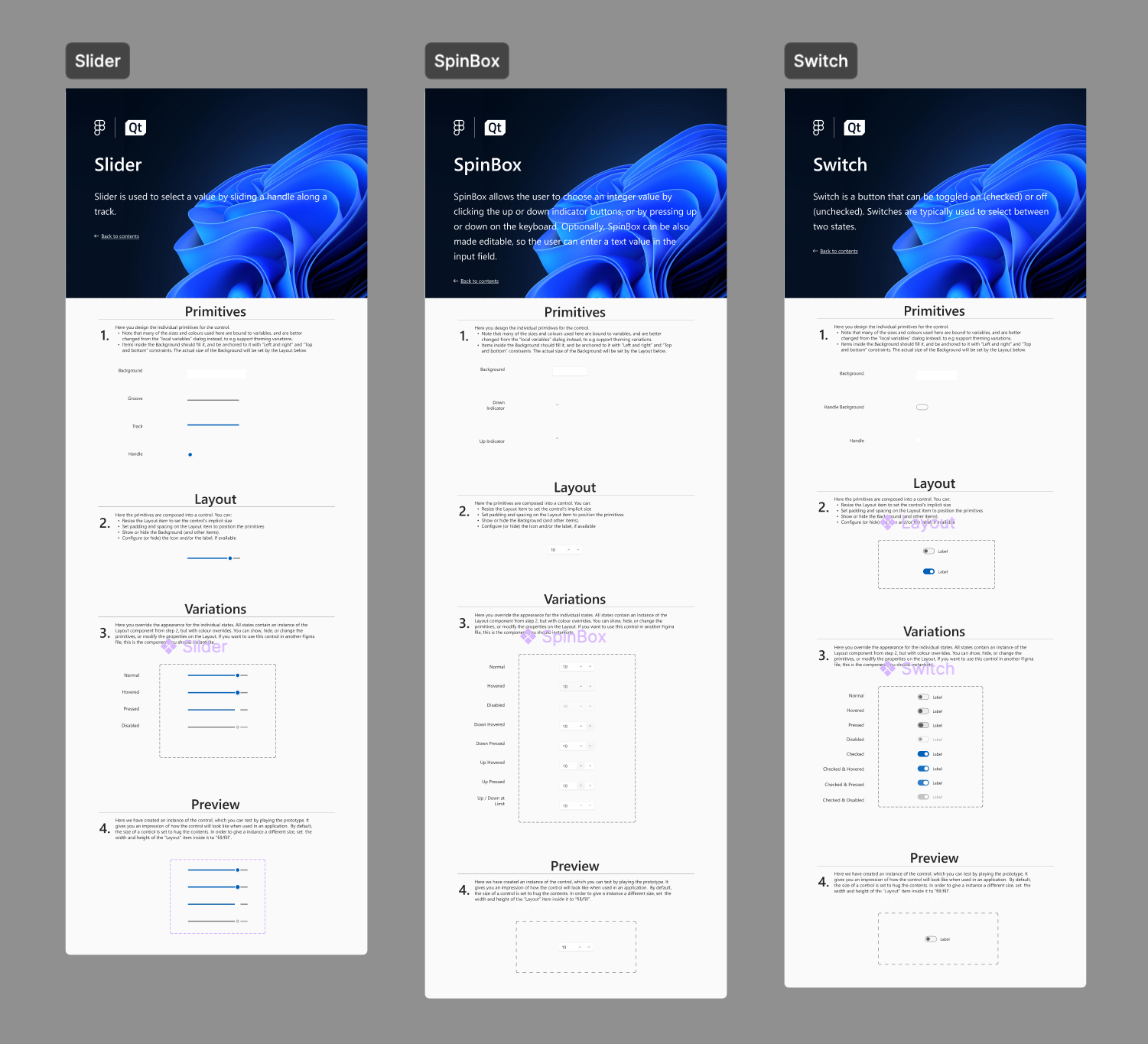
A key part of the tool are the Qt Quick Style Generator Templates, which are used as a basis for designing the controls. These templates leverage Figma's variables system to manage essential design attributes and are designed to closely match the structure and semantics of Qt Quick Controls.
该工具的一个关键部分是Qt Quick样式生成器模板,它被用作设计控件的基础。这些模板利用Figma的变量系统来管理基本的设计属性,旨在与Qt Quick控件的结构和语义紧密匹配。
Templates provide a structured approach for users to design and implement Qt Quick Controls styles effectively. Each template is tailored to a specific control like button, checkbox, and others. By following established patterns, the templates ensure consistency and adherence to the rules for Qt Quick Controls. They also help users map design elements to the correct QML components of each control, allowing designers to focus on creativity without being burdened by implementation details.
模板为用户提供了一种结构化的方法来有效地设计和实现Qt Quick控件样式。每个模板都针对特定的控件(如按钮、复选框等)进行了定制。通过遵循既定的模式,模板确保了Qt Quick控制规则的一致性和遵守性。它们还可以帮助用户将设计元素映射到每个控件的正确QML组件,使设计人员能够专注于创造力,而不会受到实施细节的负担。
The components in Figma are designed to closely mimic the structure, naming, and behaviour of controls in Qt Quick, ensuring a seamless transition between design and implementation. Each component aligns with the corresponding control delegate, such as a background or an indicator, which is represented as layers in the Figma templates components. Additionally, we have introduced things like Layout components which closely reflect how a control layout behaves, with the contentItem positioned within the background area and adjusted based on the specified padding. The templates also include multiple states for each control, carefully mapped to the various states of the corresponding Qt Quick control. By imitating the architecture and semantics of Qt Quick Controls, these components enable designers to create controls that are both visually accurate and functionally consistent with the underlying code.
Figma中的组件旨在紧密模仿Qt Quick中控件的结构、命名和行为,确保设计和实现之间的无缝过渡。每个组件都与相应的控制委托对齐,例如背景或指示器,在Figma模板组件中表示为层。此外,我们还引入了类似布局组件的东西,这些组件密切反映了控件布局的行为方式,contentItem位于背景区域内,并根据指定的填充进行调整。模板还包括每个控件的多个状态,仔细映射到相应Qt Quick控件的各种状态。通过模仿Qt Quick Controls的架构和语义,这些组件使设计人员能够创建视觉上准确且功能上与底层代码一致的控件。
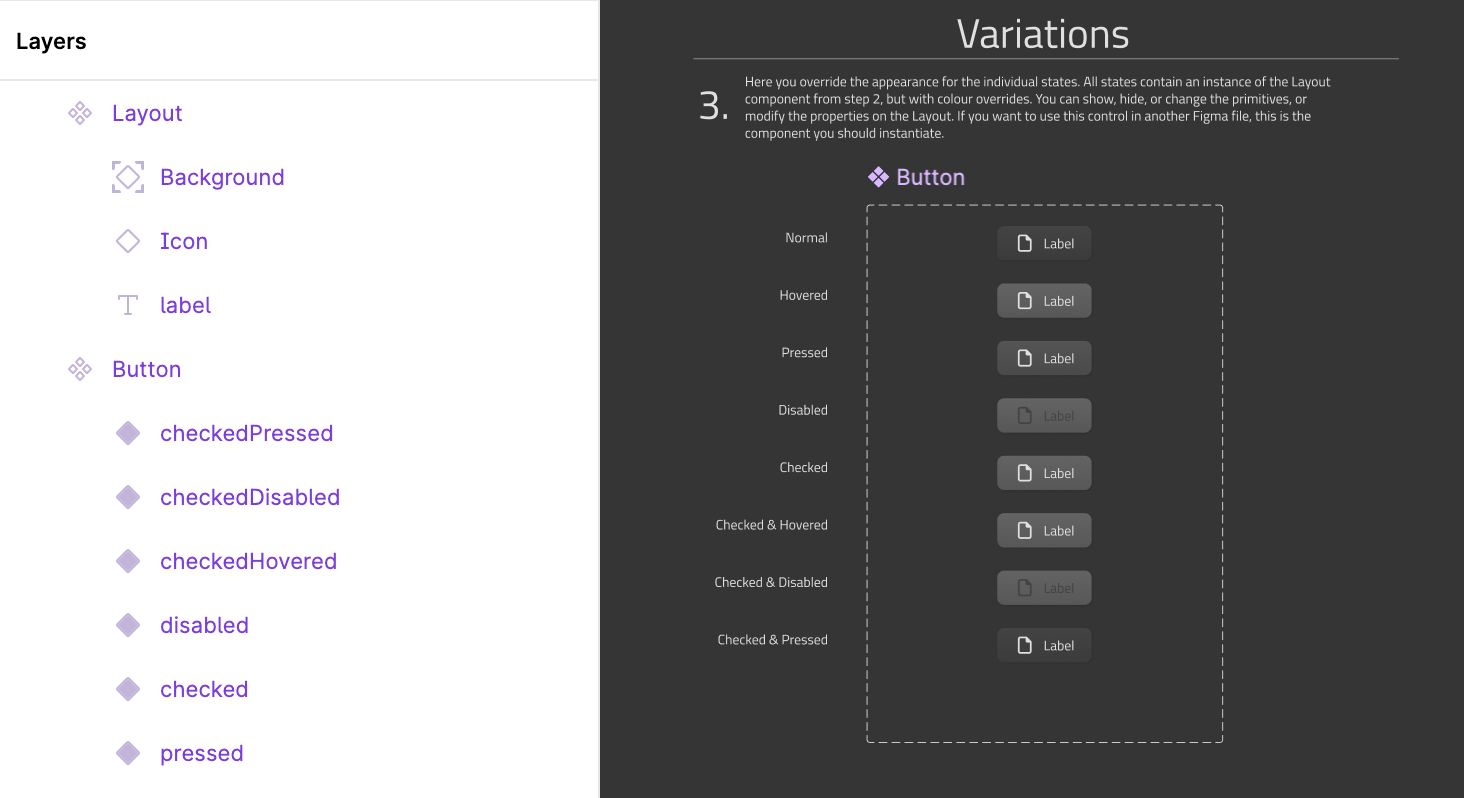
To manage key design attributes such as colors, spacing, and corner radii, the new variables system in Figma is used. This system allows for the definition of themes, making it easier to manage style variations like light mode and dark mode. By centralising these definitions, the variables system promotes consistency across all components and simplifies the process of updating or modifying themes. With light and dark modes already set up, users can seamlessly switch between themes while maintaining visual and functional harmony.
为了管理颜色、间距和角半径等关键设计属性,使用了Figma中的新变量系统。该系统允许定义主题,使管理浅色模式和深色模式等风格变化变得更加容易。通过集中这些定义,变量系统促进了所有组件的一致性,并简化了更新或修改主题的过程。由于已经设置了亮暗模式,用户可以在主题之间无缝切换,同时保持视觉和功能的和谐。
Tool
工具
The second important component of the style generator is the qqstylegenerator tool. This tool provides both a command-line and graphical user interface, and takes the Figma file ID, representing the design file to generate the style from, as argument. It also allows flexibility by setting several other options. These include options to specify the target directory, generate specific controls, define image formats and resolutions, and set a fallback style. The output includes a fully defined style package: a qmldir file for registration, a .qrc file, QML templates for controls, a CMake module for easy integration, and image assets ready for use in applications. The generated style is image-based, which means the visual assets are exported as images to represent the controls.
样式生成器的第二个重要组件是qqtylegenerator工具。该工具提供命令行和图形用户界面,并将表示生成样式的设计文件的Figma文件ID作为参数。它还通过设置其他几个选项来提供灵活性。这些选项包括指定目标目录、生成特定控件、定义图像格式和分辨率以及设置回退样式。输出包括一个完全定义的样式包:用于注册的qmldir文件、.qrc文件、用于控件的QML模板、易于集成的CMake模块以及可在应用程序中使用的图像资产。生成的样式是基于图像的,这意味着视觉资源被导出为图像来表示控件。
How does it work?
它是如何工作的?
The tool works by using the Figma REST APIs to download a JSON representation of the Figma file, providing a structured view of the design. A separate configuration JSON file is specified, detailing the elements (or "atoms" as they’re called in Figma) to be exported for each control, as well as the states of those controls. For each control and its corresponding states, the tool exports the assets and configuration needed to reflect the design accurately. The exported information includes key properties like sizing, layout details such as paddings, offsets, and radiuses, as well as images for the relevant atoms. Once all the data is processed, the tool generates a QML configuration file, which consolidates all the exported information. This configuration object and its properties are then directly used in the style’s control templates to provide the necessary information.
该工具通过使用Figma REST API下载Figma文件的JSON表示,提供设计的结构化视图。指定了一个单独的配置JSON文件,详细说明了每个控件要导出的元素(或Figma中称为“原子”),以及这些控件的状态。对于每个控件及其相应的状态,该工具导出准确反映设计所需的资产和配置。导出的信息包括关键属性,如大小、布局细节,如填充、偏移和半径,以及相关原子的图像。处理完所有数据后,该工具生成一个QML配置文件,该文件整合了所有导出的信息。然后,此配置对象及其属性直接用于样式的控制模板中,以提供必要的信息。
Building the FluentWinUI3 Style with StyleGenerator
使用StyleGenerator构建FluentWinUI3风格
The StyleGenerator tool was instrumental in creating the new FluentWinUI3 style for Qt Quick Controls. The process began with designing the controls in Figma, following Microsoft's Fluent and WinUI3 guidelines, and using the Figma Quick Controls templates as a starting point. Each control was designed to match the Fluent specifications and maintain a consistent look and feel. Once the designs were finalised, they were exported from Figma and processed through the qqstylegenerator tool to generate the necessary assets and configurations.
StyleGenerator工具在为Qt Quick控件创建新的FluentWinUI3样式方面发挥了重要作用。该过程始于设计Figma中的控件,遵循微软的Fluent和WinUI3指南,并使用Figma快速控件模板作为起点。每个控件的设计都符合Fluent规范,并保持一致的外观和感觉。一旦设计最终确定,它们就会从Figma导出,并通过qqtylegenerator工具进行处理,以生成必要的资产和配置。
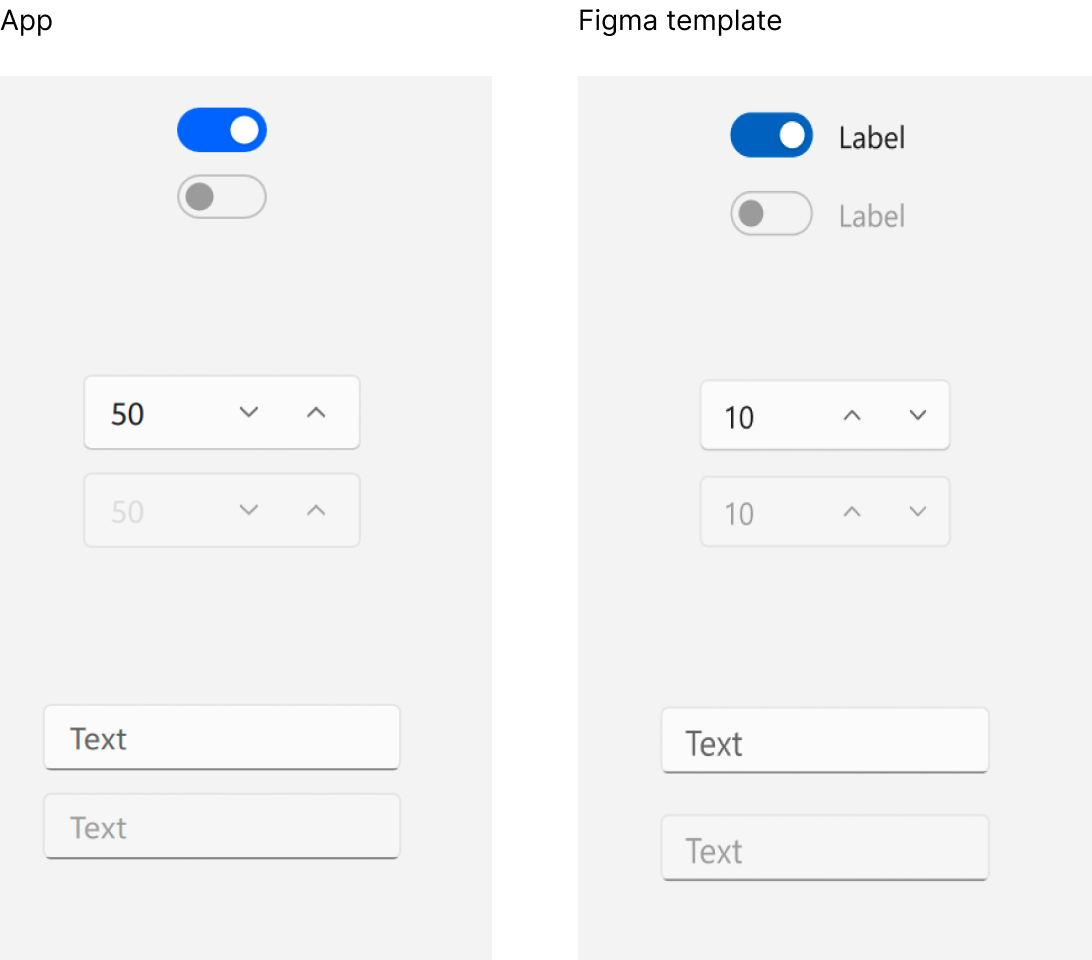
The tool generated assets and configurations for each control and its states, including images and layout details. However, certain controls required additional modifications. For example, in the FluentWinUI3 style, controls like the ComboBox and other text controls needed angled accent-coloured strokes at the bottom when focused, which were implemented directly in QML. Other enhancements, such as animations and transitions not included in the Figma designs, were also added in QML. The tool's ability to preserve manual edits to template files during subsequent runs made it easier to integrate these custom changes and refine the controls without losing previous modifications. This allowed us to refine the controls without worrying about losing modifications.
该工具为每个控件及其状态生成了资源和配置,包括图像和布局细节。然而,某些控制措施需要额外的修改。例如,在FluentWinUI3风格中,组合框和其他文本控件等控件在聚焦时需要在底部使用有角度的重音笔划,这是在QML中直接实现的。QML中还添加了其他增强功能,如Figma设计中未包含的动画和过渡。该工具能够在后续运行中保留对模板文件的手动编辑,这使得集成这些自定义更改和优化控件变得更加容易,而不会丢失之前的修改。这使我们能够改进控制,而不必担心丢失修改。
With the qqstylegenerator tool, the Fluent style was implemented accurately and efficiently. While manual modifications were still necessary for certain features, the tool significantly streamlined the process. The final results demonstrated how effectively the tool translated the Figma designs into implementation, combining automation with flexibility to deliver a polished, functional style.
借助qqtylegenerator工具,Fluent风格得以准确有效地实现。虽然某些功能仍需要手动修改,但该工具大大简化了流程。最终结果证明了该工具如何有效地将Figma设计转化为实现,将自动化与灵活性相结合,以提供一种精致的功能风格。
How to Create Your Custom Styles with qqstylegenerator
如何使用qqtylegenerator创建自定义样式
Creating your own custom styles with Qt Quick Style Generator is a straightforward process. Start by implementing your design into your own copy of the Figma templates provided, which includes detailed documentation to guide you through every step. You can modify building blocks, or what we call “primitives”, as well as global variables such as radii, sizes, etc. , and the changes will take effect in all the control components.
使用Qt Quick样式生成器创建自己的自定义样式是一个简单的过程。首先,将设计实现到自己提供的Figma模板中,其中包括详细的文档来指导完成每一步。可以修改构建块,或者我们所说的“基元”,以及全局变量,如半径、大小等,并且这些变化将在所有控制组件中生效。
If you require more specific adjustments, you can dive deeper into the main components. For instance, you can make broader changes to elements like backgrounds or indicators. For highly specific needs, such as altering the appearance of a slider only on hover, the template enables you to navigate directly to that state and make precise modifications.
如果需要更具体的调整,可以更深入地了解主要组件。例如,可以对背景或指标等元素进行更广泛的更改。对于高度特定的需求,例如仅在悬停时更改滑块的外观,该模板使您能够直接导航到该状态并进行精确的修改。
Whether you’re changing the layout, background, or indicator, the template’s step-by-step instructions make the process intuitive. Once your adjustments are complete, you can use the preview section in Figma to test how your design looks across various states and scenarios.
无论是更改布局、背景还是指示器,模板的分步说明都会使整个过程变得直观。调整完成后,您可以使用Figma中的预览部分来测试设计在各种状态和场景下的外观。
Once you have defined the templates, the next step is to retrieve the Figma file ID for the file containing your templates. You will also need to generate a Figma access token to enable the tool to access your designs. With these prerequisites complete, you are ready to use the qqstylegenerator tool. The tool is available in this repository. Once built, you can run the tool using either the command-line or the graphical user interface.
定义模板后,下一步是检索包含模板的文件的Figma文件ID。还需要生成一个Figma访问令牌,以使该工具能够访问设计。完成这些先决条件后,就可以使用qqtylegenerator工具了。此存储库中提供了该工具。构建后,可以使用命令行或图形用户界面运行该工具。
To use the tool, specify the Figma file ID and access token you retrieved earlier. Additional options can be configured through the GUI or directly via the command line. For instance, the following command generates styles for selected controls with specific image formats:
要使用该工具,请指定您之前检索到的Figma文件ID和访问令牌。可以通过GUI或直接通过命令行配置其他选项。例如,以下命令为具有特定图像格式的选定控件生成样式:
qqstylegenerator --directory /path/to/output --token YOUR_FIGMA_TOKEN --generate Button --generate Slider --format png@2x --format png@3x --fallbackstyle Fusion YOUR_FIGMA_FILE_ID
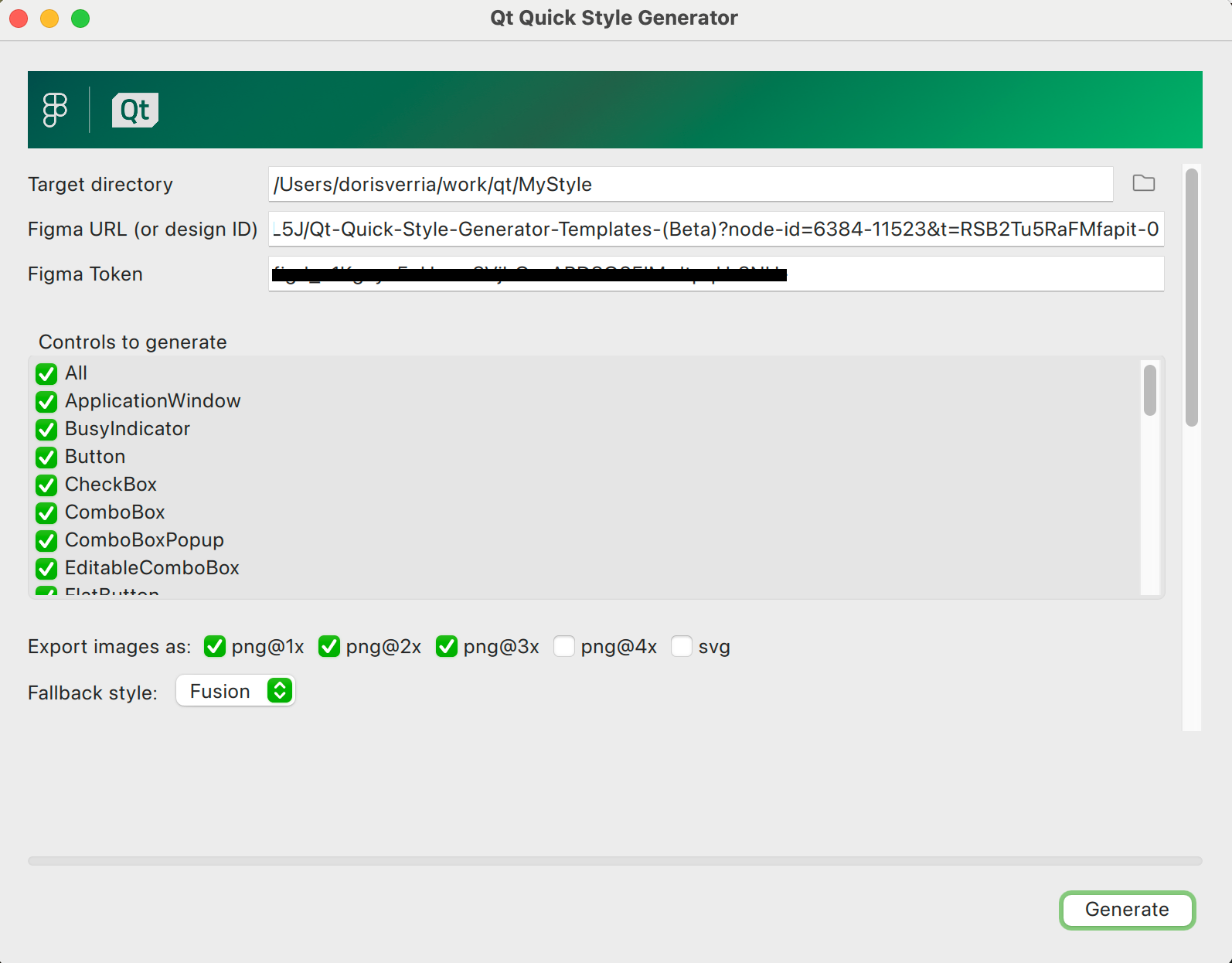
Once the tool completes the process, developers should review the generated files and image assets. Any necessary refinements or adjustments can be made at this stage to ensure the style meets the application's requirements. The tool supports an iterative process where the changes made to the QML files won't be overridden after tool re-runs.
一旦该工具完成了该过程,开发人员应该查看生成的文件和图像资产。在此阶段可以进行任何必要的改进或调整,以确保样式符合应用程序的要求。该工具支持迭代过程,在工具重新运行后,对QML文件所做的更改不会被覆盖。
Finally, the generated style can be integrated into a Qt application. You can use the style in your project in several ways. If you include the style’s CMake module directly in your CMake project and link to it, you can then set the style normally through compile-time or run-time selection. For more information on using and setting Qt Quick Controls styles, see Using Styles in Qt Quick Controls. Alternatively, by setting the QML_IMPORT_PATH environment variable, the application can load the style dynamically, by specifying the style name as a runtime argument (-style MyStyle). Another option is to embed the style into the application as a resource using the provided .qrc file, allowing you to import the style directly from the resource path in QML. By leveraging Figma designs and the automation provided by qqstylegenerator, the workflow of creating and applying custom styles becomes both efficient and straightforward.
最后,生成的样式可以集成到Qt应用程序中。可以通过多种方式在项目中使用该样式。如果将样式的CMake模块直接包含在CMake项目中并链接到它,则可以通过编译时或运行时选择正常设置样式。有关使用和设置Qt Quick控件样式的更多信息,请参阅在Qt Quick控件中使用样式。或者,通过设置QML_IMPORT_PATH环境变量,应用程序可以通过将样式名称指定为运行时参数(-style MyStyle)来动态加载样式。另一种选择是使用提供的.qrc文件将样式作为资源嵌入到应用程序中,允许直接从QML中的资源路径导入样式。通过利用Figma设计和qqtylegenerator提供的自动化,创建和应用自定义样式的工作流程变得既高效又简单。
Experimental State
实验状态
This work represents an experimental project from our qt-labs and is currently in its beta state. We encourage designers and developers to explore the templates, run the tool, try them out in their workflows, and provide us with feedback. Your input will be invaluable in refining and enhancing the tool.
这项工作代表了我们qt实验室的一个实验项目,目前处于测试阶段。我们鼓励设计师和开发人员探索模板,运行工具,在他们的工作流程中尝试它们,并向我们提供反馈。您的意见对于改进和增强该工具将是无价的。





 扫一扫
扫一扫


 704
704

 被折叠的 条评论
为什么被折叠?
被折叠的 条评论
为什么被折叠?
 到【灌水乐园】发言





