





 本文详细介绍了Kotlin中的SharedFlow和StateFlow,两种流类型及其用途,并提供了最佳实践,如选择合适的流、封装可变流、管理资源等,同时给出了实际应用案例,如实时数据和事件总线.
深入探索Kotlin流的世界,并比较SharedFlow和StateFlow。下面是这两种流类型以及它们的用途的总览:
SharedFlow和StateFlow都是Kotlin的kotlinx.coroutines库的一部分,专门设计用来处理异步数据流。它们都是建立在Flow的基础之上的,但用于不同的目的。
SharedFlow
SharedFlow是一个可以有多个收集器的热流。它可以独立于收集器发出值,多个收集器可以从流中收集相同的值。
它在需要向多个收集器广播值或者希望有多个订阅者订阅同一数据流时非常有用。
SharedFlow没有初始值,你可以配置其重播缓存以为新收集器存储一定数量的先前发出的值。
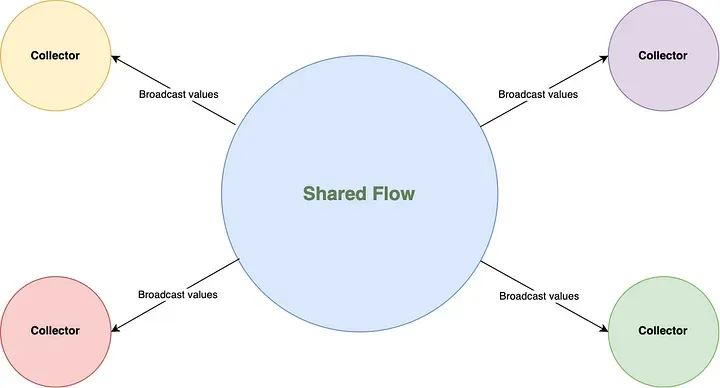
例子:
val sharedFlow = MutableSharedFlow<Int>()

// 从sharedFlow收集值
launch {
  sharedFlow.collect { value ->
    println("Collector 1 received: $value")
  }
}

// 从sharedFlow收集值
launch {
  sharedFlow.collect { value ->
    println("Collector 2 received: $value")
  }
}

// 向sharedFlow发出值
launch {
  repeat(3) { i ->
    sharedFlow.emit(i)
  }
}
StateFlow
StateFlow是一个代表状态的热流,一次只能持有一个值。它也是一个合并流,意味着当发出新值时,最近的值被保留并立即发出给新的收集器。
它在需要维护一个状态的单一真实源并自动更新所有收集器的最新状态时非常有用。
StateFlow总是有一个初始值,并且只存储最新发出的值。
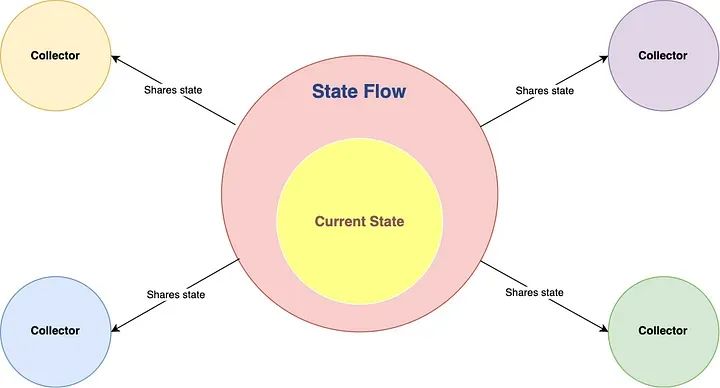
例子:
val mutableStateFlow = MutableStateFlow(0)
val stateFlow: StateFlow<Int> = mutableStateFlow

// 从stateFlow收集值
launch {
  stateFlow.collect { value ->
    println("Collector 1 received: $value")
  }
}

// 从stateFlow收集值
launch {
  stateFlow.collect { value ->
    println("Collector 2 received: $value")
  }
}

// 更新状态
launch {
  repeat(3) { i ->
    mutableStateFlow.value = i
  }
}
最佳实践
以下是在Kotlin中使用SharedFlow和StateFlow的一些最佳实践:
-
• 选择正确的流:
-
• 当需要向多个收集器广播值或希望有多个订阅者订阅同一数据流时,使用SharedFlow。
-
• 当需要维护和分享一个状态的单一真实源,并自动更新所有收集器的最新状态时,使用StateFlow。
-
-
• 封装可变流:
-
• 暴露你的可变流的只读版本,以防止外部更改。这可以通过使用MutableSharedFlow的SharedFlow接口和MutableStateFlow的StateFlow接口来实现。
-
  class ExampleViewModel {
    private val _mutableSharedFlow = MutableSharedFlow<Int>()
    // Represents this mutable shared flow as a read-only shared flow.
    val sharedFlow = _mutableSharedFlow.asSharedFlow()

    private val _mutableStateFlow = MutableStateFlow(0)
    // Represents this mutable state flow as a read-only state flow.
    val stateFlow = _mutableStateFlow.asStateFlow()
}-
• 正确管理资源:
-
• 当使用SharedFlow或StateFlow时,确保你正确管理资源,比如在不再需要时取消协程或收集器。
-
val scope = CoroutineScope(Dispatchers.Main)

val sharedFlow = MutableSharedFlow<Int>()

val job = scope.launch {
   sharedFlow.collect { value ->
       println("Received: $value")
   }
}

// Later, when the collector is no longer needed
job.cancel()-
• 明智地使用缓冲和重播配置:
-
• 对于SharedFlow,你可以设置缓冲容量和重播容量。选择适合的缓冲容量以避免反压问题,并根据你的用例要求设置重播容量。
-
• 对于StateFlow,记住它总是有一个大小为1的重播缓存,意味着它保留最新值给新的收集器。
-
val sharedFlow = MutableSharedFlow<Int>(
    replay = 2, // Replay the last 2 emitted values to new collectors
    extraBufferCapacity = 8 // Extra buffer capacity to avoid backpressure
)-
• 使用 combine 、 map 、 filter 和其他运算符:
利用 Kotlin 流运算符根据需要转换、组合或过滤数据。这有助于创建更具表现力和更高效的代码。
val flow1 = MutableStateFlow(1)
val flow2 = MutableStateFlow(2)

val combinedFlow = flow1.combine(flow2) { value1, value2 ->
    value1 + value2
}

// Collect and print the sum of flow1 and flow2
launch {
    combinedFlow.collect { sum ->
        println("Sum: $sum")
    }
}-
• 正确处理错误:
使用流程时,请确保正确处理异常。使用 catch 运算符处理流管道内的异常,使用 onCompletion 运算符执行清理操作或对流的完成做出反应。
val flow = flow {
    emit(1)
    throw RuntimeException("Error occurred")
    emit(2)
}.catch { e ->
    // Handle the exception and emit a default value
    emit(-1)
}

launch {
    flow.collect { value ->
        println("Received: $value")
    }
}-
• 使用 lifecycleScope 、 repeatOnLifecycle 和其他生命周期感知运算符:
使用 Android 或其他具有生命周期的平台时,请利用生命周期感知运算符来自动管理流程的生命周期。
class MyFragment : Fragment() {
    private val viewModel: MyViewModel by viewModels()

    override fun onViewCreated(view: View, savedInstanceState: Bundle?) {
        super.onViewCreated(view, savedInstanceState)

        viewLifecycleOwner.lifecycleScope.launch {
            // Suspend the coroutine until the lifecycle is DESTROYED.
            // repeatOnLifecycle launches the block in a new coroutine every time the
            // lifecycle is in the STARTED state (or above) and cancels it when it's STOPPED.
            repeatOnLifecycle(Lifecycle.State.STARTED) {
                // Safely collect from locations when the lifecycle is STARTED
                // and stop collecting when the lifecycle is STOPPED
                viewModel.stateFlow.collect { value ->
                    // Update UI with the value
                }
            }
            // Note: at this point, the lifecycle is DESTROYED!
        }
    }
}
实际应用案例
StateFlow使用案例:实时数据
假设你有一个应用程序,需要接收和显示服务器上的实时数据。在这种情况下,你可以使用StateFlow来存储并更新这个实时数据。然后,在你的UI层,你可以收集这个StateFlow并更新UI。由于StateFlow总是持有最新的值,因此每当有新的数据从服务器接收时,所有的收集器都会自动接收最新的值。
// StockViewModel.kt
class StockViewModel {
    // Create a private MutableStateFlow property to hold the stock price
    private val _stockPrice = MutableStateFlow(0.0)
    // Create a public StateFlow property that exposes the stock price as an immutable value
    val stockPrice = _stockPrice.asStateFlow()

    init {
        // Launch a coroutine in the viewModelScope to update the stock price
        viewModelScope.launch {
            updateStockPrice()
        }
    }

    private suspend fun updateStockPrice() {
        while (true) {
            delay(1000) // Update every second
            val newPrice = fetchNewPrice()
            // Update the stock price using the MutableStateFlow's value property
            _stockPrice.value = newPrice
        }
    }

    // Private function to fetch the new stock price from an API or data source
    private suspend fun fetchNewPrice(): Double {
        // TODO: Fetch the new stock price from an API or data source
        return 0.0
    }
}

// MainActivity.kt
class MainActivity : AppCompatActivity() {
    private val stockViewModel = StockViewModel()

    override fun onCreate(savedInstanceState: Bundle?) {
        super.onCreate(savedInstanceState)

        // Launch a coroutine in the lifecycleScope to observe changes to the stock price
        lifecycleScope.launch {
            // Use the repeatOnLifecycle function to ensure the coroutine
            // is active only when the activity is started
            repeatOnLifecycle(Lifecycle.State.STARTED) {
                // Observe changes to the stock price using the collect operator
                stockViewModel.stockPrice.collect { price ->
                    // Update the UI with the new stock price
                    stockPriceTextView.text = "Stock Price: $price"
                }
            }
        }
    }
}
SharedFlow 用例 2:事件总线
这是使用共享流的更高级示例。假设我们要创建一个事件总线,使用 SharedFlow 将事件广播到多个侦听器。
1、 EventBus.kt:定义具有共享流的通用 EventBus 类。
/**
 * An event bus implementation that uses a shared flow to
 * broadcast events to multiple listeners.
 */
class EventBus<T> {
    // Create a private MutableSharedFlow property to hold events
    private val _events = MutableSharedFlow<T>(replay = 0, extraBufferCapacity = 64)
    // Create a public SharedFlow property that exposes events as an immutable value
    val events: Flow<T> = _events.asSharedFlow()

    /**
     * Sends an event to the shared flow.
     */
    suspend fun sendEvent(event: T) {
        _events.emit(event)
    }
}
2.Event.kt:定义各种事件类型。
sealed class Event {
    object EventA : Event()
    object EventB : Event()
    data class EventC(val value: Int) : Event()
}
3、EventListener.kt:创建一个EventListener类,负责订阅特定的事件类型。
class EventListener(
    private val eventBus: EventBus<Event>,
    private val scope: CoroutineScope
) {
    init {
        // Subscribe to the events flow using the onEach operator
        eventBus.events
            .onEach { event ->
                // Use a when expression to handle different types of events
                when (event) {
                    is Event.EventA -> handleEventA()
                    is Event.EventB -> handleEventB()
                    is Event.EventC -> handleEventC(event.value)
                }
            }
            // Launch the event listener in the given coroutine scope
            // It can cancel the subscription when scope is not present any more
            .launchIn(scope)
    }

    // Private functions to handle specific types of events
    private fun handleEventA() {
        println("EventA received")
    }

    private fun handleEventB() {
        println("EventB received")
    }

    private fun handleEventC(value: Int) {
        println("EventC received with value: $value")
    }
}
4 Main.kt:实例化EventBus和EventListener,然后使用EventBus发送事件。
fun main() = runBlocking {
    val eventBus = EventBus<Event>()
    // Instantiate EventListener to start listening for events from the eventBus
    val eventListener = EventListener(eventBus, this)

    // Send events using the eventBus in a separate coroutine
    launch(Dispatchers.Default) {
        delay(1000)
        eventBus.sendEvent(Event.EventA)

        delay(1000)
        eventBus.sendEvent(Event.EventB)

        delay(1000)
        eventBus.sendEvent(Event.EventC(42))
    }

    // Keep the main coroutine scope active to let the listener process the events
    delay(5000)
}
请注意, eventListener 变量仍未在 main 函数中显式使用。但是,它的实例化会触发 EventListener 类内的 init 块,该块订阅来自 eventBus 的事件。
创建 eventListener 变量是为了确保 EventListener 实例保留在内存中并且不会被垃圾回收,否则会阻止其接收事件。通过创建 eventListener 变量并将其分配给 EventListener 实例,侦听器保持活动状态,并且 eventBus 发送的事件将按预期进行处理。
此示例演示了 SharedFlow 的更高级用法,其中创建通用 EventBus 类以将事件广播到多个侦听器。 EventListener 类侦听特定事件类型并相应地处理它们。该代码遵循最佳实践,例如封装可变流、管理资源以及有效处理不同的事件类型。





 扫一扫
扫一扫


 9943
9943

 被折叠的 条评论
为什么被折叠?
被折叠的 条评论
为什么被折叠?
 到【灌水乐园】发言





