


单独的语音处理需要6-8G显存。
笔记本5070 8G,python3.11,新建虚拟环境就不说了,然后手动安装torch和torchvision,否则requirements.txt中会下载CPU版的。
截止到2025年11月22日,官方github中requirements.txt是下面的内容
librosa
numpy
scipy
s3tokenizer
diffusers
torch==2.7.1
torchaudio==2.7.1
triton>=3.0.0
transformers==4.57.1
accelerate==1.10.1
onnxruntime
onnxruntime-gpu
einops
gradio
我有CUDA,所以没装onnxruntime,装了onnxruntime-gpu。
pip install librosa numpy scipy s3tokenizer diffusers triton transformers==4.57.1 accelerate==1.10.1 onnxruntime-gpu einops gradio然后报错
ERROR: Ignored the following versions that require a different python version: 1.6.2 Requires-Python >=3.7,<3.10; 1.6.3 Requires-Python >=3.7,<3.10; 1.7.0 Requires-Python >=3.7,<3.10; 1.7.1 Requires-Python >=3.7,<3.10; 1.7.2 Requires-Python >=3.7,<3.11; 1.7.3 Requires-Python >=3.7,<3.11; 1.8.0 Requires-Python >=3.8,<3.11; 1.8.0rc1 Requires-Python >=3.8,<3.11; 1.8.0rc2 Requires-Python >=3.8,<3.11; 1.8.0rc3 Requires-Python >=3.8,<3.11; 1.8.0rc4 Requires-Python >=3.8,<3.11; 1.8.1 Requires-Python >=3.8,<3.11
ERROR: Could not find a version that satisfies the requirement triton (from versions: none)
ERROR: No matching distribution found for triton
是因为triton要改成triton-windows,然后再安装,安装成功。
将项目克隆到本地,下载模型文件到项目根目录,也就是根目录中创建pretrained_models文件夹,里面是SoulX-Podcast-1.7B文件夹。模型文件自行下载,我是从HuggingFace用git下载的。
然后进入项目根目录,启动webui
python webui.py --model_path pretrained_models/SoulX-Podcast-1.7B会自动下载speech_tokenizer_v2_25hz.onnx到C盘用户目录的.cache/s3tokenizer文件夹,473MB。
然后报错
D:\Miniconda3\envs\test1\Lib\site-packages\diffusers\models\lora.py:393: FutureWarning: `LoRACompatibleLinear` is deprecated and will be removed in version 1.0.0. Use of `LoRACompatibleLinear` is deprecated. Please switch to PEFT backend by installing PEFT: `pip install peft`.
  deprecate("LoRACompatibleLinear", "1.0.0", deprecation_message)
[INFO] SoulX-Podcast loaded
Traceback (most recent call last):
  File "D:\project\SoulX-Podcast\webui.py", line 627, in <module>
    page = render_interface()
           ^^^^^^^^^^^^^^^^^^
  File "D:\project\SoulX-Podcast\webui.py", line 365, in render_interface
    with gr.Blocks(title="SoulX-Podcast", theme=gr.themes.Default()) as page:
         ^^^^^^^^^^^^^^^^^^^^^^^^^^^^^^^^^^^^^^^^^^^^^^^^^^^^^^^^^^^
  File "D:\Miniconda3\envs\test1\Lib\site-packages\gradio\blocks.py", line 1071, in __init__
    super().__init__(render=False, **kwargs)
TypeError: BlockContext.__init__() got an unexpected keyword argument 'theme'由于gradio在2025年11月22日发布了6.0版,有些语法变了,而项目代码未更新,导致webui启动报错,所以安装gradio时需指定5.50.0,gradio发布说明。
theme参数在 6.0 里被从Blocks()构造函数移走了,所以这行在 6.0 会直接报错:
with gr.Blocks(title="SoulX-Podcast", theme=gr.themes.Default()) as page:Gradio 6 的迁移说明里写得很清楚:
theme、css、js这些“全局参数”不再放在Blocks()里,而是放到launch()里。在 Gradio 6 里,下面这些参数都不能再写在
gr.Blocks(...)里:
theme=...
css=...
css_paths=...
js=...
head=...
head_paths=...如果你的老代码里还有这些,也要一律挪到:
demo.launch( theme=..., css=..., js=..., head=..., )
再次启动,成功
`torch_dtype` is deprecated! Use `dtype` instead!
Loading checkpoint shards: 100%|█████████████████████████████████████████████████████████| 3/3 [00:02<00:00,  1.33it/s]
D:\Miniconda3\envs\test1\Lib\site-packages\diffusers\models\lora.py:393: FutureWarning: `LoRACompatibleLinear` is deprecated and will be removed in version 1.0.0. Use of `LoRACompatibleLinear` is deprecated. Please switch to PEFT backend by installing PEFT: `pip install peft`.
  deprecate("LoRACompatibleLinear", "1.0.0", deprecation_message)
[INFO] SoulX-Podcast loaded
D:\project\SoulX-Podcast\webui.py:365: DeprecationWarning: The 'theme' parameter in the Blocks constructor will be removed in Gradio 6.0. You will need to pass 'theme' to Blocks.launch() instead.
  with gr.Blocks(title="SoulX-Podcast", theme=gr.themes.Default()) as page:
D:\Miniconda3\envs\test1\Lib\site-packages\gradio\components\dropdown.py:230: UserWarning: The value passed into gr.Dropdown() is not in the list of choices. Please update the list of choices to include: (无) or set allow_custom_value=True.
  warnings.warn(
* Running on local URL:  http://0.0.0.0:7860
* To create a public link, set `share=True` in `launch()`.
浏览器访问127.0.0.1:7860
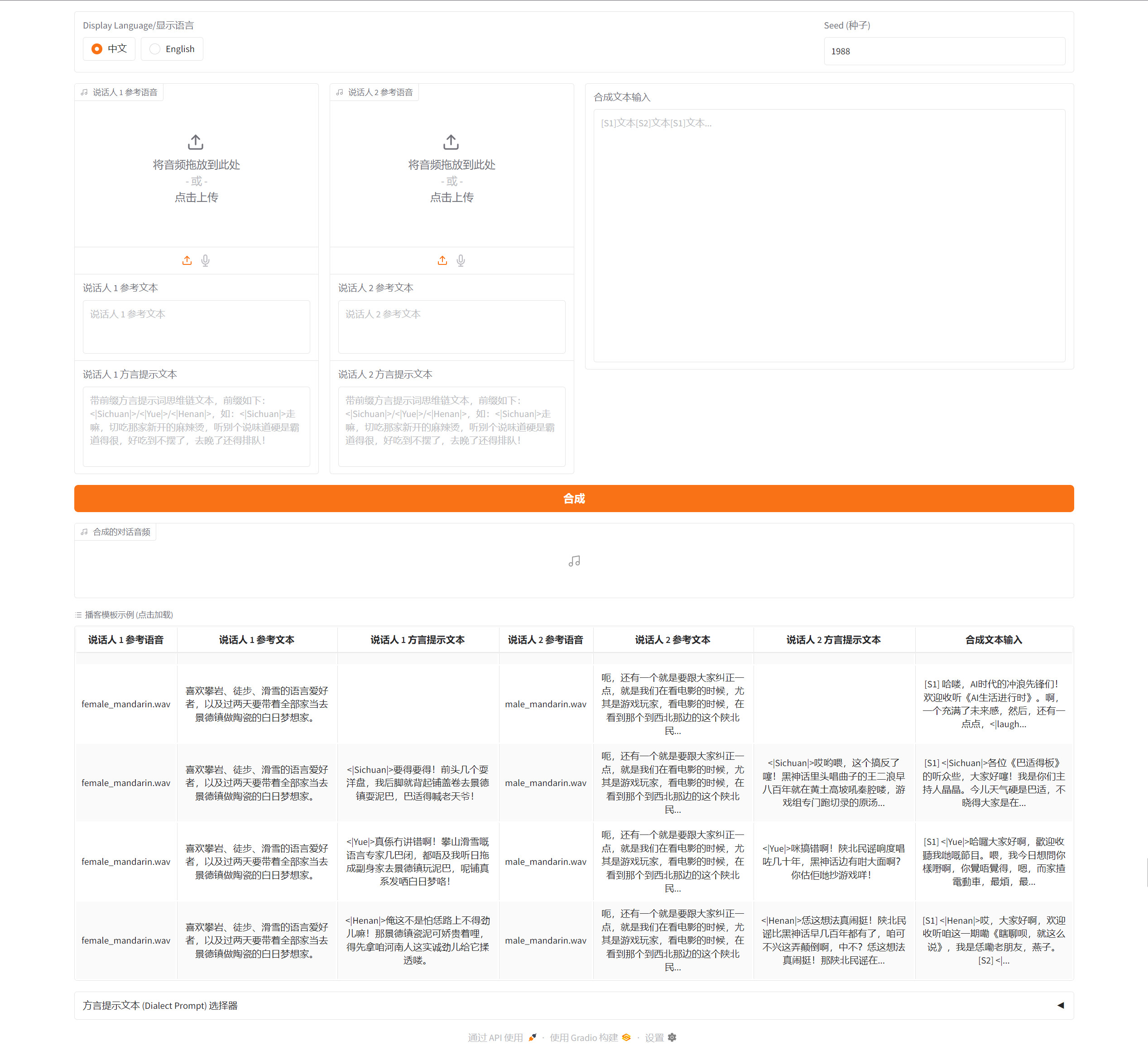
点击页面中的第一个例子,报错
[WARNING] - Error processing data item 001: TorchCodec is required for load_with_torchcodec. Please install torchcodec to use this function.
Traceback (most recent call last):
  File "D:\Miniconda3\envs\test1\Lib\site-packages\gradio\queueing.py", line 759, in process_events
    response = await route_utils.call_process_api(
               ^^^^^^^^^^^^^^^^^^^^^^^^^^^^^^^^^^^
  File "D:\Miniconda3\envs\test1\Lib\site-packages\gradio\route_utils.py", line 354, in call_process_api
    output = await app.get_blocks().process_api(
             ^^^^^^^^^^^^^^^^^^^^^^^^^^^^^^^^^^^
  File "D:\Miniconda3\envs\test1\Lib\site-packages\gradio\blocks.py", line 2191, in process_api
    result = await self.call_function(
             ^^^^^^^^^^^^^^^^^^^^^^^^^
  File "D:\Miniconda3\envs\test1\Lib\site-packages\gradio\blocks.py", line 1698, in call_function
    prediction = await anyio.to_thread.run_sync(  # type: ignore
                 ^^^^^^^^^^^^^^^^^^^^^^^^^^^^^^^^^^^^^^^^^^^^^^^
  File "D:\Miniconda3\envs\test1\Lib\site-packages\anyio\to_thread.py", line 56, in run_sync
    return await get_async_backend().run_sync_in_worker_thread(
           ^^^^^^^^^^^^^^^^^^^^^^^^^^^^^^^^^^^^^^^^^^^^^^^^^^^^
  File "D:\Miniconda3\envs\test1\Lib\site-packages\anyio\_backends\_asyncio.py", line 2485, in run_sync_in_worker_thread
    return await future
           ^^^^^^^^^^^^
  File "D:\Miniconda3\envs\test1\Lib\site-packages\anyio\_backends\_asyncio.py", line 976, in run
    result = context.run(func, *args)
             ^^^^^^^^^^^^^^^^^^^^^^^^
  File "D:\Miniconda3\envs\test1\Lib\site-packages\gradio\utils.py", line 915, in wrapper
    response = f(*args, **kwargs)
               ^^^^^^^^^^^^^^^^^^
  File "D:\project\SoulX-Podcast\webui.py", line 325, in dialogue_synthesis_function
    data = process_single(
           ^^^^^^^^^^^^^^^
  File "D:\project\SoulX-Podcast\webui.py", line 266, in process_single
    prompt_mels_for_llm, prompt_mels_lens_for_llm = s3tokenizer.padding(data["log_mel"])  # [B, num_mels=128, T]
                                                                        ~~~~^^^^^^^^^^^
TypeError: 'NoneType' object is not subscriptable
在处理音频文件时,程序尝试使用 s3tokenizer 加载音频,但由于缺少 torchcodec,加载过程失败并返回了 None,后续访问 data["log_mel"] 时出现空指针错误,安装torchcodec后再试一下
pip install torchcodec又报错
[WARNING] - Error processing data item 001: Could not load libtorchcodec. Likely causes:
          1. FFmpeg is not properly installed in your environment. We support
             versions 4, 5, 6, and 7 on all platforms, and 8 on Mac and Linux.
          2. The PyTorch version (2.9.1+cu128) is not compatible with
             this version of TorchCodec. Refer to the version compatibility
             table:
             https://github.com/pytorch/torchcodec?tab=readme-ov-file#installing-torchcodec.
          3. Another runtime dependency; see exceptions below.
        The following exceptions were raised as we tried to load libtorchcodec:

[start of libtorchcodec loading traceback]
FFmpeg version 8: Could not load this library: D:\Miniconda3\envs\test1\Lib\site-packages\torchcodec\libtorchcodec_core8.dll
FFmpeg version 7: Could not load this library: D:\Miniconda3\envs\test1\Lib\site-packages\torchcodec\libtorchcodec_core7.dll
FFmpeg version 6: Could not load this library: D:\Miniconda3\envs\test1\Lib\site-packages\torchcodec\libtorchcodec_core6.dll
FFmpeg version 5: Could not load this library: D:\Miniconda3\envs\test1\Lib\site-packages\torchcodec\libtorchcodec_core5.dll
FFmpeg version 4: Could not load this library: D:\Miniconda3\envs\test1\Lib\site-packages\torchcodec\libtorchcodec_core4.dll
[end of libtorchcodec loading traceback].
Traceback (most recent call last):
  File "D:\Miniconda3\envs\test1\Lib\site-packages\gradio\queueing.py", line 759, in process_events
    response = await route_utils.call_process_api(
               ^^^^^^^^^^^^^^^^^^^^^^^^^^^^^^^^^^^
  File "D:\Miniconda3\envs\test1\Lib\site-packages\gradio\route_utils.py", line 354, in call_process_api
    output = await app.get_blocks().process_api(
             ^^^^^^^^^^^^^^^^^^^^^^^^^^^^^^^^^^^
  File "D:\Miniconda3\envs\test1\Lib\site-packages\gradio\blocks.py", line 2191, in process_api
    result = await self.call_function(
             ^^^^^^^^^^^^^^^^^^^^^^^^^
  File "D:\Miniconda3\envs\test1\Lib\site-packages\gradio\blocks.py", line 1698, in call_function
    prediction = await anyio.to_thread.run_sync(  # type: ignore
                 ^^^^^^^^^^^^^^^^^^^^^^^^^^^^^^^^^^^^^^^^^^^^^^^
  File "D:\Miniconda3\envs\test1\Lib\site-packages\anyio\to_thread.py", line 56, in run_sync
    return await get_async_backend().run_sync_in_worker_thread(
           ^^^^^^^^^^^^^^^^^^^^^^^^^^^^^^^^^^^^^^^^^^^^^^^^^^^^
  File "D:\Miniconda3\envs\test1\Lib\site-packages\anyio\_backends\_asyncio.py", line 2485, in run_sync_in_worker_thread
    return await future
           ^^^^^^^^^^^^
  File "D:\Miniconda3\envs\test1\Lib\site-packages\anyio\_backends\_asyncio.py", line 976, in run
    result = context.run(func, *args)
             ^^^^^^^^^^^^^^^^^^^^^^^^
  File "D:\Miniconda3\envs\test1\Lib\site-packages\gradio\utils.py", line 915, in wrapper
    response = f(*args, **kwargs)
               ^^^^^^^^^^^^^^^^^^
  File "D:\project\SoulX-Podcast\webui.py", line 325, in dialogue_synthesis_function
    data = process_single(
           ^^^^^^^^^^^^^^^
  File "D:\project\SoulX-Podcast\webui.py", line 266, in process_single
    prompt_mels_for_llm, prompt_mels_lens_for_llm = s3tokenizer.padding(data["log_mel"])  # [B, num_mels=128, T]
                                                                        ~~~~^^^^^^^^^^^
TypeError: 'NoneType' object is not subscriptable
我电脑里有ffmpeg,可能是它找不到或不兼容,那我就在虚拟环境中用conda再安装下吧。
conda安装前
where ffmpeg  # linux用which ffmpeg
D:\ffmpeg\bin\ffmpeg.exe

ffmpeg -version
ffmpeg version N-109823-g385ec46424-20230211 Copyright (c) 2000-2023 the FFmpeg developers
built with gcc 12.2.0 (crosstool-NG 1.25.0.90_cf9beb1)
configuration: --prefix=/ffbuild/prefix --pkg-config-flags=--static --pkg-config=pkg-config --cross-prefix=x86_64-w64-mingw32- --arch=x86_64 --target-os=mingw32 --enable-gpl --enable-version3 --disable-debug --disable-w32threads --enable-pthreads --enable-iconv --enable-libxml2 --enable-zlib --enable-libfreetype --enable-libfribidi --enable-gmp --enable-lzma --enable-fontconfig --enable-libvorbis --enable-opencl --disable-libpulse --enable-libvmaf --disable-libxcb --disable-xlib --enable-amf --enable-libaom --enable-libaribb24 --enable-avisynth --enable-chromaprint --enable-libdav1d --enable-libdavs2 --disable-libfdk-aac --enable-ffnvcodec --enable-cuda-llvm --enable-frei0r --enable-libgme --enable-libkvazaar --enable-libass --enable-libbluray --enable-libjxl --enable-libmp3lame --enable-libopus --enable-librist --enable-libssh --enable-libtheora --enable-libvpx --enable-libwebp --enable-lv2 --disable-libmfx --enable-libvpl --enable-openal --enable-libopencore-amrnb --enable-libopencore-amrwb --enable-libopenh264 --enable-libopenjpeg --enable-libopenmpt --enable-librav1e --enable-librubberband --enable-schannel --enable-sdl2 --enable-libsoxr --enable-libsrt --enable-libsvtav1 --enable-libtwolame --enable-libuavs3d --disable-libdrm --disable-vaapi --enable-libvidstab --enable-vulkan --enable-libshaderc --enable-libplacebo --enable-libx264 --enable-libx265 --enable-libxavs2 --enable-libxvid --enable-libzimg --enable-libzvbi --extra-cflags=-DLIBTWOLAME_STATIC --extra-cxxflags= --extra-ldflags=-pthread --extra-ldexeflags= --extra-libs=-lgomp --extra-version=20230211
libavutil      58.  0.100 / 58.  0.100
libavcodec     60.  0.100 / 60.  0.100
libavformat    60.  1.100 / 60.  1.100
libavdevice    60.  0.100 / 60.  0.100
libavfilter     9.  0.100 /  9.  0.100
libswscale      7.  0.100 /  7.  0.100
libswresample   4.  9.100 /  4.  9.100
libpostproc    57.  0.100 / 57.  0.100
conda安装后
先切换到虚拟环境

conda install ffmpeg

where ffmpeg
D:\Miniconda3\envs\test1\Library\bin\ffmpeg.exe
D:\ffmpeg\bin\ffmpeg.exe

ffmpeg -version
ffmpeg version 6.1.1 Copyright (c) 2000-2023 the FFmpeg developers
built with clang version 20.1.8
configuration: --prefix=/c/miniconda3/conda-bld/ffmpeg_1762437060025/_h_env/Library --cc=clang.exe --ar=llvm-ar --nm=llvm-nm --ranlib=llvm-ranlib --strip= --disable-doc --enable-swresample --enable-swscale --enable-openssl --enable-libxml2 --enable-libtheora --enable-demuxer=dash --enable-postproc --enable-hardcoded-tables --enable-libfreetype --enable-libharfbuzz --enable-libfontconfig --enable-libdav1d --enable-zlib --enable-libaom --enable-pic --enable-shared --disable-static --disable-gpl --enable-version3 --disable-sdl2 --ld=lld-link --target-os=win64 --toolchain=msvc --host-cc=clang.exe --enable-cross-compile --disable-libmp3lame --host-extralibs= --disable-pthreads --enable-w32threads --extra-libs='ucrt.lib vcruntime.lib oldnames.lib' --disable-stripping
libavutil      58. 29.100 / 58. 29.100
libavcodec     60. 31.102 / 60. 31.102
libavformat    60. 16.100 / 60. 16.100
libavdevice    60.  3.100 / 60.  3.100
libavfilter     9. 12.100 /  9. 12.100
libswscale      7.  5.100 /  7.  5.100
libswresample   4. 12.100 /  4. 12.100
然后再次尝试,如果还报错,就卸载重装torchcodec
依赖关系说明
1. torchcodec 的架构依赖
torchcodec是一个用于视频/音频解码的 PyTorch 扩展库,它有以下特点:
- 它依赖于系统级的多媒体库(如 FFmpeg)来处理音视频编解码
- 在安装时,
torchcodec会尝试链接系统中可用的 FFmpeg 库- 如果安装时 FFmpeg 不可用或版本不兼容,
torchcodec可能无法正确构建其核心组件2. 安装时的链接过程
当您运行
pip install torchcodec时:
- pip 下载 torchcodec 源码或预编译包
- 安装程序会检查系统中是否存在兼容的 FFmpeg 库
- 如果存在,它会链接这些库并构建相应的功能
- 如果不存在或不兼容,某些功能会被禁用或构建失败
3. 为什么需要重新安装
您需要重新安装
torchcodec的原因包括:环境变化
# 原来的环境状态 [安装 torchcodec 时] → 没有 FFmpeg → 构建不完整 # 现在的环境状态 [conda install ffmpeg 后] → 有了 FFmpeg → 可以完整构建动态链接需求
torchcodec在运行时需要加载 FFmpeg 的动态链接库:
- 安装时如果没有 FFmpeg,就无法创建正确的链接
- 安装后添加 FFmpeg,但已安装的 torchcodec 仍然缺少链接信息
- 重新安装可以让 torchcodec 正确链接到新安装的 FFmpeg
版本兼容性
不同版本的 FFmpeg 可能有不同 API:
torchcodec需要在安装时确定使用哪个版本的 FFmpeg API- 如果先安装 torchcodec 再安装 FFmpeg,版本可能不匹配
- 重新安装可以确保使用当前环境中的 FFmpeg 版本
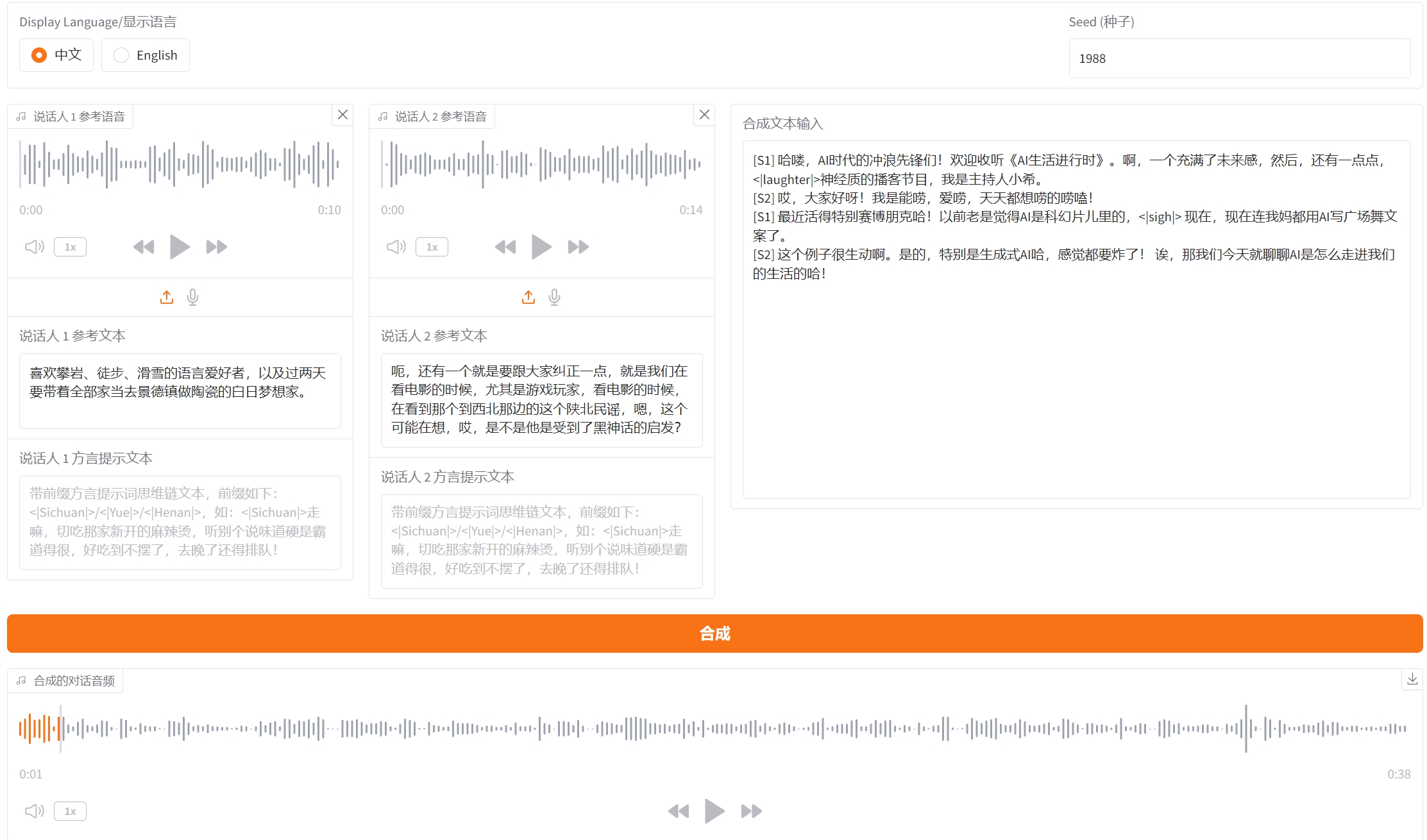
合成成功
参考链接






 扫一扫
扫一扫


 1166
1166

 被折叠的 条评论
为什么被折叠?
被折叠的 条评论
为什么被折叠?
 到【灌水乐园】发言





