


 本文介绍如何使用Python的requests、BeautifulSoup及xlwings库从软科中国大学排名网站抓取数据,并将这些数据保存到Excel文件中。文章详细展示了网页数据抓取的过程,包括请求网页、解析HTML、提取信息并存储。
文章目录
利用requests、BeautifulSoup、xlwings库抓取软科中国大学排名首页数据
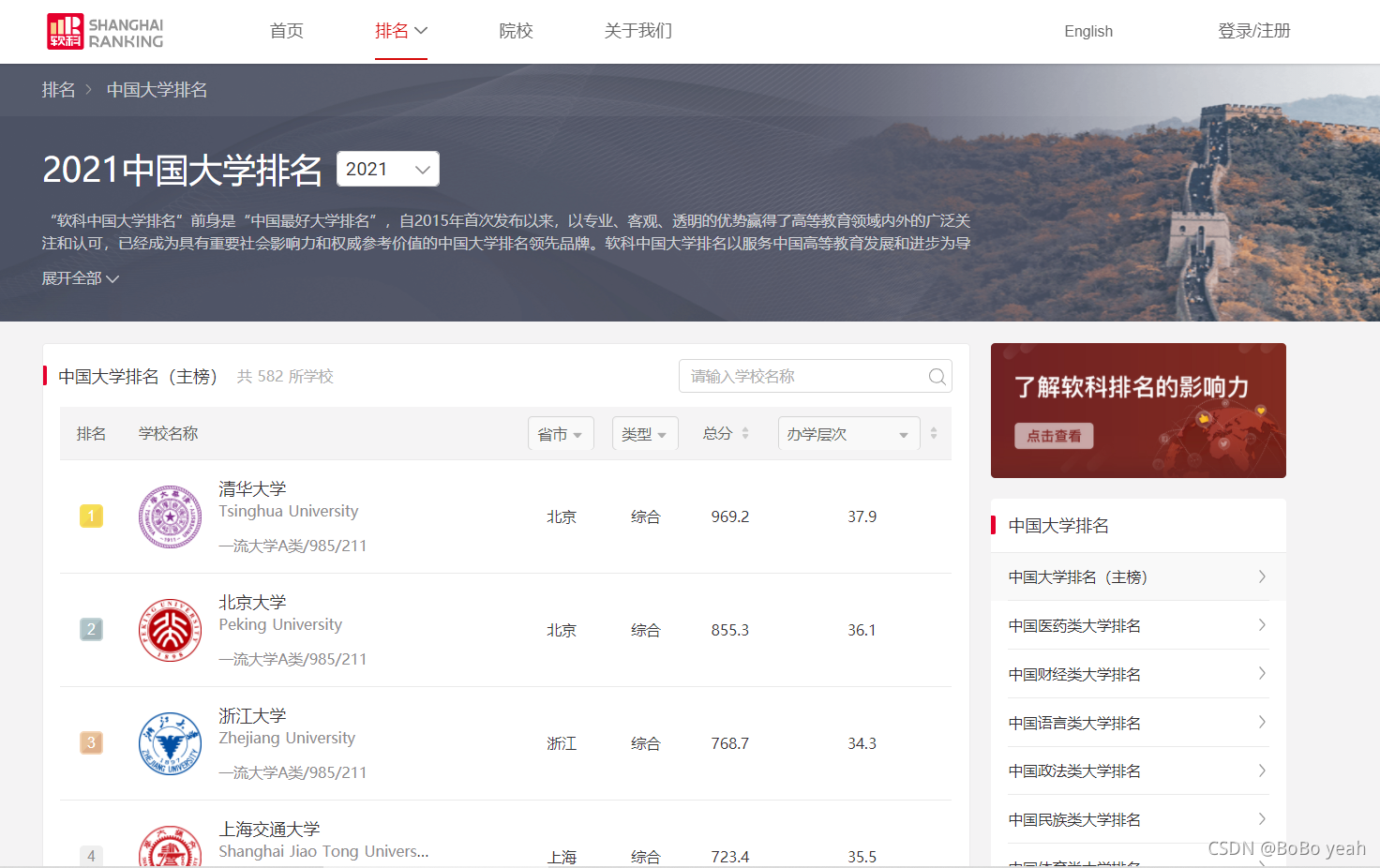
(1)软科中国大学排名
import requests
import bs4
from requests.exceptions import RequestException
from bs4 import BeautifulSoup
import xlwings as xw
(2)调用requests模块中get方法,get方法包括headers参数,访问上述网址,获取Response 对象。
headers = {'User-Agent': 'Mozilla/5.0 (Macintosh; Intel Mac OS X 10_11_4) AppleWebKit/537.36 (KHTML, like Gecko) Chrome/52.0.2743.116 Safari/537.36'}
web=requests.get(url,timeout=30,headers=headers)
(3)利用BeautifulSoup类解析。
lxml HTML 解析器
BeautifulSoup(markup, "lxml")
速度快、文档容错能力强
#BeautifulSoup将字节流转换为utf-8编码
soup=BeautifulSoup(web.text,'lxml')
(4)利用find_all等方法查找tr、td等标签对象。
    for tr in soup.tbody.find_all('tr'):
        if isinstance(tr, bs4.element.Tag): #bs4.element.Tag 类型,这是 Beautiful Soup 中一个重要的数据结构
            tds = tr.find_all('td')
bs4.element.Tag 类型,这是 Beautiful Soup 中一个重要的数据结构。经过选择器选择后,选择结果都是这种 Tag 类型。Tag 具有一些属性,比如 string 属性,调用该属性,可以得到节点的文本内容。
(5)将找到的相应标签内容依次添加到列表中。
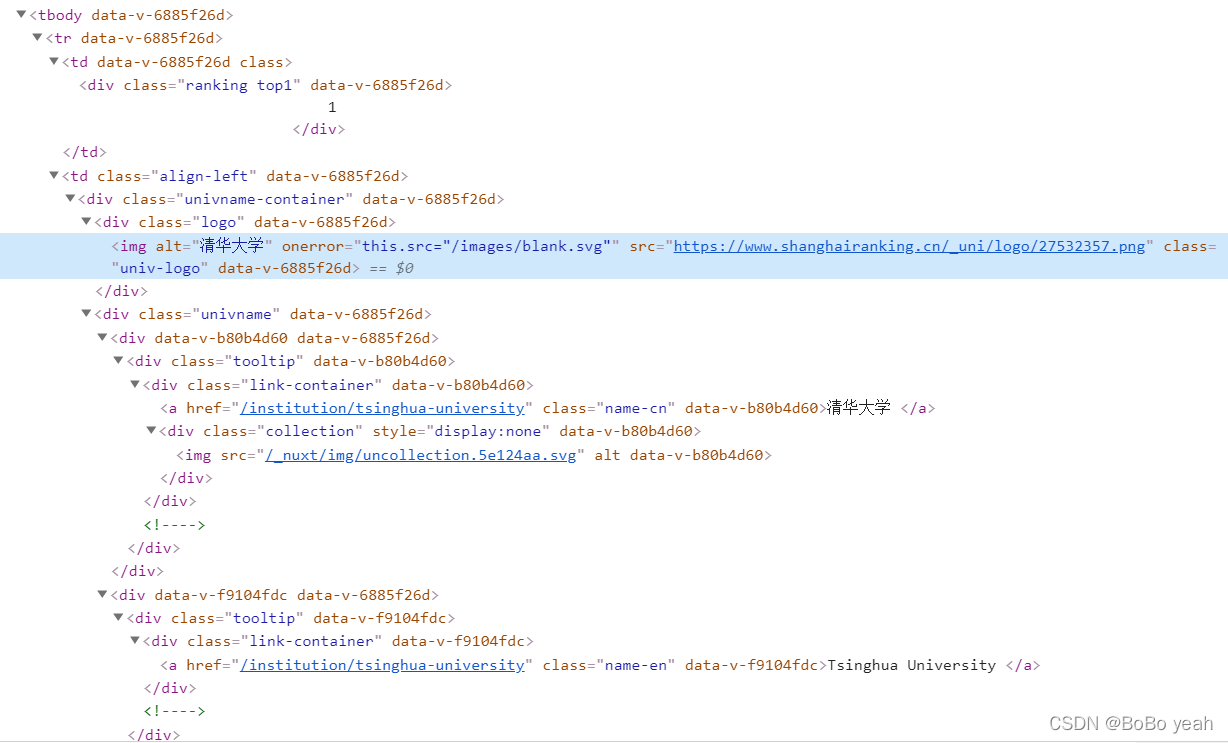
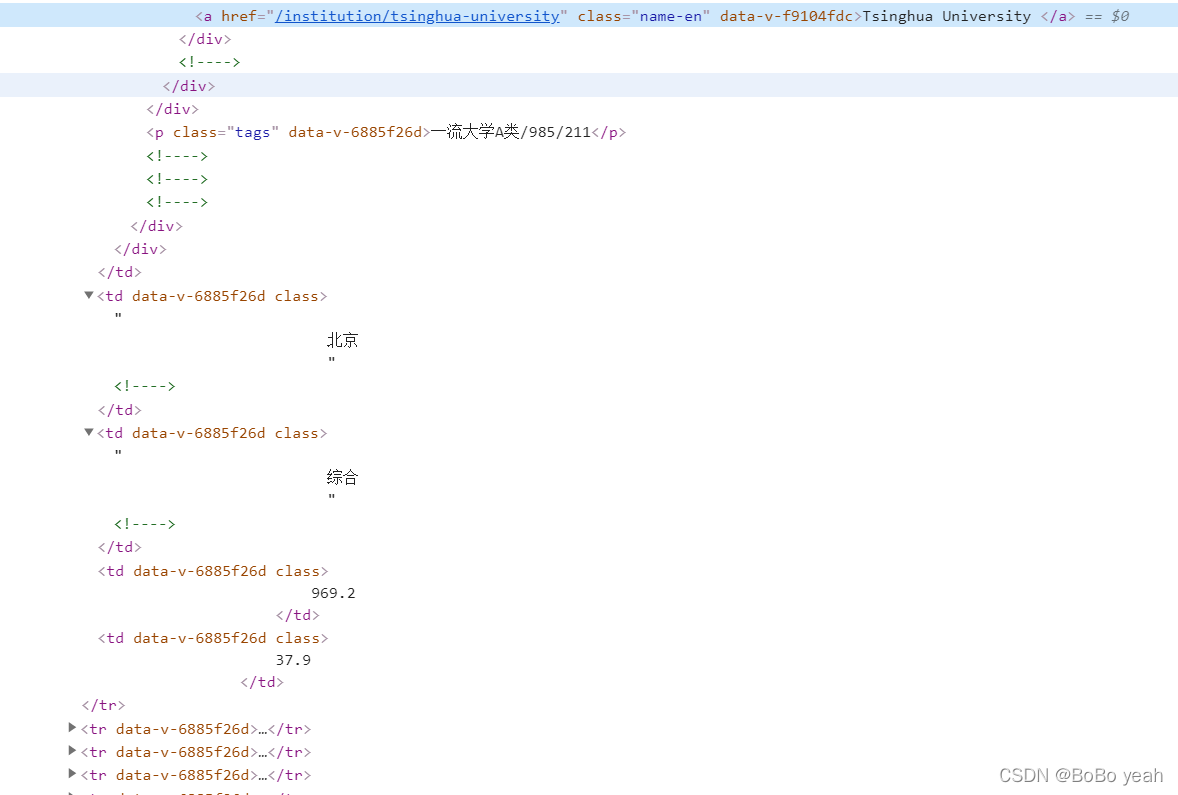
ulist.append([tds[0].text.strip(), #排名
                          tds[1].find(class_="univ-logo").get('src'),#univ-logo
                          tds[1].find(class_="name-cn").text.strip(),#学校中文名称
                          tds[1].find(class_="name-en").text.strip(),#学校英文名称
                          tds[1].find(class_="tags").text.strip(),#备注
                          tds[2].text.strip(),#省市
                          tds[3].text.strip(),#类型
                          tds[4].text.strip(),#总分
                          tds[5].text.strip() #办学层次
                          ])
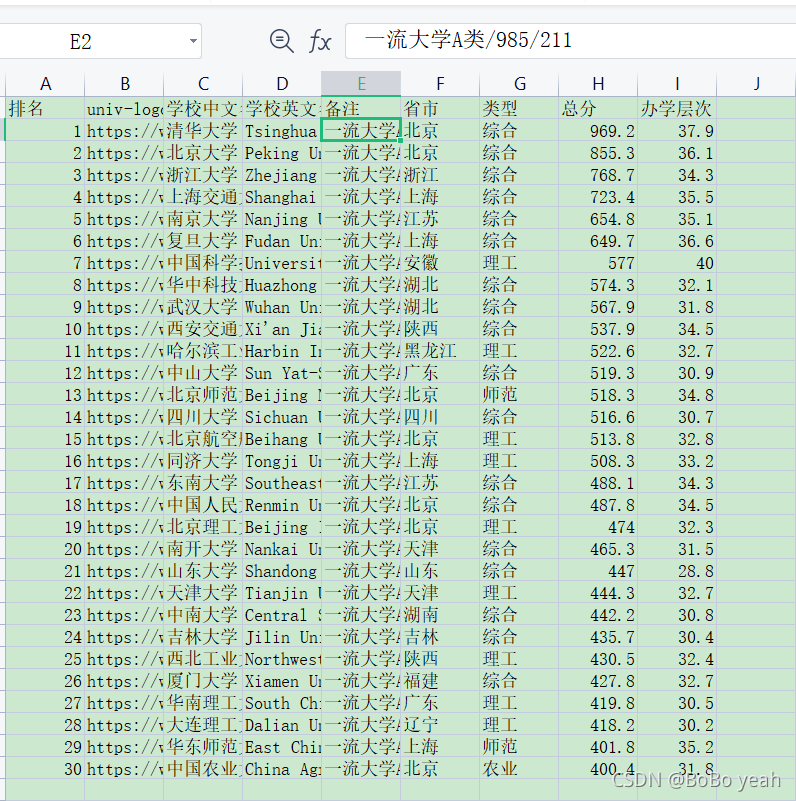
(6)利用xlwings库,将列表内容写入Excel文件。
    #写入Excel文件
    wb=xw.Book()
    sht=wb.sheets('Sheet1')
    sht.range('a1').value=uinfo#将数据添加到表格中
    #wb.close()
(7)将获取排名数据封装为一个方法。
def getHTML(url):
    try:
        headers = {
            'User-Agent': 'Mozilla/5.0 (Macintosh; Intel Mac OS X 10_11_4) AppleWebKit/537.36 (KHTML, like Gecko) Chrome/52.0.2743.116 Safari/537.36'
        }
        response = requests.get(url,timeout=30, headers=headers)
        response.encoding = response.apparent_encoding
        if response.status_code == 200:
            return response.text
        return None
    except RequestException:
        return None
(8)将抽取排名信息封装为一个方法。
def findUniversity(soup):
    ulist = [['排名', 'univ-logo', '学校中文名称', '学校英文名称', '备注', '省市', '类型', '总分', '办学层次']]

    for tr in soup.tbody.find_all('tr'):
        if isinstance(tr, bs4.element.Tag): #bs4.element.Tag 类型,这是 Beautiful Soup 中一个重要的数据结构
            tds = tr.find_all('td')
            ulist.append([tds[0].text.strip(), #排名
                          tds[1].find(class_="univ-logo").get('src'),#univ-logo
                          tds[1].find(class_="name-cn").text.strip(),#学校中文名称
                          tds[1].find(class_="name-en").text.strip(),#学校英文名称
                          tds[1].find(class_="tags").text.strip(),#备注
                          tds[2].text.strip(),#省市
                          tds[3].text.strip(),#类型
                          tds[4].text.strip(),#总分
                          tds[5].text.strip() #办学层次
                          ])
    return ulist
(9)main()方法完成整体调用。
def main():
    url = "https://www.shanghairanking.cn/rankings/bcur/2021"
    html = getHTML(url)
    #BeautifulSoup将字节流转换为utf-8编码
    soup=BeautifulSoup(html,'lxml')
    uinfo = findUniversity(soup)

    #写入Excel文件
    wb=xw.Book()
    sht=wb.sheets('Sheet1')
    sht.range('a1').value=uinfo#将数据添加到表格中

    #wb.close()
# -*- coding: utf-8 -*-
import requests
import bs4
from requests.exceptions import RequestException
from bs4 import BeautifulSoup
import xlwings as xw


def getHTML(url):
    try:
        headers = {
            'User-Agent': 'Mozilla/5.0 (Macintosh; Intel Mac OS X 10_11_4) AppleWebKit/537.36 (KHTML, like Gecko) Chrome/52.0.2743.116 Safari/537.36'
        }
        response = requests.get(url,timeout=30, headers=headers)
        response.encoding = response.apparent_encoding
        if response.status_code == 200:
            return response.text
        return None
    except RequestException:
        return None


def findUniversity(soup):
    ulist = [['排名', 'univ-logo', '学校中文名称', '学校英文名称', '备注', '省市', '类型', '总分', '办学层次']]

    for tr in soup.tbody.find_all('tr'):
        if isinstance(tr, bs4.element.Tag):
            tds = tr.find_all('td')
            ulist.append([tds[0].text.strip(),
                          tds[1].find(class_="univ-logo").get('src'),
                          tds[1].find(class_="name-cn").text.strip(),
                          tds[1].find(class_="name-en").text.strip(),
                          tds[1].find(class_="tags").text.strip(),
                          tds[2].text.strip(),
                          tds[3].text.strip(),
                          tds[4].text.strip(),
                          tds[5].text.strip()])
    return ulist


def main():
    # 获取BeautifulSoup对象
    url = "https://www.shanghairanking.cn/rankings/bcur/2021"
    html = getHTML(url)
    # BeautifulSoup将字节流转换为utf-8编码
    soup = BeautifulSoup(html, 'lxml')
    uinfo = findUniversity(soup)

    # 写入Excel文件
    wb = xw.Book()
    sht = wb.sheets('Sheet1')
    sht.range('a1').value = uinfo  # 将数据添加到表格中
    #wb.close()


if __name__ == "__main__":
    main()







 扫一扫
扫一扫


 被折叠的 条评论
为什么被折叠?
被折叠的 条评论
为什么被折叠?
 到【灌水乐园】发言





