


 该博客介绍了如何利用Python的OGR库进行栅格影像的坐标转换。通过读取遥感影像,进行EPSG坐标系统的转换,并输出转换后的影像。代码详细展示了从读取影像、坐标转换到输出影像的完整流程,适用于地理信息系统领域的数据处理。
前言
OGR坐标参考系和坐标转换教程官方教程。
本文主要采用OGR库,对栅格影像进行投影转换,其中用EPSG对坐标系进行选择。
EPSG对照表
一、读取影像
利用gdal读取遥感影像
from osgeo import gdal

def read_img(filename):
    dataset = gdal.Open(filename)  # 打开文件
    if dataset == None:
        raise Exception(f"cant find/open {filename}")
    im_width = dataset.RasterXSize  # 栅格矩阵的列数
    im_height = dataset.RasterYSize  # 栅格矩阵的行数
    im_Band = dataset.RasterCount  # 栅格矩阵的波段数

    im_geotrans = dataset.GetGeoTransform()
    im_proj = dataset.GetProjection()
    im_data = dataset.ReadAsArray(0, 0, im_width, im_height)  # 将数据写成数组,对应栅格矩阵

    del dataset  # 关闭对象,文件dataset
    return im_proj, im_geotrans, im_data, im_width, im_height, im_Band
二、输出影像
DType2GDAL = {"uint8": gdal.GDT_Byte,
              "uint16": gdal.GDT_UInt16,
              "int16": gdal.GDT_Int16,
              "uint32": gdal.GDT_UInt32,
              "int32": gdal.GDT_Int32,
              "float32": gdal.GDT_Float32,
              "float64": gdal.GDT_Float64,
              "cint16": gdal.GDT_CInt16,
              "cint32": gdal.GDT_CInt32,
              "cfloat32": gdal.GDT_CFloat32,
              "cfloat64": gdal.GDT_CFloat64}


def write_img(filename, im_proj, im_geotrans, im_data):
    # 判断栅格数据的数据类型
    if im_data.dtype.name in DType2GDAL:
        datatype = DType2GDAL[im_data.dtype.name]
    else:
        datatype = gdal.GDT_Float32
    # 判读数组维数
    if len(im_data.shape) == 3:
        im_bands, im_height, im_width = im_data.shape
    else:
        im_bands, (im_height, im_width) = 1, im_data.shape
    # 创建文件
    if not pathlib.Path(filename).parent.exists():
        pathlib.Path(filename).parent.mkdir(parents=True, exist_ok=True)
    driver = gdal.GetDriverByName("GTiff")  # 数据类型必须有,因为要计算需要多大内存空间
    dataset = driver.Create(filename, im_width, im_height, im_bands, datatype)

    dataset.SetGeoTransform(im_geotrans)  # 写入仿射变换参数
    dataset.SetProjection(im_proj)  # 写入投影
    if im_bands == 1:
        dataset.GetRasterBand(1).WriteArray(im_data)  # 写入数组数据
    else:
        for i in range(im_bands):
            dataset.GetRasterBand(i + 1).WriteArray(im_data[i])
    del dataset
三、坐标转换
class GEOchange(object):

    def __init__(self, toEPSG):
        self.EPSG = toEPSG
        self.to_crs = osr.SpatialReference()
        self.to_crs.ImportFromEPSG(toEPSG)

    def run(self, infile, outfile):
        im_proj, im_geotrans, im_data, self.im_width, self.im_height, self.im_Band = read_img(infile)
        srs = osr.SpatialReference()
        srs.ImportFromWkt(im_proj)
        self.Transformation = osr.CoordinateTransformation(srs, self.to_crs)
        geotrans = self.setGeotrans(im_geotrans)
        write_img(outfile, self.to_crs.ExportToWkt(), geotrans, im_data)

    def setGeotrans(self, im_geotrans):
        lon, lat = self.imagexy2geo(im_geotrans, 0, 0)
        coords00 = self.Transformation.TransformPoint(lat, lon)
        lon, lat = self.imagexy2geo(im_geotrans, self.im_height, 0)
        coords01 = self.Transformation.TransformPoint(lat, lon)
        lon, lat = self.imagexy2geo(im_geotrans, 0, self.im_width)
        coords10 = self.Transformation.TransformPoint(lat, lon)

        trans = [0 for i in range(6)]
        trans[0] = coords00[0]
        trans[3] = coords00[1]
        trans[2] = (coords01[0] - trans[0]) / self.im_height
        trans[5] = (coords01[1] - trans[3]) / self.im_height
        trans[1] = (coords10[0] - trans[0]) / self.im_width
        trans[4] = (coords10[1] - trans[3]) / self.im_width
        return trans

    def imagexy2geo(self, im_geotrans, row, col):
        px = im_geotrans[0] + col * im_geotrans[1] + row * im_geotrans[2]
        py = im_geotrans[3] + col * im_geotrans[4] + row * im_geotrans[5]
        return px, py
完整代码
# -*- coding: utf-8 -*-
"""
 @ time: 2022/11/11 13:49
 @ file: GEOchange.py
 @ author: QYD2001
"""
from osgeo import osr

from Tool import read_img, write_img


class GEOchange(object):

    def __init__(self, toEPSG):
        self.EPSG = toEPSG
        self.to_crs = osr.SpatialReference()
        self.to_crs.ImportFromEPSG(toEPSG)

    def run(self, infile, outfile):
        im_proj, im_geotrans, im_data, self.im_width, self.im_height, self.im_Band = read_img(infile)
        srs = osr.SpatialReference()
        srs.ImportFromWkt(im_proj)
        self.Transformation = osr.CoordinateTransformation(srs, self.to_crs)
        geotrans = self.setGeotrans(im_geotrans)
        write_img(outfile, self.to_crs.ExportToWkt(), geotrans, im_data)

    def setGeotrans(self, im_geotrans):
        lon, lat = self.imagexy2geo(im_geotrans, 0, 0)
        coords00 = self.Transformation.TransformPoint(lat, lon)
        lon, lat = self.imagexy2geo(im_geotrans, self.im_height, 0)
        coords01 = self.Transformation.TransformPoint(lat, lon)
        lon, lat = self.imagexy2geo(im_geotrans, 0, self.im_width)
        coords10 = self.Transformation.TransformPoint(lat, lon)

        trans = [0 for i in range(6)]
        trans[0] = coords00[0]
        trans[3] = coords00[1]
        trans[2] = (coords01[0] - trans[0]) / self.im_height
        trans[5] = (coords01[1] - trans[3]) / self.im_height
        trans[1] = (coords10[0] - trans[0]) / self.im_width
        trans[4] = (coords10[1] - trans[3]) / self.im_width
        return trans

    def imagexy2geo(self, im_geotrans, row, col):
        px = im_geotrans[0] + col * im_geotrans[1] + row * im_geotrans[2]
        py = im_geotrans[3] + col * im_geotrans[4] + row * im_geotrans[5]
        return px, py


if __name__ == '__main__':
    change = GEOchange(32650)

    filepath = r"E:\RsData\1108\1m\1m\LNPJ210912_GF2PMS0005882472_001.tif"
    outPath = r"E:\RsData\1108\1m\1m\LNPJ210912_GF2PMS0005882472_001_UTM.tif"
    change.run(filepath, outPath)
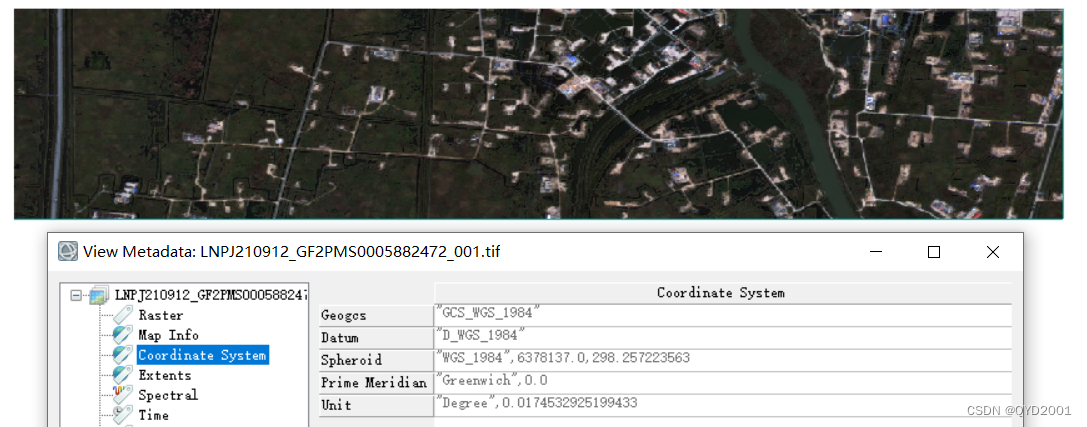
结果展示
原始数据
输出结果
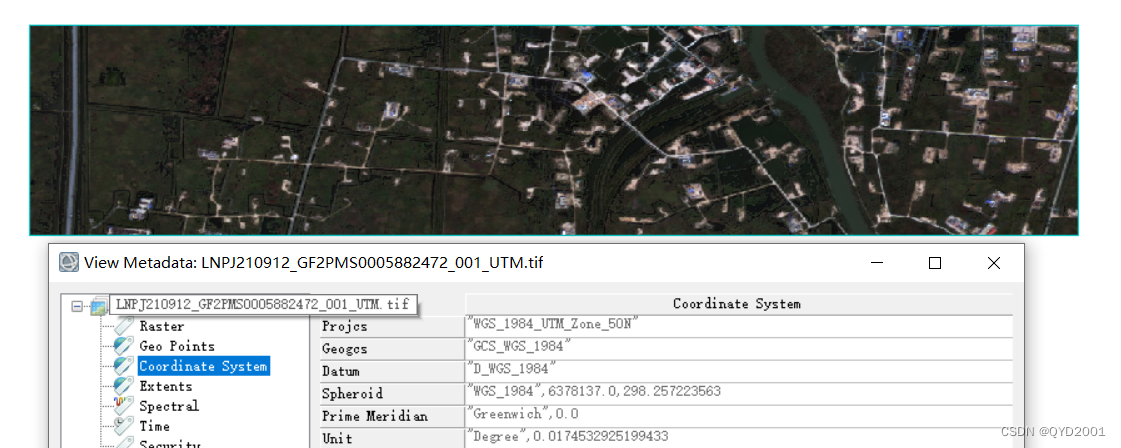
圆满完成任务@-@
注*
本人环境采用python3.8 +gdal3.2.3。
如有错误可以尝试改一下环境,
目前看到gdal 2.3.3会报错,导致结果有误 T-T






 扫一扫
扫一扫


 2279
2279


 到【灌水乐园】发言



