



 本文介绍了在移动端网页中实现底部元素固定布局的三种方法,包括初始化文档高度、解决虚拟键盘弹出时的问题以及处理屏幕旋转导致的布局错位。
场景描述, 当document的高度不够window的高度时候,如在ip6中文档的高度比窗体的高度小,到底设计在最下方的区域没有在窗体最下方,就留有空白地方如下图的灰色部分
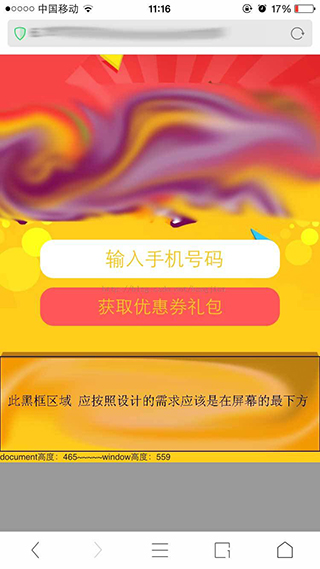
1、 解决初始化文档高度,让文档高度等于窗体高度,并fixed需要定位的区域在最下方
(function bottonm(){
			if($(document).height()<$(window).height()){
				$('.bottom_fix').css({'position':'fixed','bottom':'0px'});
				$(document).height($(window).height()+'px');
			}
		})();
2、解决输入框input获取焦点得时,虚拟键盘会把fixed元素顶上去(次现在在部分安卓上能发现)如下图
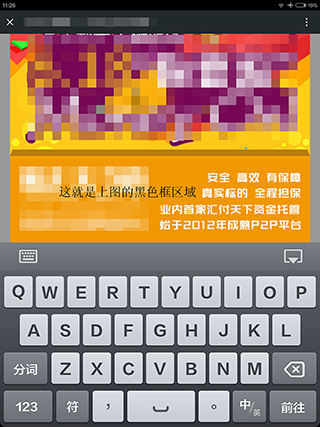
$('#phone').bind('focus',function(){
			$('.bottom_fix').css('position','static');
			//或者$('#viewport').height($(window).height()+'px');
		}).bind('blur',function(){
			$('.bottom_fix').css({'position':'fixed','bottom':'0'});
			//或者$('#viewport').height('auto');
});3、解决屏幕旋转也会出现以上问题
$(document).bind('orientationchange',function(){
			if(window.orientation==90 || window.orientation==-90){
				$('.bottom_fix').css('position','static');
			}else{
				$('.bottom_fix').css({'position':'fixed','bottom':'0'});
			}
		});





 扫一扫
扫一扫


 7400
7400

 被折叠的 条评论
为什么被折叠?
被折叠的 条评论
为什么被折叠?
 到【灌水乐园】发言





