


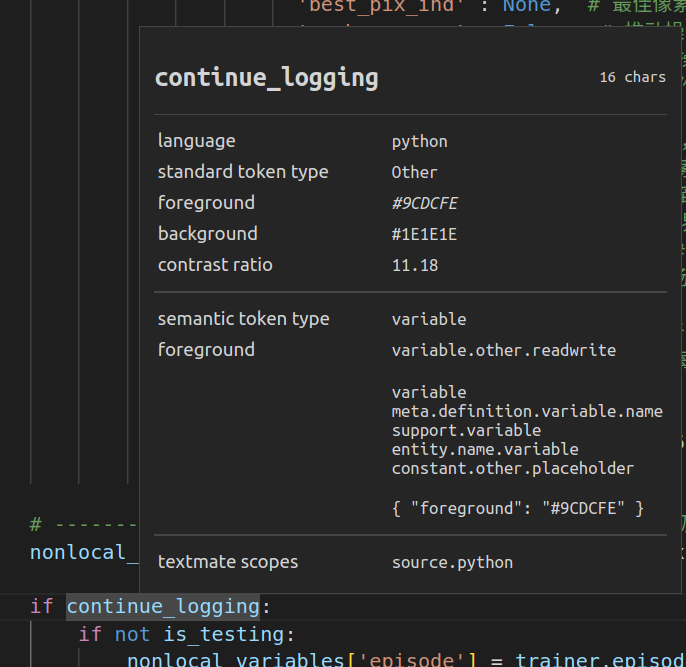
这张截图展示了 VS Code 的 "Developer: Inspect Editor Tokens and Scopes" 工具的详细信息窗口,这是用于分析代码语法高亮和语义标记的强大工具。本文将详细解析每个部分:
1. 顶部信息:当前检查的标识符
-
# continue_logging:这是您当前鼠标悬停或光标所在的代码标识符(变量名)
2. 基础语言信息
-
language: python:当前文件是 Python 代码 -
standard token type: Other:标准令牌类型为"其他"(非关键字等特殊类型) -
foreground: #9CDCFE:该标识符的文字颜色是浅蓝色(RGB 值) -
background: #1E1E1E:该标识符的背景颜色是深灰色 -
contrast ratio: 11.18:前景色和背景色的对比度(无障碍标准要求>4.5)
3. 语义标记信息
-
semantic token type: variable:语义令牌类型被识别为变量 -
foreground: variable.other.readwrite:颜色规则来源 - 可读写的普通变量
4. TextMate 作用域层级(关键部分)
这是语法高亮的底层规则匹配链,从最具体到最通用:
variable
meta.definition.variable.name
support.variable
entity.name.variable
constant.other.placeholder
这些作用域解释:
最内层作用域:
variable- 标识为变量定义作用域:
meta.definition.variable.name- 变量定义位置语言支持作用域:
support.variable- 语言支持的变量类型实体命名作用域:
entity.name.variable- 变量名称实体通用作用域:
constant.other.placeholder- 占位符性质的常量
5. 生效的颜色规则
"foreground": "#9CDCFE"
表示最终生效的颜色规则是浅蓝色 #9CDCFE
6. 上下文代码
# nonlocal__ textmate scopes    source.python

if continue_logging:
    if not is_testing:
    nonlocal_variables['console'] = trainer_episod
这是代码片段上下文:
-
continue_logging是正在检查的变量 -
它出现在条件语句中:
if continue_logging: -
下面有操作:
nonlocal_variables['console'] = trainer_episod
-------------------------------------------------------------------
关键解读总结
-
变量类型识别:
-
VS Code 将
continue_logging识别为 普通变量 (variable) -
颜色规则来自
variable.other.readwrite(可读写变量)
-
-
颜色来源:
-
最终显示为浅蓝色
#9CDCFE -
这是 VS Code 深色主题对普通变量的标准配色
-
-
作用域链意义:
-
作用域层级展示了 VS Code 如何逐步确定代码元素的类型
-
从具体(
variable)到通用(constant.other.placeholder) -
匹配到
variable层级时确定了变量类型
-
-
实际代码含义:
if continue_logging:  # 如果"继续记录"为真
    if not is_testing:  # 且不在测试模式
        nonlocal_variables['console'] = trainer_episod  # 更新控制台记录器
continue_logging是控制日志行为的布尔标志- 当它为 True 且不在测试环境时,会更新日志系统
为什么这个工具重要?
-
理解高亮原理:明白为什么不同代码显示不同颜色
-
自定义主题:可据此修改特定类型代码的颜色
-
代码分析:了解 IDE 如何解析你的代码结构
-
调试辅助:当颜色显示不符合预期时,可用此工具诊断
当您需要自定义颜色时,可以在 VS Code 设置中添加:
"editor.tokenColorCustomizations": {
  "textMateRules": [
    {
      "scope": "variable", // 作用域类型
      "settings": {
        "foreground": "#FF0000" // 改为红色
      }
    }
  ]
}






 扫一扫
扫一扫


 1778
1778

 被折叠的 条评论
为什么被折叠?
被折叠的 条评论
为什么被折叠?
 到【灌水乐园】发言





