


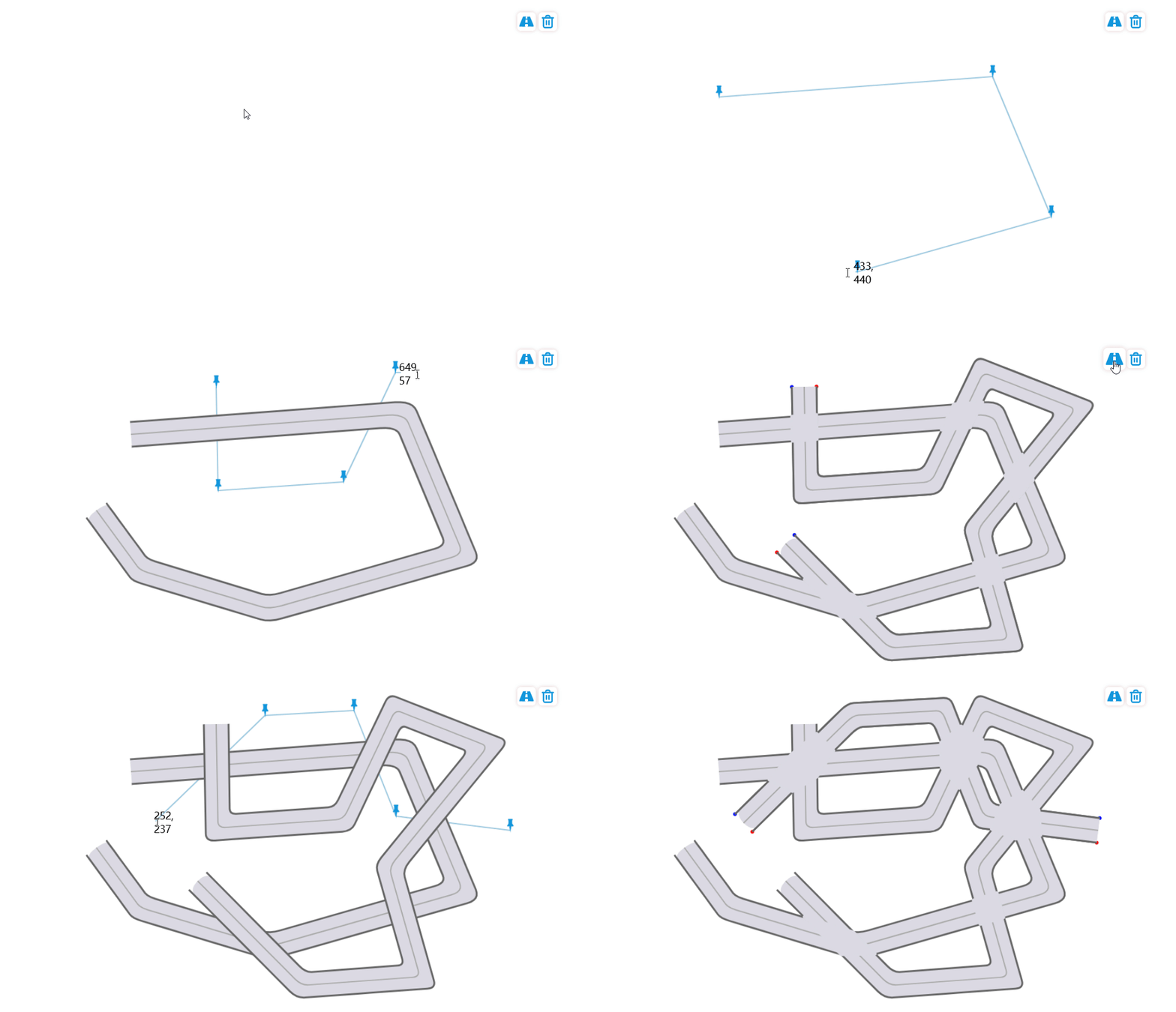
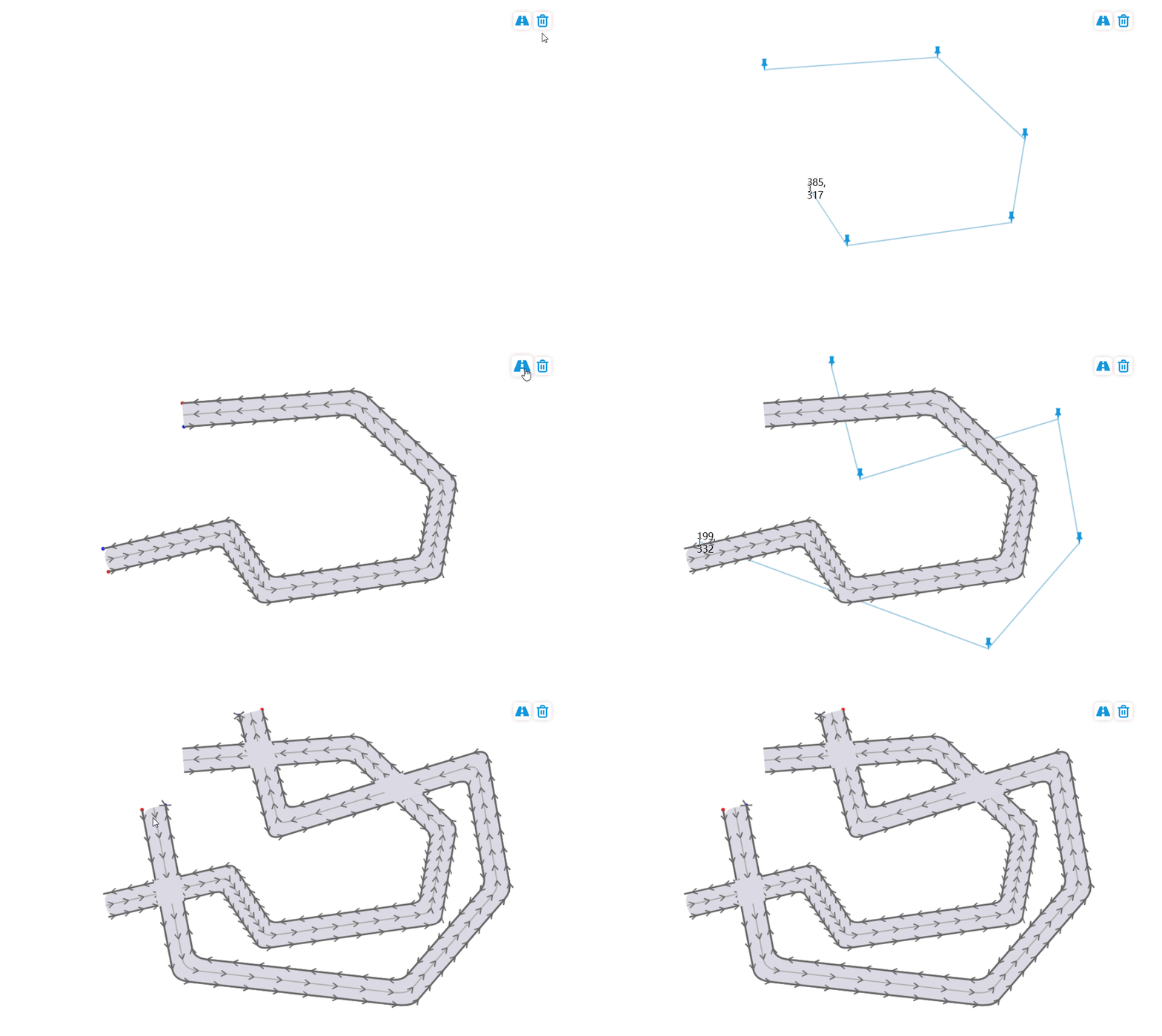
一、目标
1. 生成道路:通过提供的一些随机的点信息,自动扩展成一定宽度的道路,道路具有路沿点、道路中心点分上下行车道,点的方向根据实际车道运行的方向生成。
2. 生成路口:如果多天道路之间有相交,则可以自动在交叉位置计算出道路路口,方便后续车辆在路口拐弯的计算和展示美观,无线路交叉感。
二、实现原理
1. 如何生成一条道路
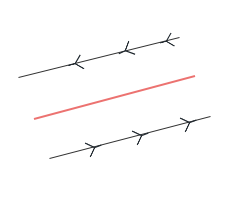
1) 以每两个点形成一条直线向两侧扩展一定的宽度生成一个面(如图一),但是需要考虑多个连续的线段之间可能会有线段交叉或者无交叉的情况(如图二),
如果两个线段有交点时需要把舍弃掉部分扩展道路点同时插入交叉点A,如果没有交点则需要插入直线的交点B来将道路连接起来
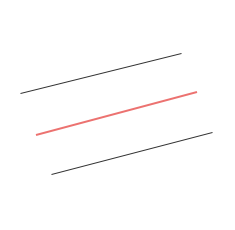
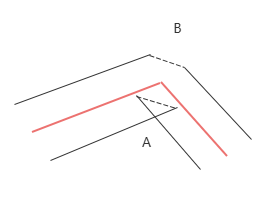
2) 将扩展的左、右两侧的道路点信息拼接起来,如果是逆时针,则上下行顺序正确,否则需要将点信息反转
2. 如何生成相互交叉的道路和路口
注:同一条道路如果有交叉,不会生成路口
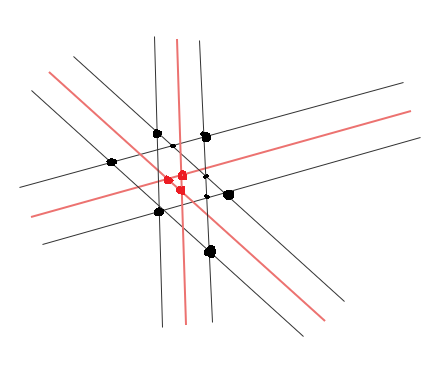
1)分组道路:如果多条道路在某一个点附近交叉,可以认为这些道路共用一个路口,循环遍历所有道路,如果道路交叉点之间的距离小于某个范围,则认为属于同一个路口
2) 按组对道路点进行循环,对上下行道路点分别进行交叉点计算,同时生成一个多边形,按照算法获取这个多边形最大的凸包即路口的点信息,
如图中红色点为多条道路中心线的交叉点,如果红点之间的距离小于一定范围,则认为这三条道路归属一个路口
每个黑色的线(即上下行边线)相交的点(图中所有黑色的点)组成一个polygon,通过Graham扫描法寻找最大的凸包时会只保留较大的黑色点,三个小黑点由于在凸包范围内则被舍弃
这样就获取到完整的路口点信息
三、代码逻辑
1. 简单创建页面


<!DOCTYPE html>
<html lang="en">

<head>
    <meta charset="UTF-8">
    <meta http-equiv="X-UA-Compatible" content="IE=edge">
    <meta name="viewport" content="width=device-width, initial-scale=1.0">

    <title>localhost:8086</title>
    <script type="module" src="./main.js"></script>
</head>

<body style="margin: 0;">
    <div class="button">
        <img class="button-item" src="./images/road.svg" id="drawRoad">
        <img class="button-item" src="./images/clear.svg" id="clear">
    </div>
    <canvas id="webgl"></canvas>
</body>

<style >
    html, body, #webgl {
        height: 100%;
        width: 100%;
        overflow: hidden;
    }
    .button {
        float: right;
        right: 50px;
        top: 20px;
        position: absolute;
        z-index: 100;
    }
    .button-item {
        width: 24px;
        height: 24px;
        box-shadow: 0px 0px 7px #e1cccc;
        border-radius: 6px;
        padding: 3px;
        cursor: pointer;
        background: white;
    }

    .button-item:hover {
        transform: scale(1.2);
    }

    .webgl {
        width: 100%;
        height: 100%;
    }
</style>
</html>
2. 为了快速测试功能,通过在界面手动戳点来快速创建随机的道路点信息


// import { pushLine, refresh } from './Line.js';
import * as roadCtrl from '../road/RoadControl.js';

let that = null;
export default class Draw {
    constructor(props) {
        that = this;

        // 鼠标图钉对象
        this.mouseDom = null;
        // 道路拐点信息
        this.points = [];

        this.ctx = document.getElementById(props.id).getContext('2d');

        this.width = document.getElementById(props.id).offsetWidth;
        this.height = document.getElementById(props.id).offsetHeight;

        this.thumbtack = new Image();
        this.thumbtack.src = './images/thumbtack.svg';

        this.mouseX = 0;
        this.mouseY = 0;

        this.drawEnd = props.drawEnd;

        this.initMouse();
    }

    initMouse() {
        this.mouseDom = document.createElement('div');
        const imgDom = document.createElement('img');
        imgDom.src = './images/thumbtack-add.svg';

        this.mouseDom.style.position = 'absolute';
        this.mouseDom.style.right = '0px';
        this.mouseDom.style.top = '0px';
        this.mouseDom.style.width = '24px';

        document.body.appendChild(this.mouseDom);

        this.registerEvent();
    }

    registerEvent() {
        this.mouseDom.addEventListener('click', this.clickEvent);
        document.addEventListener('mousemove', this.mousemoveEvent);
        document.addEventListener('keydown', this.keydownEvent);
        document.addEventListener('dblclick', this.dblclickEvent);
    }

    clickEvent(event) {
        that.points.push([event.clientX, event.clientY]);
        that.refresh();
    }

    keydownEvent(event) {
        if (event.key === 'Escape') {
            that.points.pop();
            that.refresh();
        }
    }

    mousemoveEvent(e) {
        that.mouseX = e.clientX;
        that.mouseY = e.clientY;
        that.mouseDom.style.left = e.clientX - 3 + 'px';
        that.mouseDom.style.top = e.clientY - 20 + 'px';
        that.mouseDom.innerHTML = `${e.clientX}, ${e.clientY}`;
        that.refresh();
    }

    dblclickEvent() {
        that.points.pop();
        if (that.drawEnd) {
            that.destory();
            that.drawEnd(that.points);
        }
    }

    refresh() {
        this.ctx.clearRect(0, 0, this.width, this.height);
        this.drawLine(this.mouseX, this.mouseY);
        this.drawPoint();
        roadCtrl.refresh();
    }

    drawLine(lastX, lastY) {
        this.ctx.clearRect(0, 0, this.width, this.height);
        if (this.points.length !==  0) {
            this.ctx.strokeStyle = '#9ec9df';
            this.ctx.lineWidth = 2;
            this.ctx.lineJoin="round";
            this.ctx.beginPath();
            this.ctx.moveTo(...this.points[0]);
            for (let i = 0; i < this.points.length; i++) {
                this.ctx.lineTo(...this.points[i]);
            }
            this.ctx.lineTo(lastX, lastY);
            this.ctx.stroke();
        }
    }

    drawPoint() {
        for (let i = 0; i < this.points.length; i++) {
            this.ctx.drawImage(this.thumbtack, this.points[i][0] - 11, this.points[i][1] - 20, 24, 24);
        }
    }

    destory() {
        this.ctx.clearRect(0, 0, this.width, this.height);
        this.mouseDom.removeEventListener('click', this.clickEvent);
        document.removeEventListener('mousemove', this.mousemoveEvent);
        document.removeEventListener('keydown', this.keydownEvent);
        document.removeEventListener('dblclick', this.dblclickEvent);
        this.mouseDom.remove();
    }
}
3. 创建工具文件,计算是否顺时针、计算凸包等算法功能


/**
 * 根据贝塞尔公式获取一条平滑的曲线
 * @param {*} points
 * @param {*} numSegments
 * @returns
 */
function getBezierPoints(points, numSegments = 8) {
    const bezierPoints = [];

    for (let i = 0; i < points.length - 1; i++) {
        const p0 = points[i];
        const p1 = points[i + 1];

        // 计算控制点
        const cp1 = {
            x: p0[0] + (p1[0] - p0[0]) / 3,
            y: p0[1] + (p1[1] - p0[1]) / 3
        };
        const cp2 = {
            x: p0[0] + 2 * (p1[0] - p0[0]) / 3,
            y: p0[1] + 2 * (p1[1] - p0[1]) / 3
        };

        // 计算贝塞尔曲线上的点
        for (let t = 0; t <= 1; t += 1 / numSegments) {
            const t2 = t * t;
            const t3 = t2 * t;
            const mt = 1 - t;
            const mt2 = mt * mt;
            const mt3 = mt2 * mt;

            const x = mt3 * p0[0] + 3 * mt2 * t * cp1.x + 3 * mt * t2 * cp2.x + t3 * p1[0];
            const y = mt3 * p0[1] + 3 * mt2 * t * cp1.y + 3 * mt * t2 * cp2.y + t3 * p1[1];

            if (bezierPoints.length === 0 || x !== bezierPoints[bezierPoints.length - 1][0] && y !== bezierPoints[bezierPoints.length - 1][1]) {
                bezierPoints.push([x, y]);
            }
        }
    }

    return bezierPoints;
}

/**
 * 求两个线段的交点
 * @param {*} line1
 * @param {*} line2
 * @returns
 */
function getIntersectionPoint(line1, line2) {
    const [p11, p12] = [...line1];
    const [p21, p22]  = [...line2];

    // 计算线段1的向量
    const dx1 = p12[0] - p11[0];
    const dy1 = p12[1] - p11[1];

    // 计算线段2的向量
    const dx2 = p22[0] - p21[0];
    const dy2 = p22[1] - p21[1];

    // 计算行列式
    const determinant = dx1 * dy2 - dy1 * dx2;

    // 如果行列式为0,则两条线段平行或共线,没有交点
    if (determinant === 0) {
        return [];
    }

    // 计算参数t1和t2
    const t1 = ((p21[0] - p11[0]) * dy2 - (p21[1] - p11[1]) * dx2) / determinant;
    const t2 = ((p21[0] - p11[0]) * dy1 - (p21[1] - p11[1]) * dx1) / determinant;

    // 检查交点是否在线段范围内
    if (t1 >= 0 && t1 <= 1 && t2 >= 0 && t2 <= 1) {
        // 计算交点坐标
        const x = p11[0] + t1 * dx1;
        const y = p11[1] + t1 * dy1;
        return [parseInt(x), parseInt(y)];
    }

    // 没有交点
    return [];
}

/**
 * 求两条直线的交点
 * @returns
 */
function getIntersection(line1, line2) {
    // 计算直线1的方程
    const [x1, y1] = line1[0];
    const [x2, y2] = line1[1];
    const isVertical1 = x1 === x2;

    let A1, B1, C1;
    if (isVertical1) {
        A1 = 1;
        B1 = 0;
        C1 = -x1;
    } else {
        const m1 = (y2 - y1) / (x2 - x1);
        const b1 = y1 - m1 * x1;
        A1 = m1;
        B1 = -1;
        C1 = b1;
    }

    // 计算直线2的方程
    const [x3, y3] = line2[0];
    const [x4, y4] = line2[1];
    const isVertical2 = x3 === x4;

    let A2, B2, C2;
    if (isVertical2) {
        A2 = 1;
        B2 = 0;
        C2 = -x3;
    } else {
        const m2 = (y4 - y3) / (x4 - x3);
        const b2 = y3 - m2 * x3;
        A2 = m2;
        B2 = -1;
        C2 = b2;
    }

    // 判断是否平行于 Y 轴
    if (isVertical1 && isVertical2) {
        // 两条直线都平行于 Y 轴
        if (x1 === x3) {
            // 两条直线重合
            return null; // 有无数个交点
        } else {
            // 两条直线平行但不重合
            return null; // 没有交点
        }
    } else if (isVertical1) {
        // 第一条直线平行于 Y 轴
        const x = x1;
        const y = (-A2 * x - C2) / B2;
        return [x, y];
    } else if (isVertical2) {
        // 第二条直线平行于 Y 轴
        const x = x3;
        const y = (-A1 * x - C1) / B1;
        return [x, y];
    } else {
        // 两条直线都不平行于 Y 轴
        const det = A1 * B2 - A2 * B1;

        if (det === 0) {
            // 两条直线平行或重合
            return null; // 没有唯一交点
        } else {
            // 计算交点坐标
            const x = (B1 * C2 - B2 * C1) / det;
            const y = (A2 * C1 - A1 * C2) / det;
            return [x, y];
        }
    }
}

/**
 * 计算三个点的重心位置
 */
function calTriangleCenter(p1, p2, p3) {
    const [x1, y1] = p1;
    const [x2, y2] = p2;
    const [x3, y3] = p3;
    const centerX = (x1 + x2 + x3) / 3;
    const centerY = (y1 + y2 + y3) / 3;
    return [centerX, centerY];
}

/**
 * 判断一个多边形是否是顺时针,如果返回true则为顺时针,false为逆时针,
 * 需要考虑坐标系和普通坐标系相反的问题
 * @param {*} poly
 * @returns
 */
function isClockWise(poly) {
    if(!poly || poly.length < 3) return null;
    let end = poly.length - 1;
    let sum = poly[end][0] * poly[0][1] - poly[0][0] * poly[end][1];
    for(let i = 0; i < end; ++i) {
        const n = i + 1;
        sum += poly[i][0] * poly[n][1] - poly[n][0] * poly[i][1];
    }
    return sum > 0;
}

/**
 * 根据给定的多个点,采用Graham扫描法寻找最大的凸包
 */
function getMaxPolygon(points) {
    // 计算两个点之间的距离
    function distance(p1, p2) {
        return Math.sqrt((p1[0] - p2[0]) ** 2 + (p1[1] - p2[1]) ** 2);
    }

    // 计算叉积
    function cross(o, a, b) {
        return (a[0] - o[0]) * (b[1] - o[1]) - (a[1] - o[1]) * (b[0] - o[0]);
    }

    // 极角排序比较函数
    function angleCompare(base) {
        return function(p1, p2) {
            const angle1 = Math.atan2(p1[1] - base[1], p1[0] - base[0]);
            const angle2 = Math.atan2(p2[1] - base[1], p2[0] - base[0]);
            if (angle1 === angle2) {
                return distance(base, p1) - distance(base, p2);
            }
            return angle1 - angle2;
        };
    }

    if (points.length < 3) return points;

    // 选择基准点
    const base = points.reduce((min, p) => p[1] < min[1] || (p[1] === min[1] && p[0] < min[0]) ? p : min, points[0]);

    // 极角排序
    points.sort(angleCompare(base));

    // 构建凸包
    const stack = [points[0], points[1], points[2]];

    for (let i = 3; i < points.length; i++) {
        while (stack.length > 1 && cross(stack[stack.length - 2], stack[stack.length - 1], points[i]) <= 0) {
            stack.pop();
        }
        stack.push(points[i]);
    }

    return stack;
}

/**
 * 拷贝数据
 */
function clone(data) {
    return JSON.parse(JSON.stringify(data));
}

function createRandomId(prefix) {
    return prefix + '_' + 'xx-xxxx-4xxx-yxxx'.replace(/[xy]/g, (c) => {
        var r = Math.random() * 16 | 0, v = c == 'x' ? r : (r & 0x3 | 0x8);
        return v.toString(16);
    });
}

/**
 * 计算距离
 */
function distance(point1, point2) {
    return Math.sqrt(Math.pow(point1[0] - point2[0], 2) + Math.pow(point1[1] - point2[1], 2), 2);
}

export {
    createRandomId,
    getBezierPoints,
    getIntersectionPoint,
    isClockWise,
    getIntersection,
    calTriangleCenter,
    clone,
    getMaxPolygon,
    distance
}
4. 创建主文件,与UI交互,获取道路、路口数据,绘制道路、路口功能


import { refresh } from './control/Line.js';
import Draw from './control/Draw.js';
import * as roadCtrl from './road/RoadControl.js';
import * as crossCtrl from './road/CrossControl.js';
import { distance, getIntersectionPoint, getMaxPolygon } from './road/Util.js';

let flag = false;
let drawIns = null;
let canvasDom = null;
let ctx = null;
function initEvent() {
    const map = {
        drawRoad,
        clear
    }
    const list = document.getElementsByClassName('button-item');
    for (let i = 0; i < list.length; i++) {
        list[i].addEventListener('click', (e) => {
            map[e.target.id]();
        })
    }

    canvasDom = document.getElementById('webgl');
    ctx = canvasDom.getContext('2d');
    canvasDom.setAttribute('width', canvasDom.offsetWidth);
    canvasDom.setAttribute('height', canvasDom.offsetHeight);

    roadCtrl.setCtx(ctx);
    crossCtrl.setCtx(ctx);
}

function drawRoad() {
    if (!flag) {
        flag = true;
        drawIns = new Draw({ id: 'webgl', drawEnd: (coords) => {
            roadCtrl.addRoad({ coords, width: 20 });
            roadCtrl.refresh();
            flag = false;

            const allRoads = roadCtrl.getAllRoad();
            getCross(allRoads);

            console.log(crossCtrl.getAllCross());
        } });
    } else {
        drawIns.destory();
        flag = false;
        refresh();
    }
}

/**
 * 获取所有的焦点
 */
function getInterPoint(line1, line2) {
    const inter = [];
    for(let i = 0; i < line1.length - 1; i++){
        for(let j = 0; j < line2.length - 1; j++){
            const interPoint =  getIntersectionPoint([line1[i], line1[i + 1]], [line2[j], line2[j + 1]]);
            if (interPoint.length !== 0) {
                inter.push(interPoint);
            }
        }
    }
    return inter;
}

/**
 * 判断两个点之间相近
 * @param {*} point1 点1
 * @param {*} point2 点2
 * @param {*} tolerance 容忍值
 * @returns
 */
function isNear(point1, point2, tolerance) {
    return distance(point1, point2) < tolerance;
}

/**
 * 判断是否存在道路列表中
 */
function isNotExist(roads, id) {
    return roads.filter(e => e.id === id).length === 0;
}

/**
 * 从多个点中获取距离基准点最近的点
 * @param {*} points
 * @param {*} basePoint
 * @param {*} tolerance
 */
function getNearestPoint(points, basePoint, tolerance = 160) {
    const pointDis = points.map(e => {
        return {
            point: e,
            dis: distance(e, basePoint)
        };
    });
    pointDis.sort((a, b) => a.dis - b.dis);
    if (distance(pointDis[0].point, basePoint) < tolerance) {
        return pointDis[0].point;
    } else {
        return [];
    }
}

function groupCross(roads) {
    // 计算原则,多条路相交于一点或者近乎一点时
    // same 格式 XY 轴坐标联合作为key值存储数据
    // {
    //     'x,y': {
    //         point: [], 道路交点,多条道路只存储一个交点
    //         links: [] 该路口的关联道路信息
    //     }
    // }
    const same = {};
    for (let i = 0; i < roads.length - 1; i++) {
        for (let j = i + 1; j < roads.length; j++) {
            const tempInter = getInterPoint(roads[i].CCoords, roads[j].CCoords);
            tempInter.forEach(e => {
                let flag = false;
                for (const o in same) {
                    if (isNear(same[o].point, e, 40)) {
                        if (isNotExist(same[o].links, roads[i].id)) {
                            same[o].links.push(roads[i]);
                        }
                        if (isNotExist(same[o].links, roads[j].id)) {
                            same[o].links.push(roads[j]);
                        }
                        flag = true;
                    }
                }
                if (!flag) {
                    same[e.join(',')] = {
                        point: e,
                        links: [roads[i], roads[j]]
                    };
                }
            });
        }
    }
    const linkVals = Object.values(same);

    const allInter = [];
    for (let i = 0; i < linkVals.length; i++) {
        allInter[i] = {
            coords: [],
            links: linkVals[i].links
        };
        for (let j = 0; j < linkVals[i].links.length - 1; j++) {
            for (let m = j + 1; m < linkVals[i].links.length; m++) {
                const cPoint = linkVals[i].point;

                const LL = getInterPoint(linkVals[i].links[j].LCoords, linkVals[i].links[m].LCoords, cPoint);
                const LR = getInterPoint(linkVals[i].links[j].LCoords, linkVals[i].links[m].RCoords, cPoint);
                const RL = getInterPoint(linkVals[i].links[j].RCoords, linkVals[i].links[m].LCoords, cPoint);
                const RR = getInterPoint(linkVals[i].links[j].RCoords, linkVals[i].links[m].RCoords, cPoint);
                if (LL.length !== 0) {
                    const temp = getNearestPoint(LL, cPoint);
                    if (temp.length !== 0) {
                        allInter[i].coords.push(temp);
                    }
                }
                if (LR.length !== 0) {
                    const temp = getNearestPoint(LR, cPoint);
                    if (temp.length !== 0) {
                        allInter[i].coords.push(temp);
                    }
                }
                if (RL.length !== 0) {
                    const temp = getNearestPoint(RL, cPoint);
                    if (temp.length !== 0) {
                        allInter[i].coords.push(temp);
                    }
                }
                if (RR.length !== 0) {
                    const temp = getNearestPoint(RR, cPoint);
                    if (temp.length !== 0) {
                        allInter[i].coords.push(temp);
                    }
                }
            }
        }
    }

    return allInter.filter(e => e.length !== 0);
}

/**
 * 计算道路口
 */
function getCross(roads) {
    crossCtrl.removeAll();
    const allInter = groupCross(roads);
    allInter.forEach(e => {
        const crossObj = getMaxPolygon(e.coords);
        crossCtrl.add({
            coords: crossObj,
            linkRoad: e.links
        });
        // drawPolygon(out);
    });
}

function drawPoint(points, color = 'red') {
    ctx.save()
    points.forEach(e => {
        ctx.beginPath();
        ctx.arc(...e, 3, 0, 2 * Math.PI);
        ctx.fillStyle = color; // 设置原点的颜色
        ctx.fill();
        ctx.closePath();
    });
    ctx.restore();
}

function drawPolygon(points) {
    if (points.length === 0) {
        return;
    }
    ctx.save();
    ctx.beginPath();
    ctx.strokeStyle = '#dbdae3';
    ctx.lineWidth = 5;
    ctx.moveTo(...points[0]);
    points.forEach(e => {
        ctx.lineTo(...e);
    });
    ctx.closePath();
    ctx.stroke();
    ctx.fillStyle = '#dbdae3';
    ctx.fill();
    ctx.restore();
}

function clear() {
    roadCtrl.removeAll();
    ctx.clearRect(0, 0, canvasDom.offsetWidth, canvasDom.offsetHeight);
}

function drawId(text, points) {
    ctx.save();
    ctx.font = '15px Arial';
    ctx.fillStyle = 'blue'; // 文字颜色为蓝色
    ctx.textAlign = 'center'; // 水平对齐方式为居中
    ctx.textBaseline = 'middle'; // 垂直对齐方式为居中
    ctx.fillText(text, ...points); // 在坐标(100, 100)处绘制文字
    ctx.restore();
}

window.onload = () => {
    initEvent();
}
5. 创建道路类,包括绘制道路、获取扩展点等


import { getBezierPoints, getIntersectionPoint, isClockWise, getIntersection, clone, calTriangleCenter } from './Util.js';
class Road {
    constructor(props) {
        // 车道ID
        this.id = props.id;
        // 顶点数
        this.turnCoords = props.coords;
        // 单向车道数
        this.laneNum = 1;
        // 道路宽度
        this.width = props.width || 20;
        // 车道中心点信息
        this.CCoords = [];
        // 左车道点信息
        this.LCoords = [];
        // 右车道点信息
        this.RCoords = [];

        this.ctx = props.ctx;

        this.init();
    }

    init() {
        this.extendRoadCoord();
        this.draw();
    }

    /**
     * 获取线段上垂直的点
     * @param {*} line
     * @param {*} point
     */
    getVerticalPoint(line, point, width) {
        const [x1, y1] = [...line[0]];
        const [x2, y2] = [...line[1]];
        const [px, py] = [...point];

        if (y1 - y2 !== 0) {
            const beta = Math.abs(Math.cos(Math.atan((x2 - x1) / (y1 - y2))) * width);
            const tempX1 = px + beta;
            const tempX2 = px - beta;
            const tempY1 = (x2 - x1) / (y1 - y2) * tempX1
                + (py * (y1 - y2) - px * (x2 - x1)) / (y1 - y2);
            const tempY2 = (x2 - x1) / (y1 - y2) * tempX2
                + (py * (y1 - y2) - px * (x2 - x1)) / (y1 - y2);

            return [[tempX1, tempY1], [tempX2, tempY2]];
        } else {
            return [[px, py - width], [px, py + width]];
        }
    }

    /**
     * 获取道路扩展后的顶点信息
     * 原理:通过判断两条线段是否有交点,如果有交点则代表扩展的点需要舍弃一个同时插入交点,否则线路就会有交叉
     *       如果没有交点,则代表线段不相交,需要插入两条线段代表的直线的交点
     */
    getSideCoord() {
        const [left, right] = [[], []];

        for(let i = 0; i < this.turnCoords.length - 1; i++){
            const polygon = [];

            const preSides = this.getVerticalPoint([this.turnCoords[i], this.turnCoords[i + 1]], this.turnCoords[i], this.width);
            const nextSides = this.getVerticalPoint([this.turnCoords[i], this.turnCoords[i + 1]], this.turnCoords[i + 1], this.width);

            polygon.push(preSides[0], nextSides[0], nextSides[1], preSides[1]);

            if (isClockWise(polygon)) {
                left.push(preSides[0], nextSides[0]);
                right.push(preSides[1], nextSides[1]);
            } else {
                left.push(preSides[1], nextSides[1]);
                right.push(preSides[0], nextSides[0]);
            }
        }

        return { left, right };
    }

    /**
     * 根据获取的边线顶点
     */
    extendRoadCoord() {
        const sides = this.getSideCoord();
        if (this.turnCoords.length <= 2) {
            const cloneLeft = sides.left;
            const cloneRight = sides.right;
            const polygon = cloneLeft.concat(cloneRight.reverse());
            if (isClockWise(polygon)) {
                this.LCoords = sides.left;
                this.RCoords = sides.right;
            } else {
                this.LCoords = sides.left;
                this.RCoords = sides.right.reverse();
            }
            this.CCoords = this.turnCoords;

            this.LCoords.push(this.LCoords[this.LCoords.length - 1]);
            this.LCoords.unshift(this.LCoords[0]);
            this.RCoords.push(this.RCoords[this.RCoords.length - 1]);
            this.RCoords.unshift(this.RCoords[0]);
        } else {
            const left = sides.left;
            const right = sides.right;
            let [tempLeft, tempRight] = [[], []]; // 最终生成的道路左右边线顶点
            let [preLeftInterPoint, preRightInterPoint] = [];
            for (let i = 0; i < left.length - 2; i += 2) {
                const interPoint = getIntersectionPoint([left[i], left[i + 1]], [left[i + 2], left[i + 3]]);
                if (interPoint.length !== 0) {
                    if (i === 0) {
                        tempLeft.push(left[i], interPoint);
                    } else {
                        tempLeft.push(interPoint);
                    }
                    preLeftInterPoint = interPoint;
                } else {
                    // 线所组成的直线对应的交点
                    const straightInterPoint = getIntersection([left[i], left[i + 1]], [left[i + 2], left[i + 3]]);
                    if (!preLeftInterPoint) {
                        if (i === 0) {
                            tempLeft.push(left[i], straightInterPoint);
                        } else {
                            tempLeft.push(straightInterPoint);
                        }
                    } else {
                        tempLeft.push(straightInterPoint);
                    }
                    preLeftInterPoint = null;
                }
                if (i === left.length - 4) {
                    tempLeft.push(left[left.length - 1]);
                }
            }

            for (let i = 0; i < right.length - 2; i += 2) {
                const interPoint = getIntersectionPoint([right[i], right[i + 1]], [right[i + 2], right[i + 3]]);
                if (interPoint.length !== 0) {
                    if (i === 0) {
                        tempRight.push(right[i], interPoint);
                    } else {
                        tempRight.push(interPoint);
                    }
                    preRightInterPoint = interPoint;
                } else {
                    // 线所组成的直线对应的交点
                    const straightInterPoint = getIntersection([right[i], right[i + 1]], [right[i + 2], right[i + 3]]);
                    if (!preRightInterPoint) {
                        if (i === 0) {
                            tempRight.push(right[i], straightInterPoint);
                        } else {
                            tempRight.push(straightInterPoint);
                        }
                    } else {
                        tempRight.push(straightInterPoint);
                    }
                    preRightInterPoint = null;
                }

                if (i === right.length - 4) {
                    tempRight.push(right[right.length - 1]);
                }
            }
            this.drawPoint([tempLeft[tempLeft.length - 1], tempLeft[0]], 'red');
            this.drawPoint([tempRight[tempRight.length - 1], tempRight[0]], 'blue');
            // 为了在末端绘制的更加圆滑,所以增加几个重复点,使用贝塞尔曲线绘制底色时不会出现圆弧
            tempLeft.push(tempLeft[tempLeft.length - 1]);
            tempLeft.unshift(tempLeft[0]);
            tempRight.push(tempRight[tempRight.length - 1]);
            tempRight.unshift(tempRight[0]);

            tempRight.reverse();

            this.LCoords = getBezierPoints(tempLeft);
            this.RCoords = getBezierPoints(tempRight);
            this.CCoords = getBezierPoints(this.turnCoords);

        }
    }

    /**
     * 绘制车道外轮廓
     */
    drawOutline() {
        // 绘制左侧车道
        this.drawLine(this.LCoords);
        // 绘制右侧车道
        this.drawLine(this.RCoords);
        // 绘制车道中心线
        this.drawLine(this.CCoords, { color: '#aaa', dash: false, width: 2 });
    }

    /**
     * 绘制道路背景色
     */
    drawBackground() {
        const cloneLeft = clone(this.LCoords);
        const cloneRight = clone(this.RCoords);
        const polygon = cloneLeft.concat(cloneRight);

        this.ctx.save();
        this.ctx.beginPath();
        this.ctx.moveTo(...polygon[0]);
        for (let i = 0; i < polygon.length - 1; i++) {
            const xc = (polygon[i][0] + polygon[i + 1][0]) / 2;
            const yc = (polygon[i][1] + polygon[i + 1][1]) / 2;
            this.ctx.quadraticCurveTo(...polygon[i], xc, yc);
        }
        this.ctx.lineTo(...polygon[polygon.length - 1]);
        this.ctx.lineTo(...polygon[polygon.length - 1]);
        this.ctx.closePath();
        this.ctx.fillStyle = '#dbdae3';
        this.ctx.fill();
        this.ctx.restore();
    }

    draw() {
        this.drawBackground();
        this.drawOutline();
        this.drawLane();
    }

    /**
     * 绘制车道线
     */
    drawLane() {

    }

    drawLine(points, style = {}) {
        this.ctx.save();
        this.ctx.strokeStyle = style.color || '#666';
        this.ctx.lineWidth = style.width || 3;
        this.ctx.lineJoin = 'round';
        if (style.dash) {
            this.ctx.setLineDash([this.width * 0.8, this.width * 0.6]);
        }
        this.ctx.beginPath();
        this.ctx.moveTo(...points[0]);
        for (let i = 0; i < points.length - 1; i++) {
            const xc = (points[i][0] + points[i + 1][0]) / 2;
            const yc = (points[i][1] + points[i + 1][1]) / 2;
            this.ctx.quadraticCurveTo(...points[i], xc, yc);
        }
        this.ctx.lineTo(...points[points.length - 1]);
        this.ctx.stroke();
        this.ctx.restore();

        // 主要用来测试,直观的观察点的位置以及线的方向顺序
        this.drawArrow(points);
        // this.drawPoint(points, style.color);
    }

    /**
     * 计算方向向量  用于测试
     * @param {*} start
     * @param {*} end
     * @returns
     */
    calculateDirectionVector(start, end) {
        return {
            dx: end.x - start.x,
            dy: end.y - start.y
        };
    }

    /**
     * 计算中间点 用于测试
     * @param {*} start
     * @param {*} end
     * @returns
     */
    calculateMiddlePoint(start, end) {
        return {
            x: (start.x + end.x) / 2,
            y: (start.y + end.y) / 2
        };
    }

    /**
     * 绘制方向向量  用于测试
     * @param {*} middle
     * @param {*} direction
     */
    drawDirectionVector(middle, direction) {
        const arrowLength = 10;
        const angle = Math.atan2(direction.dy, direction.dx);

        // 计算箭头的两个端点
        const arrowX1 = middle.x + arrowLength * Math.cos(angle - Math.PI / 6);
        const arrowY1 = middle.y + arrowLength * Math.sin(angle - Math.PI / 6);
        const arrowX2 = middle.x + arrowLength * Math.cos(angle + Math.PI / 6);
        const arrowY2 = middle.y + arrowLength * Math.sin(angle + Math.PI / 6);

        // 绘制箭头
        this.ctx.save();
        this.ctx.strokeStyle = '#666';
        this.ctx.beginPath();
        this.ctx.moveTo(middle.x, middle.y);
        this.ctx.lineTo(arrowX1, arrowY1);
        this.ctx.moveTo(middle.x, middle.y);
        this.ctx.lineTo(arrowX2, arrowY2);
        this.ctx.stroke();
        this.ctx.restore();
    }

    /**
     * 绘制箭头,主要用于测试,查看绘制线路的方向
     */
    drawArrow(points) {
        for (let i = 0; i < points.length - 1; i++) {
            const start = { x: points[i][0], y: points[i][1] };
            const end = { x: points[i + 1][0], y: points[i + 1][1] };
            const directionVector = this.calculateDirectionVector(start, end);
            const middlePoint = this.calculateMiddlePoint(start, end);
            this.drawDirectionVector(middlePoint, directionVector);
        }
    }

    drawPoint(points, color) {
        this.ctx.save()
        points.forEach(e => {
            this.ctx.beginPath();
            this.ctx.arc(...e, 3, 0, 2 * Math.PI);
            this.ctx.fillStyle = color; // 设置原点的颜色
            this.ctx.fill();
            this.ctx.closePath();
        });
        this.ctx.restore();
    }
}

export default Road;
6. 创建道路管理器,用于存储、新建、删除和刷新道路


import Road from './Road.js';
import { createRandomId } from './Util.js';

let instances = []; // 道路实例
let ctx = null; // canvas上下文


function setCtx(context) {
    ctx = context;
}

/**
 * 添加道路
 */
function addRoad(param) {
    instances.push(new Road({
        id: param.id || createRandomId('road'),
        coords: param.coords,
        width: param.width,
        ctx
    }));
}

/**
 * 删除道路
 */
function removeRoad(id) {
    const index = instances.findIndex(e => e.id === id);
    instances.splice(index, 1);
}

/**
 * 刷新绘制道路
 */
function refresh() {
    instances.forEach(e => {
        e.draw();
    });
}

function removeAll() {
    instances = [];
}

function getAllRoad() {
    return instances;
}

export {
    setCtx,
    addRoad,
    removeRoad,
    refresh,
    removeAll,
    getAllRoad
}
7. 创建路口类


class Cross {
    constructor(props) {
        // 路口ID
        this.id = props.id;
        // 路口坐标
        this.coords = props.coords;
        // 路口连接的道路
        this.linkRoad = props.linkRoad;

        this.ctx = props.ctx;

        this.draw();
    }

    draw() {
        if (this.coords.length === 0) {
            return;
        }
        this.ctx.save();
        this.ctx.beginPath();
        this.ctx.strokeStyle = '#dbdae3';
        this.ctx.lineWidth = 5;
        this.ctx.moveTo(...this.coords[0]);
        this.coords.forEach(e => {
            this.ctx.lineTo(...e);
        });
        this.ctx.closePath();
        this.ctx.stroke();
        this.ctx.fillStyle = '#dbdae3';
        this.ctx.fill();
        this.ctx.restore();
    }
}

export default Cross;
8. 创建路口管理器,用于存储、新建、删除等功能


import Cross from './Cross.js';
import { createRandomId } from './Util.js';

const instances = [];
let ctx = null;

function setCtx(context) {
    ctx = context;
}

function add(param) {
    instances.push(new Cross({
        id: param.id || createRandomId('cross'),
        coords: param.coords,
        linkRoad: param.linkRoad,
        ctx
    }));
}

function remove() {

}

function removeAll() {
    instances.splice(0, instances.length);
}

function getAllCross() {
    return instances;
}

function refresh() {
    instances.forEach(e => {
        e.draw();
    })
}

export { setCtx, add, remove, removeAll, getAllCross, refresh };
原创作者: codeOnMar 转载于: https://www.cnblogs.com/codeOnMar/p/18454913





 扫一扫
扫一扫


 6960
6960

 被折叠的 条评论
为什么被折叠?
被折叠的 条评论
为什么被折叠?
 到【灌水乐园】发言





