<template>
<el-dialog :title="dialogMode === 'create' ? '新建' : dialogMode === 'edit' ? '修改' : '查看'" :visible.sync="dialogVisible"
:modal-append-to-body="true" append-to-body :close-on-click-modal="false" custom-class="fixed-height-dialog"
width="60%" top="5vh">
<el-form label-width="80px" ref="formRef" :model="currentForm"
style="height: 100%; display: flex; flex-direction: column;" :rules="rules">
<!-- 项目信息区域 -->
<div class="formBorder">
<el-row :gutter="10">
<el-col :span="6">
<el-form-item size="mini" label="项目名称" prop="projectName">
<el-input v-model="currentForm.projectName" clearable style="width:100%" size="mini"
:disabled="dialogMode === 'view'"></el-input>
</el-form-item>
</el-col>
<el-col :span="6">
<el-form-item size="mini" label="项目编号" prop="projectCode">
<el-input v-model="currentForm.projectCode" clearable style="width:100%" size="mini"
:disabled="dialogMode === 'view'"></el-input>
</el-form-item>
</el-col>
<el-col :span="12">
<el-form-item size="mini" label="项目周期" prop="projectDate">
<el-date-picker v-model="projectDate" range-separator="→" start-placeholder="请选择开始日期"
end-placeholder="请选择结束日期" type="daterange" size="mini" style="width: 100%;" unlink-panels
:disabled="dialogMode === 'view'">
</el-date-picker>
</el-form-item>
</el-col>
</el-row>
<el-row>
<el-col :span="6">
<el-form-item label="负责人" size="mini" style="width: fit-content;">
<el-input v-model="currentForm.projectUser" clearable style="width:100%" size="mini"
:disabled="dialogMode === 'view'"></el-input>
</el-form-item>
</el-col>
</el-row>
<el-row>
<el-col :span="24">
<el-form-item label="项目概述">
<el-input v-model="currentForm.remark" :rows="2" :disabled="dialogMode === 'view'"></el-input>
</el-form-item>
</el-col>
</el-row>
</div>
<!-- 待检边坡区域 - 使用纯CSS控制高度 -->
<div class="formBorder2">
<el-container style="height: 100%;">
<!-- 搜索区域 -->
<el-header style="height: auto; flex-shrink: 0; padding-bottom: 10px;">
<el-row :gutter="10" type="flex" class="searchDialog">
<el-col :span="5">
<el-select v-model="filterForm.maintenanceCompanyName" placeholder="请选择管养单位" size="mini" clearable
filterable @clear="resetSearch" :disabled="dialogMode === 'view'">
<el-option v-for="item in MaintenanceUnitoptions" :key="item.value" :label="item.label"
:value="item.value"></el-option>
</el-select>
</el-col>
<el-col :span="5">
<el-select v-model="filterForm.routeCode" placeholder="请选择路线编号" size="mini" clearable filterable
@clear="resetSearch" :disabled="dialogMode === 'view'">
<el-option v-for="item in routeCodeOptions" :key="item.value" :label="item.label"
:value="item.value"></el-option>
</el-select>
</el-col>
<el-col :span="5">
<el-input v-model="filterForm.searchKey" placeholder="请输入边坡编号或名称" size="mini" clearable
@keyup.enter.native="searchForm" @clear="resetSearch" :disabled="dialogMode === 'view'">
<i slot="suffix" class="el-input__icon el-icon-search"></i>
</el-input>
</el-col>
<el-col :span="5">
<el-select v-model="filterForm.evaluateLevel" placeholder="请选择技术状态等级" size="mini" clearable
@clear="resetSearch" :disabled="dialogMode === 'view'">
<el-option v-for="item in evaluateLeveloptions" :key="item.value" :label="item.label"
:value="item.value" />
</el-select>
</el-col>
<el-col :span="2" :offset="4">
<el-button type="primary" size="mini" style="width:100%" icon="el-icon-search" @click="searchForm"
:loading="loading" :disabled="dialogMode === 'view'">搜索</el-button>
</el-col>
</el-row>
</el-header>
<!-- 边坡表格 - 移除动态高度绑定 -->
<el-main style="overflow-y: auto;">
<el-table ref="scrollTable" v-loading="loading" style="width: 100%;" border :data="formTabledata"
:header-row-style="{ height: '40px' }"
:header-cell-style="{ padding: '0', height: '40px', lineHeight: '40px', textAlign: 'center', }"
:cell-style="{ textAlign: 'center' }" :row-key="getRowkey">
<!-- 选择列(查看模式禁用) -->
<el-table-column type="selection" width="55" :selectable="isRowSelectable" :reserve-selection="true">
</el-table-column>
<!-- 其他数据列 -->
<el-table-column label="管养单位" prop="maintenanceCompanyName" width="290"
show-overflow-tooltip></el-table-column>
<el-table-column label="路线编号" prop="routeCode" width="100"></el-table-column>
<el-table-column label="边坡编号" prop="sideSlopeCode" width="240" show-overflow-tooltip></el-table-column>
<el-table-column label="边坡名称" prop="sideSlopeName" width="267" show-overflow-tooltip></el-table-column>
<el-table-column label="技术状态等级" width="137">
<template slot-scope="scope">
{{ mapEvaluateLevel(scope.row.evaluateLevel) }}
</template>
</el-table-column>
</el-table>
</el-main>
<!-- 分页区域 -->
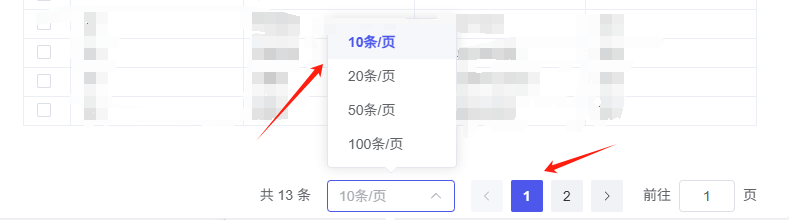
<el-footer style="flex-shrink: 0; padding-top: 10px;">
<el-pagination background @size-change="handleSizeChange" @current-change="handleCurrentChange"
:current-page="pageParams.pageNo" :page-sizes="[10, 20, 50, 100]" :page-size="pageParams.pageSize"
layout="total, sizes, prev, pager, next" :total="total">
</el-pagination>
</el-footer>
</el-container>
</div>
</el-form>
<!-- 弹窗底部按钮 -->
<div slot="footer" class="dialog-footer" v-if="dialogMode === 'create' || dialogMode === 'edit'">
<el-button @click="dialogVisible = false">取消</el-button>
<el-button type="primary" @click="submitForm">提交</el-button>
</div>
</el-dialog>
</template>
<script>
import { mapCfg } from "@/utils";
import {
getPeriodicInspectionSideSlopePageList,
addPeriodicInspection,
modifyPeriodicInspection,
getSelectedPeriodicInspectionSideSlopeList
} from "../../api/testProject";
import { getMaintenanceCompanyList, getRouteList } from "../../api/basicInformation";
export default {
name: "SideSlopeDialog",
props: {
visible: Boolean, // 控制弹窗显示
mode: String, // 模式:create/edit/view
initialForm: Object, // 初始表单数据
},
data() {
return {
dialogVisible: this.visible, // 弹窗显示状态
dialogMode: this.mode, // 当前模式
currentForm: { ...this.initialForm }, // 当前表单数据
projectDate: [], // 项目日期范围
total: 0, // 总数据量
loading: false, // 加载状态
pageParams: { // 分页参数
pageNo: 1,
pageSize: 10,
},
filterForm: { // 搜索条件
maintenanceCompanyName: "",
routeCode: "",
searchKey: "",
evaluateLevel: "",
},
mulitipleSelection: [], // 存储所有选择的边坡(使用Map提高性能)
MaintenanceUnitoptions: [], // 管养单位选项
routeCodeOptions: [], // 路线编号选项
formTabledata: [], // 表格数据
evaluateLeveloptions: [], // 技术状态等级选项
rules: { // 表单验证规则
projectName: [
{ required: true, message: "项目名称不能为空", trigger: "blur" },
],
projectCode: [
{ required: true, message: "项目编码不能为空", trigger: "blur" },
],
},
};
},
watch: {
// 监听模式变化
mode(val) {
this.dialogMode = val;
},
// 监听弹窗显示状态变化
async visible(val) {
this.dialogVisible = val;
if (val) {
// 打开对话框时
if (this.dialogMode !== 'create' && this.currentForm.id) {
this.LoadListData();
} else {
this.resetAllData(); // 新增:完全重置状态
}
} else {
// 关闭对话框时 - 关键修复:完全重置组件状态
this.resetAllData();
}
},
// 同步弹窗显示状态到父组件
dialogVisible(val) {
this.$emit("update:visible", val);
},
// 监听初始表单数据变化
initialForm: {
immediate: true,
handler(val) {
// 仅当ID变化时更新
if (val.id !== this.currentForm.id) {
this.currentForm = { ...val };
this.projectDate = [val.projectStartDate, val.projectEndDate];
}
}
},
// 处理日期范围变化
projectDate: {
deep: true,
handler(value) {
if (value && value.length === 2) {
this.currentForm.projectStartDate = value[0];
this.currentForm.projectEndDate = value[1];
}
},
},
},
async created() {
// 初始化数据
this.getRouteList();
await this.getEvaluateLevel();
this.getMaintenanceCompanyList();
},
methods: {
getRowkey(row) {
return row.id
},
// 判断行是否可选(查看模式禁用选择)
isRowSelectable(row, index) {
return this.dialogMode !== "view";
},
// 获取管养单位列表
async getMaintenanceCompanyList() {
const res = await getMaintenanceCompanyList();
this.MaintenanceUnitoptions = res.map((item) => ({
value: item,
label: item,
}));
},
// 获取路线列表
async getRouteList() {
const res = await getRouteList();
this.routeCodeOptions = res.map((item) => ({
value: item.id,
label: item.routeCode,
}));
},
// 搜索方法
searchForm() {
this.pageParams.pageNo = 1;
this.LoadListData();
},
// 重置搜索条件
resetSearch() {
this.filterForm = {
maintenanceCompanyName: "",
routeCode: "",
searchKey: "",
evaluateLevel: "",
};
this.pageParams.pageNo = 1;
this.LoadListData();
},
// 重置组件状态
resetAllData() {
this.resetSelection();
this.formTabledata = []; // 清空表格数据
this.total = 0; // 重置总条数
this.pageParams = { // 重置分页
pageNo: 1,
pageSize: 10
};
// 重置搜索条件(可选)
this.filterForm = {
maintenanceCompanyName: "",
routeCode: "",
searchKey: "",
evaluateLevel: ""
};
},
// 修改原有方法
resetSelection() {
this.allSelection = new Map();
if (this.$refs.scrollTable) {
this.$refs.scrollTable.clearSelection();
}
},
// 映射技术状态等级
mapEvaluateLevel(level) {
const option = this.evaluateLeveloptions.find(
(item) => item.value === level
);
return option.label;
},
// 加载表格数据
async LoadListData() {
this.loading = true;
const params = {
orgId: this.filterForm.maintenanceCompanyName,
routeId: this.filterForm.routeCode,
searchKey: this.filterForm.searchKey,
evaluateLevel: this.filterForm.evaluateLevel,
pageSize: this.pageParams.pageSize,
pageNo: this.pageParams.pageNo,
};
try {
const res = await getPeriodicInspectionSideSlopePageList(params);
// 关键修改:保留原数据的选中状态
this.formTabledata = res.entities;
this.total = res.entityCount;
if (this.dialogMode !== 'create' && this.currentForm.id) {
const data = {
periodicId: this.currentForm.id,
pageSize: this.pageParams.pageSize,
pageNo: this.pageParams.pageNo
};
const selected = await getSelectedPeriodicInspectionSideSlopeList(data);
this.mulitipleSelection = selected.entities;
if (this.mulitipleSelection.length > 0) {
this.formTabledata.forEach(row => {
this.mulitipleSelection.forEach(item => {
if (row.sideSlopeUniqueCode === item.sideSlopeUniqueCode) {
this.$refs.scrollTable.toggleRowSelection(row, true)
}
})
})
}
}
this.$nextTick(() => {
})
} finally {
this.loading = false;
}
},
// 分页大小变化
handleSizeChange(val) {
this.pageParams.pageSize = val;
this.pageParams.pageNo = 1;
this.LoadListData();
},
// 当前页码变化
handleCurrentChange(val) {
this.pageParams.pageNo = val;
this.LoadListData();
},
// 获取技术状态等级选项
async getEvaluateLevel() {
const levelList = await mapCfg("Inspection.Regular.RegularEvaluateLevel")();
this.evaluateLeveloptions = levelList.map((item) => ({
value: item.key,
label: item.value,
}));
},
// 提交表单
async submitForm() {
this.$refs.formRef.validate(async (valid) => {
if (valid) {
// 验证是否选择了边坡
if (this.allSelection.size === 0) {
this.$message.warning("请至少选择一个边坡");
return;
}
// 构造提交参数
const params = {
...this.currentForm,
sideSlopeDetailList: Array.from(this.allSelection.values()).map((item) => ({
sideSlopeUniqueCode: item.sideSlopeUniqueCode,
evaluateLevel: item.evaluateLevel,
evaluateDate: item.evaluateDate ? item.evaluateDate : undefined,
})),
};
// 根据模式选择操作
const action = this.dialogMode === "create"
? addPeriodicInspection
: modifyPeriodicInspection;
// 执行操作
try {
const success = await action(params);
if (success) {
this.$message.success(
this.dialogMode === "create" ? "新建成功" : "修改成功"
);
this.$refs.scrollTable.clearSelection();
this.$emit("success");
this.dialogVisible = false;
} else {
this.$message.error("操作失败");
}
} catch (error) {
this.$message.error(error.message || "操作失败");
}
}
});
}
},
};
</script>
<style lang="scss" scoped>
:deep(.fixed-height-dialog) {
.el-dialog {
display: flex;
flex-direction: column;
max-height: 80vh !important;
height: 80vh !important;
.el-dialog__body {
flex: 1;
overflow: hidden;
padding: 15px 20px;
display: flex;
flex-direction: column;
}
}
}
// 项目信息区域样式
.formBorder {
position: relative;
border: thin dotted black;
padding: 10px;
flex-shrink: 0;
&::before {
content: "项目信息";
position: absolute;
top: -10px;
left: 40px;
background-color: #fff;
padding: 0 10px;
font-size: 14px;
color: #606266;
}
}
.formBorder2 {
margin-top: 15px;
position: relative;
border: thin dotted black;
padding: 10px;
flex-shrink: 0;
&::before {
content: "待检边坡";
position: absolute;
top: -10px;
left: 40px;
background-color: #fff;
padding: 0 10px;
font-size: 14px;
color: #606266;
}
.el-container {
height: 100%;
display: flex;
flex-direction: column;
.el-header {
flex-shrink: 0;
/* 固定高度 */
}
.el-main {
flex: 1;
/* 占据剩余空间 */
overflow-y: auto;
/* 自动滚动 */
padding: 0;
}
.el-footer {
flex-shrink: 0;
/* 固定高度 */
}
}
}
// 弹窗底部按钮区域
.dialog-footer {
padding: 10px 20px;
border-top: 1px solid #ebeef5;
text-align: center;
}
// 搜索区域样式
.searchDialog {
margin-top: 5px;
}
// 空数据样式
:deep(.el-table__empty-block) {
min-height: 200px;
display: flex;
justify-content: center;
align-items: center;
}
// 分页样式
:deep(.el-pagination) {
padding: 5px 0;
}
</style>
怎么在这个代码的修改上点击查看和编辑只显示已选择的边坡
最新发布







 扫一扫
扫一扫


 2345
2345

 被折叠的 条评论
为什么被折叠?
被折叠的 条评论
为什么被折叠?
 到【灌水乐园】发言





