


 文章介绍了一个使用Python编写的脚本,该脚本用于批量提取和处理交易数据,特别是从日志文件中抓取特定信息,以解决交易丢失问题。脚本首先遍历指定目录下的.log文件,然后查找包含特定字符串的行,进一步解析出相关信息并写入新文件,降低了人工操作的时间和错误成本。
项目简介
针对在实际项目开发过程中遇到的问题(交易丢失),通过python脚本智能化完成对交易数据的批量提取并对应的交易文件,大大减少了人工和时间成本,并减少了相关损失。
环境准备
jupyter notebook + python3
代码
#提取一票通交易文件
import os
import io
import codecs
import binascii

def mkdir(path):
    # 引入模块
    import os
    # 去除首位空格
    path=path.strip()
    # 去除尾部 \ 符号
    path=path.rstrip("\\")
    # 判断路径是否存在
    # 存在     True
    # 不存在   False
    isExists=os.path.exists(path)
    # 判断结果
    if not isExists:
        os.makedirs(path)
        print (path+' 创建成功')
        return True
    else:
        # 如果目录存在则不创建,并提示目录已存在
        print (path+' 目录已存在')
        return False

def get_filename(path, allfile, dict_filetype=None):
    '''递归获得所有符合条件的文件名
    @param : path 起始目录,要检查的根目录
    @param : allfile 传入的初始文件名列表,填空即可
    @param : dict_filetype 要检查的文件类型,为None时则不检查返回所有。默认为None
    @return: 列表 所有与 dict_filetype 对应的文件名
    '''
    filelist = os.listdir(path)
    for filename in filelist:
        filepath = os.path.join(path, filename)
        # 判断文件夹
        if os.path.isdir(filepath):
            # 文件夹继续递归
            get_filename(filepath, allfile, dict_filetype)
        else:
            temp_file_type = filepath.split(".")[-1]
            # 判断文件类型
            if dict_filetype is None or temp_file_type in dict_filetype:
                allfile.append(filepath)
            # 展示所有未包含的文件
            else:
                print("the file is not include : %s" % filepath )
    return allfile
list = get_filename("D:\常州故障日志",[],['log'])
count = 0

# for i in list:
#     print(i)
#     with io.open(i,'r',encoding='utf-8',errors='ignore') as file:
#         key=["付费区读写器:出站命令响应"]
#         for line in file.readlines():
#             if key[0] in line:
#                 print(line)
#                 count = count +1
# print(count)

for i in list:
# for i in range(0,1):
    print(i)
    with io.open(i,'r',encoding='utf-8',errors='ignore') as file:
        key=["付费区读写器:出站命令响应"]
        for line in file.readlines():
            if key[0] in line:
                if len(line)>70:
#                     print(line.split(' '))
#                     print(line[133:882])
#                     tmp = line[133:882]
                    index = line.find("付费区读写器:出站命令响应")
                    tmp = line[index+96:index+96+749-12]
                    buff = tmp.split(' ')
#                     for j in tmp.split(' '):
#                         if(j!='\n'):
#                             print(format(int(j, 16), '#04x'))
#                             hexlist = []
#                             hexlist.append(format(int(j, 16),'#04x'))
#                             print(hexlist)
#                             print(hex(int(j, 16)))
                    timeTmp = line[:30]
                    print(''.join(timeTmp.split(' ')[1].split('-')))
                    print(''.join(timeTmp.split(' ')[2].split(':')))
                    dateBuff='%s%s'%(''.join(timeTmp.split(' ')[1].split('-')),''.join(timeTmp.split(' ')[2].split(':')))
                    if(buff[1]!='99'):
                        print(buff)
                        print(buff[95])
                        deviceID=buff[17]+buff[18]+buff[19]+buff[20]
                        if buff[1]=='03':
                            fileType = '1001'
                        else:
                            fileType = '1002'
                        fileName = '%s.%s.%s.%08d.0001'%(fileType,deviceID,dateBuff,count)
                        # 定义要创建的目录
                        mkpath="D:\ypt\\"+deviceID
                        # 调用函数
                        mkdir(mkpath)
#                       fp = io.opemkdir"D:\hello\\"+fileName,'wb')
                        fp = io.open(mkpath+"\\"+fileName,'wb')
                        print("写文件%",fileName)
                        #写文件头
                        headList =  []
                        if buff[1]=='03':
                            headList.append('10')
                            headList.append('01')
                        else:
                            headList.append('10')
                            headList.append('02')
                        headList.append(buff[17])
                        headList.append(buff[18])
                        headList.append(buff[19])
                        headList.append(buff[20])
                        headList.append(buff[8])
                        headList.append(buff[9])
                        headList.append(buff[10])
                        headList.append(buff[11])
                        headList.append(buff[12])
                        headList.append(buff[13])
                        headList.append(('%08s'%(hex(count).replace('0x',''))).replace(' ','0'))
                        headList.append('00')
                        headList.append('01')
                        headList.append(('%08s'%(hex(1).replace('0x',''))).replace(' ','0'))
                        for m in headList:
                            fp.write(bytes.fromhex(m))
                        for k in buff:
                            if(k!='\n'):
                                fp.write(bytes.fromhex(k))
                        tailList =[]
                        tailList.append('00')
                        tailList.append('00')
                        tailList.append('00')
                        tailList.append('00')
                        tailList.append('00')
                        tailList.append('00')
                        tailList.append('00')
                        tailList.append('00')
                        tailList.append('00')
                        tailList.append('00')
                        tailList.append('00')
                        tailList.append('00')
                        tailList.append('00')
                        tailList.append('00')
                        tailList.append('00')
                        tailList.append('00')
                        for n in tailList:
                            fp.write(bytes.fromhex(n))
                        count = count +1
                        fp.close()
                        print(len(line))
print(count)
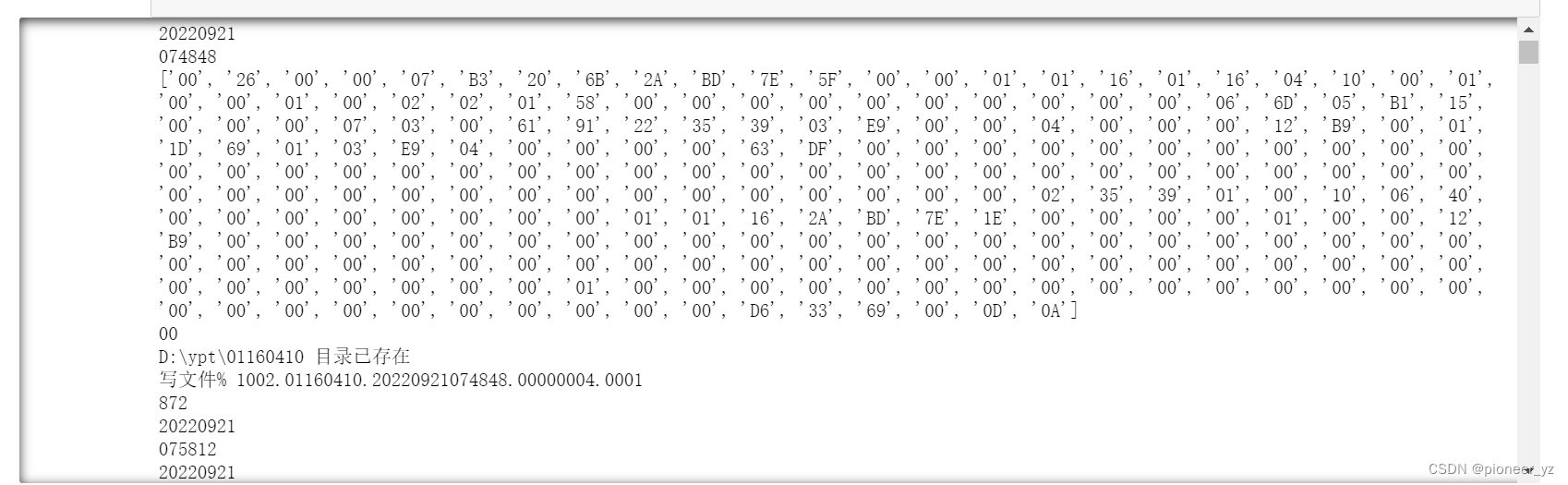
运行结果
总结
在项目开发过程中,难免会遇到各种各样的问题,始终保持一颗学习的心,不断寻求问题的解决方法,最终问题总会解决。





 扫一扫
扫一扫


 1093
1093

 被折叠的 条评论
为什么被折叠?
被折叠的 条评论
为什么被折叠?
 到【灌水乐园】发言





