



Streamlit 构建和共享数据应用的更快方式
- Streamlit 快速将数据脚本转换为可共享的 Web 应用程序
- 现代化AI与科学应用定制化 Web 开发利器
- 现代化数据分析必备良器
码码是一种沉浸式娱乐 (ง •_•)ง
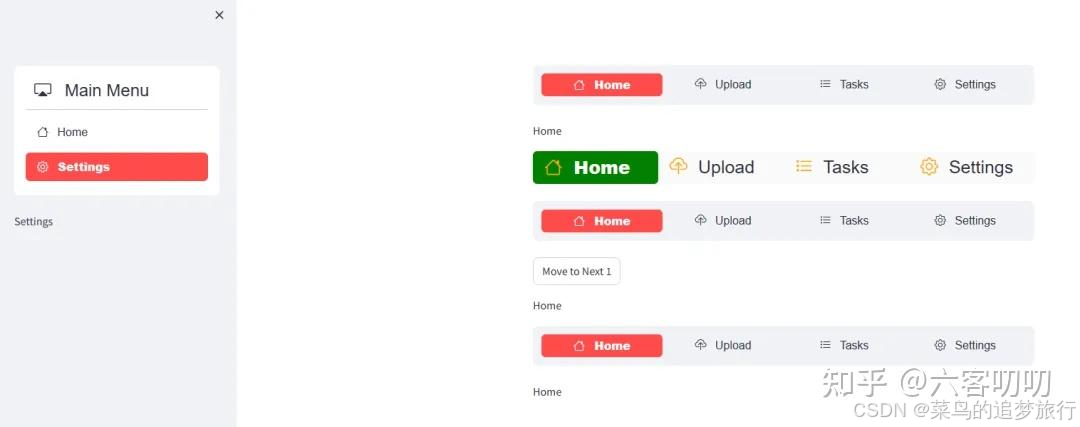
如果小伙伴正在开发一些企业内部的常用应用,并且可以将他们明确分类,我推荐小伙伴使用 streamlit-option-menu 经典全局样式
1. streamlit-option-menu
streamlit-option-menu 是一个简单的 Streamlit 组件,它允许用户从菜单的选项列表中选择单个项目。它在功能上类似于 st.selectbox(),区别:
它使用一个简单的静态列表来显示选项而不是下拉列表
它具有每个选项和菜单标题的可配置图标
菜单中大多数 HTML 元素的 CSS 样式都可以自定义(参见下面的样式参数和示例 #3)
它建立在streamlit-component-template-vue之上,使用Bootstrap和来自bootstrap-icons 的图标进行样式设置
■ 安装
pip install streamlit-option-menu
■ 引入模块
from streamlit_option_menu import option_menu
■ 语法结构
(function) def option_menu(
    menu_title: Any,
    options: Any,
    default_index: int = 0,
    menu_icon: Any | None = None,
    icons: Any | None = None,
    orientation: str = "vertical",
    styles: Any | None = None,
    manual_select: Any | None = None,
    key: Any | None = None,
    on_change: Any | None = None
) -> Any
■ 参数
menu_title(str)- 菜单的标题,必要的
  - 如果 menu_title=None,则隐藏标题
options([str])- 菜单中显示的(字符串)选项列表,必要的
  - 如果要插入节分隔符,请将选项设置为“---”
default_index(int)- 默认选中选项的索引,默认 0,可选的
menu_icon(str)- 菜单标题的图标名称
  - 可选值: 图标参考
icons([str])- 选项的图标名称,可选的
  - 它的长度应该等于 options 选项的长度
  - 可选值: 图标参考
orientation(str)- 菜单方向,默认 'vertical',可选的
  - 可选值:{'vertical', 'horizontal'}
    - 'vertical':垂直排列
    - 'horizontal':水平排列
styles(dict)- 自定义样式,默认 None,可选的
  - "container"(dict)- 整个菜单的容器 div
  - "menu-title"(dict)- 包含菜单标题的 <a> 元素
  - "menu-icon"(dict)- 菜单标题旁边的图标
  - "nav"(dict)- 包含 "nav-link" 的 <ul>
  - "nav-item"(dict)- 包含“nav-link”的 <li> 元素
  - "nav-link"(dict)- 包含每个选项文本的 <a> 元素
  - "nav-link-selected"(dict)- 包含所选选项文本的 <a> 元素
  - "icon"(dict)- 每个选项旁边的图标
  - "separator"(dict)- 分隔选项的 <hr> 元素
manual_select(any)- 通过以手动更改菜单项选择
key(any)- 唯一值
on_change(callback)- 回调函数
  - 回调默认参数为 key
■ 返回值
(str)- 该函数返回当前选择的(字符串)选项
■ 官方示例
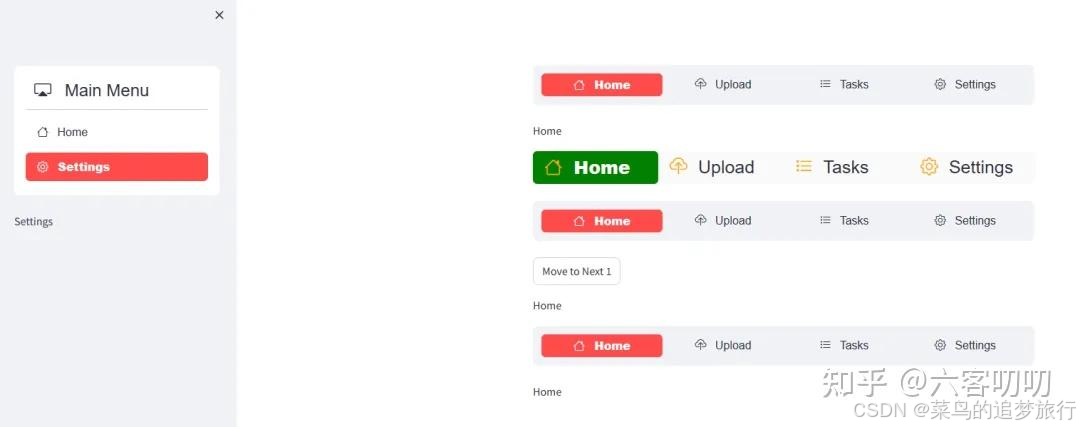
import streamlit as st
from streamlit_option_menu import option_menu

# 1. as sidebar menu
with st.sidebar:
    selected = option_menu("Main Menu", ["Home", 'Settings'],
        icons=['house', 'gear'], menu_icon="cast", default_index=1)
    selected

# 2. horizontal menu
selected2 = option_menu(None, ["Home", "Upload", "Tasks", 'Settings'],
    icons=['house', 'cloud-upload', "list-task", 'gear'],
    menu_icon="cast", default_index=0, orientation="horizontal")
selected2

# 3. CSS style definitions
selected3 = option_menu(None, ["Home", "Upload",  "Tasks", 'Settings'],
    icons=['house', 'cloud-upload', "list-task", 'gear'],
    menu_icon="cast", default_index=0, orientation="horizontal",
    styles={
        "container": {"padding": "0!important", "background-color": "#fafafa"},
        "icon": {"color": "orange", "font-size": "25px"},
        "nav-link": {"font-size": "25px", "text-align": "left", "margin":"0px", "--hover-color": "#eee"},
        "nav-link-selected": {"background-color": "green"},
    }
)

# 4. Manual item selection
if st.session_state.get('switch_button', False):
    st.session_state['menu_option'] = (st.session_state.get('menu_option', 0) + 1) % 4
    manual_select = st.session_state['menu_option']
else:
    manual_select = None

selected4 = option_menu(None, ["Home", "Upload", "Tasks", 'Settings'],
    icons=['house', 'cloud-upload', "list-task", 'gear'],
    orientation="horizontal", manual_select=manual_select, key='menu_4')
st.button(f"Move to Next {st.session_state.get('menu_option', 1)}", key='switch_button')
selected4

# 5. Add on_change callback
def on_change(key):
    selection = st.session_state[key]
    st.write(f"Selection changed to {selection}")

selected5 = option_menu(None, ["Home", "Upload", "Tasks", 'Settings'],
                        icons=['house', 'cloud-upload', "list-task", 'gear'],
                        on_change=on_change, key='menu_5', orientation="horizontal")
selected5
2. 全局经典样式多页应用
下面是一个标准的全局经典样式多页应用示例
文件结构
App/
├── pages/
│   ├── __init__.py
│   ├── home.py
│   ├── business_app.py
│   ├── financial_app.py
│   └── system_management.py
├── static/
│   ├── 1714909940005.png
│   ├── 1714909962855.png
│   ├── 1714909982198.png
│   ├── 1714909997943.png
│   ├── 1714910012407.png
│   ├── 1714910025974.png
│   └── 1714910042374.png
└── head.py
■ head.py
import pages as pgs

import streamlit as st
from streamlit_option_menu import option_menu
st.set_page_config(page_title='test', page_icon=' ', layout='wide')

with st.sidebar:
    page = option_menu(
        menu_title='企业集成平台',
        options=['首页', '业务应用', '财务应用', '报表应用', '系统管理'],
        default_index=0,
        menu_icon='windows',
        icons=['house', 'people', 'piggy-bank', 'clipboard-data', 'gear']
    )

functions = {
    '首页': pgs.home,
    '业务应用': pgs.business_app,
    '财务应用': pgs.financial_app,
    '报表应用': pgs.report_app,
    '系统管理': pgs.system_management
}

go_to = functions.get(page)

if go_to:
    go_to()
■ pages_init_.py
from pages.home import home
from pages.business_app import business_app
from pages.financial_app import financial_app
from pages.system_management import system_management
from pages.report_app import report_app
■ pages\home.py
# 首页导航
import streamlit as st

def home():
    col01, col02_1, col02_2, col03 = st.columns([1,5,1, 1])
    col02_1.text_input(label='sou', max_chars=36, key='search_text', label_visibility='collapsed')
    col02_2.button(label=' 搜索', key='search_button')
■ pages\business_app.py
# 业务应用
import streamlit as st

data_title = [
    '工程建设标准查询', '建设工程项目信息', '建设工程基本信息',
    '建设工程人员信息', '建设工程企业信息', '住房保障服务',
    '住房公积金服务', '工程建设服务', '物业管理服务',
    '燃气监管服务', '更多服务>>>'
    ]

def tit_button():
    for ind, tit in enumerate(data_title):
        if st.session_state[f"tit_{ind}"]:
            st.session_state['index'] = ind
            st.session_state['info'] = tit

def business_app():
    if 'info' not in st.session_state:
        st.session_state.index = 0
        st.session_state.info = data_title[0]
    tp = lambda x: 'primary' if st.session_state.index == x else 'secondary'
    col01, col02 = st.columns([1, 9])
    with col01:
        with st.container(height=660, border=False):
            for ind, tit in enumerate(data_title):
                st.button(label=tit, key=f'tit_{ind}', use_container_width=True, on_click=tit_button, type=tp(ind))
    with col02:
        with st.container(border=True, height=660):
            st.write(st.session_state.info)
■ pages\financial_app.py
# 财务应用
import streamlit as st
data_title = ['账务处理', '发票管理', '固定资产', '工资管理', '往来管理', '报表与分析', '出纳管理']

def financial_app():
    tab01, tab02, tab03, tab04, tab05, tab06, tab07 = st.tabs(data_title)
    with tab01:
        st.image(r'static\1714909940005.png')
    with tab02:
        st.image(r'static\1714909962855.png')
    with tab03:
        st.image(r'static\1714909982198.png')
    with tab04:
        st.image(r'static\1714909997943.png')
    with tab05:
        st.image(r'static\1714910012407.png')
    with tab06:
        st.image(r'static\1714910025974.png')
    with tab07:
        st.image(r'static\1714910042374.png')
■ pages\system_management.py
### 系统管理
import streamlit as st
import streamlit_antd_components as sac

def system_management():
    col1, col2 = st.columns([1, 7])
    with col1:
        ot = sac.tree(
            items=[  # 选项卡内容
                sac.TreeItem(
                    label='业务管理', icon=None, tag='hot',
                    children=[
                        sac.TreeItem(
                            label='工程建设',
                            ),
                        sac.TreeItem(label='建设工程'),
                        sac.TreeItem(label='住房保障'),
                        sac.TreeItem(label='住房公积金'),
                        sac.TreeItem(label='物业管理', icon='cup-hot')
                        ],
                    ),
                sac.TreeItem(
                    label='财务管理', icon='houses',
                    ),
                sac.TreeItem(label='报表管理', icon='cup-straw'),
                sac.TreeItem(label='系统设置', icon='car-front', tag=sac.Tag(label='hot', color='#ee82ee', icon='car-front')),
            ],
            format_func=None,   # 项目标签格式化
            icon=None,  # 树上的引导程序图标
            height=660,  # 树的高度(px)
            open_all=False,  # 打开所有项目
            checkbox=False,  # 显示允许多选的复选框
            checkbox_strict=False,  # 父项和子项不关联
            show_line=True,  # 显性的显示树节点之间的层级结构
            return_index=False,  # 返回值为索引
            on_change=None,  # 回调函数
            args=None,
            kwargs=None,
            key='sac_tree',
            )
    with col2:
        st.markdown(f'### {ot}')
问题解决
解决图像这个问题
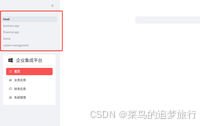
因为 streamlit 默认开启多页导航栏模式,有两种方法关闭它:
①在启动时 streamlit run you_app.py --client.showSidebarNavigation false
②在 config.toml 配置文件中修改:showSidebarNavigation = false;终端命令下输入 streamlit config show





 扫一扫
扫一扫


 6333
6333

 被折叠的 条评论
为什么被折叠?
被折叠的 条评论
为什么被折叠?
 到【灌水乐园】发言





