



matlab实验之画茶壶
1.程序如下
%% Displaying Complex Three-Dimensional Objects
% This example shows how to create and display a complex three dimensional
% object and control its appearance.

%   Copyright 2014 The MathWorks, Inc.

%% Get Geometry of Object
% This example uses a graphics object called the Newell teapot.  The
% vertex, face, and color index data for the teapot are calculated by the
% |teapotData| function. Since the teapot is a complex geometric shape,
% there are a large number of vertices (4608) and faces (3872) returned by
% the function.

[verts, faces, cindex] = teapotGeometry;

%% Create Teapot Patch Object
% Using the geometry data, draw the teapot using the |patch| command.  The
% |patch| command creates a patch object.

figure
p = patch('Faces',faces,'Vertices',verts,'FaceVertexCData',cindex,'FaceColor','interp')
%%
% Use the |view| command to change the orientation of the object.

view(-151,30)     % change the orientation
axis equal off    % make the axes equal and invisible

%% Adjust Transparency
% Make the object transparent using the |FaceAlpha| property of the patch
% object.

p.FaceAlpha = 0.3;   % make the object semi-transparent

%%
% If the |FaceColor| property is set to 'none', then the object appears as
% a wire frame diagram.

p.FaceColor = 'none';    % turn off the colors

%% Change Colormap
% Change the colors for the object using the |colormap| function.

p.FaceAlpha = 1;           % remove the transparency
p.FaceColor = 'interp';    % set the face colors to be interpolated
p.LineStyle = 'none';      % remove the lines
colormap(copper)           % change the colormap

%% Light the Object
% Add a light to make the object appear more realistic.

l = light('Position',[-0.4 0.2 0.9],'Style','infinite')
lighting gouraud

%%
% These properties of the patch object affect the strength of the light and
% the refective properties of the object:
%
% * |AmbientStrength| - controls the strength of ambient light
% * |DiffuseStrength| - controls the strength of diffuse light
% * |SpecularStrength| - controls the strength of reflected light
% * |SpecularExponent| - controls the harshness of reflected light
% * |SpecularColorReflectance| - controls how refected color is calculated.
%
% You can set these properties individually. To set these properties to a
% predetermined set of values that approximate the appearance of metal,
% shiny, or dull material, use the |material| command.

material shiny

%%
% Adjust the position of the light using its |Position| property.  The
% position is in _x_, _y_, _z_ coordinates.

l.Position = [-0.1 0.6 0.8]
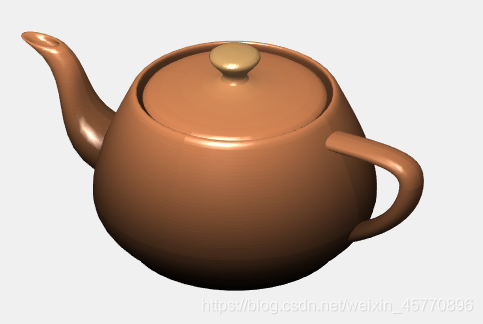
2.效果如下图






 扫一扫
扫一扫


 6961
6961

 被折叠的 条评论
为什么被折叠?
被折叠的 条评论
为什么被折叠?
 到【灌水乐园】发言





