 iOS GPS定位详解



 本文详细介绍在iOS设备上如何实现GPS定位功能,包括修改plist文件、创建启动GPS的视图、显示位置信息、处理实时位置更新、用户权限检测及错误处理等关键步骤。
文章目录
ios获取GPS信息方法如下:
1.更改plist
添加如下变量
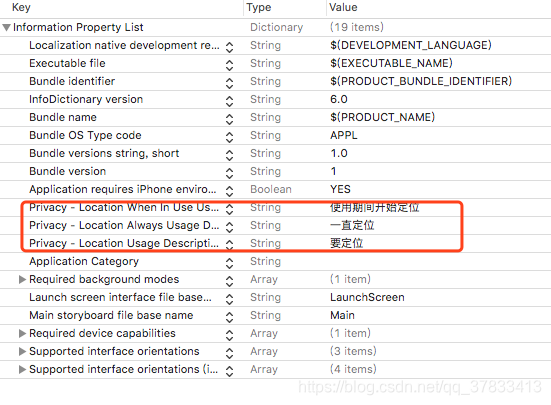
2.新建视图用来启动GPS
此视图控制器继承CLLocationManagerDelegate
#import <UIKit/UIKit.h>
#import <CoreLocation/CoreLocation.h>

@interface GpsViewController : UIViewController <CLLocationManagerDelegate>

@end
3.定义标签用来显示位置,并开启定位
UILabel *latitudeValue;
UILabel *longitudeValue;
CLLocationManager *locationManager;

- (void)viewDidLoad {
    [super viewDidLoad];

    self.view.backgroundColor=[UIColor redColor];
    self.view.alpha=0.5;

    UILabel *latitude=[[UILabel alloc] init];
    latitude.text=@"Latitude:";
    latitude.frame=CGRectMake(100, 200, 100, 15);
    [self.view addSubview:latitude];

    latitudeValue=[[UILabel alloc] init];
    latitudeValue.text=@"";
    latitudeValue.frame=CGRectMake(210, 200, 150, 15);
    [self.view addSubview:latitudeValue];

    UILabel *longitude=[[UILabel alloc] init];
    longitude.text=@"Longitude:";
    longitude.frame=CGRectMake(100, 300, 100, 15);
    [self.view addSubview:longitude];

    longitudeValue=[[UILabel alloc] init];
    longitudeValue.text=@"";
    longitudeValue.frame=CGRectMake(210, 300, 150, 15);
    [self.view addSubview:longitudeValue];

    //开启定位
    locationManager=[[CLLocationManager alloc] init];
    locationManager.delegate=self;
    locationManager.desiredAccuracy=kCLLocationAccuracyBest;
    locationManager.distanceFilter=kCLDistanceFilterNone;
    locationManager.allowsBackgroundLocationUpdates=YES;
    //使用期间定位
    [locationManager requestWhenInUseAuthorization];
    [locationManager requestAlwaysAuthorization];
    [locationManager startUpdatingLocation];
// Do any additional setup after loading the view.
}
4.通过委托说去实时位置
- (void)locationManager:(CLLocationManager *)manager didUpdateLocations:(NSArray<CLLocation *> *)locations
{
    NSLog(@"Update location");
    CLLocation *newLoaction=locations[0];
    latitudeValue.text=[[NSString alloc] initWithFormat:@"%f",newLoaction.coordinate.latitude];
    longitudeValue.text=[[NSString alloc] initWithFormat:@"%f",newLoaction.coordinate.longitude];
}
5.用户权限检测
if ([CLLocationManager locationServicesEnabled]) {
        switch ([CLLocationManager authorizationStatus]) {
            case kCLAuthorizationStatusNotDetermined:
                NSLog(@"用户尚未进行选择");
                break;
            case kCLAuthorizationStatusRestricted:
                NSLog(@"定位权限被限制");
                break;
            case kCLAuthorizationStatusAuthorizedAlways:
            case kCLAuthorizationStatusAuthorizedWhenInUse:
                NSLog(@"用户允许定位");
                break;
            case kCLAuthorizationStatusDenied:
                NSLog(@"用户不允许定位");
                break;

            default:
                break;
        }
    }
6.定位失败委托
- (void)locationManager:(CLLocationManager *)manager didFailWithError:(NSError *)error
{
    NSLog(@"Update error");

    if(error.code == kCLErrorLocationUnknown) {
        NSLog(@"无法检索位置");
    }
    else if(error.code == kCLErrorNetwork) {
        NSLog(@"网络问题");
    }
    else if(error.code == kCLErrorDenied) {
        NSLog(@"定位权限的问题");
        [locationManager stopUpdatingLocation];
    }
}
7.GPS获取方法封装
7.1 方法封装
LLLocation.h
#import <Foundation/Foundation.h>
#import <CoreLocation/CoreLocation.h>

@protocol LocationHandlerDelegate <NSObject>

@required
-(void) didUpdateToLocation:(CLLocation*)newLocation;

@end

@interface LLLocation :  NSObject <CLLocationManagerDelegate>
{
    CLLocationManager *locationManager;
}

@property(nonatomic,strong) id<LocationHandlerDelegate> delegate;

+(id)getSharedInstance;
-(void)startUpdatingLocation;
-(void) stopUpdatingLocation;

@end
LLLocation.m
#import "LLLocation.h"

@interface LLLocation()

-(void)initLocationManager;

@end

@implementation LLLocation

+ (LLLocation *)getSharedInstance
{
    static LLLocation *location = nil;
    static dispatch_once_t onceToken;
    dispatch_once(&onceToken, ^{
        location = [[LLLocation alloc] init];
        [location initLocationManager];
    });
    return location;
}

-(void)initLocationManager
{
    NSLog(@"init");
    locationManager = [[CLLocationManager alloc] init];
    locationManager.delegate = self;
}

-(void)startUpdatingLocation
{
    [locationManager startUpdatingLocation];
}

-(void) stopUpdatingLocation
{
    [locationManager stopUpdatingLocation];
}

- (void)locationManager:(CLLocationManager *)manager didUpdateLocations:(NSArray<CLLocation *> *)locations
{
    [locationManager stopUpdatingLocation];
    NSLog(@"Update gps");
    if ([self.delegate respondsToSelector:@selector
         (didUpdateToLocation:)])
    {
        [self.delegate didUpdateToLocation:locations[0]];

    }
}

@end
7.2 实现委托
@interface GpsViewController ()<LocationHandlerDelegate>

@property(nonatomic,strong) CLLocationManager *locationManager;

@end
-(void) didUpdateToLocation:(CLLocation*)newLocation
{
     latitudeValue.text=[[NSString alloc] initWithFormat:@"%f",newLocation.coordinate.latitude];
     longitudeValue.text=[[NSString alloc] initWithFormat:@"%f",newLocation.coordinate.longitude];

}
7.3 方法调用
    LLLocation *location=[LLLocation getSharedInstance];
    [location startUpdatingLocation];
    [location setDelegate:self];
PS:在应用过程中会出现委托并未调用情况,如果按上述步骤进行,委托还未调用,则建议查看CLLocationManagerDelegate的定义,确定委托方法是否在此ios版本中适用;或者把CLLocationManager *locationManager定义为强引用的属性试试





 扫一扫
扫一扫


 8125
8125

 被折叠的 条评论
为什么被折叠?
被折叠的 条评论
为什么被折叠?
 到【灌水乐园】发言





