



1.介绍
OpenClip 在学术界和工业界被广泛认可为一个优秀的开源库,用于训练 CLIP 系列模型。然而,文档中缺乏关于如何使用本地数据集微调 CLIP 模型以适应下游任务的详细说明,初学者可能一开始会不知道从何入手。基于我的实际经验,这篇文章介绍了一些使用 OpenClip 的注意事项。我希望它能帮助那些刚接触 CLIP 系列模型的学生。
2. Clone the repository
git clone https://github.com/mlfoundations/open_clip.git
# Enter the project root directory.
cd open_clip
注意是进入到src路径下
3.安装环境
首先,在安装 torch 和相关包之前,检查你的 CUDA 版本。如果我们直接使用官方命令安装依赖项,很可能会遇到由于 torch 版本和 CUDA 版本不匹配而导致的一系列错误。 因此,请根据实际情况安装你的环境。
3.1 在 shell 中检查我们的 CUDA 版本
nvidia-smi
然后我们会得到驱动版本(以我的本地设备为例)
NVIDIA-SMI 515.65.01 Driver Version: 515.65.01 CUDA Version: 11.7
然后访问 torch 官方网站,根据你的 CUDA 版本获取相应的 torch 和其他相关包的版本。建议使用 pip 命令进行安装,例如:
pip install torch==2.0.1 torchvision==0.15.2 torchaudio==2.0.2 --index-url https://download.pytorch.org/whl/cu117
3.2 检查安装
import torch
print(torch.cuda.is_available())
# True
如果输出是“True”,恭喜你!你已经成功安装了最重要的包!然后使用以下命令安装其余的包:
pip install -r requirements-training.txt
4.准备你的本地数据集
CLIP 使用视觉-文本对比损失进行训练,因此你的本地数据集必须包含图像及其对应的文本描述。之后,你需要创建一个索引文件,将图像与其相应的标题链接起来。在官方教程中,img2dataset 被用于数据管理,因为它涉及下载一些公共数据集。然而,对于本地数据,使用 CSV 文件作为索引是最方便的选择。以下教程将以 CSV 文件为例。
CSV 文件的示例内容如下:
filepath,caption
/base_path/img/Party Penguins_6664.png,"A picture of Party Penguins, containing Red Background Stitches Cheeks Cute Eyes Normal Beak None Face Basketball Hat Red Jacket Clothes."
/base_path/img/Party Penguins_9467.png,"A picture of Party Penguins, containing Green Background None Cheeks Cute Eyes Sneeze Beak None Face Cheeseburger Hat Hawaiian Shirt Clothes."
/base_path/img/Party Penguins_902.png,"A picture of Party Penguins, containing Red Background Zigzag Cheeks Normal Eyes Moustache Beak None Face Steak Dinner Hat Light Blue Shells Clothes."
/base_path/img/Party Penguins_4356.png,"A picture of Party Penguins, containing Red Background Pink Bandaid Cheeks Cute Eyes Sneeze Beak None Face Panda Hat Hat Pink Nightgown Clothes."
/base_path/img/Party Penguins_1602.png,"A picture of Party Penguins, containing Red Background Shy Cheeks Normal Eyes Vampire Beak Hair Clips Face Orange Cap Hat Bikini Clothes."
CSV 文件应至少包含两列:图像路径及其对应的文本描述。特别需要注意的是,记住它们的标题(例如 filepath, caption),这些将在后续步骤中使用。
5.选择合适的预训练模型
OpenClip 官方提供了许多 CLIP 系列的预训练模型供下载和使用。你可以使用以下命令查看这些模型的具体细节。
5.1 了解模型
cd open_clip
cd src
python
import open_clip
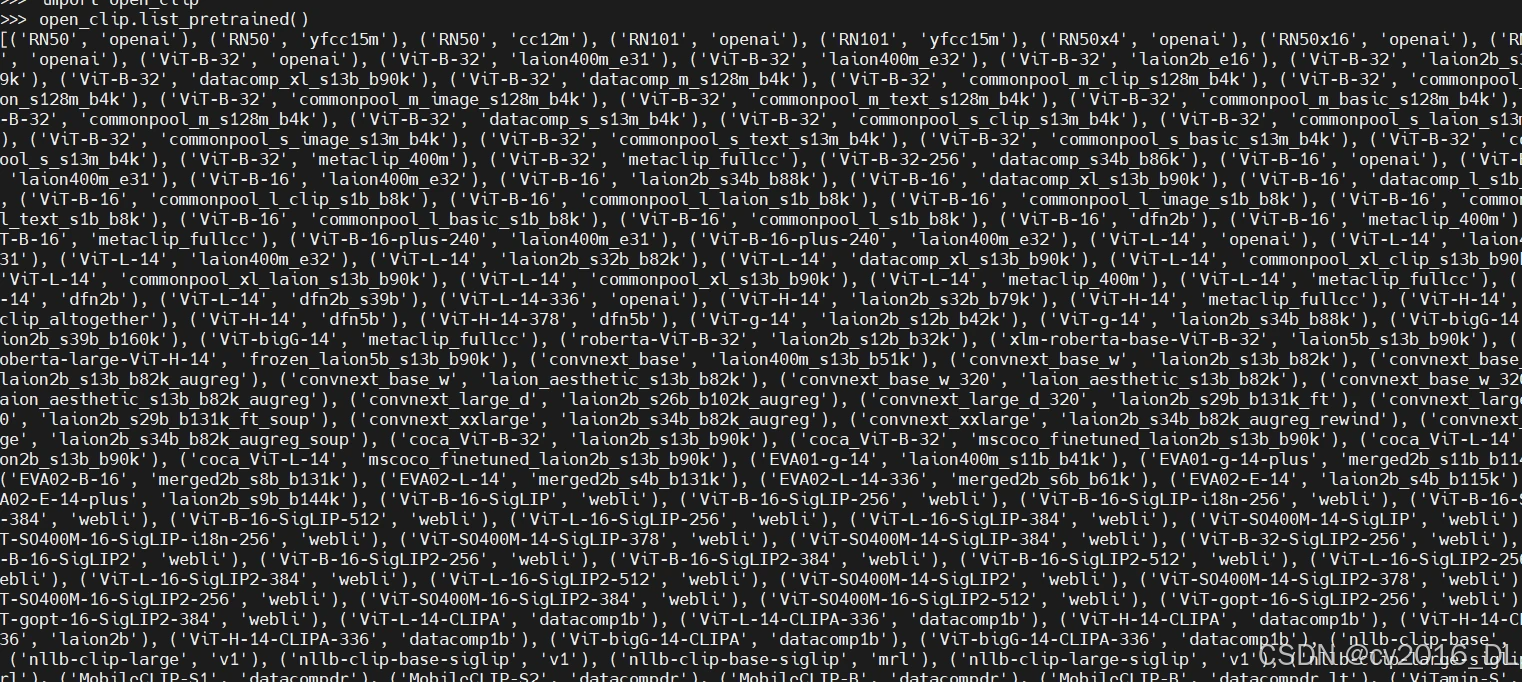
open_clip.list_pretrained()
第一列代表模型的名称,它也是模型中用于文本编码的参数。第二列表示模型的提供者或使用的训练数据集的规模。
5.2测试你的设置
现在通过官方示例测试你的项目设置,它会自动下载所需的模型(记得根据你的实际情况替换“img_path”)。
import torch
from PIL import Image
import open_clip

model, _, preprocess = open_clip.create_model_and_transforms('ViT-B-32', pretrained='laion2b_s34b_b79k')
tokenizer = open_clip.get_tokenizer('ViT-B-32')

img_path = "/path/to/a/local/img/xxx.jpg"
image = preprocess(Image.open(img_path)).unsqueeze(0)
text = tokenizer(["a diagram", "a dog", "a cat"])

with torch.no_grad(), torch.cuda.amp.autocast():
    image_features = model.encode_image(image)
    text_features = model.encode_text(text)
    image_features /= image_features.norm(dim=-1, keepdim=True)
    text_features /= text_features.norm(dim=-1, keepdim=True)

    text_probs = (100.0 * image_features @ text_features.T).softmax(dim=-1)

print("Label probs:", text_probs)  # prints: [[1., 0., 0.]]
如果由于某些原因你的服务器无法通过官方 OpenClip 脚本直接下载这些发布的模型,你仍然可以使用其他方法将它们下载到本地机器,然后上传到服务器。 OpenAI 发布的模型资源如下:
"RN50": "https://openaipublic.azureedge.net/clip/models/afeb0e10f9e5a86da6080e35cf09123aca3b358a0c3e3b6c78a7b63bc04b6762/RN50.pt",
"RN101": "https://openaipublic.azureedge.net/clip/models/8fa8567bab74a42d41c5915025a8e4538c3bdbe8804a470a72f30b0d94fab599/RN101.pt",
"RN50x4": "https://openaipublic.azureedge.net/clip/models/7e526bd135e493cef0776de27d5f42653e6b4c8bf9e0f653bb11773263205fdd/RN50x4.pt",
"RN50x16": "https://openaipublic.azureedge.net/clip/models/52378b407f34354e150460fe41077663dd5b39c54cd0bfd2b27167a4a06ec9aa/RN50x16.pt",
"RN50x64": "https://openaipublic.azureedge.net/clip/models/be1cfb55d75a9666199fb2206c106743da0f6468c9d327f3e0d0a543a9919d9c/RN50x64.pt",
"ViT-B/32": "https://openaipublic.azureedge.net/clip/models/40d365715913c9da98579312b702a82c18be219cc2a73407c4526f58eba950af/ViT-B-32.pt",
"ViT-B/16": "https://openaipublic.azureedge.net/clip/models/5806e77cd80f8b59890b7e101eabd078d9fb84e6937f9e85e4ecb61988df416f/ViT-B-16.pt",
"ViT-L/14": "https://openaipublic.azureedge.net/clip/models/b8cca3fd41ae0c99ba7e8951adf17d267cdb84cd88be6f7c2e0eca1737a03836/ViT-L-14.pt",
"ViT-L/14@336px": "https://openaipublic.azureedge.net/clip/models/3035c92b350959924f9f00213499208652fc7ea050643e8b385c2dac08641f02/ViT-L-14-336px.pt",
更多预训练模型,参考:https://github.com/mlfoundations/open_clip/blob/main/src/open_clip/pretrained.py
在你成功将预训练模型上传到服务器后,使用以下示例代码进行测试(记得根据你的实际情况替换“model_path”、“model_name”和“img_path”)。
以下是一个示例代码,展示如何加载本地预训练模型并进行推理:
import torch
from PIL import Image
import open_clip
device = torch.device("cuda:x" if torch.cuda.is_available() else "cpu")
model_path = "/path/to/local/model/xxx.pt"
model_name = "ViT-L-14"

model, _, preprocess = open_clip.create_model_and_transforms(model_name = model_name, pretrained = model_path)
tokenizer = open_clip.get_tokenizer(model_name)
model.to(device)

img_path = "/path/to/a/local/img/xxx.jpg"

image = preprocess(Image.open(img_path)).unsqueeze(0).cuda(device=device)
text = tokenizer(["a diagram", "a dog", "a cat"]).cuda(device=device)

with torch.no_grad(), torch.cuda.amp.autocast():
    image_features = model.encode_image(image)
    text_features = model.encode_text(text)
    image_features /= image_features.norm(dim=-1, keepdim=True)
    text_features /= text_features.norm(dim=-1, keepdim=True)

    text_probs = (100.0 * image_features @ text_features.T).softmax(dim=-1)

print("Label probs:", text_probs)  # prints: [[1., 0., 0.]]
如果你得到了相应的输出,恭喜你,你已经完成了所有的准备工作!
6. 训练模型
如果你想在同一台服务器上同时使用多个 GPU 进行训练,可以使用以下命令:
# enter the src folder of the open_clip repository
cd open_clip/src
# specify which GPUs you want to use.
export CUDA_VISIBLE_DEVICES=0,1,2,3,4,5
# set the training args
torchrun --nproc_per_node 6 -m training.main \
--batch-size 500 \
--precision amp \
--workers 4 \
--report-to tensorboard \
--save-frequency 1 \
--logs="/path/to/your/local/logs" \
--dataset-type csv \
--csv-separator="," \
--train-data /path/to/your/local/training_dict.csv \
--csv-img-key filepath \
--csv-caption-key caption \
--warmup 1000 \
--lr=5e-6 \
--wd=0.1 \
--epochs=32 \
--model ViT-B-32 \
--pretrained /path/to/your/local/model
# args explanation
--nproc_per_node 6 # On each server, 6 GPUs are used, corresponding to the number specified earlier.
--report-to tensorboard # (Optional) Send training details to the corresponding TensorBoard file, but make sure to install the required packages beforehand.
--save-frequency 1 # save a checkpoint after each epoch
--logs="/models/clip/openclip_finetuning/logs" # local path to store the training log and the checkpoints
--dataset-type csv # (important!) specify the index file type
--csv-separator="," # (important!) specify the csv separator of your csv file, OpenClip official uses the "Tab" key as a delimiter, but generally CSV files default to using "," as a delimiter. Remember to modify this delimiter, otherwise an error will occur!
--train-data /path/to/your/local/training_dict.csv # your local path to training data CSV index file,validation data CSV index file is the same principle, and here I have omitted it.
--csv-img-key filepath
--csv-caption-key caption # (important!)make sure to modify these two values according to the headers in your custom CSV file. You can refer to the CSV demo I provided above for reference.
--lr=5e-6 # (important!)the final learning rate should not be set too high, otherwise the training loss will oscillate severely. Experimental evidence has shown that e-6 is a good unit to use, but remember to adjust it according to your specific situation.
--pretrained #(important!)a pre-trained model type or /path/to/your/local/model
for more detailed args explanation,please refer to :https://github.com/mlfoundations/open_clip/blob/main/src/training/params.py
7.注意事项
a.如果命令行报告了一些奇怪的错误,而你不知道如何解决它们,可以将问题发送给 ChatGPT 或尝试减少批处理大小。
b.如果遇到任何无法解决的问题,请在官方仓库中提出 issue 。open_clip 的作者是我迄今为止遇到的最热情和负责任的维护者。
c.在第6部分,将 training.main 改为 open_clip_train.main,因为文件夹 training 已重命名为 open_clip_train 。另外,https://github.com/mlfoundations/open_clip/blob/main/src/training/params.py 需要指向 https://github.com/mlfoundations/open_clip/blob/main/src/open_clip_train/params.py。





 扫一扫
扫一扫


 1万+
1万+

 被折叠的 条评论
为什么被折叠?
被折叠的 条评论
为什么被折叠?
 到【灌水乐园】发言





