



第 17 章 输入、输出和文件
17.1. C++输入和输出概述
C实现自带了一个标准函数库,C++自带了一个标准类库。标准类库是一个非正式的标准,是由头文件 iostream 和 fstream 中定义的类组成。
17.1.1 流、缓冲区和iostream
C++程序把输入和输出看作字节流。
- 输入时
- 程序从
输入流中抽取字节
- 程序从
- 输出时
- 程序把
字节插入到输出流中
- 程序把
输入流中的字节可能来自键盘、存储设备或者其它程序。
输出流中的字节可以流向屏幕、打印机、存储设备或者其它程序。
管理输入包含两步:
- 将流与输入去向的程序关联起来
- 将流与文件连接起来。
细致地讲就是:输入流要有两个连接,每个端口一个。文件端连接提供了流的来源,程序端连接将输出流的流出部分转储到程序中。
对输出的管理:将输出流连接到程序以及将输出目标与流关联起来。
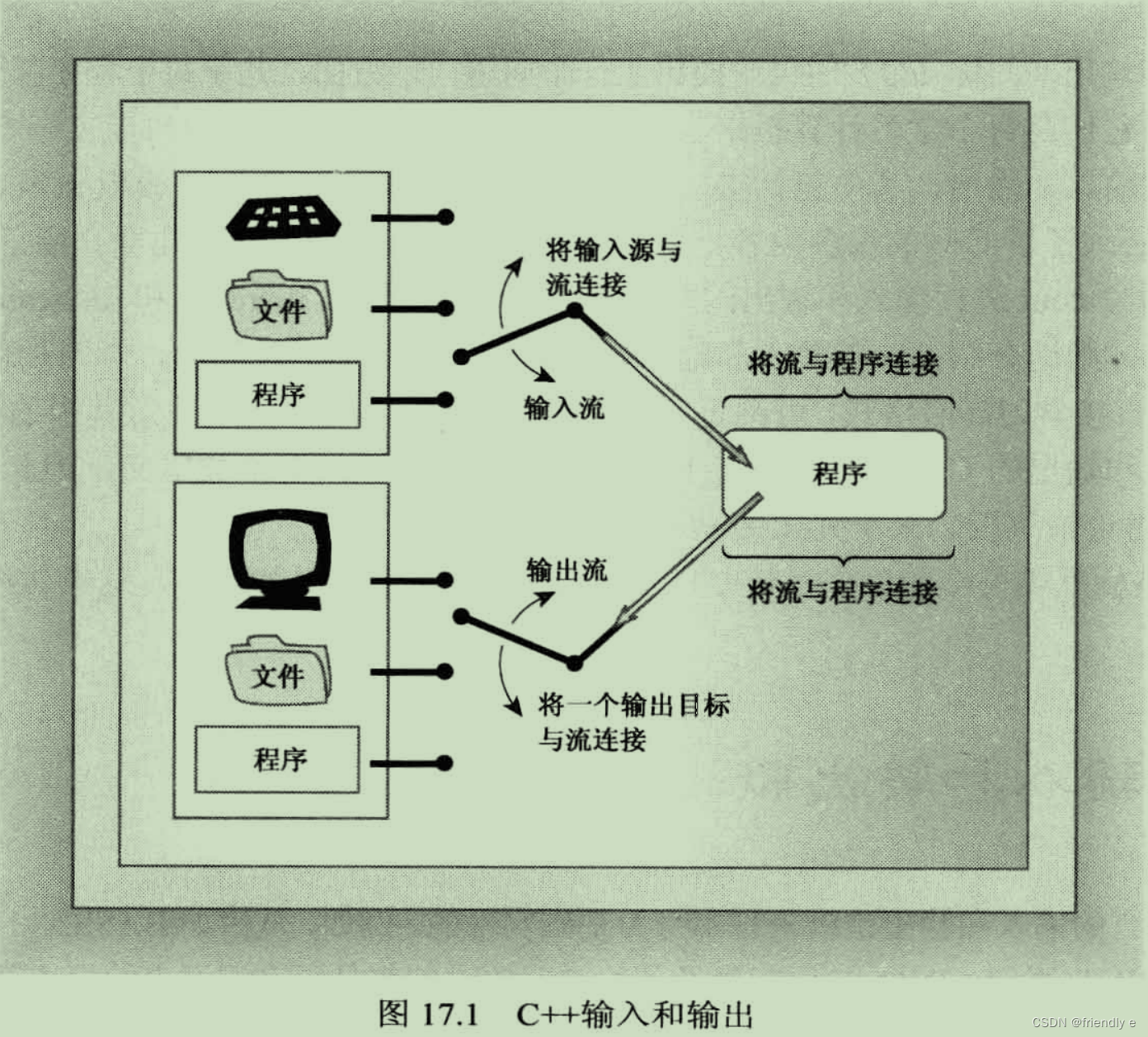
通常,通过使用缓冲区可以高效地处理输入和输出。缓冲区是用作中介的内存块 。它将信息从设备传输到程序或从程序传输给设备的 临时存储工具。
⚠️没有缓冲区的弊端:程序只能将文件中的内容一个字符一个字符读取出来,这样需要大量的磁盘活动,性能非常低。
✅缓冲区的好处:磁盘以数据块为单位传输信息,而程序每次只能处理一个字节的信息。缓冲区可以帮助**匹配二者的信息传输速率。**缓冲方法从磁盘中读取大量的信息,并存储到缓冲区(内存空间中预留了一定的存储空间,这些存储空间用来缓冲输入或输出的数据,这部分预留的空间就叫做缓冲区。它属于内存的一部分)中,这样程序从内存中读取单个字节的速度比从磁盘上读取要快得多。
刷新缓冲区(flushing the buffer):输出时,程序首先填满缓冲区,然后把整块数据传输给硬盘,并清空缓冲区,以便下一批输出使用。
📖tips:对键盘输入进行缓冲可以让用户在将输入传输给程序之前返回更正,(c++通常是在用户按下回车键时刷新输入缓冲区),这就是为什么用户按下回车键(相当于:换行符)时程序才会运行,屏幕才会输出(显示结果)。
头文件iostream 中包含了一些专门设计用来实现管理流和缓冲区的类。
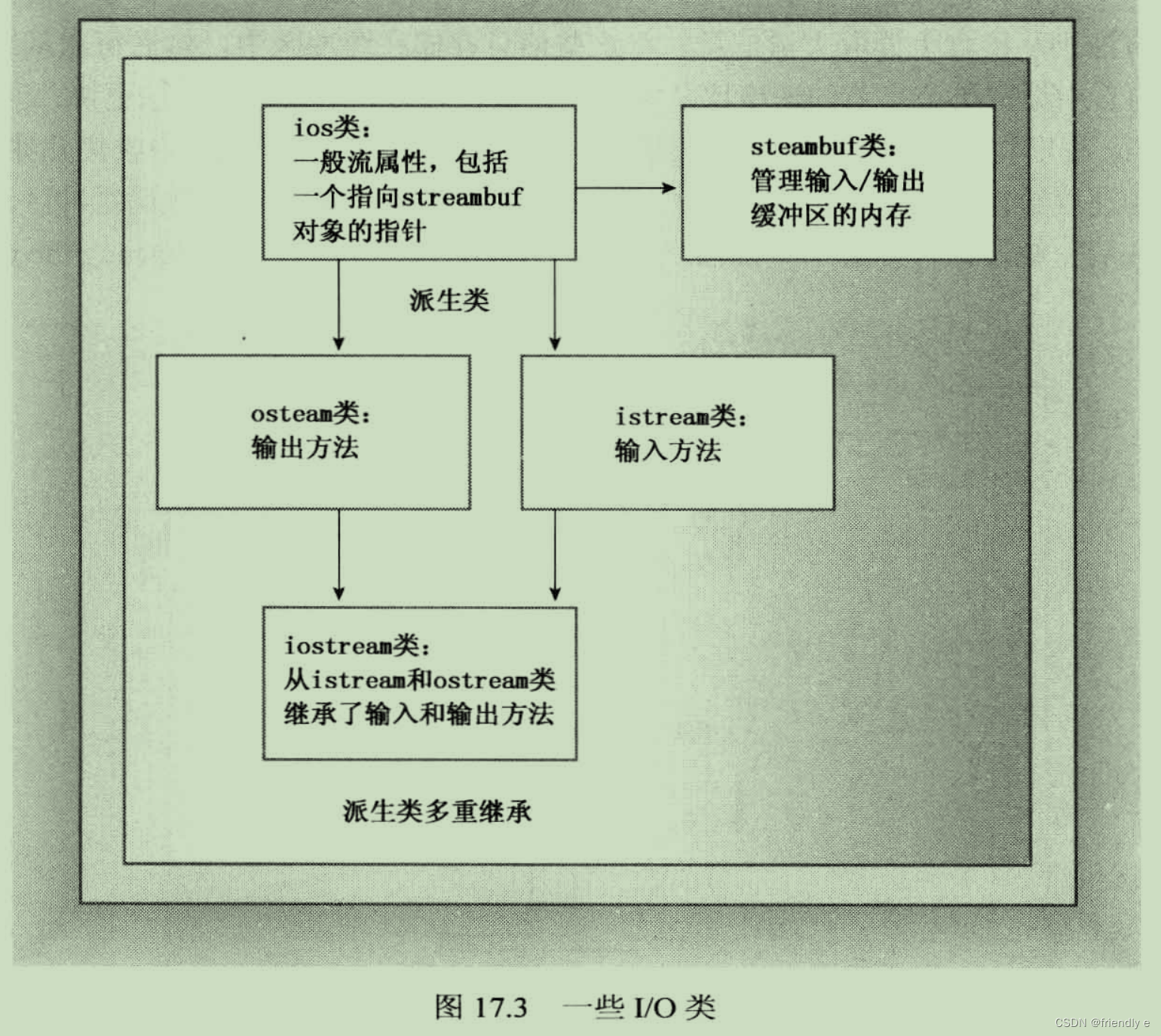
- streambuf类 为缓冲区提供了内存,并提供了用于填充缓冲区,访问缓冲区内容,刷新缓冲区和管理缓冲区内存的类方法。
- ios_base类 表示流的一般特征,如是否可读取,是二进制还是文本流等。
- ios类基于ios_base,其中包含了一个指向streambuf对象的指针成员。
- ostream类 是基于ios类派生而来,提供输出方法。
- istream类 也是基于ios类派生而来,提供输入方法。
- iostream是基于 istream 和 ostream类,基础了输入和输出方法。
在程序中包含 iostream 文件,将自动创建8个流对象(4个用于窄字符流,4个用于宽字符流)
- 处理窄字符流 ----- 处理 char_t 类型
cin对象对应于标准输入流。cout对象与标准输出流相对应。cerr对象与标准错误流相对应,用于显示错误信息。流不会被缓冲。clog对象对应标准错误流。流会被缓冲。
- 处理宽字符流 ----- 处理 wchar_t 类型
- wcin对象
- wcout对象
- wcerr对象
- wclog对象
17.1.2 重定向
标准输入和输出流通常连接键盘和屏幕。
输入重定向(<)输出重定向(>)
假如有一名为counter.exe的可执行文件:
C>counter
//input message
Hello
and goodbye!
Control-Z	  		<< 模拟文件尾
Input contained 19 characters
C>
通过输入重定向和输出重定向来使上述文件符计算文件oklahoma中的字符数,并将结果放回cow_cnt文件中。
cow_cnt file:
C>counter <oklahoma >cow_cnt
C>
解释:<oklahoma将标准输入与oklahoma文件连接,使cin从该文件(而不是键盘)中读取输入。>cow_cnt将标准输出与cow_cnt文件连接,使cout将输出发送给这个文件。
1⃣️从第一点看来,操作系统可以改变输入流的流入端连接,而流出端仍然与程序相连。
2⃣️从第二点看来,操作系统可以改变输出流的流出端连接,而流入端仍然与程序相连。
17.2.1 使用cout进行输出
17.2.1.1 输出和指针
C++将输出流看作字节流。平台不同,则读取字节流会有差异。
ostream类最重要的任务之一:将数据内部表示(二进制位模式)转换为由字符字节组成的输出流,使能够直接翻译成二进制数据。
在C++中,<< 运算符的默认含义是按位左移运算符。但ostream类重新定义了 << 运算符,方法将其重载为输出(也称为 插入运算符)。
插入运算符的所有化身的返回类型都是 ostream&。原型格式如下:
ostream & operator<<(type);
‼️C++用指向字符串存储位置的指针来表示字符串,指针的形式可以是char数组名,显式的char指针或用引用括起来的字符串
char name[20] = "Duddy Diddlemore";
char *pn = "Violet D'Amore";
cout << "Hello!";
cout << name;	//Duddy Diddlemore
cout << pn;		//Violet D'Amore
‼️如果要获得字符串的地址,则必须将其强制转换为其他类型,如下:
char *amount = "dozen";
cout << amount;
cout << (void *) amount; //prints the address of the "dozen" string
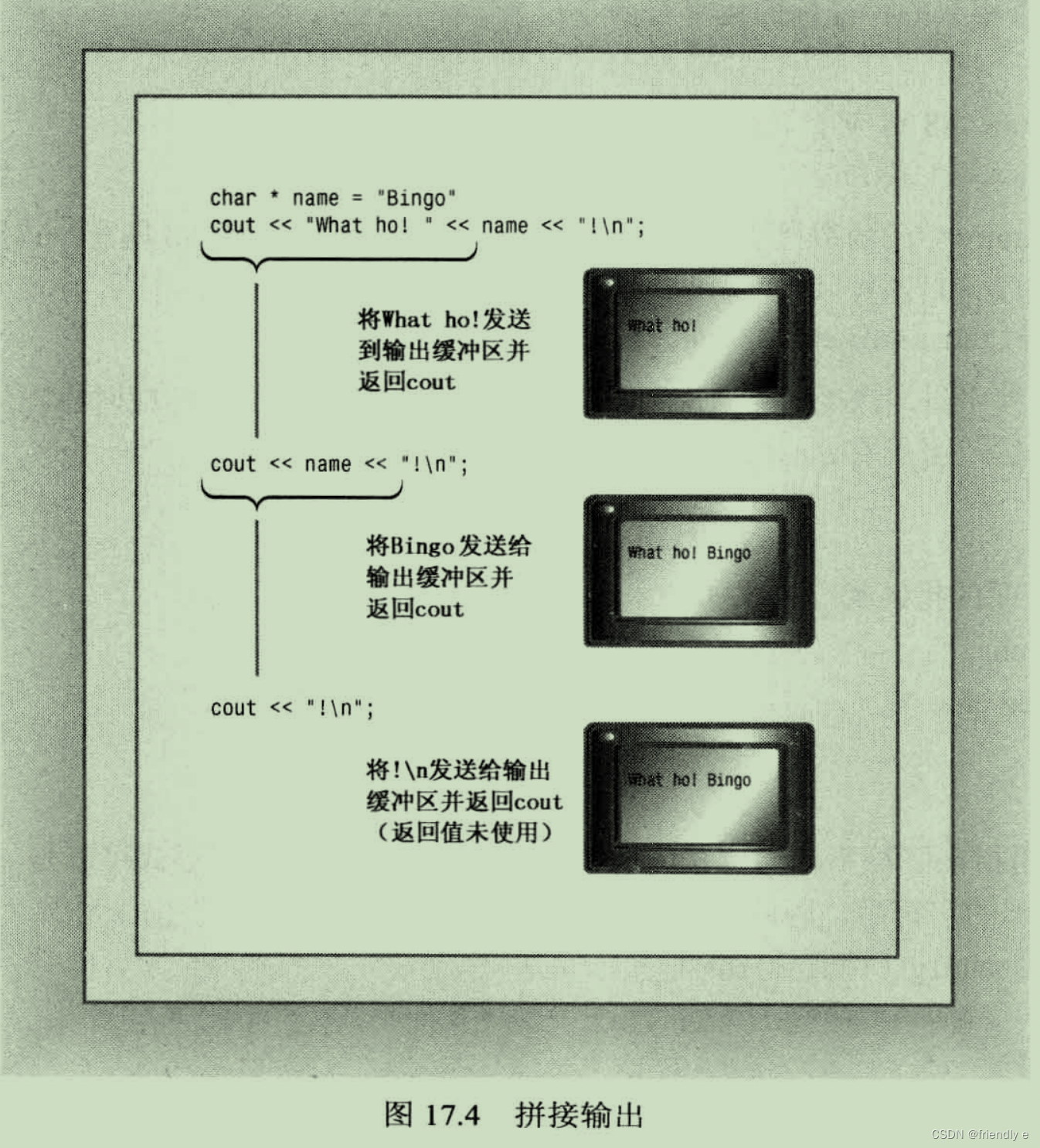
17.2.1.2 拼接输出
函数定义指出:引用将指向用于该运算符的对象。
17.2.2 其他ostream方法
除了 operator<<() 函数外,ostream类还提供 put() 方法和 write() 方法。前者用于显示字符,后者用于显示字符串。
-
put()方法- 原型如下:
// 参数:提供要显示的字符
ostream &put(char);
cout是调用方法的对象,put()是类成员函数–该函数也返回一个指向对象的引用,所以可以用它拼接输出:
cout.put('I').put('t'); //displaying It with two put() calls; -
write()方法- 原型如下:
// 第一个参数:提供要显示字符串的地址 // 第二个参数:指出要显示多少个字符 basic_ostream<charT, traits> & write(const char_type* s, streamsize n);- ⚠️注意点:write() 方法不会在遇到空字符时自动停止打印字符,而只是打印指定数目的字符,即使超出字符串的边界。下面举个例子看一下write的工作方式:
#include <iostream> #include <cstring> int main() { using namespace std; const char *state1 = "Florida"; const char *state2 = "Kansas"; const char *state3 = "Euphoria"; int len = std::strlen(state2); cout << "Increasing loop index: " << endl; int i; for (i = 1; i <= len; i++) { cout.write(state2, i); cout << endl; } //concatenate(拼接) output cout << "Decreasing loop index: " << endl; for (i = len; i >= 0; i--) { cout.write(state2,i) << endl; } //exceed string length cout << "Exceeding string length:" << endl; cout.write(state2,len + 5) << endl; return 0; } 输出: Increasing loop index: K Ka Kan Kans Kansa Kansas Decreasing loop index: Kansas Kansa Kans Kan Ka K Exceeding string length: KansasEuph- write()方法也可用于数值数据,您可以将数字的地址强制转换为char*,然后传递给它:
long val = 560031841;
cout.write((char *) &val , sizeof(long));
都是类成员函数,需要有调用对象
cout.put('w');
cout.write("Kansas",6);
17.2.3 刷新输出缓冲区
ostream类对cout对象处理的输出进行缓冲,所以输出不会立即发送到目标地址,而是被存储到缓冲区中,直到缓冲区填满。然后程序将刷新缓冲区,把内容发送出去,并清空缓冲区,以存储新的数据。
如果实现不能在所希望时刷新输出,可以使用强制刷新的两个控制符之一:
flush:刷新缓冲区endl:刷新缓冲区,并插入一个换行符
cout << "Hello, good-looking !" << flush;
cout << "Wait just a moment, please ." << endl;
17.2.4 用cout进行格式化
ostream插入运算符将值转换为文本格式。在默认情况下,格式化值的方式如下:
char值:如果代表的是可打印字符,则将被作为一个字符显示在宽度为一个字符的字段中。数值整型:将以十进制方式显示在一个刚好容纳该数字的字段中。字符串:显示在宽度等于该字符串长度的字段中浮点类型:浮点类型被显示为6位,末尾的0不显示- 数字以
定点表示法显示还是科学计数法表示,取决于值。 - 当指数大雨6或者小于等于-5时,将使用科学计数法。
字段宽度恰好容纳数字和负号。
- 数字以
下面程序演示默认的输出情况,ps:1.0/9.0位无穷小数
#include <iostream>
int main() {
    using namespace std;
    cout << "12345678901234567890" << endl;
    char ch = 'k';
    int t = 273;
    cout << ch << ":\n";
    cout << t << ":\n";
    cout << -t << "\n";

    double f1 = 1.200;
    cout << f1 << ":\n";
    cout << (f1 + 1.0 / 9.0) << ":\n";

    double f2 = 1.67e2;
    cout << f2 << ":\n";
    f2 += 1.0 / 9.0;
    cout << f2 << ":\n";
    cout << (f2 * 1.0e4) << ":\n";

    double f3 = 2.3e-4;
    cout << f3 << ":\n";
    cout << f3 / 10 << ":\n";

    return 0;
}


输出:
12345678901234567890
k:
273:
-273
1.2:
1.31111:
167:
167.111:
1.67111e+06:
0.00023:
2.3e-05:
⚠️该实现将指数变为两位(也有可能是三位,实现由不同编译器而异),按照输出看来,浮点型有效数字一般为6位。
17.2.4.1 修改显示时使用的计数系统
ostream类从ios类派生而来,而ios从ios_base类派生而来。ios_base类存储了描述格式状态的信息。
通过使用 ios_base 的成员函数,可以控制字段和小数位数。。因ios_base类时ostream的间接基类,可以将其方法用于ostream对象。
要控制整数以十进制、十六进制还是八进制显示,可以使用 dec、hex 和 oct 控制符。
dec(cout);   // 十进制,等价于  cout << dec;
hex(cout);   // 十六进制,等价于 cout << hex;
oct(cout);   // 八进制,等价于 cout << oct;
使用上述设置后,程序将以十六进制形式打印整数值,直到将格式状态设置为其它选项为止。注意:控制符不是成员函数,不必通过对象来调用。下面程序演示了这些控制符的用法:
#include <iostream>
int main(){
    using namespace std;
    cout << "Enter an integer:" ;
    int n;
    cin >> n;

    cout << "n      n * n\n";
    cout << n << "      " << n * n << "(decimal)\n";

    //set to hex;(十六进制)
    cout << hex;
    cout << n << "      " << n * n << "(hexadecimal)\n";

    //set to octal(八进制)
    cout << oct;
    cout << n << "      " << n * n << "(octal)\n";


    //函数调用
    dec(cout);
    cout << n << "      " << n * n << "(decimal)\n";

    return 0;
}

输出:
Enter an integer:13
n      n * n
13      169(decimal)
d      a9(hexadecimal)
15      251(octal)
13      169(decimal)
17.2.4.2 调整字段宽度
由于数字的字段宽度不同,所以可以使用 width 成员函数将长度不同的数字放到宽度相同的字段中。方法原型为:
int width(); // 返回字段宽度的当前设置
int width(int i); // 将字段宽度设置为 i 个空格,并返回以前的字段宽度值
width() 方法只影响将显示的下一个项目,然后字段宽度将恢复为默认值。
C++永远不会截短数据,会增宽字段,以容纳该数据。C/C++的原则 :显示所有的数据比保持列的整洁更重要,C++视内容重于形式。
int main()
{
  cout.width(5);
  cout << "N" << ":";
}
下面演示width()是如何工作的:
#include <iostream>
int main(){
    using namespace std;
    int w = cout.width(30);
    cout << "default field width = " << w << "\n";
    cout.width(5);
    cout << "N" << ':';
    cout.width(8);
    cout << "N * N" << ":\n";

    for (long i = 1; i <= 100; i *= 10) {
        cout.width(5);
        cout << i << ":";
        cout.width(8);
        cout << i * i << "\n";
    }

    return 0;

}

输出:
        default field width = 0
    N:   N * N:
    1:       1
   10:     100
  100:   10000
解释:看输出结果可知,cout.width(30)返回的是原本的值,它将字段宽度设置为30只是影响下一个要输出第一个字符串"default field width = "(这个字符串长度为22),故输出的时候前面要填充8个空格以满足字段宽度30。
17.2.4.3 填充字符
在默认情况下,cout 使用空格填充字段中未被使用的部分,可以使用 fill() 成员函数来改变填充字符。
cout.fill('*');
对于检查结果,防止接收方添加数字很有用。
下面演示该成员函数的用法:
#include <iostream>

int main() {
    using namespace std;
    cout.fill('*');
    const char *staff[2] = {"Waldo Whipsnade", "Wilmarie Wooper"};
    long bonus[2] = {900, 1350};
    for (int i = 0; i < 2; ++i) {
        cout << staff[i] << ":$";
        cout.width(7);
        cout << bonus[i] << "\n";
    }

    return 0;
}

输出:
Waldo Whipsnade:$****900
Wilmarie Wooper:$***1350
17.2.4.4 设置浮点数的显示精度
浮点数精度的含义取决于输出模式。在默认模式下,指的是显示的总位数。
在定点模式和科学模式下,精度指的是小数点后的位数。
C++中的默认精度为6位(末尾的0将不显示),precision() 成员函数使能够选择其他值。
cout.precision(2); // 设置精度为2,设置后一直有效,只有重新设置会被重置
下面程序演示该成员函数的用法:
#include <iostream>
int main(){
    using namespace std;

    float price_1 = 20.40;
    float price_2 = 1.9 + 8.0 / 9.0;

    cout << "\"Furry Friends\" is $" << price_1 << "!\n";
    cout << "\"Fiery Friends\" is $" << price_2 << "!\n";

    cout.precision(2);
    cout << "\"Furry Friends\" is $" << price_1 << "!\n";
    cout << "\"Fiery Friends\" is $" << price_2 << "!\n";

    return 0;
}

输出:
"Furry Friends" is $20.4!
"Fiery Friends" is $2.78889!
"Furry Friends" is $20!
"Fiery Friends" is $2.8!
17.2.4.5 打印末尾的0或小数点
使用 setf() 函数,能够控制多种格式化特性:
cout.setf(ios_base::showpoint); // 默认精度是6位
使用默认的浮点格式时,会将导致末尾的0被显示出来。
‼️showpoint是iOS_BASE类声明中定义的类级静态常量。类级意味着如果在成员函数定义的外面使用它,则必须在常量名前面加上作用域运算符(:😃。因此ios_base::showpoint指的是在ios_base类定义的一个常量。
在17.2.4.5中的程序里加入line1的代码即可看到效果:
#include <iostream>
int main(){
    using namespace std;

    float price_1 = 20.40;
    float price_2 = 1.9 + 8.0 / 9.0;

    cout.setf(ios_base::showpoint);
    cout << "\"Furry Friends\" is $" << price_1 << "!\n";
    cout << "\"Fiery Friends\" is $" << price_2 << "!\n";

    cout.precision(2);
    cout << "\"Furry Friends\" is $" << price_1 << "!\n";
    cout << "\"Fiery Friends\" is $" << price_2 << "!\n";

    return 0;
}

输出:
"Furry Friends" is $20.4000!
"Fiery Friends" is $2.78889!
"Furry Friends" is $20.!
"Fiery Friends" is $2.8!
输出的第三行显示了小数点,因为小数点前面已经包含两位了。
17.2.4.6 setf()
ios_base类有一个受保护的数据成员,其中的各位分别控制着格式化的各个方面。
对于setf() 函数,有两个原型:
// 此为原型1
fmtflags setf(fmtflags);
fmtflags 是 bitmask类型的typedef名,用于存储格式标记,该名称是在ios_base中定义的。
其中ios_base定义了代表位置的常量,其中一些定义为:
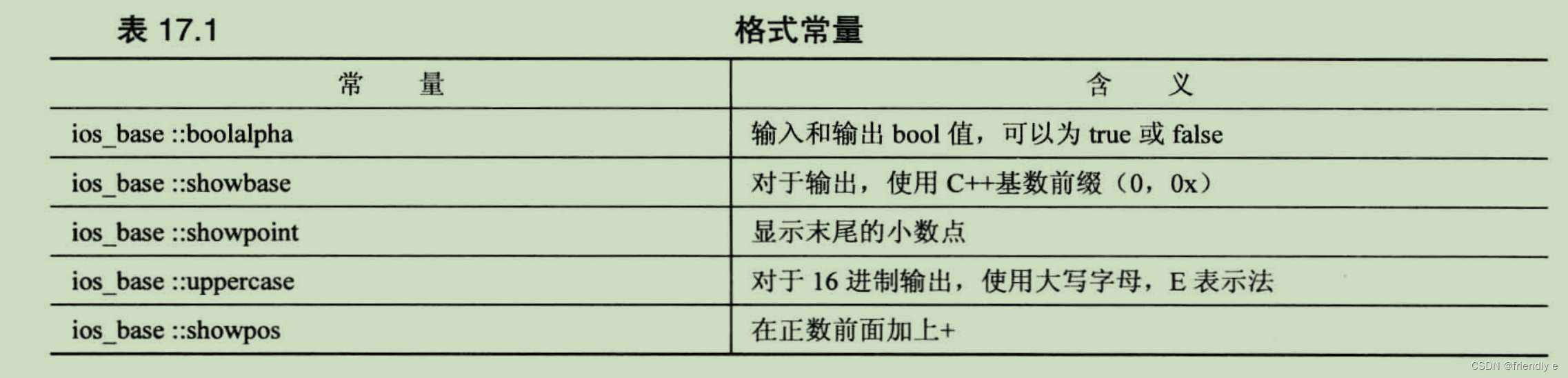
因为都是 ios_base类中定义,所以使用时,必须加上
作用域解析运算符。
#include <iostream>
int main(){
    using std::cout;
    using std::endl;
    using std::ios_base;

    int temperature = 63;
    cout << "Today's water temperature:";
    cout.setf(ios_base::showpos);
    cout << temperature << endl;

    cout << "For our programming friend,that's\n";
    cout << std::hex << temperature << endl;    //use 16进制
    cout.setf(ios_base::uppercase);     //use uppercase in hex
    cout.setf(ios_base::showbase);      //use 0X prefix(前缀) for hex
    cout << "or\n";
    cout << temperature << endl;
    cout << "How " << true << "!  oops -- How ";
    cout.setf(ios_base::boolalpha);
    cout << true << "!\n";
    return 0;
}


输出:
Today's water temperature:+63
For our programming friend,that's
3f
or
0X3F
How 0X1!  oops -- How true!
⚠️仅当十进制时才使用加号,c++将十六进制和八进制都视为无符号的。
bitmask 类型是一种用来存储各个位值的类型。可以是整型、枚举,也可以是STL bitset容器。
第二种 setf() 函数的原型:
// 第一个参数:包含所需设置的fmtflags值
// 第二个参数:指出要清除第一个参数中的哪些位
fmtflags setf(fmtflags,fmtflags);
清除位(clearing the bit):将第3位设置为1表示以10为基数,将第4位设置为1表示以8为基数,将第5位设置为1表示以16为基数。假设输出是以10为基数,而要将它设置为16为基数,则不仅需要将第5位设置为1,还需要将第三位设置为0,这就叫作清除位。
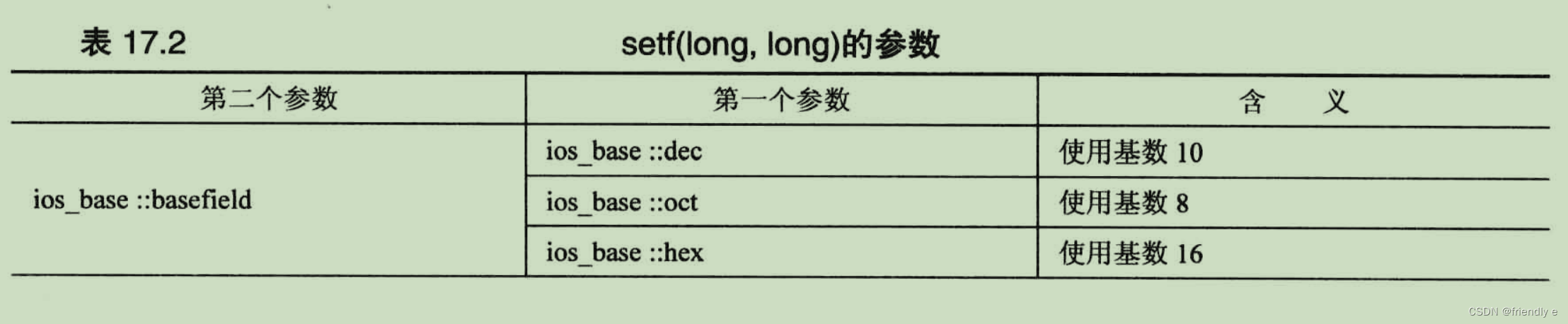
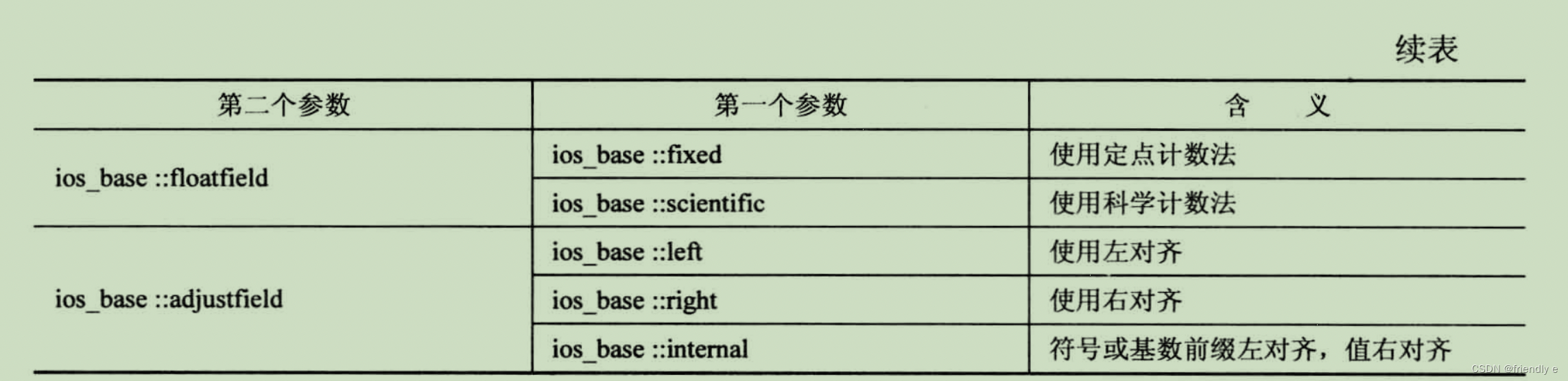
例如,要左对齐,则使用:
ios_base::fmtflags old = cout::setf(ios::left, ios::adjustfield);
下面函数调用和使用十六进制控制符的作用相同:
cout.setf(ios_base::hex,ios_base::basefield);
定点表示法意味着使用格式123.4来表示浮点值,科学表示法则意味着使用格式1.23e04.对于printf()的说明符,则可能知道,定点表示法对应与%f说明符,而科学表示法对应于%e说明符。
如果要恢复以前的设置,则使用
cout.setf(old,ios::adjustfield);
在调用setf() 后可以通过unsetf() 来消除,unsetf() 的原型如下:
// mask 是位模式,mask中是所有的位都设置为1,将使得对应的位被复位(置为0)
void unsetf(fmtflags mask);
其对应的用法如下:
cout.setf(ios_base::showpoint);	//display trailing decimal point
cout.unsetf(ios_base::boolshowpoint);	//don't displaying trailing decimal point
cout.setf(ios_base::boolalpha);		//display true or false
cout.unsetf(ios_base::boolalpha);	//display 1 or 0
在C++标准中,定点表示法和科学表示法都有两个特征:
- 精度指的是小数位数,而不是总位数
- 显示末尾的0
下面是有关setf()的版本二的相关用法:
#include <iostream>
#include <cmath>

int main(){
    using namespace std;
    //use left justification,show the plus sign,show trailing(后面的,尾随)
    //zeros,with a precision of 3
    cout.setf(ios_base::left,ios_base::adjustfield);
    cout.setf(ios_base::showpos);
    cout.setf(ios_base::showpoint);
    cout.precision(3);
    // use e-notation(科学技术法) and save old format setting
    ios_base::fmtflags old = cout.setf(ios_base::scientific,ios_base::floatfield);
    cout << "Left Justification:\n";
    long n;
    for (n = 1;n <= 41;n+=10){
        cout.width(4);
        cout << n << "|";
        cout.width(12);
        cout << sqrt(double(n)) << "|\n";
    }

    //change to internal justification
    cout.setf(ios_base::internal,ios_base::adjustfield);
    //restore default floating-ponit display style
    cout.setf(old,ios_base::floatfield);

    cout << "Internal Justification:\n";
    for (n = 1;n <= 41;n+=10){
        cout.width(4);
        cout << n << "|";
        cout.width(12);
        cout << sqrt(double(n)) << "|\n";
    }

    //use right justification ,fixed notation
    cout.setf(ios_base::right,ios_base::adjustfield);
    cout.setf(ios_base::fixed,ios_base::floatfield);
    cout << "Right Justification:\n";
    for (n = 1;n <= 41;n+=10){
        cout.width(4);
        cout << n << "|";
        cout.width(12);
        cout << sqrt(double (n)) << "|\n";
    }
    return 0;
}

Left Justification:
+1  |+1.000e+00  |
+11 |+3.317e+00  |
+21 |+4.583e+00  |
+31 |+5.568e+00  |
+41 |+6.403e+00  |
Internal Justification:
+  1|+       1.00|
+ 11|+       3.32|
+ 21|+       4.58|
+ 31|+       5.57|
+ 41|+       6.40|
Right Justification:
  +1|      +1.000|
 +11|      +3.317|
 +21|      +4.583|
 +31|      +5.568|
 +41|      +6.403|
解释:line13的语句存储了之前浮点型的输出结果的格式,其右值对下面的语句才开始起作用,就好比如之前学的cout.width(),line26的setf以原本的显示模式作为第一参数(目标显示模式),ios_base::floatfield作为第二参数。
17.2.4.7 标准控制符
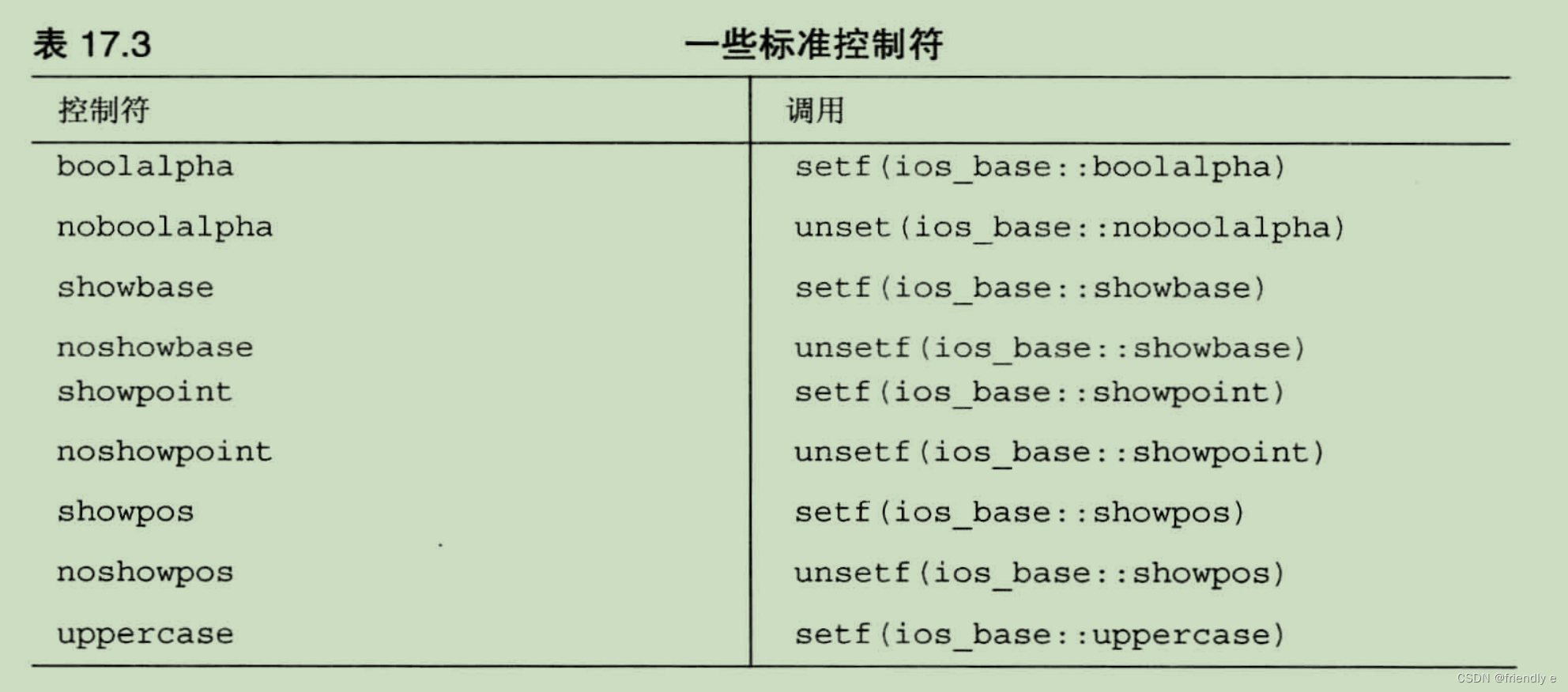
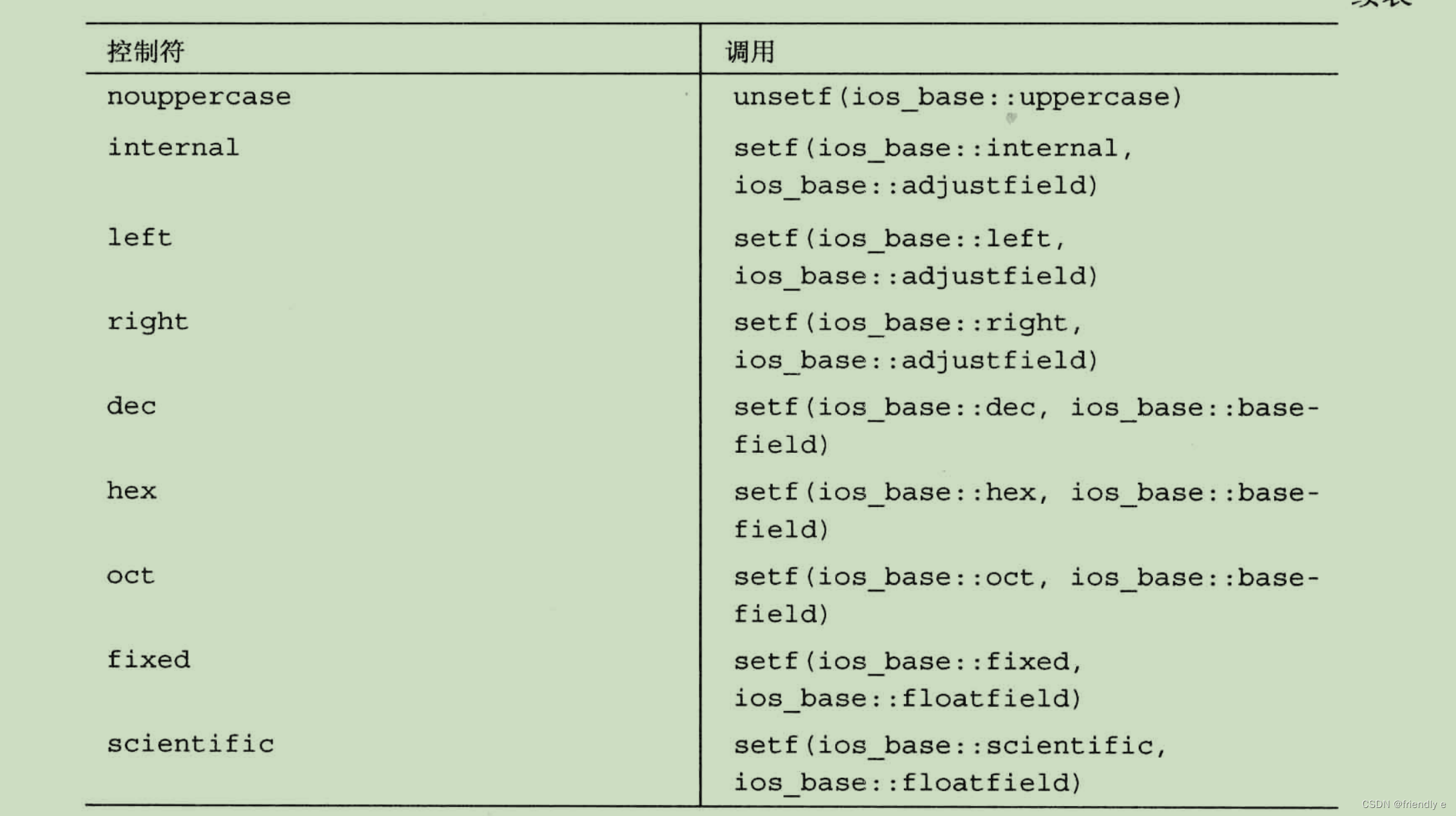
17.2.4.8 头文件iomanip
C++ 在头文件 iomanip中提供了一些控制符。其中3个最常用的控制符分别是:
setprecision():设置精度- 接受一个指定精度的整数参数
setfill():填充字符- 接受一个指定填充字符的char参数
setw():字符宽度- 接受一个指定字段宽度的整数参数
下面对这些控制符进行简单演示:
#include <iostream>
#include <iomanip>
#include <cmath>
using namespace std;
int main(){
    cout << fixed << right;//设置输出方式:定点表示法、往右对齐
    // use iomanip munipulators(使用iomanip的控制符)
    cout << setw(4) << "N" << setw(14) << "Square root"
            << setw(15) << "fourth root\n";

    double root;
    for(int i = 10 ;i <= 100 ;i += 10){
        root = sqrt(double (i));
        cout << setw(6) << setfill('~') << i << setfill(' ')
                << setw(12) << setprecision(3) << root
                << setw(13) << setprecision(4) << sqrt(root) << "\n";
    }
    return 0;
}

输出:
   N   Square root   fourth root
~~~~10       3.162       1.7783
~~~~20       4.472       2.1147
~~~~30       5.477       2.3403
~~~~40       6.325       2.5149
~~~~50       7.071       2.6591
~~~~60       7.746       2.7832
~~~~70       8.367       2.8925
~~~~80       8.944       2.9907
~~~~90       9.487       3.0801
~~~100      10.000       3.1623
17.3. 使用cin进行输入
cin对象将标准输入表示为字节流,通常情况下,通过键盘来生成这种字符流。
17.3.1 cin>>如何检查输入
不同版本的抽取运算符查看输入流的方法都是相同的。他们跳过空白(空格、换行符和制表符),直到遇到非空白字符。
- 单字符模式
>>运算符将读取该字符,将它放置到指定的位置
- 其他模式
>>运算符将读取一个指定类型的数据。
对于下面的代码:
int evolution;
cin >> evolution;
若向evolution中输入-123Z,那么evolution只能取到3就截止了,因为Z字符对应int来说不是有效的字符,故其留在了输入流里,下个cin将会从Z的位置开始读取。
17.3.2 流状态
流状态(被定义为isolate类型,而isolate是一种bitmask类型)。由3个ios_base元素组成:
eofbit:表示到达文件末尾badbit:遇到无法诊断的失败破坏流failbit:未能读取到预期的字符
其中的每个元素都是一位,可以是1(设置)或0(清除)。当3个状态位都被设置为0时,说明一切顺利。
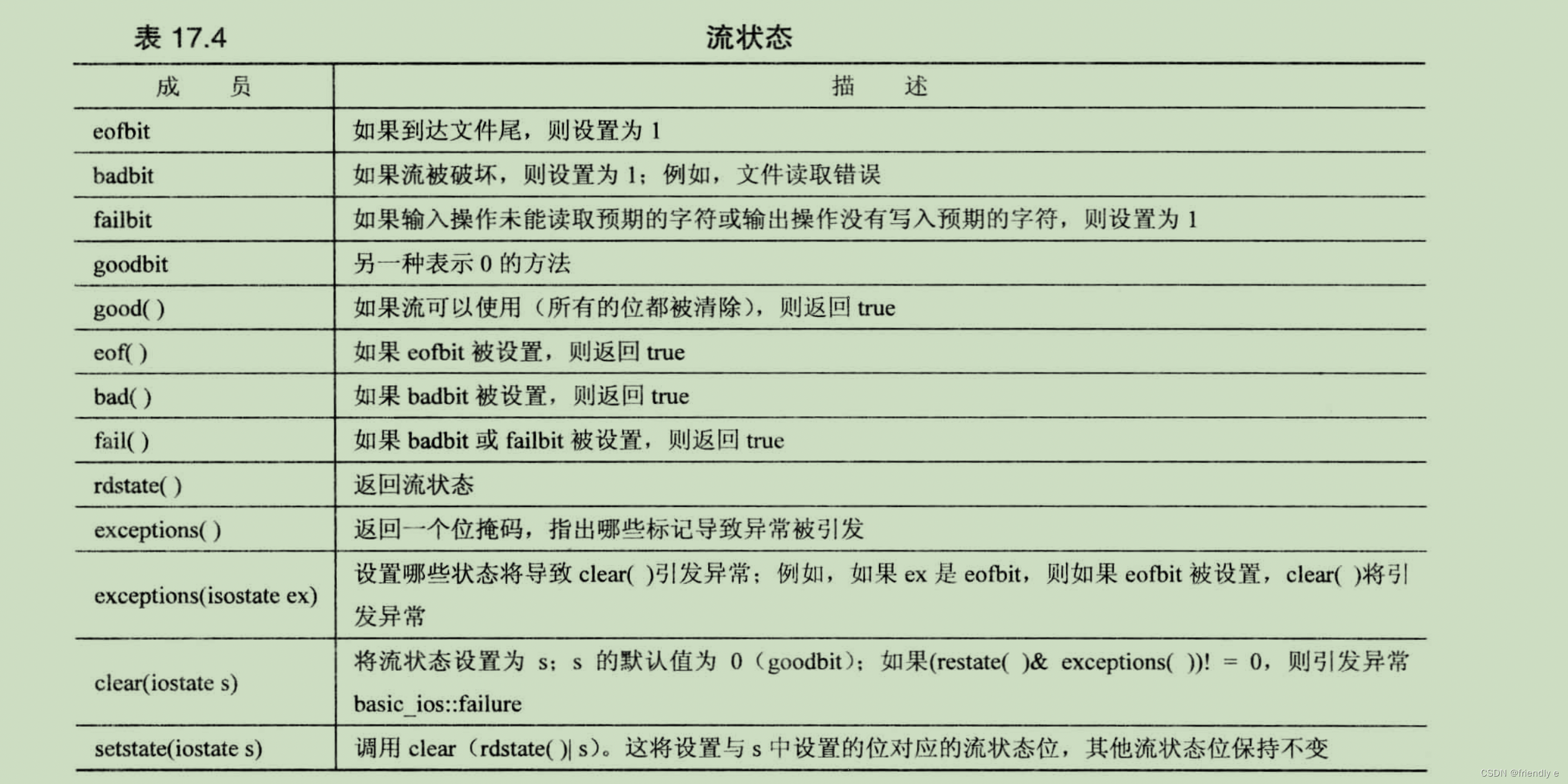
clear() 和 setstate() 类型,都是重置状态,但采取的方式不同。
clear():将状态设置为它的参数setstate():只影响其参数中设置的位置,而不会影响其他位。
exceptions() 方法返回一个位字段,包含3位,分别对应于eofbit、failbit、badbit。修改流状态涉及clear() 或 setstate() ,都将使用clear()。当前状态中的对应位也被设置,则clear() 将引发 ios_base::failure 异常。如果两个值都设置了badbit,将发生这种情况。ios_base::failure是std::exception派生来的类,因此包含一个what()方法
exceptions() 的默认设置为 goodbit,没有引发异常,但重载的 exceptions(isolate) 函数使得能够控制其行为。
cin.exceptions(badbit);
位运算符OR 使能够指定多位。
cin.exceptions(badbit | eofbit);
下面程序演示了其能够在failbit被设置之后捕获异常:
#include<iostream>
#include<iomanip>

using namespace std;

int main() {

    int integerValue;
    cout << "Before a bad input operation:" << endl;
    cout << " cin.rdstate():" << cin.rdstate() << endl;
    cout << " cin.eof():" << cin.eof() << endl;
    cout << " cin.fail():" << cin.fail() << endl;
    cout << " cin.bad():" << cin.bad() << endl;
    cout << " cin.good():" << cin.good() << endl << endl;
    cout << " Expects an integer, but enter a character:" << endl;

    cin >> integerValue;
    cout << endl;

    cout << "After a bad input operation:" << endl;
    cout << " cin.rdstate():" << cin.rdstate() << endl;
    cout << " cin.eof():" << cin.eof() << endl;
    cout << " cin.fail():" << cin.fail() << endl;
    cout << " cin.bad():" << cin.bad() << endl;
    cout << " cin.good():" << cin.good() << endl << endl;
    cin.clear();
    cout << "After cin.clear()" << " cin.fail():" << cin.fail()
         << " cin.good():" << cin.good() << endl;

    return 0;
}


输出:
Enter numbers: Before a bad input operation:
 cin.rdstate():0
 cin.eof():0
 cin.fail():0
 cin.bad():0
 cin.good():1

 Expects integers, but enter a character:
4
2
a
ios_base::clear: unspecified iostream_category error
After a bad input operation:
 cin.rdstate():4
 cin.eof():0
 cin.fail():1
 cin.bad():0
 cin.good():0

The last input value: 0
ios::goodbit = 0
ios::badbit = 1
ios::eofbit = 2
ios::failbit = 4
Sum = 6
‼️思考:为什么last input value为0?
可能由于(cin>>input)输入的预期数据类型错误,failbit被置为1,因而导致了goodbit置为0,此时cin.good()–>input,导致了input最后的值为0而不是为2.(不同的编译器可能不同,clion上是这样的我认为,本书的例子给出的output的last_input_value 为 错例输入前的那个整数,放在这里就是2)。
补充一下:为什么goodbit、badbit、eofbit、failbit分别问0、1、2、4?
用cout检测goodbit, badbit, eofbit, failbit的值分别是0,1,2,4,这与上面的表格正好完全对应着
(goodbit:0000 0000; badbit:0000 0001;eofbit:0000 0010; failbit:0000 0100)。
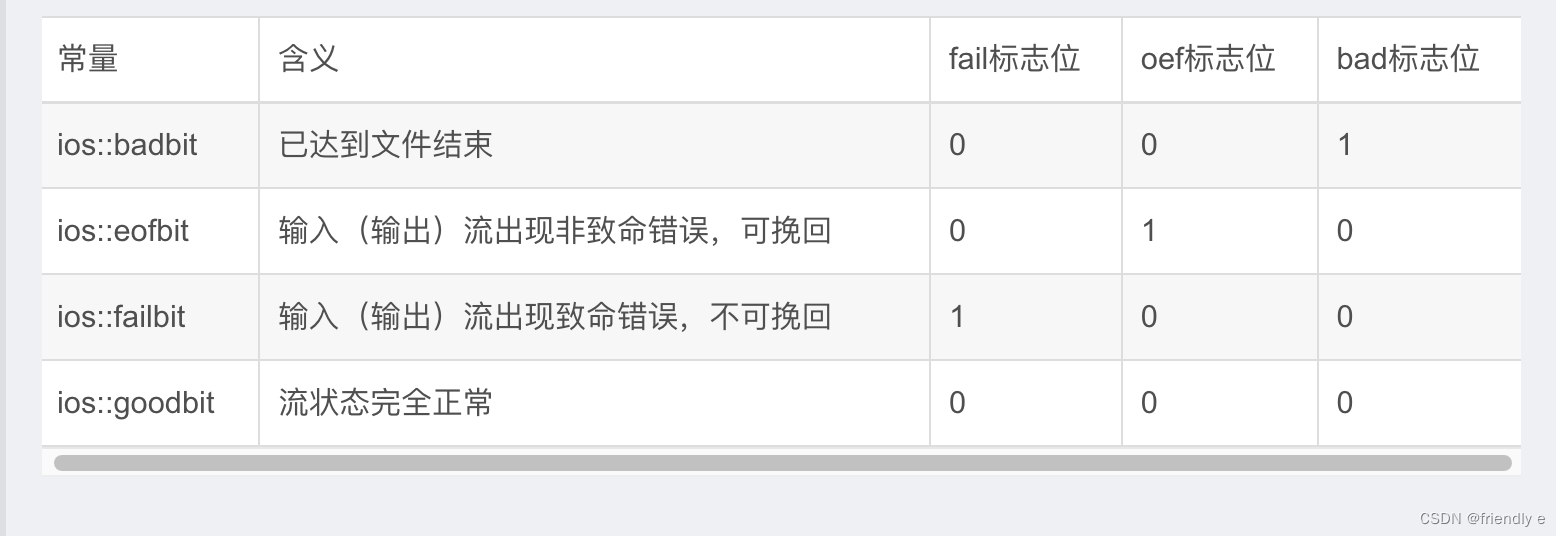
只有在流状态的良好的情况(所有的位都被清楚),下面的测试中while的循环条件才会为true。设置流状态位将对后面的输入或者输出关闭,直到位将被清除。
while (cin >> input)
{
  sum += input;
}
// 可以在此处增加 clear() 来清除流状态
//cout.clear();
cin >> input; // don't work
如果希望程序在流状态位被设置后能够读取后面的输入,就必须将流状态设置为良好。可以通过调用 clear() 来实现。导致输入循环终止的不匹配输入仍留在输入队列中,程序必须跳过它。
//在cin >> input前、cout.clear()之间增加
while(!isspace(cin.get())){
  continue;	//get rid of badinput
}
is space()函数是一个cctype函数,它在参数是空白字符的时候返回true,这样上面的语句能够跳过当前输入错误的字符or字符串。还有另一个办法保证接下来的输入不会出错:丢弃行中的剩余部分。
while(cin.get() != '\n'){
	contiune;//get rid of line left
}
现在,假设循环是由于到达文件尾或者由于硬件故障而终止的,则处理错误输入的代码将显得毫无意义。可以使用fail()方法检测是否正确。(ps:fail()在failbit或badbit其一有问题都会返回true),故需要排除后面一种情况,下面看个例子:
while (cin >> input)
{
  sum += input;
}
....
if(cin.fail() && !cin.bad() && !cin.eof()){
  	cin.clear();
  	while(!isspace(cin.get())){
  		continue;	//get rid of badinput
		}
}
else{
  	cout << "I cannot go on!";
  	exit(1);
}
cout << "Now new input:" << endl;
cin >> input;
17.3.3 其他istream类方法
- 方法
get(char&)和get(void)提供不跳过空白的单个字符输入功能 - 函数
get(char*, int, char)和getline(char*, int, char)在默认情况下读取整行而不是一个单词。
都称为 非格式化输入函数(unformatted input functions)。都只是读取字符输入,而不会跳过空白,也不进行数据转换。
17.3.3.1 单字符输入
(1)成员函数get(char &):返回一个指向用于调用它的istream对象的引用
先来看一个程序:
int ct = 0;
char ch;
cin.get(ch);
while(ch != '\n'){
  	cout << ch;
  	ct++;
  	cin.get(ch);
}
cout << ct << endl;
//输入I C++ clearly.<enter>
按下回车后,这行输入将被发送给程序。上述程序段先读入I,cout显示它,并将ct递增到1。接着,读取I后面的空格字符,显示它,并将ct递增到2,这一过程将一直继续下去,直到程序将回车键作为换行符处理,并终止循环。这里的get(ch),不仅考虑可打印字符,还考虑空格。
如果使用**>>**,那么代码会跳过空格,这样的话将不考虑空格,上面的例子输出:IC++clearly.然而使用这个还有一个弊端,抽取运算符跳过了跳过了换行符,不会将换行符赋给ch,这样while循环成了死循环。
对于下面的例子:
char c1,c2,c3;
cin.get(c1).get(c2) >> c3;
首先,cin.get(c1)将第一个输入字符赋值给c1,返回调用对象cin,接着就可以对第二个字符赋值给c2,c3的输入语句可压缩为cin >> c3;
如果到达了文件尾(无论是真实的,或者是键盘仿真的),它都不会给其参数赋值,因为到了文件尾,没有值可供给参数了。最重要的是该方法还调用setstate(failbit),导致cin的测试结果为false。
char ch;
while (cin.get()){
		//process input
}
只要是持续存在有效输入,那么它的返回值为都是cin,则while条件判其为true,到达文件末尾时,返回值判定为false,循环终止。
(2)成员函数get(void)
get(void)成员函数还读取空白,但使用返回值来将输入传递给程序,其函数返回类型为int(或者某种更大的整型),这样下面语句编写的时候会非法:
char c3;
cin.get().get() >> c3; // invalid
但下面的语句是合法的:
#include <iostream>
#include <stdlib.h>
int main(){
    using namespace std;
    char c1;
    int c2;
    c2 = cin.get(c1).get();
    cout <<"c1 = " << c1 << " c2 = " << c2 << endl;
    return 0;
}

输出:
//input:aA
c1 = a c2 = 65(A)
到达文件尾后,cin.get(void)都将返回值EOF----头文件iostream提供的一个符号常量。所以为了避免不要的错误,ch需要声明为int的类型,而非char类型,避免EOF无法用char类型来表示。

17.3.3.2 采取哪种单字符输入形式:
对于 >>、get(char &) 或者 get(void)的选择问题上,确定是否跳过空格,如果跳过空白则使用抽取运算符>>。
get() 方法会检查程序每个字符。可以将cin.get()替换所有的getchar(),用cout.put(ch)替换所有的putchar()来将c程序转换为c++程序
17.3.3.3 字符串输入:getline()、get()和ignore()
对于字符串的输入成员函数,getline() 成员函数和 get() 的字符串读取版本都读取字符串,他们的函数特征标相同。
// 第一个参数:放置输入字符串的内存单元的地址
// 第二个参数:比要读取的最大字符数大1(额外的一个字符用于存储结尾的空字符,以便输入存储为一个字符串)
// 第三个参数:指定用做分界符的字符
istream & get(char *, int, char);
istream & get(char *, int);
istream & getline(char *, int, char);
istream & getline(char *, int);
下面代码将字符输入读取到字符数组line中:
char line[50];
cin.get(line,50);
由上面的说明可知,cin.get()函数将在到达第49个字符或者遇到换行符后停止将输入读取到数组中。
对于get() 和 getline() 方法的区别:
get():将换行符留在输入流中getline():抽取并丢弃输入流中的换行符。
特殊的成员函数 ignore(),函数原型表示:
istream & ignore(int = 1,int = EOF); // 原型中的两个参数提供的默认值为 1 和 EOF。
默认参数值EOF导致 ignore() 读取指定数目的字符或读取文件尾。
下面程序演示getline()、get()的使用方法,还顺便介绍一个新的函数ignore。
#include <iostream>
#include <string>
const int Limit = 255;
int main(){
    using namespace std;
    char input[Limit];

    cout << "Enter a string for getline() processing:\n" << endl;
    cin.getline(input,Limit,'#');
    cout << "Here is your input:\n";
    cout << input << "\nDone with phase 1\n";

    char ch;
    cin.get(ch);
    cout << "The next input character is " << ch << endl;

    if(ch != '\n'){
      	//读取并丢弃接下来的Limit个字符或直到到达第一个换行符(针对的是输入流中残存的字符流)
        cin.ignore(Limit,'\n');
    }

    cout << "Enter a string for get() procesiing:\n";
    cin.get(input,Limit,'#');
    cout << "Here is your input:\n";
    cout << input << "\nDone with phase 2\n";

    cin.get(ch);
    cout << "The text input character is "  << ch << endl;
    return 0;
}

输出:
Enter a string for getline() processing:
Please pass
me a #3 melon!
Here is your input:
Please pass
me a
Done with phase 1
The next input character is 3
Enter a string for get() procesiing:
I still
want a #3 melon!
Here is your input:
I still
want a
Done with phase 2
The text input character is #
17.3.3.4 意外字符串输入
两种特殊情况:无输入以及输入到达或超过函数调用指定的最大字符数。
对于get(char *,int)和getline(),如果不能抽取字符,它们将把空值字符放置到输入串中,并使用setstate()设置为failbit。出现这种情况有两种可能:
-
输入方法立刻到达了文件尾
-
对于get(char *,int)来说,另一种可能是输入了空行。
-
char temp[80];
while (cin.get(temp,80)){ //terminates on empty line
	...
}
-
-
getline()遇到空行不会设置failbit,这是因为getline()仍将抽取换行符,如果希望getline()遇到空行时就终止循环可以这样写:
-
char tmep[80];
while(cin.getline(temp,80) && temp[0] != '\0')	//terminates on empty line
-
-
getline()如果读取0-79个字符,并且下一个字符不是换行符,则设置failbit,后续的字符无法输入进来。
17.3.4 其他istream方法
read():读取指定数目的字节,并将其存储在指定的位置中。不会在输入后加上空值字符。(返回类型为istream&)peek():返回输入中的下一个字符,但不抽取输入流中的字符。gcount():返回最后一个非格式化抽取方法读取的字符数。(strlen比它快)putback():将一个字符插入到输入字符串中,被插入的字符将是下一条输入语句读取的第一个字符。(返回类型为istream&)
下面通过示例演示一下这种方法:
#include <iostream>
#include <string>
int main(){
    using namespace std;
    char ch;

    while (cin.get(ch)){    //terminate on EOF
        if (ch != '#'){
            cout << ch;
        }else{
            cin.putback(ch);    //reinsert character
            break;
        }
    }

    if (!cin.eof()){
        cin.get(ch);
        cout << endl << ch << " is next input character.\n";
    }else{
        cout << "End of file reached.\n";
        std::exit(0);
    }

    while (cin.peek() != '#'){
        cin.get(ch);
        cout << ch;
    }
    if(!cin.eof()){
        cin.get(ch);
        cout << endl << ch << " is next input character.\n";
    }else{
        cout << "End of file reached.\n";
    }
    return 0;
}

输出:
I used a #3 pencil and when I should have used a #2.
I used a
# is next input character.
3 pencil and when I should have used a
# is next input character.
下面的例子使用peek()来确定是否读取了整行。如果一行中只有部分内容被加入到数组中,程序将删除余下内容:
#include <iostream>
#include <string>

const int SLEN = 10;

inline void eatline() {
    while (std::cin.get() != '\n') {
        continue;
    }
}

int main() {
    using namespace std;

    char name[SLEN];
    char title[SLEN];
    cout << "Enter your name:\n";
    cin.get(name, SLEN);
    if (cin.peek() != '\n') {
        cout << "Sorry,we only have enough room for " << name << endl;
    }
    eatline();
    cout << "Dear " << name << ", enter your title:\n";
    cin.get(title, SLEN);
    if (cin.peek() != '\n') {
        cout << "We were forced to truncate(截断) your title.\n";
    }
    eatline();
    cout << " Name: " << name << "\nTitle: " << title << endl;
    return 0;
}

输出:
Enter your name:
Ella Fishsniffer
Sorry,we only have enough room for Ella Fish
Dear Ella Fish, enter your title:
Executive Adjunct
We were forced to truncate(截断) your title.
 Name: Ella Fish
Title: Executive
17.4. 文件输入和输出
C++ I/O类软件包处理文件输入和输出的方式与处理标准输入和输出的方式相似。
- 要写入文件,需要创建一个
ofstream对象,并使用ofstream方法。 - 要读取文件,需要创建一个
ifstream对象,并使用ifstream方法。
17.4.1 简单的文件I/O
要让程序写入文件的做法:
- 创建一个
ofstream对象来管理输出流 - 将该对象与特定的文件关联起来
- 以使用
cout的方式使用该对象,唯一的区别是输出将进入文件,而不是屏幕。
读取文件的做法:
- 创建一个
ifstream对象来管理输入流 - 将该对象与特定的文件关联起来
- 以使用
cin的方式使用该对象
当输入和输出流对象过期(如程序终止)时,到文件的连接将自动关闭,另外,也可以使用 close() 方法来显式地关闭到文件的连接。关闭连接并不会删除流,只是将流重新连接到同一个文件或者另一个文件。
ifstream fin;
ofstream fout;
fout.close();
fin.close();
下面看一个简单的例子:输入文件名,并以该输入的文件,将一些信息写入到该文件中,然后关闭该文件。
#include <iostream>
#include <fstream>
#include <string>

int main(){
    using namespace std;
    string fileName;

    cout << "Enter name for new file: ";
    cin >> fileName;

    //create output stream object for new file and call it fout
    ofstream fout(fileName.c_str());
    fout << "For your eyes only:\n";
    cout << "Enter your secret number:\n";
    float secret;
    cin >> secret;
    fout << "Your secret number is " << secret << endl;
    fout.close();


    //create input stream object for new file and call it fin
    ifstream fin(fileName.c_str());
    cout << "Here are the contents of " << fileName << ":\n";
    char ch;
    while (fin.get()){
        cout << ch;
    }
    cout << "Done\n";
    fin.close();
    return 0;
}
下面在目录下找到了相应的文件:
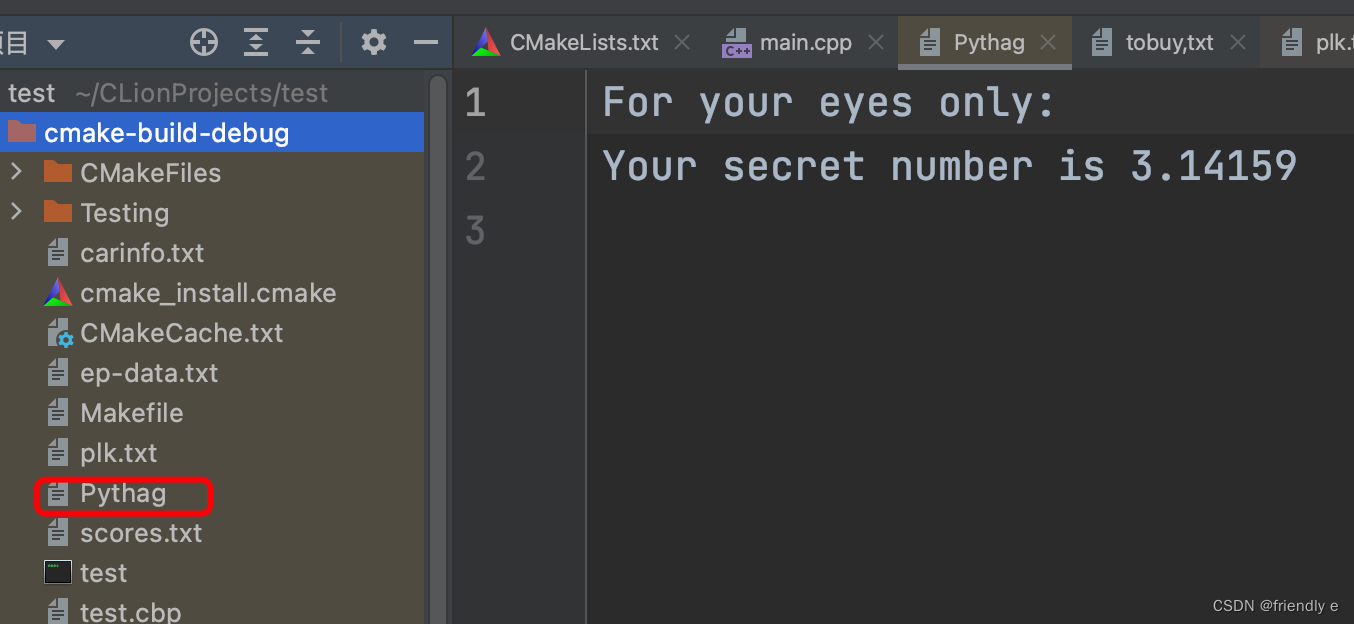
17.4.2 流状态检查和is_open()
C++文件流从 ios_base 类那里继承了一个流状态成员。在C++通过使用 is_open() 方法 来检查文件是否被成功打开。
假如打开一个不存在的文件进行输入时,将设置为failbit位,因此可以这样写:
fin.open("fileName");
if(fin.fail()){...}
//or
if(!fin){...}
//or
if(!fin.open()){...}
17.4.3 命令行处理技术
文件处理程序通常是使用命令行参数来指定文件。命令行参数是用户在输入命令时,在命令行中输入的参数。
//wc是程序名,后面三个参数是作为命令行参数传递给程序的文件名
wc report1 report2 report3
C++中在命令行环境中运行的程序能够访问命令行参数的机制
// argc:命令行中的参数个数
// argv:变量为一个指针,指向一个指向char的指针。argv[0] 表示指向一个参数(字符串指针)
int main(int argc, char *argv[])
可以在命令行中打开main.cpp:
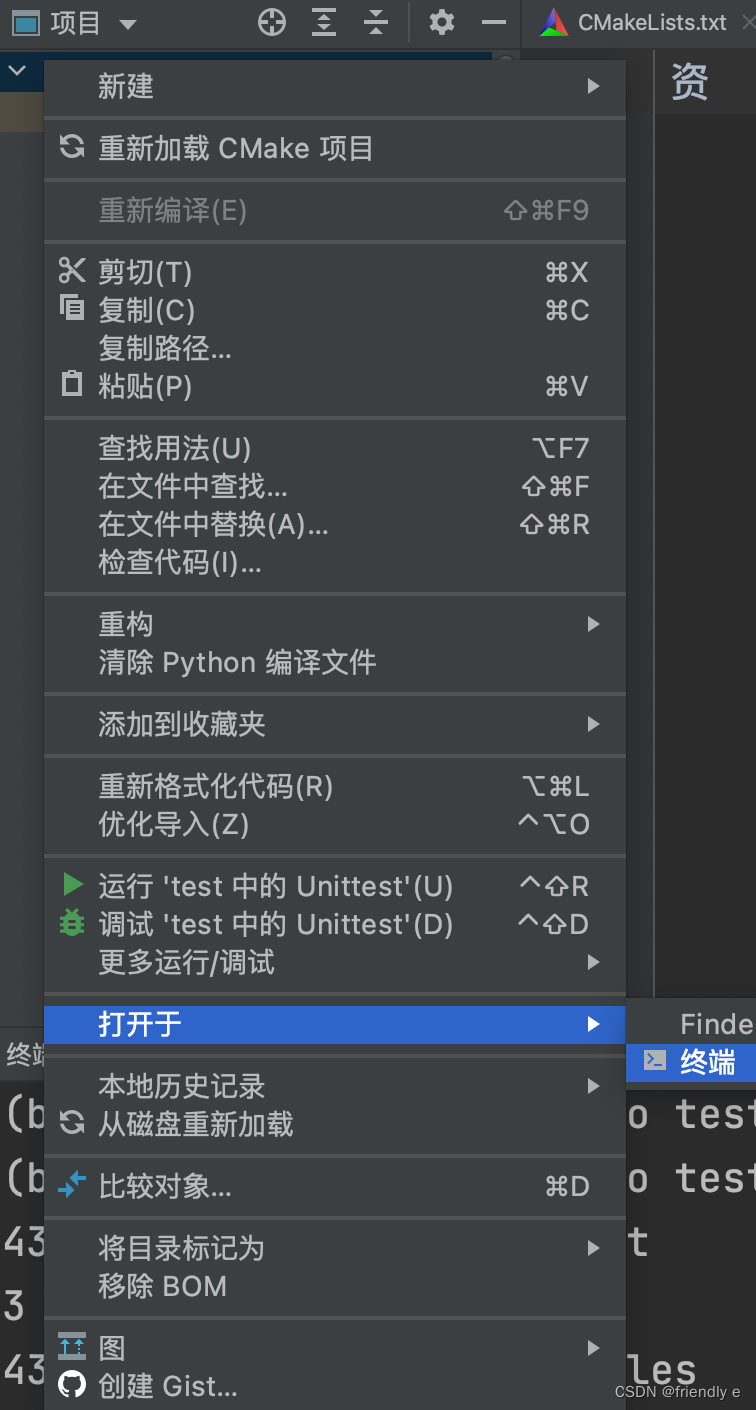
然后在终端进行命令行输入:
g++ main.cpp //编译,会产生一个a.out文件
./a.out article1(这是文件)

输出:
43842 characters in ./a.out
3 characters in article1(存有一个汉字)
43845 characters in all files
argc = 2
补充:不同的编码方式,汉字所占的字符是不同的,在国家标准GB2312中:一个汉字 = 2 个字符;在UTF-8中,一个汉字 = 3个字符。
17.4.4 文件模式
将流与文件关联时,都可以指定文件模式的第二个参数
ifstream fin("banjo",mode1);
ofstream fout();
fout.open("harp",mode2);
文件模式描述的是文件将被如何使用:读、写、追加等。
ios_base类定义了一个 openmode 类型,用于表示模式。
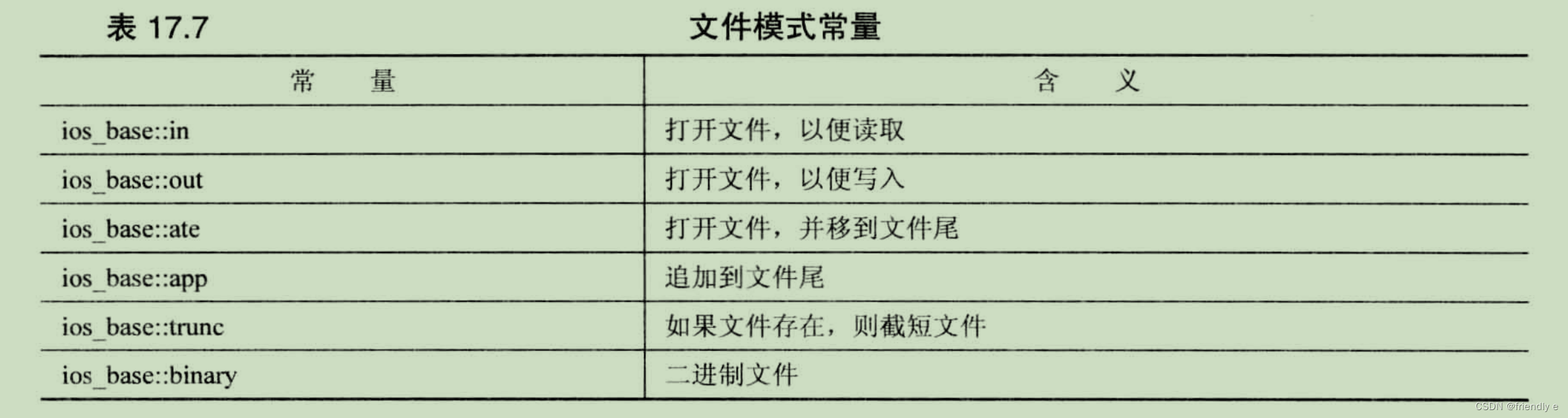
位运算符OR(|):将两个位值合并成一个可用于设置两个位的值。
ofstream fout("bageis",ios_base::out | ios_base::app);
在 ios_base::out 本身将导致文件将被截短,但与 ios_base::in 一起使用时,不会导致文件被截短,没有列出的组合。
ios_base::ate 和 ios_base::app 都将文件指针指向打开的文件结尾。区别之处:
ios_base::app:将指针放到文件尾ios_base::ate:只允许数据添加到文件尾。
下面是一些C++和C的打开模式
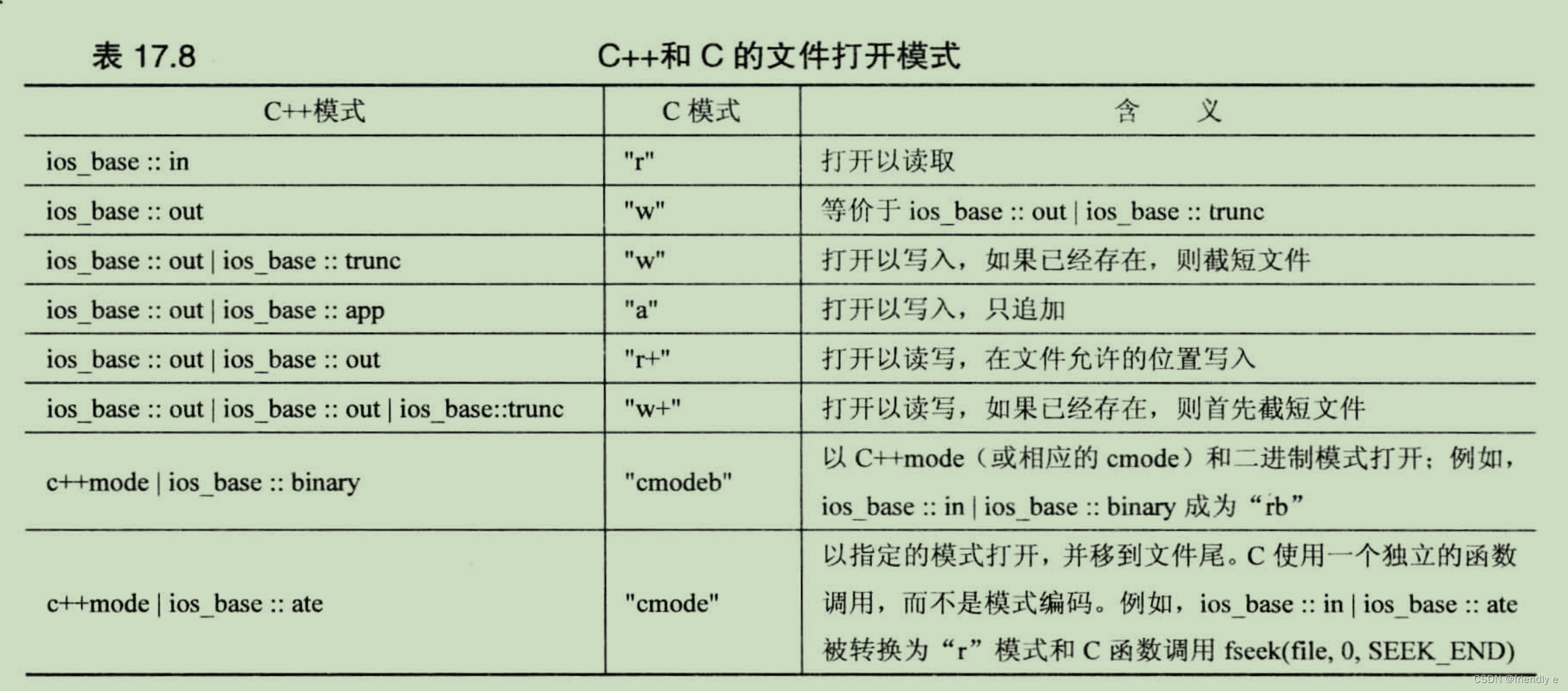
1、文件追加
下面程序演示在文件尾追加数据:
#include <iostream>
#include <fstream>
#include <string>
#include <cstdlib>

const char * file = "guest.txt";
int main(){
    using namespace std;
    char ch;
    ifstream fin;
    fin.open(file);

    if (fin.is_open()){
        cout << "Here are the current contents of the "
            << file << " file:\n";
        while (fin.get(ch)){
            cout << ch;
        }
        fin.close();
    }

    //add new names
    ofstream fout(file,ios::out | ios::app);
    if (!fout.is_open()){
        cerr << "Can't open " << file << " file for output.\n";
        exit(EXIT_FAILURE);
    }
    cout << "Enter guest names (enter a blank line to quit):\n";
    string name;
    while (getline(cin,name) && name.size() > 0){
        fout << name << endl;
    }
    fout.close();

    //show revised file
    fin.clear();        //not necessary for some compilers
    fin.open(file);
    if (fin.is_open()){
        cout << "Here are the new contents of the "
        <<  file << " file:\n";
        while (fin.get(ch)){
            cout << ch;
        }
        fin.close();
    }
    cout << "Done.\n";
    return 0;
}

输出:
Enter guest names (enter a blank line to quit):
Genghis Kant
Hank Attila
Charles Bigg

Here are thee new contents of the guest.txt file:
Genghis Kant
Hank Attila
Charles Bigg
Done.


二次执行:
Here are the current contents of the guest.txt file:
Genghis Kant
Hank Attila
Charles Bigg
Enter guest names (enter a blank line to quit):
Greta Greppo
LaDonna Mobile
Fannie Mae

Here are the new contents of the guest.txt file:
Genghis Kant
Hank Attila
Charles Bigg
Greta Greppo
LaDonna Mobile
Fannie Mae
Done.
2、二进制文件
数据存储在文件中,是两种形式:
- 文本格式:将所有的内容都存储为文本。
- 二进制格式:将存储值的计算机内部表示。
- 计算机不是存储字符,而是以二进制的形式存储。
文件两种存储形式的优缺点
- 文本格式
- 优点
- 便于读取
- 使用编辑器或字符处理器来读取和编辑
- 优点
- 二进制格式
- 优点
- 不会有转换误差或者舍入误差
- 保存速度快,不需要转换
- 可以大块存储数据。
- 数据特征不同,空间占用小
- 缺点
- 换系统或者OS会导致无法正常使用
- 优点
要以二进制格式(而不是文本格式)存储数据,可以使用 write() 成员函数。
将文件使用二进制的格式:
fout.write((char *) &pl, sizeof pl)
// 将pl地址强制转换为指向char的指针
// sizeof() 获取字节数
// 这条语句导致程序前往pl的地址,并将开始的36个字节复制到与fout相关联的文件。
要使用文件恢复信息,则使用通过 ifstream对象 使用相应的 read() 方法:
ifstream fin("planets.dat",ios_base::in | ios_base::binary);
fin.read((char *) &pl,sizeof pl);
//这将从文件中复制sizeof pl个字节到pl结构中
read()和write()成员函数的功能是相反,一般使用read()来恢复write()写入的数据。
下面程序使用以上方法创建和读取二进制文件
#include <iostream>
#include <fstream>
#include <iomanip>
#include <cstdlib>  //for exit()

inline void eatline(){
    while (std::cin.get() != '\n'){
        continue;
    }
}

struct planet{
    char name[20];
    double population;
    double g;   //its acceleration of gravity
};

const char* file = "planets.dat";
int main(){
    using namespace std;
    planet pl;
    cout << fixed;

    //show initial contents
    ifstream fin;
    fin.open(file);
    if (fin.is_open()){
        cout << "Here are the current contents of the "
             << file << " file:\n";
        while (fin.read((char *) &pl,sizeof pl)){
            cout << setw(20) << pl.name << ":"
                << setprecision(0) << setw(12) << pl.population
                << setprecision(0) << setw(6) << pl.g;
        }
        fin.close();
    }
    //add new data
    ofstream fout(file,ios::out |  ios::app | ios::binary);
    if(!fout.is_open()){
        cerr << "Cannot open " << file << " file for output:\n";
        exit(EXIT_FAILURE);
    }

    cout << "Enter planet name (enter a blank line to quit):\n";
    cin.get(pl.name,20);
  	//'\0'代表字符串的末尾
    while (pl.name[0] != '\0'){
        eatline();
        cout << "Enter planetary population: ";
        cin >> pl.population;
        cout << "planet's acceleration of gravity: ";
        cin >> pl.g;
        eatline();
        fout.write((char *) &pl,sizeof pl);
        cout << "Enter planet name (enter a blank line to quit):\n";
        cin.get(pl.name,20);
    }
    fout.close();

    //show revised file
    fin.clear();
    fin.open(file);
    if (fin.is_open()){
        cout << "Here are the current contents of the "
             << file << " file:\n";
        while (fin.read((char *) &pl,sizeof pl)){
            cout << setw(20) << pl.name << ":"
                 << setprecision(0) << setw(12) << pl.population
                 << setprecision(0) << setw(6) << pl.g;
        }
        fin.close();
    }
    cout << "Done\n";
    return 0;

}

//首次执行:
Enter planet name (enter a blank line to quit):
Earth
Enter planetary population: 6928198253
planet's acceleration of gravity: 9.81
Enter planet name (enter a blank line to quit):

Here are the current contents of the planets.dat file:
               Earth:  6928198253    10
Done

//第二次执行
Here are the current contents of the planets.dat file:
               Earth:  6928198253    10
Enter planet name (enter a blank line to quit):
Jenny's world
Enter planetary population: 32155648
planet's acceleration of gravity: 8.93
Enter planet name (enter a blank line to quit):

Here are the current contents of the planets.dat file:
               Earth:  6928198253    10
       Jenny's world:    32155648     9
Done
⚠️:是否可以使用string来替代字符数组来表示planet中的name。在不做出比较大的修改时答案是否定的。因为string本身是没有字符串的,而是包含一个指向存储字符串的内存单元的指针,故复制的时候,只会复制字符串的地址而不是字符串的数据。
17.4.5 随机存取
随机存取指的是直接移动(不是依次移动)到文件的任何位置。
随机存取常被用于数据库文件,程序维护一个独立的索引文件。文件指出数据在主数据文件中的位置。
需要在一种文件中移动的方式,ifstream类继承的两个方法:
-
hiseekg():将输入指针移到指定的文件位置。
- 可用于
ifstream对象
- 可用于
-
seekp():将输出指针移到指定的xing 文件位置。
- 可用于
ofstream对象
- 可用于
seekg() 的原型:
basic_istream<charT, traits> & seekg(off_type, ios_base::seekdir);//原型1
basic_istream<charT, traits> & seekg(pos_type);//原型2

// 将 char 具体化
istream & seekg(streamoff, ios_base::seekdir); // 定位到离第二个参数指定的文件位置特定距离(单位为字节)的位置
istream & seekg(streampos); // 定位到离开文件开头特定距离(单位为字节)的位置
下面是一些关于原型1调用的示例:
ps:常量ios_base::cur指相对于当前位置的偏移量;ios_base::end指相对于文件尾的偏移量。
fin.seekg(30,ios_base::beg);	//30 bytes beyond the beginning
fin.seekg(-1,ios_base::cur);	//back up one byte
fin.seekg(0,ios_base::end);		//go to the end of the file
下面是一些关于原型2调用的示例:
fin.seekg(112); //第113个字节
下面程序对17.4.4进行优化,所用的流既可以输出也可以输入,该程序的功能为修改特定位置的二进制数据:
#include <iostream>
#include <fstream>
#include <iomanip>
#include <cstdlib>

const int LIM = 20;
struct planet {
    char name[LIM];
    double population;
    double g;
};

const char *file = "planets.dat";

inline void eatline() {
    while (std::cin.get() != '\n') {
        continue;
    }
}

int main() {
    using namespace std;
    planet pl;
    cout << fixed;

    //show initial contents
    fstream finout;     //read and write streams
    finout.open(file, ios_base::in | ios_base::out | ios_base::binary);

    int ct = 0;
    if (finout.is_open()) {
        finout.seekg(0);        //go to beginning
        cout << "Here are the current contents of the " << file << " file:\n";
        while (finout.read((char *) &pl, sizeof pl)) {
            cout << ct++ << ": " << setw(LIM) << pl.name << ": "
                 << setprecision(0) << setw(12) << pl.population
                 << setprecision(2) << setw(6) << pl.g << endl;
        }
        if (finout.eof()) {
            finout.clear();
        } else {
            cerr << "Error in reading " << file << ".\n";
            exit(EXIT_FAILURE);
        }
    } else {
        cerr << file << " could not be opened -- bye.\n";
        exit(EXIT_FAILURE);
    }

    //change a record
    cout << "Enter the record number you wish to change: ";
    long rec;
    cin >> rec;
    eatline();
    if (rec < 0 || rec >= ct) {
        cerr << "Invalid record number -- bye.\n";
        exit(EXIT_FAILURE);
    }
    streampos place = rec * sizeof pl;  //convert to streampos type
    finout.seekg(place);    //random acces
    if (finout.fail()) {
        cerr << "Error on attempted seek\n";
        exit(EXIT_FAILURE);
    }
    finout.read((char *) &pl, sizeof pl);
    cout << "Your selection:\n";
    cout << rec << ": " << setw(LIM) << pl.name << ": "
         << setprecision(0) << setw(12) << pl.population
         << setprecision(2) << setw(6) << pl.g << endl;

    if (finout.eof()){
        finout.clear(); //clear eof flag
    }

    cout << "Enter planet name:";
    cin.get(pl.name,20);
    eatline();
    cout << "Enter planetary population: ";
    cin >> pl.population;
    cout << "Enter planer's acceleration of gravity: ";
    cin >> pl.g;
    finout.seekg(place);
    finout.write((char *) &pl,sizeof pl) << flush;
    if (finout.fail()){
        cerr << "Error on attempted write\n";
        exit(EXIT_FAILURE);
    }

    ct = 0;
    finout.seekg(0);        //go to beginning of file;
    cout << "Here are the new contents of the " << file << " file: \n";
    while (finout.read((char *) &pl,sizeof pl)){
        cout << ct++ << ": " << setw(LIM) << pl.name << ": "
             << setprecision(0) << setw(12) << pl.population
             << setprecision(2) << setw(6) << pl.g << endl;
    }
    finout.close();
    cout << "Done.\n";
    return 0;
}


输出:
Here are the current contents of the planets.dat file:
0:                Earth:   6928198253  9.81
1:             Tranmtor: 895218447777 10.53
2:        Jenny's World:     32155648  8.93
3:              Trellan:      5214000  9.62
4:            Freestone:   3945851000  8.68
5:            Taanagoot:    361000004 10.23
6:                Marin:       252409  9.79
Enter the record number you wish to change: 1
Your selection:
1:             Tranmtor: 895218447777 10.53
Enter planet name:Carlie
Enter planetary population: 24398573451
Enter planer's acceleration of gravity: 8.77
Here are the new contents of the planets.dat file:
0:                Earth:   6928198253  9.81
1:               Carlie:  24398573451  8.77
2:        Jenny's World:     32155648  8.93
3:              Trellan:      5214000  9.62
4:            Freestone:   3945851000  8.68
5:            Taanagoot:    361000004 10.23
6:                Marin:       252409  9.79
Done.
17.5 内核格式化
读取string对象中的格式化信息或将格式化信息写入string对象中被称为内核格式化。
头文件 sstream 定义了一个从 ostream类派生来的ostringstream类。如果创建了一个ostringstream对象,则可以将信息写入其中,并将其信息存储。
istringstream 和 ostringstream类使得能够使用 istream 和 ostream 类的方法来管理存储在字符串中的字符数据。
下面是一个有关内核格式化的简短示例:
#include <iostream>
#include <sstream>
#include <string>
int main(){
    using namespace std;
    ostringstream outstr;   //manages astring stream
    string hardDisk;
    cout << "What's the name of your hard disk? ";
    getline(cin,hardDisk);
    int cap;
    cout << "What's its capacity in GB?";
    cin >> cap;
    //write formatted information to string stream
    outstr << "The hard disk " << hardDisk << " has a capacity of "
        << cap << " gigabytes.\n";
    string result = outstr.str();
    cout << result;
    return 0;
}

输出:
What's the name of your hard disk? Datarapture
What's its capacity in GB?2000
The hard disk Datarapture has a capacity of 2000 gigabytes.
使用str()方法可以“冻结”该对象,使得信息不能写入该对象中
下面使用重载的>>运算符读取字符串中的内容,每次读取一个单词:
#include <iostream>
#include <sstream>
#include <string>
int main(){
    using namespace std;
    string lit = "It was a dark and stromy day,and the full moon glowed brilliantly.";
		string num = "1 2 3 4 6 8";
    int n,sum = 0;
    istringstream instr(lit);
    istringstream inNum(num);
    string word;;
    cout << "string: " << endl;
    while (instr >> word){	//read a word a time
        cout << word << endl;
    }
    while (inNum >> n){
        sum += n;
    }
    cout << "sum = " << sum << endl;
    return 0;
}

输出:
string:
It
was
a
dark
and
stromy
day,and
the
full
moon
glowed
brilliantly.
sum = 24





 扫一扫
扫一扫


 3600
3600

 被折叠的 条评论
为什么被折叠?
被折叠的 条评论
为什么被折叠?
 到【灌水乐园】发言





