



Logging. Ah, yes... the age-old problem.
In the world of iOS development, the trusty NSLog macro is used by many to print out debug information.
It's not uncommon to see delights such as this in a battle-worn developer's code:
NSLog(@"DEBUG: got here 2");
while ([self retainCount]) {
    [self release];
    NSLog(@"DEBUG: retain count is now: %u", [self retainCount]);
    // lol i have no idea what i am doing
}
If we look past the egregious memory management techniques being employed here, we see some pretty typical NSLog usage. The problem here is that NSLog is not actually meant for debug messages such as these.
If we read the NSLog documentation we find this description:
NSLog- Logs an error message to the Apple System Log facility.
Logs an error to the Apple System Log facility. Not a debug message, an error.
So what does this matter as long as we see the message in the debug console?
Well, the problem is that NSLog messages will appear in a device's log even in release builds.
To demonstrate this, I tapped around some of the apps on my iPhone. Looking at the device console via Xcode's Organizer, I saw a bunch of messages which are clearly meant for debugging purposes:
Flight Control
FlightControl[12724] <Warning>: Free space on file system: 2537136128 bytes
FlightControl[12724] <Warning>: authenticateWithCompletionHandler: enter
FlightControl[12724] <Warning>: authenticateWithCompletionHandler: exit
FlightControl[12724] <Warning>: ---URLSTR: file:///var/mobile/Applications/.../Library/Caches/CC_Data/index.htm
FlightControl[12724] <Warning>: query: (null)
FlightControl[12724] <Warning>: ---URLSTR: file:///var/mobile/Applications/.../FlightControl.app/res/more_games/index.htm
FlightControl[12724] <Warning>: query: (null)
FlightControl[12724] <Warning>: Web cache local version (v-1) is out of date, getting new version (v11)
FlightControl[12724] <Warning>: Wrote 856 bytes to '/var/mobile/Applications/.../Library/Caches/CC_Data/index.htm'
FlightControl[12724] <Warning>: Wrote 736 bytes to '/var/mobile/Applications/.../Library/Caches/CC_Data/0.jpg'
FlightControl[12724] <Warning>: Wrote 66787 bytes to '/var/mobile/Applications/.../Library/Caches/CC_Data/1.jpg'
FlightControl[12724] <Warning>: Wrote 105286 bytes to '/var/mobile/Applications/.../Library/Caches/CC_Data/2.jpg'
FlightControl[12724] <Warning>: Wrote 736 bytes to '/var/mobile/Applications/.../Library/Caches/CC_Data/3.jpg'
FlightControl[12724] <Warning>: Wrote 736 bytes to '/var/mobile/Applications/.../Library/Caches/CC_Data/4.jpg'
FlightControl[12724] <Warning>: Wrote 736 bytes to '/var/mobile/Applications/.../Library/Caches/CC_Data/5.jpg'
PONS English <-> Deutsch Dictionary
...
Phrasebook[15109] <Warning>: Morphologies: (
            {
            Basename = 4001;
            Filename = "4001.sdc";
            LanguageFrom = 1818717797;
            Path = "Phrasebook.app/4001.sdc";
            Type = 3;
        },
            {
            Basename = 4004;
            Filename = "4004.sdc";
            LanguageFrom = 1836213607;
            Path = "Phrasebook.app/4004.sdc";
            Type = 3;
        }
    )
Phrasebook[15109] <Warning>: Image test_background can't be loaded!
Phrasebook[15109] <Warning>: Image test_background can't be loaded!
Angry Birds
AngryBirds[15177] <Warning>: --> activateCrystalSetting: [set 2][val YES]
AngryBirds[15177] <Warning>: --> activateCrystalSetting: [set 2][val NO]
AngryBirds[15177] <Warning>: --> activateCrystalSetting: [set 2][val YES]
AngryBirds[15177] <Warning>: --> activateCrystalSetting: [set 2][val NO]
Red laser
RedLaser[15191] <Warning>: textLabel width: 0.000000
RedLaser[15191] <Warning>: textLabel height: 0.000000
Justin.tv
Justin.tv[15256] <Warning>: [Log Level: 4]; My Base URL is (null)
Justin.tv[15256] <Warning>: [Log Level: 4]; Final URL = https://ws.tapjoyads.com/get_vg_store_items/user_account?country_code=GB&display_multiplier=1.000000&library_version=8.1.7&udid=6e5e93e74df482fbf7f583d8c734d2ef32a1038c&app_id=48d87890-12f9-4a3e-9091-ec7d6d67beb1&lad=0&mobile_country_code=262&device_type=iPhone&connection_type=wifi&carrier_name=Telekom.de&language_code=en&os_version=5.1.1&publisher_user_id=6e5e93e74df482fbf7f583d8c734d2ef32a1038c&verifier=981aeeb7e59cd9f79ecb20390578c13906ca821c777f93541fb2e4959a8b91dc×tamp=1339496108&allows_voip=yes&app_version=3.7.4&mobile_network_code=01&carrier_country_code=de&platform=iOS&mac_address=145a059a0c78&device_name=iPhone3%2C1
Justin.tv[15256] <Warning>: [Log Level: 4]; Update Account Info Response Returned
Justin.tv[15256] <Warning>: [Log Level: 4]; TJC: Updating Currency Name in Cache
Dropbox
Dropbox[12755] <Warning>: [ANALYTICS] {"retry":0,"favorite":false,"extension":"txt","id":[snip],"cached":false,"ts":"1341324832.83","event":"file.view.start","size":133}
Dropbox[12755] <Warning>: [INFO] DocumentViewController -(void)startLoading
Dropbox[12755] <Warning>: [ANALYTICS] {"id":[snip],"ts":"1341324832.88","size":133,"event":"download.start","extension":"txt","connection":"wifi"}
Dropbox[12755] <Warning>: [INFO] FileViewController - (BOOL)shouldAutorotateToInterfaceOrientation:(UIInterfaceOrientation)interfaceOrientation orientation = 1
Dropbox[12755] <Warning>: [ANALYTICS] {"path_hash":[snip],"event":"metadata.load.success","ts":"1341324833.14"}
Dropbox[12755] <Warning>: [ANALYTICS] {"ts":"1341324833.56","screen":"DocumentViewController","event":"screen.view"}
Dropbox[12755] <Warning>: [INFO] FileViewController - (BOOL)shouldAutorotateToInterfaceOrientation:(UIInterfaceOrientation)interfaceOrientation orientation = 4
Dropbox[12755] <Warning>: [INFO] DocumentViewController - (void)willAnimateRotationToInterfaceOrientation:(UIInterfaceOrientation)interfaceOrientation duration:(NSTimeInterval)duration
Dropbox[12755] <Warning>: [INFO] FileViewController - (void)willAnimateRotationToInterfaceOrientation:(UIInterfaceOrientation)interfaceOrientation duration:(NSTimeInterval)duration
Dropbox[12755] <Warning>: [ANALYTICS] {"id":[snip],"ts":"1341324834.89","size":133,"event":"download.success","extension":"txt"}
Dropbox[12755] <Warning>: [INFO] DocumentViewController - (BOOL)webView:(UIWebView *)webView shouldStartLoadWithRequest:(NSURLRequest *)request navigationType:(UIWebViewNavigationType)navigationType 5 url = about:blank
Dropbox[12755] <Warning>: [INFO] DocumentViewController 0x4bb4640 - (void)webViewDidStartLoad:(UIWebView *)webView 0x4bbf870
Dropbox[12755] <Warning>: [ANALYTICS] {"id":[snip],"event":"file.view.success","ts":"1341324835.41"}
Dropbox[12755] <Warning>: [INFO] DocumentViewController 0x4bb4640 - (void)webViewDidFinishLoad:(UIWebView *)webView 0x4bbf870
This is messy. And this blog post post was looking pretty slick before I pasted this crap in.
Debug messages like this should never appear in a release build, at least by default. They clutter up the device log with unimportant developer left-overs, and can potentially reveal sensitive information about an app or user.
Now sure, the logs shouldn't really be accessible to outside parties, but it's still a bad idea to allow this kind of information to leak from your app. Quite simply, it's unprofessional.
As you can see from the logs above (and by testing this yourself), NSLog will post a message to the system log with the <Warning> priority.
Apple's description of the various logging levels describes a warning as meaning:
Something is amiss and might fail if not corrected.
This isn't what we want for our debug messages. If we read a little further in the documentation, Apple gives us their logging best-practices. It's worth reading it all if you have the time:
Adopt Best Practices for Logging
Treat your log messages as a potentially customer-facing portion of your application, not as purely an internal debugging tool. Follow good logging practices to make your logs as useful as possible:
- Provide the right amount of information; no more, no less. Avoid creating clutter.
- Avoid logging messages that the user can't do anything about.
- Use hashtags and log levels to make your log messages easier to search and filter.
In order for the log files to be useful (to developers and users), they must contain the right level of detail. If applications log too much, the log files quickly fill up with uninteresting and meaningless messages, overwhelming any useful content. If they log too little, the logs lack the details needed to identify and diagnose issues.
It's at this point that you probably got tired of reading this excerpt. So here's a cute picture of a kitten to keep you going.
If you looked ahead and got distracted by the kitten, I apologize.
Logging excessively makes the log files much harder to use, and decreases the value of the logs to your user (who can't easily find the important log messages), to you (who can't easily use the log messages to aid in debugging), and to other developers (whose applications' log messages are buried under yours).
[...]
If you log debugging information, you should either disable these messages by default or log them at the Debug level. This ensures that your debugging messages don't clutter up your (and your users') logs.

So you kinda get the feeling that this stuff applies more to the desktop than a mobile device, right? Wrong. We're professionals, and it's clear we need a better solution than NSLog. Even the kitten agrees.
Quick and Dirty
One quick and dirty way to improve things is to write a custom logging macro that will still useNSLog, but that turns into a NOP during a release build:
#ifdef NDEBUG
    // do nothing
    #define MyLog(...)
#else
    #define MyLog NSLog
#endif
NDEBUG is a standard macro that means "no debug" or "release mode". This will usually be defined in the Release configuration of your target's build settings.
With this little snippet of code we get a new MyLog macro which is a simple alias to NSLog when debugging, and which will turn into a no-op in our release builds. For genuine error conditions, we can stick with NSLog and the error output will always be sent to the device log. Hurrah!
There's one niggling detail, though. Our debug statements and our error messages are both going to be logged with the <Warning> priority. What the hell, NSLog? And I thought the documentation said you were supposed to log errors, not warnings. Just who the hell do you think you are?
This doesn't sit right with me. This doesn't sit right with me at all. I want to see <Debug> and<Error> in my logs, gosh-darn-it.
The Apple System Log facility
So Apple has just been telling us that we should use the APIs™ and that we get a bunch of awesome advantages when doing so. The API that Apple is referring to is the Apple System Log facility, or ASL.
Now it's at this point that some people would jump into a well thought-out introduction to the Apple System Log: its history, how it works, and maybe a few flow diagrams. I'm too lazy for that right now, so I'm just going to show you this "Hello, World!" example from the asl man pages:
#include <asl.h>
// ...
asl_log(NULL, NULL, ASL_LEVEL_INFO, "Hello World!");
OK, so we include a header... call asl_log... ignore a bunch of arguments we aren't interested in, and- oh hey, look. We can specify a logging level. Neat.
ASL has a lot of features, but all we're interested today is creating a bunch of simple logging functions so we can distinguish between debug messages, errors, warnings, natural disasters, etc. We aren't going to worry about fancy features like logging to custom files or network sockets.
If we use asl_log as in the above code sample (with the first argument as NULL), we get a simple thread-safe way (albeit through locking) to log messages to the system log at different levels.
The full list of log levels can be found in asl.h. I've listed these below, along with the corresponding descriptions from Apple's guidelines:
- The highest priority, usually reserved for catastrophic failures and reboot notices.
- A serious failure in a key system.
- A failure in a key system.
- Something has failed.
- Something is amiss and might fail if not corrected.
- Things of moderate interest to the user or administrator.
- The lowest priority that you would normally log, and purely informational in nature.
- The lowest priority, and normally not logged except for messages from the kernel.
ASL_LEVEL_EMERG
ASL_LEVEL_ALERT
ASL_LEVEL_CRIT
ASL_LEVEL_ERR
ASL_LEVEL_WARNING
ASL_LEVEL_NOTICE
ASL_LEVEL_INFO
ASL_LEVEL_DEBUG
This is looking more and more like the typical logging frameworks we see on other platforms.
By default, ASL will only record messages at priority ASL_LEVEL_NOTICE and above. This means that although we will be using the ASL system, our debug messages will not be visible in the device logs by default. This is good, but it's still a good idea to turn our debug statements into no-ops in a release build. One reason is performance: we don't want logging commands to affect performance sensitive areas of our code.
Getting down to it
So with all that out of the way, we can begin to implement some new logging macros using the ASL API.
The first thing we'll do is define a macro which will let us compile-out log statements at a certain level when in release mode:
#ifndef MW_COMPILE_TIME_LOG_LEVEL
    #ifdef NDEBUG
        #define MW_COMPILE_TIME_LOG_LEVEL ASL_LEVEL_NOTICE
    #else
        #define MW_COMPILE_TIME_LOG_LEVEL ASL_LEVEL_DEBUG
    #endif
#endif
When we are in release mode the default compile-time log level will be ASL_LEVEL_NOTICE. We want messages at "notice" and above to be sent to the system log, and everything else to be completely compiled out of our code by the preprocessor. We'll see how this is done in a moment.
When we are in debug mode, the log level will be ASL_LEVEL_DEBUG so messages at "debug" and above (i.e. all messages) will be compiled into our code.
We can also override the default value of MW_COMPILE_TIME_LOG_LEVEL with custom compiler flags in our application's build settings. This lets us control the log level for different targets and configurations.
Next we define macros for each log level that we want to support. Starting with the "emergency" level we get:
#if MW_COMPILE_TIME_LOG_LEVEL >= ASL_LEVEL_EMERG
    void MWLogEmergency(NSString *format, ...);
#else
    #define MWLogEmergency(...)
#endif
If the "emergency" log level is allowed by the value in MW_COMPILE_TIME_LOG_LEVEL, we define a typical log function which accepts a format string and arguments. Otherwise we turn it into a no-op and the statement will get compiled away by the preprocessor.
We repeat similar code for each of the different log levels:
#if MW_COMPILE_TIME_LOG_LEVEL >= ASL_LEVEL_ALERT
    void MWLogAlert(NSString *format, ...);
#else
    #define MWLogAlert(...)
#endif

//
// ... SNIP ...
//

#if MW_COMPILE_TIME_LOG_LEVEL >= ASL_LEVEL_DEBUG
    void MWLogDebug(NSString *format, ...);
#else
    #define MWLogDebug(...)
#endif
Next we write the implementations for all of these functions. We can use some more macro hackery to avoid duplicated code. In small confined situations like this, macros actually aren'tpure evil:
#define __MW_MAKE_LOG_FUNCTION(LEVEL, NAME) \
void NAME (NSString *format, ...) \
{ \
    va_list args; \
    va_start(args, format); \
    NSString *message = [[NSString alloc] initWithFormat:format
                                               arguments:args]; \
    asl_log(NULL, NULL, (LEVEL), "%s", [message UTF8String]); \
    va_end(args); \
}

__MW_MAKE_LOG_FUNCTION(ASL_LEVEL_EMERG, MWLogEmergency)
__MW_MAKE_LOG_FUNCTION(ASL_LEVEL_ALERT, MWLogAlert)
__MW_MAKE_LOG_FUNCTION(ASL_LEVEL_CRIT, MWLogCritical)
__MW_MAKE_LOG_FUNCTION(ASL_LEVEL_ERR, MWLogError)
__MW_MAKE_LOG_FUNCTION(ASL_LEVEL_WARNING, MWLogWarning)
__MW_MAKE_LOG_FUNCTION(ASL_LEVEL_NOTICE, MWLogNotice)
__MW_MAKE_LOG_FUNCTION(ASL_LEVEL_INFO, MWLogInfo)
__MW_MAKE_LOG_FUNCTION(ASL_LEVEL_DEBUG, MWLogDebug)

#undef __MW_MAKE_LOG_FUNCTION
If we expand out one of the macro invocations we can see what is generated for theMWLogDebug function:
void MWLogDebug (NSString *format, ...)
{
    va_list args;
    va_start(args, format);
    NSString *message = [[NSString alloc] initWithFormat:format
                                               arguments:args];
    asl_log(NULL, NULL, (ASL_LEVEL_DEBUG), "%s", [message UTF8String]);
    va_end(args);
}
This is pretty straight forward. Note that by passing a NULL client as the first argument toasl_log we get the default concurrency behaviour:
Multiple threads may log messages safely using a NULL aslclient argument, but the library will use an internal lock, so that in fact only one thread will log at a time.
For a simple NSLog replacement, this fine. If you wished, you could create a new client for each thread that you encounter, although managing the lifetime of this object might be a little tricky.
OK, we're almost done. I mentioned that by default, messages below the "notice" level will not be visible in the system log. Additionally, if we tried using the MWLogDebug as it is now, we wouldn't see anything in the debug console.
Fortunately ASL let's us send our messages to additional file descriptors. If we add the STDERRfile descriptor to the logging facility, we'll be able to see our messages in the debugger:
asl_add_log_file(NULL, STDERR_FILENO);
We only need to call this once, so with the help of GCD's dispatch_once we'll add the following function to our implementation file:
static void AddStderrOnce()
{
    static dispatch_once_t onceToken;
    dispatch_once(&onceToken, ^{
        asl_add_log_file(NULL, STDERR_FILENO);
    });
}
#define __MW_MAKE_LOG_FUNCTION(LEVEL, NAME) \
void NAME (NSString *format, ...) \
{ \
    AddStderrOnce(); \
    va_list args; \
    va_start(args, format); \
    NSString *message = [[NSString alloc] initWithFormat:format arguments:args]; \
    asl_log(NULL, NULL, (LEVEL), "%s", [message UTF8String]); \
    va_end(args); \
}
And we're done. We can now test this stuff out. If we run the following code:
MWLogError(@"This is an error");
MWLogDebug(@"This is a debug statement");
MWLogWarning(@"This is a warning");
We'll see this in our device log:
Example[12268] <Error>: This is an error
Example[12268] <Warning>: This is a warning
And we'll see this in our debug console:
Example[12268] <Error>: This is an error
Example[12268] <Debug>: This is a debug statement
Example[12268] <Warning>: This is a warning
Each message is marked with the appropriate level, and the debug message is only output to the debug console, not the device log. If you do want to change the level at which messages are sent to the device log, you can call the asl_set_filter function with an appropriate mask like this:
asl_set_filter(NULL, ASL_FILTER_MASK_UPTO(ASL_LEVEL_DEBUG));
After calling this, all messages (including at the DEBUG level) will be sent to the device log.
So after all that, we've implemented a very simple alternative to NSLog which uses the standard Apple System Log facility, and ensures your debug messages will not appear in customer device logs.
You can find the source code at github which you can use without restriction.
Working more efficiently by using Breakpoints
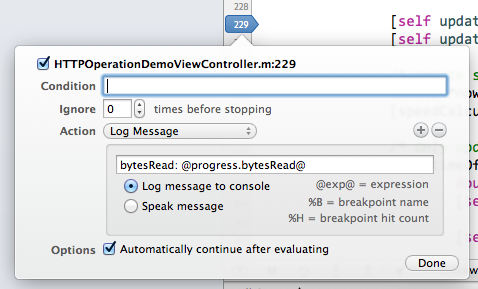
Now that we've got our brand-spanking-new logging functions, I'd like to take a few moments to discuss efficiency.
Think about how much time you waste every day writing debug statements in code. Imagine you are looking at your app running on a device, and you want to examine the value of a variable or see how it changes over time.
We all know the debugger can do this for us, but it's so easy to revert to bad habits and write a log statement instead. Think about the steps involved. You have to stop your running app, write some code like MWLogDebug(@"myValue is now %@", myValue), recompile, run your app again, and then navigate back to the view that triggers the code.
This isn't a huge amount of time when you look at just one instance. But over the course of an entire day, week, or year, this edit/compile/debug cycle is wasting a huge amount of your development time.
There is a far more efficient way to get this kind of information, without stopping your app, by using breakpoints. I would highly recommend you watch Session 412 - Debugging in Xcodefrom WWDC 2012 for more information about this. If you aren't using breakpoints in your day-to-day development, you should really watch this video.
Comments?
So that rounds up the first post of this series. If you have comments or suggestions please use the form below or email me.





 扫一扫
扫一扫


 2万+
2万+

 被折叠的 条评论
为什么被折叠?
被折叠的 条评论
为什么被折叠?
 到【灌水乐园】发言





