


MathWhiz-Junior的功能模块详解
上一篇介绍了项目的基本情况,这篇来详细聊聊每个功能模块是怎么实现的

1. 数学游戏挑战模块
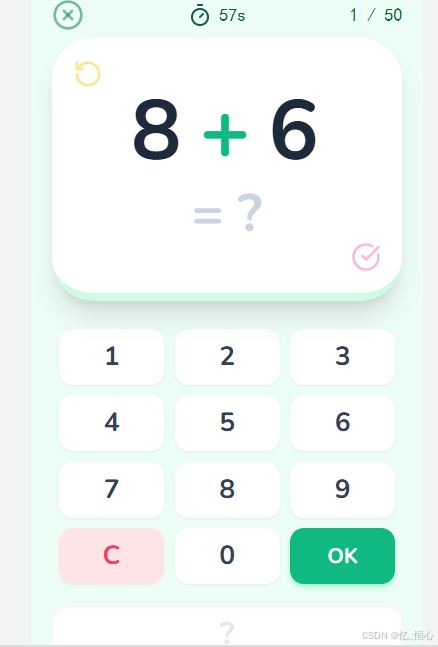
数学游戏是整个应用的核心功能之一,实现了一个可配置的答题挑战系统。下面来看看具体实现细节:
游戏配置界面
首先,用户需要选择游戏难度和运算类型,我设计了一个简单直观的配置界面:
const ConfigScreen = ({ onConfigComplete, onBack }: ConfigScreenProps) => {
  const [difficulty, setDifficulty] = useState<number>(1); // 1-3年级难度
  const [operation, setOperation] = useState<MathOperation>(MathOperation.ALL);

  return (
    <div className="flex flex-col h-full">
      <GameHeader title="数学挑战" onBack={onBack} />

      <div className="flex-1 flex flex-col p-6">
        {/* 难度选择 */}
        <div className="mb-8">
          <h2 className="text-xl font-bold mb-4 text-center">选择难度</h2>
          <div className="flex justify-between gap-4">
            {[1, 2, 3].map(level => (
              <button
                key={level}
                className={`flex-1 py-4 rounded-xl font-bold transition-all ${difficulty === level
                  ? 'bg-blue-500 text-white scale-105 shadow-lg'
                  : 'bg-gray-100 text-gray-600 hover:bg-gray-200'}`}
                onClick={() => setDifficulty(level)}
              >
                {level}年级
              </button>
            ))}
          </div>
        </div>

        {/* 运算类型选择 */}
        <div className="mb-8">
          <h2 className="text-xl font-bold mb-4 text-center">选择运算</h2>
          <div className="grid grid-cols-2 gap-4">
            {Object.entries(operationLabels).map(([key, label]) => (
              <button
                key={key}
                className={`py-3 rounded-xl font-bold transition-all ${operation === key
                  ? 'bg-green-500 text-white scale-105 shadow-lg'
                  : 'bg-gray-100 text-gray-600 hover:bg-gray-200'}`}
                onClick={() => setOperation(key as MathOperation)}
              >
                {label}
              </button>
            ))}
          </div>
        </div>

        {/* 开始按钮 */}
        <button
          className="mt-auto py-4 bg-purple-600 text-white rounded-xl font-bold text-lg shadow-lg transform hover:scale-105 transition-all"
          onClick={() => onConfigComplete({ difficulty, operation })}
        >
          开始挑战!
        </button>
      </div>
    </div>
  );
};
题目生成逻辑
游戏的核心部分是题目生成逻辑,需要根据选择的难度和运算类型动态生成合适的数学题:
const generateQuestions = (cfg: GameConfig, count = 50): Question[] => {
  const questions: Question[] = [];
  const ops = cfg.operation === MathOperation.ALL
    ? [MathOperation.ADD, MathOperation.SUBTRACT, MathOperation.MULTIPLY, MathOperation.DIVIDE]
    : [cfg.operation];

  for (let i = 0; i < count; i++) {
    // 随机选择一种运算类型
    const op = ops[Math.floor(Math.random() * ops.length)];
    questions.push(generateQuestion({ ...cfg, operation: op }, i));
  }

  return questions;
};

const generateQuestion = (cfg: GameConfig, id: number): Question => {
  let n1 = 0, n2 = 0, ans = 0;
  const limit = cfg.difficulty * 10;

  switch (cfg.operation) {
    case MathOperation.ADD:
      n1 = Math.floor(Math.random() * limit) + 1;
      n2 = Math.floor(Math.random() * limit) + 1;
      ans = n1 + n2;
      break;

    case MathOperation.SUBTRACT:
      n1 = Math.floor(Math.random() * limit) + 5;
      n2 = Math.floor(Math.random() * n1); // 确保结果为正数
      ans = n1 - n2;
      break;

    case MathOperation.MULTIPLY:
      // 乘法难度调整
      n1 = Math.floor(Math.random() * (cfg.difficulty * 3)) + 1;
      n2 = Math.floor(Math.random() * (cfg.difficulty * 3)) + 1;
      ans = n1 * n2;
      break;

    case MathOperation.DIVIDE:
      // 除法确保整除
      n2 = Math.floor(Math.random() * (cfg.difficulty * 2)) + 1;
      ans = Math.floor(Math.random() * (cfg.difficulty * 5)) + 1;
      n1 = n2 * ans; // 确保n1能被n2整除
      break;
  }

  return { id, num1: n1, num2: n2, operation: cfg.operation, answer: ans };
};
游戏主逻辑
游戏的主逻辑包括开始游戏、计时、答题和结束计算结果等功能:
const MathGame: React.FC<MathGameProps> = ({ onBack, onFinish }) => {
  // 游戏状态
  const [gameState, setGameState] = useState<GameState>(GameState.CONFIG);
  const [config, setConfig] = useState<GameConfig | null>(null);
  const [questions, setQuestions] = useState<Question[]>([]);
  const [currentIndex, setCurrentIndex] = useState<number>(0);
  const [answers, setAnswers] = useState<number[]>(Array(50).fill(-1));
  const [remainingTime, setRemainingTime] = useState<number>(60);
  const [selectedNumber, setSelectedNumber] = useState<string>('');

  // 音频引用
  const correctSound = useRef<HTMLAudioElement | null>(null);
  const wrongSound = useRef<HTMLAudioElement | null>(null);

  // 开始游戏
  const startGame = (gameConfig: GameConfig) => {
    setConfig(gameConfig);
    const newQuestions = generateQuestions(gameConfig);
    setQuestions(newQuestions);
    setAnswers(Array(50).fill(-1));
    setCurrentIndex(0);
    setSelectedNumber('');
    setRemainingTime(60);
    setGameState(GameState.PLAYING);

    // 开始计时
    const timer = setInterval(() => {
      setRemainingTime(prev => {
        if (prev <= 1) {
          clearInterval(timer);
          handleFinish();
          return 0;
        }
        return prev - 1;
      });
    }, 1000);
  };

  // 提交答案
  const submitAnswer = () => {
    const num = parseInt(selectedNumber);
    if (isNaN(num)) return;

    // 记录答案
    const newAnswers = [...answers];
    newAnswers[currentIndex] = num;
    setAnswers(newAnswers);

    // 判断正确性并播放相应音效
    const correct = num === questions[currentIndex].answer;
    if (correct) {
      correctSound.current?.play();
    } else {
      wrongSound.current?.play();
    }

    // 移动到下一题或结束游戏
    const nextIndex = currentIndex + 1;
    if (nextIndex < questions.length) {
      setCurrentIndex(nextIndex);
      setSelectedNumber('');
    } else {
      handleFinish();
    }
  };

  // 计算最终成绩
  const handleFinish = () => {
    const correctCount = answers.filter((ans, i) => ans === questions[i].answer).length;
    const accuracy = Math.round((correctCount / questions.length) * 100);

    setGameState(GameState.COMPLETED);

    // 返回结果给父组件
    onFinish({
      accuracy,
      correctCount,
      totalQuestions: questions.length,
      difficulty: config!.difficulty,
      operation: config!.operation,
    });
  };

  // 渲染不同的游戏界面
  switch (gameState) {
    case GameState.CONFIG:
      return <ConfigScreen onConfigComplete={startGame} onBack={onBack} />;
    case GameState.PLAYING:
      return (
        <div className="flex flex-col h-full">
          {/* 头部计时器和进度 */}
          <GameHeader
            title={`${remainingTime}秒`}
            progress={(currentIndex / questions.length) * 100}
            onBack={onBack}
          />

          {/* 问题展示区 */}
          <div className="flex-1 flex flex-col items-center justify-center p-6">
            <div className="w-full max-w-md mb-8">
              <div className="text-center text-4xl font-bold bg-yellow-100 p-8 rounded-2xl shadow-lg">
                {questions[currentIndex].num1}
                {operationSymbols[questions[currentIndex].operation]}
                {questions[currentIndex].num2} =
              </div>
            </div>

            {/* 数字输入键盘 */}
            <div className="w-full max-w-md grid grid-cols-3 gap-4">
              {[1, 2, 3, 4, 5, 6, 7, 8, 9, 'DEL', 0, 'OK'].map((num) => (
                <button
                  key={num}
                  className={`py-4 text-xl font-bold rounded-xl transition-all ${num === 'OK'
                    ? 'bg-green-500 text-white'
                    : num === 'DEL'
                    ? 'bg-red-500 text-white'
                    : 'bg-blue-100 text-gray-800'}`}
                  onClick={() => handleNumberClick(num)}
                >
                  {num}
                </button>
              ))}
            </div>
          </div>
        </div>
      );
  }
};
2. AI语音老师模块
这个模块是我最喜欢的部分,实现了与AI老师的实时语音交互,让学习变得更加生动有趣。
语音会话管理
首先,我需要管理与Gemini API的语音会话连接:
export const connectToVoiceTutor = async (
  onAudioData: (base64: string) => void,
  onClose: () => void
) => {
  // 创建音频上下文
  const inputAudioContext = new (window.AudioContext)({ sampleRate: 16000 });
  let stream: MediaStream | null = null;
  let session: any = null;

  // 获取麦克风权限
  try {
    stream = await navigator.mediaDevices.getUserMedia({ audio: true });
  } catch (err) {
    console.error("麦克风访问失败", err);
    onClose();
    return null;
  }

  // 创建音频处理节点
  const createAudioProcessor = () => {
    // 创建AudioWorkletProcessor
    const processor = new AudioWorkletNode(inputAudioContext, 'audio-processor');

    // 处理音频数据
    processor.port.onmessage = (event) => {
      const pcmData = event.data.buffer;
      const base64 = createPcmBlob(pcmData);
      // 发送PCM数据到AI服务
      session?.send({ audio: { data: base64 } });
    };

    return processor;
  };

  // 连接Gemini Live API
  try {
    const sessionPromise = ai.live.connect({
      model: 'gemini-2.5-flash-native-audio-preview-09-2025',
      callbacks: {
        onopen: async () => {
          session = await sessionPromise;

          // 设置麦克风流
          const source = inputAudioContext.createMediaStreamSource(stream!);

          // 加载音频处理worklet
          await inputAudioContext.audioWorklet.addModule('/audio-processor.js');

          // 创建并连接音频处理器
          const processor = createAudioProcessor();
          source.connect(processor);
          processor.connect(inputAudioContext.destination);
        },

        onmessage: async (message) => {
          // 处理AI返回的音频数据
          const audioData = message.serverContent?.modelTurn?.parts?.[0]?.inlineData?.data;
          if (audioData) {
            // 将音频数据传递给UI组件播放
            onAudioData(audioData);
          }
        },

        onclose: () => {
          cleanUp();
          onClose();
        },

        onerror: (error) => {
          console.error('AI连接错误:', error);
          cleanUp();
          onClose();
        }
      },

      config: {
        // 设置AI角色为数学老师
        systemInstruction: `
          你是一位友好、精力充沛的小学数学老师,名叫"香蕉老师"。
          你的目标是和学生一起练习"口算"。

          规则:
          1. 用孩子能理解的简单语言
          2. 每次出一道数学题,难度适中
          3. 如果学生答对了,给予表扬
          4. 如果学生答错了,给予鼓励并给出正确答案
          5. 每次对话结束时,都要问学生是否还想继续练习
          6. 保持对话轻松愉快,加入适当的幽默
        `
      }
    });

  } catch (error) {
    console.error('语音老师连接失败:', error);
    cleanUp();
    onClose();
    return null;
  }

  // 清理函数
  const cleanUp = () => {
    if (stream) {
      stream.getTracks().forEach(track => track.stop());
    }
    if (inputAudioContext) {
      inputAudioContext.close();
    }
  };

  // 返回断开连接的方法
  return {
    disconnect: () => {
      session?.close();
      cleanUp();
    }
  };
};
语音老师界面
UI组件负责展示语音状态和播放AI的回应:
const VoiceTutor: React.FC<VoiceTutorProps> = ({ onBack }) => {
  const [isConnected, setIsConnected] = useState<boolean>(false);
  const [isListening, setIsListening] = useState<boolean>(false);
  const [conversation, setConversation] = useState<Array<{sender: string, message: string}>>([]);
  const [visualizerData, setVisualizerData] = useState<Uint8Array | null>(null);

  const sessionRef = useRef<any>(null);
  const audioContextRef = useRef<AudioContext | null>(null);
  const sourceRef = useRef<AudioBufferSourceNode | null>(null);

  // 开始语音会话
  const startSession = async () => {
    try {
      const session = await connectToVoiceTutor(
        async (audioData) => {
          // 播放AI返回的音频
          await playAudio(audioData);
        },
        () => {
          // 会话结束
          setIsConnected(false);
          setIsListening(false);
          sessionRef.current = null;
        }
      );

      if (session) {
        sessionRef.current = session;
        setIsConnected(true);

        // 添加系统消息
        setConversation(prev => [...prev, {
          sender: 'system',
          message: '已连接香蕉老师!请对着麦克风说话,老师会提问数学问题。'
        }]);
      }
    } catch (error) {
      console.error('启动语音老师失败:', error);
      setConversation(prev => [...prev, {
        sender: 'system',
        message: '连接失败,请检查麦克风权限后重试。'
      }]);
    }
  };

  // 播放音频
  const playAudio = async (base64Audio: string) => {
    try {
      // 解码base64音频数据
      const audioData = await decodeAudioData(base64Audio);

      // 创建音频上下文
      if (!audioContextRef.current) {
        audioContextRef.current = new (window.AudioContext)();
      }

      // 创建音频源并播放
      const source = audioContextRef.current.createBufferSource();
      source.buffer = audioData;
      source.connect(audioContextRef.current!.destination);
      source.start();

      // 存储引用以便后续清理
      sourceRef.current = source;
    } catch (error) {
      console.error('播放音频失败:', error);
    }
  };

  // 断开连接
  const disconnect = () => {
    if (sessionRef.current) {
      sessionRef.current.disconnect();
      sessionRef.current = null;
    }
    setIsConnected(false);
    setIsListening(false);
  };

  // 组件卸载时清理
  useEffect(() => {
    return () => {
      if (sessionRef.current) {
        sessionRef.current.disconnect();
      }
      if (audioContextRef.current) {
        audioContextRef.current.close();
      }
    };
  }, []);

  return (
    <div className="flex flex-col h-full">
      {/* 头部 */}
      <GameHeader
        title="香蕉老师"
        onBack={onBack}
      />

      <div className="flex-1 flex flex-col p-6">
        {/* 语音状态显示 */}
        <div className="mb-8 text-center">
          <div className={`inline-block p-6 rounded-full mb-4 ${isConnected ? 'bg-green-100' : 'bg-gray-100'}`}>
            {isConnected ? (
              <MicActive className="w-16 h-16 text-green-500" />
            ) : (
              <Mic className="w-16 h-16 text-gray-400" />
            )}
          </div>
          <h2 className="text-xl font-bold">
            {isConnected ? '已连接香蕉老师' : '未连接'}
          </h2>
        </div>

        {/* 对话历史 */}
        <div className="flex-1 bg-gray-50 rounded-xl p-4 overflow-y-auto mb-6">
          {conversation.length === 0 ? (
            <div className="text-center text-gray-500 py-8">
              点击下方按钮开始对话
            </div>
          ) : (
            conversation.map((item, index) => (
              <div
                key={index}
                className={`mb-4 p-4 rounded-lg ${item.sender === 'system'
                  ? 'bg-blue-50 text-blue-800'
                  : item.sender === 'ai'
                  ? 'bg-green-50 text-green-800'
                  : 'bg-purple-50 text-purple-800'
                }`}
              >
                <div className="font-semibold mb-1">
                  {item.sender === 'system' ? '系统' :
                   item.sender === 'ai' ? '香蕉老师' : '你'}
                </div>
                <div>{item.message}</div>
              </div>
            ))
          )}
        </div>

        {/* 控制按钮 */}
        <div className="flex justify-center gap-4">
          {isConnected ? (
            <button
              className="px-8 py-3 bg-red-500 text-white rounded-lg font-bold"
              onClick={disconnect}
            >
              断开连接
            </button>
          ) : (
            <button
              className="px-8 py-3 bg-green-500 text-white rounded-lg font-bold"
              onClick={startSession}
            >
              连接老师
            </button>
          )}
        </div>
      </div>
    </div>
  );
};

技术实现中的小技巧
1. 自适应界面设计
为了让应用在不同设备上都有良好的体验,我使用了Tailwind CSS的响应式设计:
/* 响应式布局示例 */
.flex-col /* 在手机上垂直布局 */
.grid-cols-3 /* 在平板和桌面端3列布局 */
.md\:grid-cols-4 /* 中等屏幕4列 */
.lg\:grid-cols-6 /* 大屏幕6列 */
2. 性能优化
对于音频处理等性能敏感操作,我采用了Web Worker来避免阻塞主线程:
// audio-processor.js
class AudioProcessor extends AudioWorkletProcessor {
  process(inputs) {
    // 从麦克风获取音频数据
    const input = inputs[0];
    if (input && input.length > 0) {
      // 将PCM数据发送到主线程
      this.port.postMessage({ buffer: input[0].buffer });
    }
    return true;
  }
}

registerProcessor('audio-processor', AudioProcessor);
3. 数据持久化
为了保存用户的游戏记录,我使用了localStorage进行本地数据存储:
// 保存游戏结果
const saveResult = (result: GameResult) => {
  try {
    const results = JSON.parse(localStorage.getItem('mathGameResults') || '[]');
    results.push({
      ...result,
      timestamp: Date.now()
    });
    localStorage.setItem('mathGameResults', JSON.stringify(results));
  } catch (error) {
    console.error('保存结果失败:', error);
  }
};

// 加载历史记录
const loadResults = (): GameResult[] => {
  try {
    return JSON.parse(localStorage.getItem('mathGameResults') || '[]');
  } catch (error) {
    console.error('加载历史记录失败:', error);
    return [];
  }
};
遇到的挑战和解决方案
挑战一:音频处理延迟
在实现语音交互时,音频处理和传输可能会导致明显延迟。我通过以下方法解决:
- 使用更轻量的音频格式和较低的采样率
- 优化音频数据处理流程,减少中间转换步骤
- 采用流式传输技术,实现边录制边发送
挑战二:儿童友好的交互设计
为了让界面适合儿童使用,我特别注意:
- 使用大按钮和清晰的视觉提示
- 添加反馈音效,增强操作感知
- 简化操作流程,减少复杂的导航步骤
- 使用明亮、丰富的色彩,但不过度刺激
结语
通过实现这三个功能模块,我对React应用开发和AI技术在教育领域的应用有了更深入的理解。虽然项目还存在一些不足,但作为一个个人小项目,我觉得已经达到了最初的目标 - 用有趣的方式帮助小朋友学习数学。
下一篇文章,我会分享在开发过程中使用的一些技术细节和优化技巧,包括前端性能优化、AI模型集成等方面的内容。





 扫一扫
扫一扫


 1136
1136

 被折叠的 条评论
为什么被折叠?
被折叠的 条评论
为什么被折叠?
 到【灌水乐园】发言





