Matlab极坐标画图

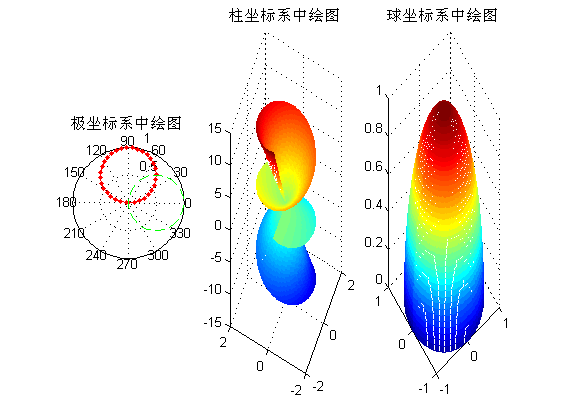
本文介绍如何使用MATLAB在极坐标系、柱坐标系及球坐标系中绘制特定图形。通过定义不同坐标的参数,利用polar、mesh等函数实现图形绘制,并展示了不同坐标系间的转换方法。

 1

2

3

4

5

6

7

8

9

10

11

12

13

14

15

16

17

18

19

20

21

22

23

24

25

26

27

28

29

30

31

%% ==========在特殊坐标系中绘制特殊图形。=======

%利用polar函数在极坐标系中绘制图形

figure;

theta=0:.1:pi;

rho1=sin(theta);

rho2=cos(theta);

subplot(1,3,1);

polar(theta,rho1,'.-r');

hold on;

polar(theta,rho2,'--g');

title('极坐标系中绘图');

%另外一种和极坐标有关系的坐标系就是柱坐标系了

theta=0:pi/100:3*pi;

rho=sin(theta)+cos(theta);

[t,r]=meshgrid(theta,rho);

z=r.*t;

subplot(1,3,2);

[x,y,z]=pol2cart(t,r,z);%极坐标系向柱坐标系转化

mesh(x,y,z);%柱坐标系中进行绘图

title('柱坐标系中绘图');

view([-65 30]);

%将球坐标系转换为柱面坐标系

subplot(1,3,3);

delta=pi/100;

theta=0:delta:pi; % theta is zenith angle

phi=0:delta:pi; % phi is azimuth angle

[t p]=meshgrid(theta,phi);

r=ones(size(t));

[x,y,z]=sph2cart(t,p,r);%球坐标向柱坐标转化

mesh(x,y,z);%球坐标系中进行绘图

title('球坐标系中绘图');

评论
添加红包

请填写红包祝福语或标题

红包个数最小为10个

红包金额最低5元

当前余额3.43前往充值 >
需支付:10.00
成就一亿技术人!
领取后你会自动成为博主和红包主的粉丝 规则
hope_wisdom
发出的红包

打赏作者

天天Matlab科研工作室

你的鼓励将是我创作的最大动力

¥1 ¥2 ¥4 ¥6 ¥10 ¥20
扫码支付:¥1
获取中
扫码支付

您的余额不足,请更换扫码支付或充值

打赏作者

实付
使用余额支付
点击重新获取
扫码支付
钱包余额 0

抵扣说明:

1.余额是钱包充值的虚拟货币,按照1:1的比例进行支付金额的抵扣。
2.余额无法直接购买下载,可以购买VIP、付费专栏及课程。

余额充值